Operating the Switches Around the Steering Wheel
ENGINE START/STOP Button
- Detail
The ENGINE START/STOP button is on (in red), if the engine is running.
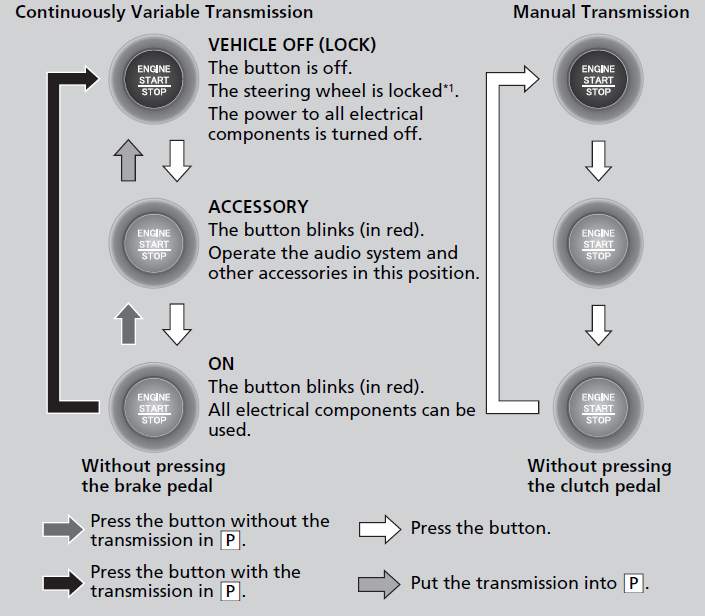
- Manual transmission models
If you leave the vehicle for 30 to 60 minutes with the transmission in P (continuously variable transmission) and the power mode in ACCESSORY, the vehicle automatically goes into the mode similar to VEHICLE OFF (LOCK) to avoid draining the battery.
When in this mode:
The steering wheel does not lock. You cannot lock or unlock doors with the remote transmitter or the keyless access system. Press the ENGINE START/STOP button twice to switch the mode to VEHICLE OFF (LOCK).
If you open the driver’s door when the power mode is in ACCESSORY, a warning beep sounds.
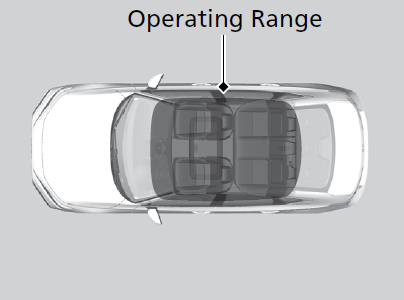
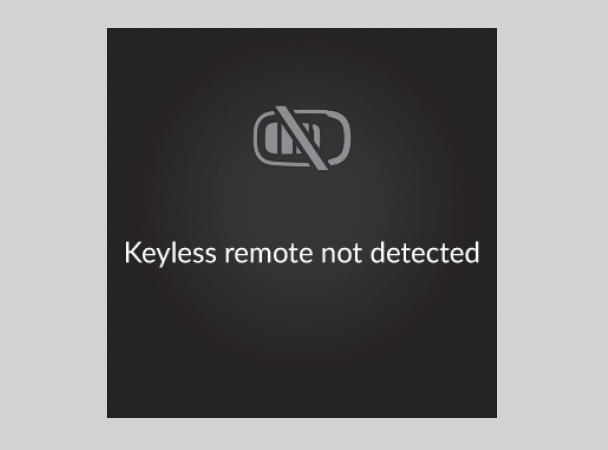
- When the power mode is set to any mode other than OFF and you remove the keyless remote from the vehicle and shut the door, an alarm will sound. If the alarm continues to sound, place the keyless remote in another location
The alarm will sound from outside the vehicle.
An alarm will sound both inside and outside the vehicle. In addition, a warning indicator will appear on the instrument panel.
- Detail
Turn Signals
- The turn signals can be used when the power mode is in ON
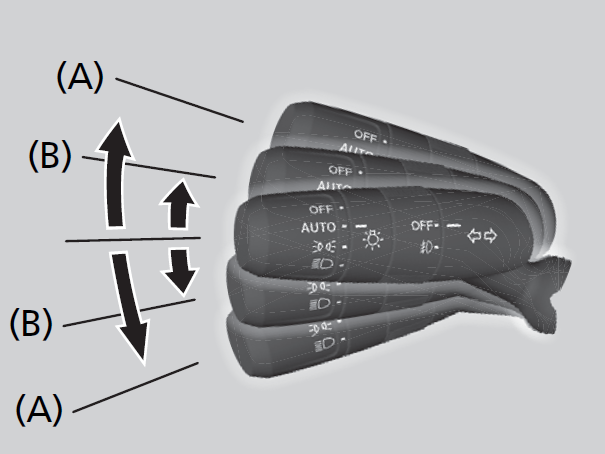
Push the lever up or down based on the direction you want to turn, and the turn signal will blink.
When you lightly push the lever up or down and release it, the turn signal will blink 3 times.
- If you lightly push the lever in the opposite direction while it is blinking, the blinking will stop.
- Detail
Light Switches
- Detail
- Rotating the light switch turns the lights on and off, regardless of the power mode setting
Push the lever forward until you hear a click.
When in high beams, pull the lever back to return to low beams.
Pull the lever back, and release it.
Turn the lever to OFF either when:
- The shift lever is in P (continuously variable transmission).
- The parking brake is applied.
To turn the lights on again, turn the lever to OFF to cancel the lights off mode. Even if you do not cancel the lights off mode, the lights come on automatically when:
- The transmission is taken out of P (continuously variable transmission) and the parking brake is released.
- The vehicle starts to move.

Automatic lighting control can be used when the power mode is in ON.
When the light switch is in AUTO, the headlights and other exterior lights will switch on and off automatically depending on the ambient brightness.
The headlights come on when you unlock a door in dark areas with the headlight switch in AUTO.
- Once you lock the door, the headlights will go off.

- Detail
Do not cover this light sensor with anything; otherwise, the automatic lighting system may not work properly.


You can adjust the auto light sensitivity as follow:

The instrument panel brightness does not change when the headlights come on.
The headlights, all other exterior lights, and the instrument panel lights turn off 15 seconds after you set the power mode to VEHICLE OFF, take the keyless remote with you, and close the driver’s door.
If you set the power mode to VEHICLE OFF with the headlight switch on, but do not open the door, the lights turn off after 10 minutes (3 minutes, if the switch is in the AUTO position).
The lights turn on again when you unlock or open the driver’s door. If you unlock the door, but do not open it within 15 seconds, the lights go off. If you open the driver’s door, you will hear a reminder chime alerting you that the lights are on.
- Detail
Fog Lights*
- When the low beam headlights are on, turn the fog light switch on to use the fog lights.

* Not available on all models
Daytime Running Lights
The parking/daytime running lights come on when the following conditions have been met:
- The power mode is in ON.
- The headlight switch is AUTO or
 .
. - The parking brake is released.
The lights remain on even if you set the parking brake. Setting the power mode to VEHICLE OFF will turn off the daytime running lights.
The daytime running lights are off once the headlight switch is turned on, or when the headlight switch is in AUTO and it is getting darker outside.
Auto High-Beam
The front wide view camera detects the light sources ahead of the vehicle such as the lights of a preceding or oncoming vehicle, or street lights. When you are driving at night, the system automatically switches the headlights between low beam and high beam depending on the situation.

- Detail
- Do not place an object that reflects light on the dashboard.
- Keep the windshield around the camera clean. When cleaning the windshield, be careful not to apply the windshield cleanser to the camera lens.
- Do not attach an object, sticker or film to the area around the camera.
- Do not touch the camera lens.
When all of the following conditions have been met, the auto high-beam indicator comes on and the auto high-beam is activated.
-
- The power mode is in ON.
- The light switch is in AUTO.
- The lever is in the low beam position.
- The headlights have been automatically activated.
- It is dark outside the vehicle.

If the auto high-beam indicator does not come on even when all the conditions have been met, carry out the following procedure and the indicator will come on.
- Pull the lever toward you for flashing the high beams then release it while driving.
- Detail
- The brightness of the lights from the preceding or oncoming vehicle is intense or poor.
- Visibility is poor due to the weather (rain, snow, fog, windshield frost, etc.).
- Surrounding light sources, such as street lights, electric billboards and traffic lights are illuminating the road ahead.
- The brightness level of the road ahead constantly changes.
- The road is bumpy or has many curves.
- A vehicle suddenly appears in front of you, or a vehicle in front of you is not in the preceding or oncoming direction.
- Your vehicle is tilted with a heavy load in the rear.
- A traffic sign, mirror, or other reflective object ahead is reflecting strong light toward the vehicle.
- The oncoming vehicle frequently disappears under roadside trees or behind median barriers.
- The preceding or oncoming vehicle is a motorcycle, bicycle, mobility scooter, or other small vehicle.
- Windshield wipers are operating at a high speed.
- The camera has detected a dense fog.
- Use the climate control system to cool down the interior and, if necessary, also use defroster mode with the airflow directed toward the camera.
- Start driving the vehicle to lower the windshield temperature, which cools down the area around the camera.
- Park your vehicle in a safe place, and make sure the windshield is clean.
Clean the windshield if it is dirty. If the message does not disappear after driven for a while, have your vehicle checked by a dealer.
When auto high-beam is active, the headlights switch between high beam and low beam based on the following conditions.
|
Switching to high beam:
|
Switching to low beam:
|
|
|---|---|---|
|
All of the following conditions must be met before the high beams turn on.
|
 |
One of the following conditions must be met before the low beams turn on.
|
If you want to manually switch the headlights between high beam and low beam, follow either of the procedures below. Note that when you do this, the auto high-beam indicator will turn off and the auto high-beam will be deactivated.
Pull the lever toward you for flashing the high beams then release it within about one second while driving.
- To reactivate the auto high-beam, pull the lever toward you for flashing the high beams then release it while driving. The auto high-beam indicator will come on.
Turn the light switch to  .
.
- To reactivate the auto high-beam, turn the light switch to AUTO when the lever is in the low beam position, the auto high-beam indicator will come on.
Wipers and Washers
- Detail
NOTICE
Do not use the wipers when the windshield is dry.
The windshield will get scratched, or the rubber blades will get damaged.
NOTICE
In cold weather, the blades may freeze to the windshield.
Operating the wipers in this condition may damage the wipers. Use the defogger to warm the windshield, then turn the wipers on.
When the vehicle speeds up, the wiper operation’s shortest delay setting (
 ) and the LO setting become the same.
The pump may get damaged.
Rotate the wiper switch to OFF, and set the power mode to ACCESSORY or VEHICLE OFF, then remove the obstacle.
- The windshield wipers and washers can be used when the power mode is in ON
The wipers run at high speed until you release the lever.
Move the lever up or down to change the wiper settings.
Turn the adjustment ring to adjust the wiper operation.
When you release the lever for more than one second, the spray stops, the wipers sweep two or three more times to clear the windshield, then stop.
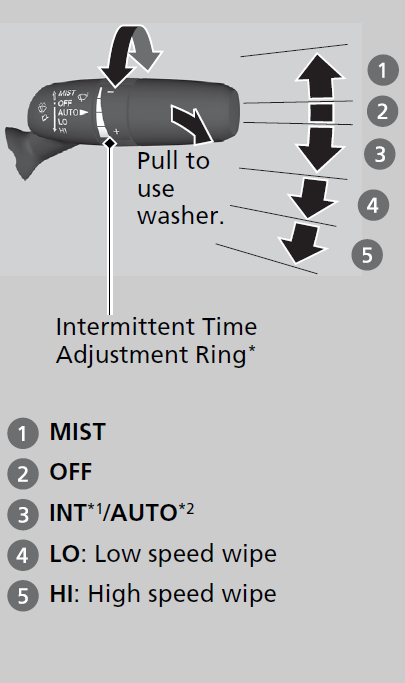
- Models with manual intermittent operation
- Models with automatic intermittent operation
When you push the lever down to AUTO, the windshield wipers sweep once, and go into the automatic mode.
The wipers operate intermittently, at low speed, or at high speed and stop in accordance with the amount of rainfall the rainfall sensor detects.
When the wiper function is set to AUTO, you can adjust the sensitivity of the rainfall sensor (using the adjustment ring) so that wipers will operate in accordance with your preference.
Sensor sensitivity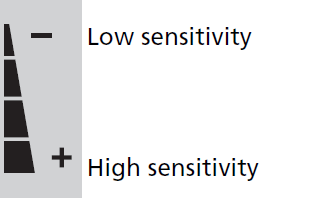
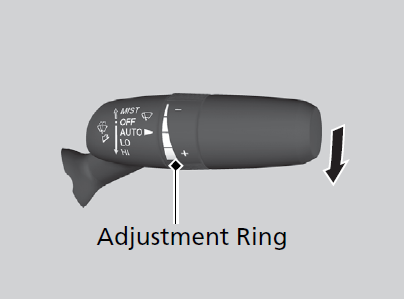
- Detail
- Cleaning the windshield
- Driving through a car wash
- No rain present

* Not available on all models
Rear Defogger/Heated Door Mirror* Button
Press the rear defogger and heated door mirror* button to defog the rear window and mirrors* when the power mode is in ON.
- The rear defogger and heated door mirror* automatically switches off after 10-30 minutes depending on the outside temperature.
However, if the outside temperature is 32°F (0°C) or below, it does not automatically switch off.

- Detail
Also, do not use the system for a long time while the engine is idling. This may weaken the battery, making it difficult to start the engine.
* Not available on all models
Brightness Control (Models with A-type meter)
When the power mode is in ON, you can use the brightness control dial to adjust instrument panel brightness.
Brighten: Turn the dial up.
Dim: Turn the dial down.You will hear a beep when the brightness reaches minimum or maximum. Several seconds after adjusting the brightness, you will be returned to the previous screen.
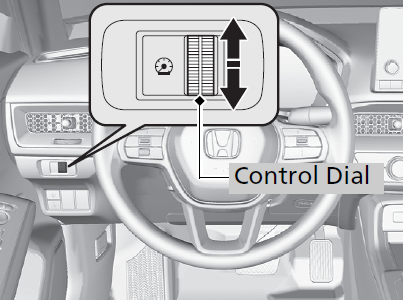
- Detail
- The power mode is in ON.
- The parking lights are turned on and it is dark outside.
-
The brightness level is shown on the driver information interface while you are adjusting it.

Brightness Control (Models with B-type meter)
- The brightness of the gauge is automatically adjusted depending on the ambient brightness.
- The brightness becomes darker when the ambient light is dark.
- The brightness becomes brighter when the ambient light is bright.
- You can change the setting even when the ambient lighting is bright, but the brightness of the gauge won't change.

-
The brightness level is shown on the driver information interface while you are adjusting it.
- Detail
Adjusting the Steering Wheel
The steering wheel height and distance from your body can be adjusted so that you can comfortably grip the steering wheel in an appropriate driving posture.
-
- While the vehicle is stopped, push the steering wheel adjustment lever down.
- The steering wheel adjustment lever is under the steering column.
- Move the steering wheel up or down, and in or out.
- Make sure you can see the instrument panel gauges and indicators.
- Pull the steering wheel adjustment lever up to lock the steering wheel in position.
- After adjusting the position, make sure you have securely locked the steering wheel in place by trying to move it up, down, in, and out.
- While the vehicle is stopped, push the steering wheel adjustment lever down.

- WARNING Adjusting the steering wheel position while driving may cause you to lose control of the vehicle and be seriously injured in a crash.
Adjust the steering wheel only when the vehicle is stopped.
Download Manual