Gauges and Driver Information Interface
Gauges
They are displayed when the power mode is in ON.


Speedometer
Displays your driving speed in mph or km/h.
- Detail

Tachometer
Shows the number of engine revolutions per minute.
- Detail
You can turn the shift up alarm feature on and off.
Displays the amount of fuel left in the fuel tank.
- Detail NOTICE
You should refuel when the reading approaches E.
Running out of fuel can cause the engine to misfire, damaging the catalytic converter.
Displays the temperature of the engine coolant.
- Detail
NOTICE
Driving with the temperature gauge reading in the upper zone can cause serious engine damage. Pull safely to the side of the road and allow engine temperature to return to normal.
Shows the total number of miles or kilometers that your vehicle has accumulated.
Shows the outside temperature in Fahrenheit (U.S.) or Celsius (Canada).
- Detail
Road heat and exhaust from another vehicle can affect the temperature reading when your vehicle speed is less than 19 mph (30 km/h).
Adjusting the outside temperature display
Adjust the temperature reading by up to ±5°F or ±3°C if the temperature reading seems incorrect.
Shows the current mode for ACC with Low Speed Follow*, LKAS, and traffic jam assist*.
- Detail

Light up from outside to center according to engine speed.
- Detail
* Not available on all models
Driver Information Interface A-type meter
When a warning message displays, please check the message and contact a dealer and have the vehicle inspected if necessary. Please refer to the pages below if the Engine oil pressure low. or Engine temperature too hot. message is displayed.
- Detail
Press the  (home) button, then roll the left selector wheel to scroll to the content you want to see. Press the left selector wheel to see detailed information.

Roll the left selector wheel to switch between trip meter A and trip meter B.

Shows the total number of miles or kilometers driven since the last reset. Meters A and B can be used to measure two separate trips.
To reset the trip meter, display it, press the left selector wheel and then select Reset.
- The trip meter is reset to 0.0.
Shows the estimated average fuel economy of each trip meter in mpg or l/100 km. The display is updated at set intervals. When a trip meter is reset, the average fuel economy is also reset.
- Detail
Shows the instant fuel economy as a bar graph in mpg or l/100 km.
Shows the estimated distance you can travel on the remaining fuel. This estimated distance is based on the vehicle’s current fuel economy.
- Detail
Roll the left selector wheel to switch between trip meter A and trip meter B.

Trip meter
Elapsed time
Shows the time elapsed since Trip A or Trip B was reset.
- Detail
Shows the average speed in mph or km/h since Trip A or Trip B was reset.
- Detail
Shows the current audio information.
Shows the current phone information.
When the turbo is producing boost, this gauge indicates boost pressure is building.
- Detail
Shows the compass screen.
When driving guidance is provided by the Android Auto or Apple CarPlay, turn-by-turn directions to your destination appear.
The Driver Attention Monitor analyzes steering inputs to determine if the vehicle is being driven in a manner consistent with drowsy or inattentive driving. If it determines that the vehicle is being driven in such a manner, it will display the degree of the driver’s attention on the driver information interface.

- When you select Driver attention on the driver information interface, bars on it light up in white to indicate the degree of the driver’s attention.

- If two bars light up, the Driver attention level low message will appear.

- If one bar lights up, the Driver attention level low. Time for a break. message will appear, a beep will sound, and the steering wheel will vibrate.
If this message appears, stop in a safe location and rest for as long as needed.
The message will disappear when the left selector wheel is pressed or when the system has determined that the driver is driving normally.
If the driver does not take a break and the monitor continues to detect that the driver is very tired, the message will appear again after approximately 15 minutes, accompanied by a beep and steering wheel vibrations.
The message does not appear when the traveling time is 30 minutes or less.

- Detail
Regardless of the system’s feedback, if you are feeling tired, stop in a safe location and rest for as long as needed.
- The engine is turned off.
- The driver unfastens the seat belt and opens the door while the vehicle is stopped.
- The vehicle must be traveling above 25 mph (40 km/h).
- The electric power steering (EPS) system indicator must be off.
- Detail
- The steering assist function of the Lane Keeping Assist System (LKAS) is active.
- The condition of the road is poor, e.g. the surface is unpaved or bumpy.
- It is windy.
- The driver is frequently operating the vehicle in an assertive manner such as changing lanes or accelerating.
You can change the Driver Attention Monitor settings. Select Tactile and audible alert*1/Tactile And Audible Alert*2, Tactile alert*1/Tactile Alert*2, or OFF.
- Models with 7-in. Color Touchscreen
- Models with 9-in. Color Touchscreen
-
Displays the accelerator position in degrees of %.
Displays the brake pressure in psi when the brake is applied.

Displays the strength (G) and direction of the load that is applied to the vehicle during driving.

- Detail
Measures the lap time, and displays the previously measured times and the fastest lap time.
-
- Roll the left selector wheel, then select and press Start/Stop to display the lap time measurement screen.
- Press the left selector wheel to start measurement.
- Press the left selector wheel to stop measurement.
- To measure the time per lap, roll the left selector wheel at the end of each lap.
- To return to the stopwatch menu screen, press and hold the left selector wheel.


-
To check or clear the history, roll the left selector wheel, then select History/Reset and press it.
- To scroll through the lap times, roll the left selector wheel.
- To clear the history, press the left selector wheel on the stopwatch history screen while the lap time is not being measured, then select and press Reset.
- To return to the stopwatch menu screen, press and hold the left selector wheel.


- Detail
Appears when any of the seat belts are latched or unlatched.
Shows the remaining oil life and Maintenance MinderTM.
Indicates the status of the Road Departure Mitigation system, CMBSTM, and blind spot information system* such as On, Off, or Failure, by color and letters.
The following colors indicate the status of any of the above mentioned systems:
- Green: The system is on.
- Gray: The system is off.
- Amber: There is a problem with the system.

- Detail
Change the settings to your liking.
- Detail
You can choose which icons to display on the home screen.
-
- Roll the left selector wheel to scroll to select Customize display, then press the left selector wheel.
- Roll the left selector wheel.

-
- Roll the left selector wheel to scroll between icons, then press the left selector wheel to check or uncheck them.

Enables you to show another unit on the driver information interface and set the displayed measurements to read in either miles and mph or km and km/h.
Press and hold the left selector wheel when you select No content on the driver information interface. Each time you do this, the unit will change from miles and mph to km and km/h or vice versa. After this, a confirmation screen will appear for a few seconds.

You can check if there are any active warning messages.
- Detail
Use the driver information interface to customize certain features.
- Detail
Press the  (home) button, then select the Settings screen by rolling the left selector wheel while the power mode is in ON, the vehicle is at a complete stop, and the shift position is in P. Then, press the left selector wheel.

|
Setup Group
|
Customizable Features
|
Description
|
Selectable Settings
|
|---|---|---|---|
|
TPMS calibration*
|
—
|
Calibrates the TPMS.
|
Cancel/Calibrate
|
|
Driver assist system setup
|
Forward collision warning distance
|
Changes the distance at which CMBSTM alerts.
|
Long/Normal*1/Short
|
|
ACC forward vehicle detect beep
|
Causes the system to beep when the system detects a vehicle, or when the vehicle goes out of ACC with Low Speed Follow range.
|
ON/OFF*1
|
|
|
Road departure mitigation setting
|
Changes the setting for the Road Departure Mitigation system.
|
Narrow/Normal*1/Wide/Warning only
|
|
|
Lane keeping assist suspend beep
|
Causes the system to beep when the LKAS is suspended.
|
ON/OFF*1
|
|
|
Blind spot information*
|
Changes the setting for the blind spot information.
|
Audible and visual alert*1/Visual alert
|
- Default Setting
|
Setup Group
|
Customizable Features
|
Description
|
Selectable Settings
|
|---|---|---|---|
|
Driver assist system setup
|
Traffic sign recognition system display setting
|
Turns the traffic sign recognition system on and off.
|
ON*1/OFF
|
|
Traffic sign recognition system exceeding speed warning
|
Turns the traffic sign recognition system over speed warning on and off.
|
ON*1/OFF
|
|
|
Speed limit warning threshold setting
|
Changes the setting speed the traffic sign recognition system over speed warning is activated.
|
Speed limit*1/
Speed limit+3mph/ Speed limit+5mph/ Speed limit+10mph (When mph is selected)
Speed limit*1/
Speed limit+5km/h/ Speed limit+10km/h/ Speed limit+15km/h (When km/h is selected)
|
|
|
Driver attention monitor
|
Changes the setting for the driver attention monitor.
|
Tactile and audible alert*1/Tactile alert/OFF
|
- Default Setting
|
Setup Group
|
Customizable Features
|
Description
|
Selectable Settings
|
|---|---|---|---|
|
Meter setup
|
Language selection
|
Changes the displayed language.
|
English*1/Français/Español
|
|
Adjust outside temp. display
|
Adjusts the temperature reading by a few degrees.
|
-5°F ~ ±0°F*1 ~ +5°F (U.S.)
-3°C ~ ±0°C*1 ~ +3°C (Canada)
|
|
|
“Trip A” reset timing
|
Changes the setting of how to reset trip meter A, average fuel economy A, average speed A, and elapsed time A.
|
When fully refueled/
IGN OFF/Manually reset*1 |
|
|
“Trip B” reset timing
|
Changes the setting of how to reset trip meter B, average fuel economy B, average speed B, and elapsed time B.
|
When fully refueled/
IGN OFF/Manually reset*1 |
|
|
Adjust alarm volume
|
Changes the alarm volume, such as buzzers, warnings, turn signal sound, and so on.
|
High/Mid*1/Low
|
|
|
Fuel efficiency backlight
|
Turns the ambient meter feature on and off.
|
ON*1/OFF
|
|
|
Rear seat reminder
|
Turns the Rear Seat Reminder feature on and off.
|
ON*1/OFF
|
|
|
Speed/distance units
|
Selects the trip meter units.
|
km/h∙km/mph∙miles*1 (U.S.)
km/h∙km*1/mph∙miles (Canada)
|
|
|
Tachometer
|
Selects whether the tachometer is displayed on the instrument panel.
|
ON*1/OFF
|
- Default Setting
|
Setup Group
|
Customizable Features
|
Description
|
Selectable Settings
|
|---|---|---|---|
|
Keyless access setup*
|
Door unlock mode
|
Changes which doors unlock when you grab the driver’s door handle.
|
Driver door only*1/All doors
|
|
Keyless access light flash
|
Causes some exterior lights to flash when you unlock/lock the doors.
|
ON*1/OFF
|
|
|
Keyless access beep
|
Causes the beeper to sound when you unlock/lock the doors.
|
ON*1/OFF
|
|
|
Remote start system ON/OFF
|
Turns the remote engine start feature on and off.
|
ON*1/OFF
|
|
|
Lighting setup
|
Auto high-beam
|
Turns the auto high-beam on and off.
|
ON*1/OFF
|
|
Interior light dimming time
|
Changes the length of time the interior lights stay on after you close the doors.
|
60sec/30sec*1/15sec
|
|
|
Headlight auto off timer
|
Changes the length of time the exterior lights stay on after you close the driver’s door.
|
60sec/30sec/15sec*1/0sec
|
|
|
Auto light sensitivity*
|
Changes the timing for the headlights to come on.
|
Max/High/Mid*1/Low/Min
|
|
|
Auto headlight ON with wiper ON
|
Changes the settings for the wiper operation when the headlights automatically come on while the headlight switch is in the AUTO position.
|
ON*1/OFF
|
- Default Setting
|
Setup Group
|
Customizable Features
|
Description
|
Selectable Settings
|
|---|---|---|---|
|
Door setup
|
Auto door lock
|
Changes the setting for when the doors automatically lock.
|
With vehicle speed*1/Shift from P/OFF
|
|
Auto door unlock
|
Changes the setting for when the doors automatically unlock.
|
All doors when driver’s door opens*1/All doors when shifted to Park/
All doors when ignition switched OFF/OFF |
|
|
Key and remote unlock mode
|
Sets up either the driver’s door or all doors to unlock on the first operation of the keyless remote or built-in key.
|
Driver door*1/All doors
|
|
|
Walk away auto lock*
|
Changes the settings for the auto lock function when you walk away from the vehicle.
|
ON/OFF*1
|
|
|
Keyless lock answer back
|
LOCK/UNLOCK- The exterior lights flash.
LOCK (2nd push)- The beeper sounds.
|
ON*1/OFF
|
|
|
Keyless remote power window control
|
Turns remote window control using the keyless remote on and off.
|
ON*1/OFF
|
|
|
Lockout prevention*
|
Changes the settings for the lockout protection function.
|
ON*1/OFF
|
|
|
Maintenance reset
|
—
|
Resets the Maintenance Minder display when you have performed the maintenance service.
|
(Selects Reset Items)
|
|
Default all
|
—
|
Cancels customized changes you have made or restores them to their default setting.
|
Cancel/Set
|
- Default Setting
The steps for changing the “Trip A” reset timing setting to When fully refueled are shown below. The default setting for “Trip A” reset timing is Manually reset.
-
- Press the
 (home) button, to select Settings, then press the left selector wheel.
- Press the


-
- Roll the left selector wheel until Meter setup appears on the display.
- Press the left selector wheel.
- Language selection appears first in the display.

-
- Roll the left selector wheel until “Trip A” reset timing appears on the display, then press the left selector wheel.
- The display switches to the customization setup screen, where you can select When fully refueled, IGN OFF, Manually reset , or Back.
- Roll the left selector wheel until “Trip A” reset timing appears on the display, then press the left selector wheel.

-
- Roll the left selector wheel and select When fully refueled, then press the left selector wheel.
- The Selected appears, then the display returns to the customization menu screen.
- Roll the left selector wheel and select When fully refueled, then press the left selector wheel.

-
- Press the left selector wheel after Back appears on the display.
- Repeat Step 6 until you return to the normal screen.

* Not available on all models
Driver Information Interface (Left Side Area) B-type meter
Shows the current mode for audio and phone information, etc.
Shows the clock.
You can adjust the time manually or change the clock display to show the 12 hour clock or 24 hour clock.
- Detail
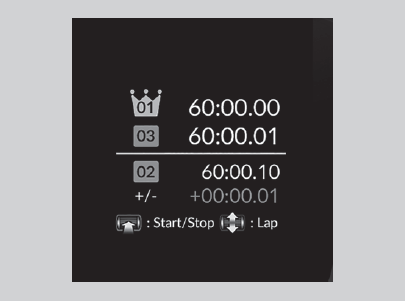
Measures the lap time, and displays the previously measured times and the fastest lap time.
-
- Change the display content on the left side area to Stopwatch.
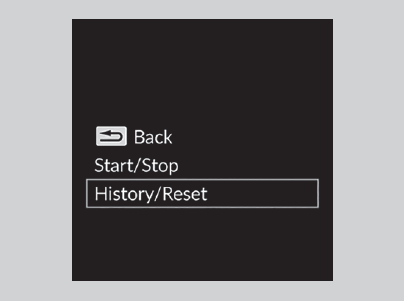
- Press the left selector wheel to display the stopwatch menu screen.
- Select Start/Stop and press the left selector wheel to display the lap time measurement screen.
- Change the display content on the left side area to Stopwatch.

-
- Press the left selector wheel to start measurement.
- Press the left selector wheel to stop measurement.
- To measure the time per lap, roll the left selector wheel at the end of each lap.
- To return to the stopwatch menu screen, press and hold the left selector wheel.
-
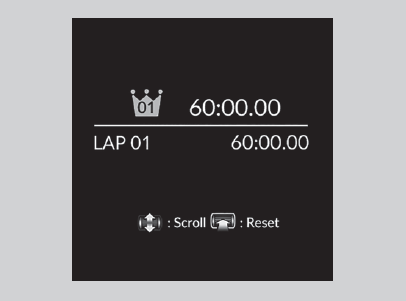
To check or clear the history, select History/Reset on the stopwatch menu screen and press the left selector wheel.
- To scroll through the lap times, roll the left selector wheel.
- To clear the history, press the left selector wheel on the stopwatch history screen while the lap time is not being measured, then select and press Reset.
- To return to the stopwatch menu screen, press and hold the left selector wheel.
- Detail
- Detail
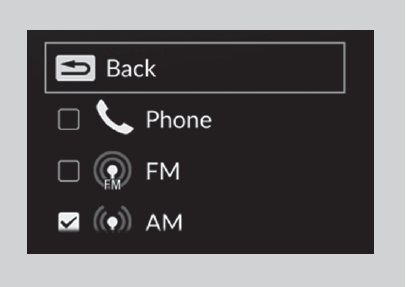
You can choose which sources to display on the audio source screen.
-
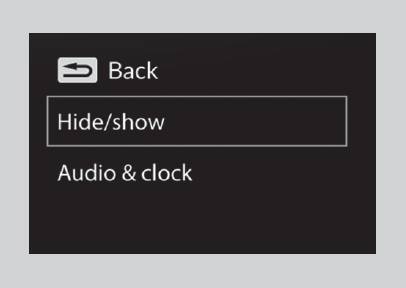
- Roll the left selector wheel until Customize display is selected, then press the left selector wheel.

-
- Roll the left selector wheel to scroll to select Hide/show, then press the left selector wheel.
-
- Roll the left selector wheel to scroll between audio sources, then press the left selector wheel to check or uncheck them.
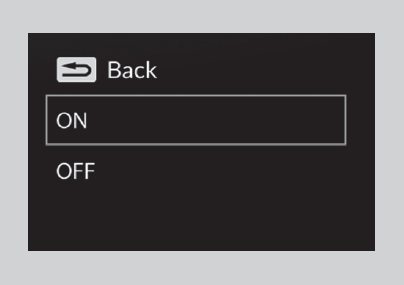
You can select whether the current audio information and clock appear on the left side area.
-
- Roll the left selector wheel until Customize display is selected, then press the left selector wheel.
-
- Roll the left selector wheel to scroll to select Audio & clock, then press the left selector wheel.
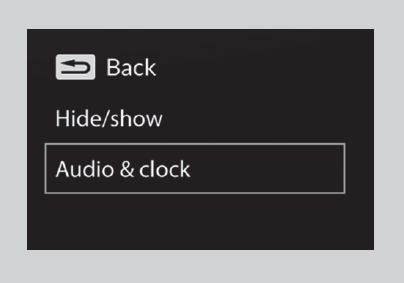
-
- Roll the left selector wheel to scroll to select your desired settings, then press the left selector wheel.
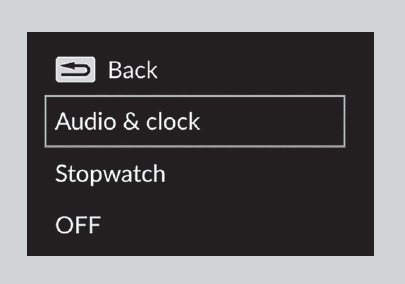
You can change the display content on the left side area. Select Audio & clock, Stopwatch, or OFF.
-
- Roll the left selector wheel until Customize display is selected, then press the left selector wheel.
-
- Roll the left selector wheel to scroll to select Display content, then press the left selector wheel.

-
- Roll the left selector wheel to scroll to select your desired content, then press the left selector wheel.
* Not available on all models
Driver Information Interface (Right Side Area) B-type meter
When a warning message displays, please check the message and contact a dealer and have the vehicle inspected if necessary. Please refer to the pages below if the Engine oil pressure low. or Engine temperature too hot. message is displayed.
Roll the right selector wheel to view different types of content.

- Detail
Press the right selector wheel to switch between trip meter A and trip meter B.

Shows the total number of miles or kilometers driven since the last reset. Meters A and B can be used to measure two separate trips.
To reset the trip meter, display it, press and hold the right selector wheel and then select Reset.
- The trip meter is reset to 0.0.
Shows the estimated average fuel economy of each trip meter in mpg or l/100 km. The display is updated at set intervals. When a trip meter is reset, the average fuel economy is also reset.
- Detail
Shows the instant fuel economy as a bar graph in mpg or l/100 km.
Shows the estimated distance you can travel on the remaining fuel. This estimated distance is based on the vehicle’s current fuel economy.
- Detail
Press the right selector wheel to switch between trip meter A and trip meter B.

Shows the time elapsed since Trip A or Trip B was reset.
- Detail
Shows the average speed in mph or km/h since Trip A or Trip B was reset.
- Detail
When the turbo is producing boost, this gauge indicates boost pressure is building.
- Detail
Shows the compass screen.
When driving guidance is provided by the navigation system, Apple CarPlay or Android Auto, turn-by-turn directions to your destination appear.
The Driver Attention Monitor analyzes steering inputs to determine if the vehicle is being driven in a manner consistent with drowsy or inattentive driving. If it determines that the vehicle is being driven in such a manner, it will display the degree of the driver’s attention on the driver information interface.

- When you select Driver Attention Monitor on the driver information interface, bars on it light up in white to indicate the degree of the driver’s attention.

- If two bars light up, the Driver attention level low message will appear.

- If one bar lights up, the Driver attention level low. Time for a break. message will appear, a beep will sound, and the steering wheel will vibrate.
If this message appears, stop in a safe location and rest for as long as needed.
The message will disappear when the right selector wheel is rolled or when the system has determined that the driver is driving normally.
If the driver does not take a break and the monitor continues to detect that the driver is very tired, the message will appear again after approximately 15 minutes, accompanied by a beep and steering wheel vibrations.
The message does not appear when the traveling time is 30 minutes or less.

- Detail
Regardless of the system’s feedback, if you are feeling tired, stop in a safe location and rest for as long as needed.
- The engine is turned off.
- The driver unfastens the seat belt and opens the door while the vehicle is stopped.
- The vehicle must be traveling above 25 mph (40 km/h).
- The electric power steering (EPS) system indicator must be off.
- Detail
- The steering assist function of the Lane Keeping Assist System (LKAS) is active.
- The condition of the road is poor, e.g. the surface is unpaved or bumpy.
- It is windy.
- The driver is frequently operating the vehicle in an assertive manner such as changing lanes or accelerating.
You can change the Driver Attention Monitor settings. Select Tactile And Audible Alert, Tactile Alert, or OFF.
-
Displays the accelerator position in degrees of %.
Displays the brake pressure in psi when the brake is applied.

Displays the strength (G) and direction of the load that is applied to the vehicle during driving.
- Detail
Appears when any of the seat belts are latched or unlatched.
Shows the remaining oil life and Maintenance MinderTM.
Indicates the status of the Road Departure Mitigation system, CMBSTM, Low Speed Braking Control and blind spot information system such as On, Off, or Failure, by color and letters.
The following colors indicate the status of any of the above mentioned systems:
- Green: The system is on.
- Gray: The system is off.
- Amber: There is a problem with the system.

- Detail
You can check if there are any active warning messages.
- Detail
Enables you to show another unit on the driver information interface and set the displayed measurements to read in either miles and mph or km and km/h.
Press and hold the right selector wheel when you select the Blank/Unit change screen on the driver information interface. Each time you do this, the unit will change from miles and mph to km and km/h or vice versa. After this, a confirmation screen will appear for a few seconds.

Change the settings to your liking.
You can choose which contents to display on the right side area.
-
- Press the right selector wheel when you select the Customize display on the driver information interface.
- Roll the right selector wheel to scroll to select Hide/show, then press the right selector wheel.

-
- Roll the right selector wheel to scroll between contents, then press the right selector wheel to check or uncheck them.

- Detail
You can change the design, such as speedometer, tachometer and so on.
-
- Press the right selector wheel when you select the Customize display on the driver information interface.
- Roll the right selector wheel to scroll to select Gauge design, then press the right selector wheel.

-
- Roll the right selector wheel to scroll to select your desired settings, then press the right selector wheel.

- Detail
* Not available on all models
Download Manual