Maintenance MinderTM
Maintenance MinderTM
If the engine oil life is less than 15%, you will see the Maintenance Minder messages appear on the driver information interface every time you set the power mode to ON. The messages notify you when to change the engine oil, or when to bring your vehicle to a dealer for indicated maintenance services.
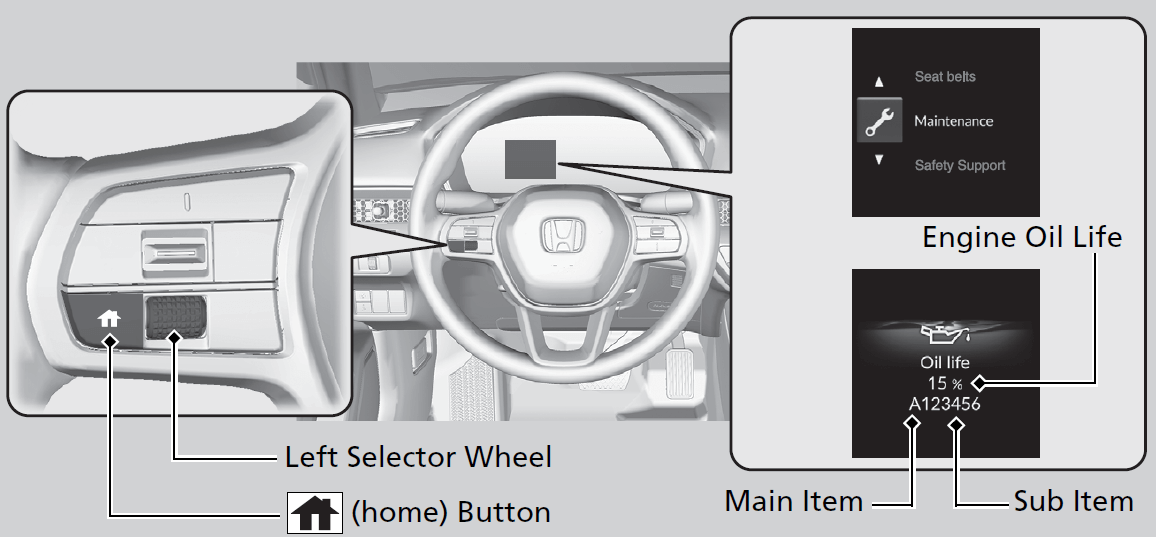
To Use Maintenance MinderTM
- Set the power mode to ON.
- Press the
 (home) button.
 - Roll the left selector wheel until
 is displayed.
 - Press the left selector wheel to go to the Maintenance Minder screen. The engine oil life appears on the driver information interface along with maintenance items due soon.
- Set the power mode to ON.
- Roll the right selector wheel until the Maintenance Minder screen is displayed.
The engine oil life appears on the driver information interface along with maintenance items due soon.
- Detail
|
Displayed Engine Oil Life (%)
|
Calculated Engine Oil Life (%)
|
|---|---|
|
100
|
100 to 91
|
|
90
|
90 to 81
|
|
80
|
80 to 71
|
|
70
|
70 to 61
|
|
60
|
60 to 51
|
|
50
|
50 to 41
|
|
40
|
40 to 31
|
|
30
|
30 to 21
|
|
20
|
20 to 16
|
|
15
|
15 to 11
|
|
10
|
10 to 6
|
|
5
|
5 to 1
|
|
0
|
0
|
|
Maintenance Message
|
Oil Life Display
|
Explanation
|
Information
|
|---|---|---|---|
|
-
|
 |
When you select the Maintenance Minder screen, it displays codes for maintenance items due at the next engine oil change, along with the percentage of engine oil life remaining.
|
-
|
|
Maintenance Due Soon
 |
15 %
 |
The remaining engine oil life is 15 to 6 percent.
Models with A-type meter
Press the
(home) button to switch to another display.Models with B-type meter
Roll the right selector wheel to switch to another display.
|
The engine oil is approaching the end of its service life, and the maintenance items should be inspected and serviced soon.
|
- Models with A-type meter
- Models with B-type meter
|
Maintenance Message
|
Oil Life Display
|
Explanation
|
Information
|
|---|---|---|---|
|
Maintenance Due Now
 |
5 %
 |
The remaining engine oil life is 5 to 1 percent.
Models with A-type meter
Press the
(home) button to switch to another display.Models with B-type meter
Roll the right selector wheel to switch to another display.
|
The engine oil has almost reached the end of its service life, and the maintenance items should be inspected and serviced as soon as possible.
|
|
Maintenance Past Due
 |
Negative Distance
 |
The engine oil life has passed its service life, and a negative distance appears after driving over 10 miles (U.S. models) or 10 km (Canadian models). The negative distance on the display blinks.
Models with A-type meter
Press the
(home) button to switch to another display.Models with B-type meter
Roll the right selector wheel to switch to another display.
|
The engine oil life has passed.
The maintenance items must be inspected and serviced immediately.
|
- Models with A-type meter
- Models with B-type meter
The system message indicator ( ) comes on along with the Maintenance Minder message.

- Models with A-type meter
- Models with B-type meter
|
CODE
|
Maintenance Main Items
|
|---|---|
|
A
|
|
|
B
|
|
- If a Maintenance Minder message does not appear more than 12 months after the display is reset, change the engine oil every year.
- See information on maintenance and emissions warranty in the first column on page 759.
|
CODE
|
Maintenance Sub Items
|
|---|---|
|
1
|
|
|
2
|
|
|
3
|
|
|
4
|
|
|
5
|
|
|
7
|
|
- If you drive in dusty conditions, replace the air cleaner element every 15,000 miles (24,000 km).
- If you drive primarily in urban areas that have high concentrations of soot in the air from industry and from diesel-powered vehicles, replace the dust and pollen filter every 15,000 miles (24,000 km).
- Driving in mountainous areas at very low vehicle speeds results in higher transmission temperatures. This requires transmission fluid changes more frequently than recommended by the Maintenance Minder. If you regularly drive your vehicle under these conditions, have the transmission fluid changed every 25,000 miles (40,000 km).
- Driving in mountainous areas at very low vehicle speeds results in higher transmission temperatures. This requires transmission fluid changes more frequently than recommended by the Maintenance Minder. If you regularly drive your vehicle under these conditions, have the transmission fluid changed every 37,500 miles (60,000 km).
- If a Maintenance Minder message does not appear more than 36 months after the display for item 7 is reset, change the brake fluid every 3 years.
- Detail
- Adjust the valves during services A, B, 1, 2, or 3 if they are noisy.
|
CODE
|
Maintenance Main Items
|
|---|---|
|
A
|
|
|
0
|
|
- If a Maintenance Minder message does not appear more than 12 months after the display is reset, change the engine oil every year.
- If you drive in dusty conditions, replace the air cleaner element every 24,000 km (15,000 miles).
- If you drive primarily in urban areas that have high concentrations of soot in the air from industry and from diesel-powered vehicles, replace the dust and pollen filter every 24,000 km (15,000 miles).
- Driving in mountainous areas at very low vehicle speeds results in higher transmission temperatures. This requires transmission fluid changes more frequently than recommended by the Maintenance Minder. If you regularly drive your vehicle under these conditions, have the transmission fluid changed every 40,000 km (25,000 miles).
- Driving in mountainous areas at very low vehicle speeds results in higher transmission temperatures. This requires transmission fluid changes more frequently than recommended by the Maintenance Minder. If you regularly drive your vehicle under these conditions, have the transmission fluid changed every 60,000 km (37,500 miles).
- If a Maintenance Minder message does not appear more than 36 months after the display for item 7 is reset, change the brake fluid every 3 years.
- See information on maintenance and emissions warranty in the first column on page 761.
|
CODE
|
Maintenance Sub Items
|
|---|---|
|
1
|
|
|
2
|
|
|
3
|
|
|
4
|
|
|
5
|
|
|
7
|
|
|
9
|
|
- Detail
- Adjust the valves during services A, 0, 9, 1, 2, or 3 if they are noisy.
Reset the maintenance minder information display if you have performed the maintenance service.

- Set the power mode to ON.
- Press the (home) button.
- Roll the left selector wheel until is displayed.
- Press the left selector wheel to go to the Maintenance Minder screen.
- Press and hold the left selector wheel for about 10 seconds to enter the reset mode.
- Roll the left selector wheel to select a maintenance item to reset, or to select All due items (You can also select Cancel to end the process).
- Press the left selector wheel to reset the selected item.
- Repeat from step 5 for other items you wish to reset.

- Set the power mode to ON.
- Roll the right selector wheel until the Maintenance Minder screen is displayed.
- Press and hold the right selector wheel for about 10 seconds to enter the reset mode.
- Roll the right selector wheel to select a maintenance item to reset, or to select All due items (You can also select Cancel to end the process).
- Press the right selector wheel to reset the selected item.
- Repeat from step 3 for other items you wish to reset.
- Detail
NOTICE
Failure to reset the Maintenance MinderTM display after a maintenance service results in the system showing incorrect maintenance intervals, which can lead to serious mechanical problems.
The dealer will reset the Maintenance MinderTM display after completing the required maintenance service. If someone other than a dealer performs maintenance service, reset the Maintenance MinderTM display yourself.
Download Manual