Opening the Liftgate
Opening the Liftgate From Outside Your Vehicle
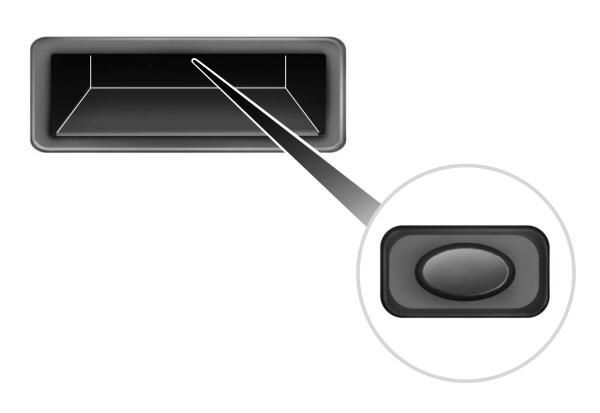
Press the control button to unlatch the liftgate and then lift to open.
Note: Be careful when opening or closing the liftgate in a garage or other enclosed area to avoid damaging the liftgate.
Note: Do not hang anything, for example a bike rack, from the glass or liftgate. This could damage the liftgate and its components.
Note: Do not leave the liftgate open while driving. This could damage the liftgate and its components.
Opening the Liftgate Using the Remote Control

Note: Be careful when opening or closing the liftgate in a garage or other enclosed area to avoid damaging the liftgate.
Note: Do not hang anything, for example a bike rack, from the glass or liftgate. This could damage the liftgate and its components.
Note: Do not leave the liftgate open while driving. This could damage the liftgate and its components.
Closing the Liftgate From Outside Your Vehicle
 WARNING: It is extremely dangerous to ride in a cargo area, inside or outside of a vehicle. In a crash, people riding in these areas are more likely to be seriously injured or killed. Do not allow people to ride in any area of your vehicle that is not equipped with seats and seatbelts. Make sure everyone in your vehicle is in a seat and properly using a seatbelt. Failure to follow this warning could result in serious personal injury or death. WARNING: Make sure that you fully close the liftgate to prevent exhaust fumes from entering your vehicle. If you are unable to fully close the liftgate, open the air vents or the windows to allow fresh air to enter your vehicle. Failure to follow this instruction could result in personal injury or death. WARNING: It is extremely dangerous to ride in a cargo area, inside or outside of a vehicle. In a crash, people riding in these areas are more likely to be seriously injured or killed. Do not allow people to ride in any area of your vehicle that is not equipped with seats and seatbelts. Make sure everyone in your vehicle is in a seat and properly using a seatbelt. Failure to follow this warning could result in serious personal injury or death. WARNING: Make sure that you fully close the liftgate to prevent exhaust fumes from entering your vehicle. If you are unable to fully close the liftgate, open the air vents or the windows to allow fresh air to enter your vehicle. Failure to follow this instruction could result in personal injury or death. |
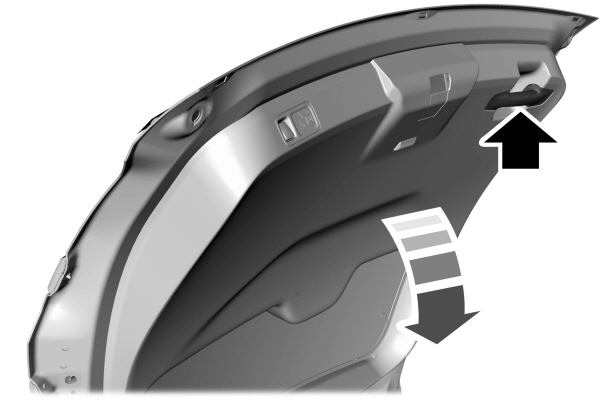
A handle is inside the liftgate to help with closing.
Note: Make sure that you fully close the liftgate to prevent cargo from falling out.
Easy Entry and Exit
Easy entry and exit moves the driver seat rearward and the steering column up when you switch the ignition off. The driver seat and steering column return to their previous positions when you switch the ignition on.
Note: Depending on your vehicle, the column may move up and in.
- Using the touchscreen, select Settings.
- Select Vehicle.
- Select Easy Entry/Exit.
If you press any adjustment or memory button when in easy exit mode, the system cancels the operation.
Download Manual