Doors and Locks
Operating the Doors From Outside Your Vehicle
Unlocking and Locking the Doors Using the Remote Control
You can only use the remote control when your vehicle is stationary.
Unlocking the Doors
 Press the button to unlock all doors.One long flash of the turn signal lamps confirms that your vehicle has unlocked. Press the button to unlock all doors.One long flash of the turn signal lamps confirms that your vehicle has unlocked. |
Locking the Doors
|
|
Unlocking and Locking the Doors Using the Key Blade
If there is a power door lock fault you can use the key blade to lock and unlock the doors.
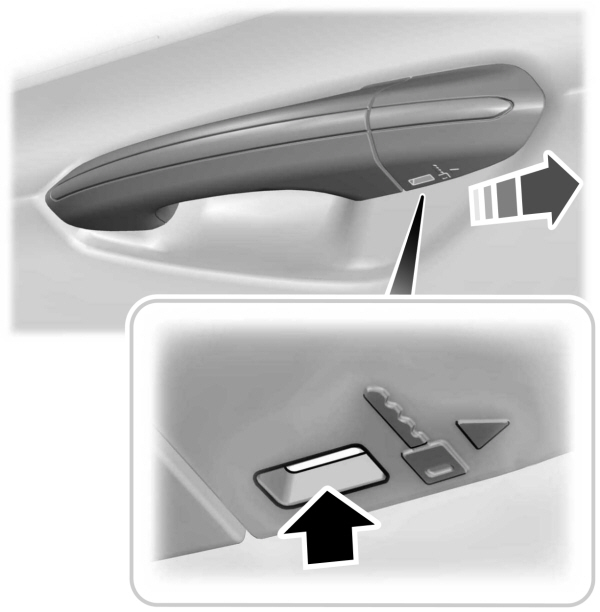
- Insert the key blade inside the door handle bezel slot and move it in the direction shown, using both hands to remove the handle bezel.
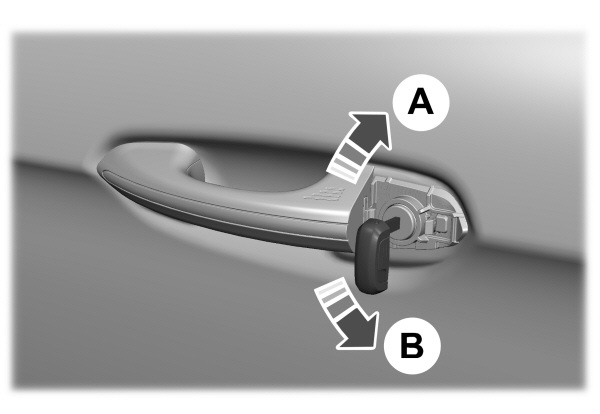
- After removing the handle bezel, insert the key blade into the door lock cylinder.
|
A |
 Turn clockwise to lock.
Individually Unlocking and Locking the Doors Using the Key Blade
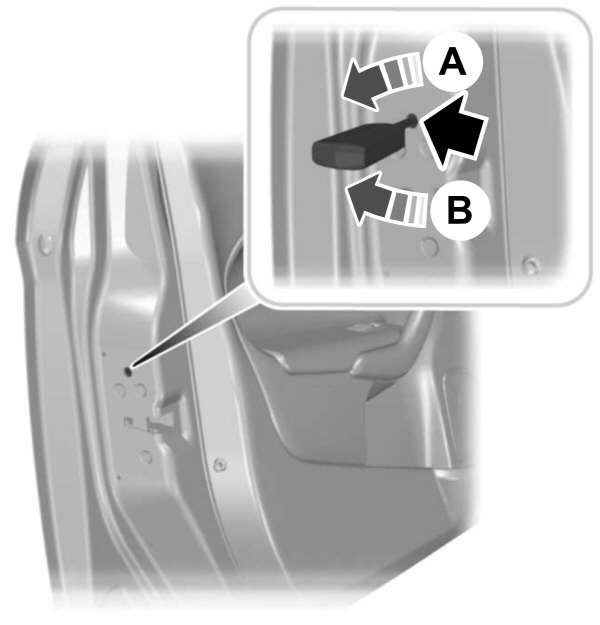
If there is a power door lock fault you can use the key blade to lock and unlock the doors.
|
A |
Unlocking and Locking the Doors Using the Central Locking
The power door lock control is on the front doors.
| Press the button to unlock all doors. |
 Press the button to lock all doors. Press the button to lock all doors. |
Note: The central locking only operates if the front doors are fully closed.
Opening the Doors From Inside Your Vehicle
Pull the interior door handle twice to unlock and open a rear door. The first pull unlocks the door and the second pull opens the door.
Autounlock
Autounlock is a feature that centrally unlocks the vehicle doors when your vehicle comes to a stop and you open the driver door.
Autounlock unlocks all the doors after:
- The vehicle speed exceeds 12 mph (20 km/h).
- Your vehicle comes to a stop.
- You open the driver door.
Note: Autounlock operates for only 10 minutes after the ignition is switched off.
- Press the menu button on the steering wheel to enter the information display main menu.
- Select Settings.
- Select Vehicle.
- Select Locks.
- Switch Autounlock on or off.
Autolock is a locking feature that centrally locks your vehicle doors when driving.
Autolock locks all the doors after:
- All doors are closed and the ignition is on.
- Your vehicle speed exceeds 12 mph (20 km/h).
Autolock repeats if:
- Your vehicle is stopped.
- Any door is opened and closed again.
- Your vehicle speed exceeds 12 mph (20 km/h).
Mislock
WHAT IS MISLOCK
Mislock is a locking feature that warns you if your vehicle has not locked.
MISLOCK LIMITATIONS
When you press the lock button once, the direction indicators do not flash if any door or the liftgate or hood is open.
- If any door or the liftgate is open.
- The hood is open.
SWITCHING MISLOCK ON AND OFF
- Press the menu button on the steering wheel to enter the information display main menu.
- Select Settings.
- Select Vehicle.
- Select Locks.
- Switch Mislock Chirp on or off.
Doors and Locks Audible Warnings
Door Ajar Audible Warning
Sounds when any front door is not fully closed and your vehicle is moving.
Troubleshooting - Doors and Locks – Warning Lamps
Door Ajar Warning Lamp
|
|
 Illuminates when you switch the ignition on and remains on if any door or the hood is open.
Troubleshooting - Doors and Locks – Information Messages
Message Details
Driver Door Ajar
Displays if a door is open. Fully close the door.
Passenger Door Ajar
Rear Left Door Ajar
Rear Right Door Ajar
Hood Ajar
Displays if a hood is open. Fully close the hood.
Doors and Locks – Frequently Asked Questions
Can accessories such as steps or handles be used with the latch assembly?
- Do not use the door latch assembly to attach any accessory, such as handles or steps, as this can cause damage to your vehicle.
Download Manual