Apps
App Precautions
 WARNING: Driving while distracted can result in loss of vehicle control, crash and injury. We strongly recommend that you use extreme caution when using any device that may take your focus off the road. Your primary responsibility is the safe operation of your vehicle. We recommend against the use of any hand-held device while driving and encourage the use of voice-operated systems when possible. Make sure you are aware of all applicable local laws that may affect the use of electronic devices while driving. WARNING: Driving while distracted can result in loss of vehicle control, crash and injury. We strongly recommend that you use extreme caution when using any device that may take your focus off the road. Your primary responsibility is the safe operation of your vehicle. We recommend against the use of any hand-held device while driving and encourage the use of voice-operated systems when possible. Make sure you are aware of all applicable local laws that may affect the use of electronic devices while driving. |
App Requirements
When you start an app through the system for the first time, you could be asked to grant certain permissions. You can review and change the permissions that you have granted at any time when your vehicle is not moving. We recommend that you check your data plan before using your apps through the system. Using them could result in additional charges. We also recommend that you check the app provider's terms and conditions and privacy policy before using their app. Make sure that you have an active account for apps that you want to use through the system. Some apps will work with no setup. Others require you to configure some personal settings before you can use them.
Accessing Apps
From the App Launcher menu, select the apps. See Center Display.
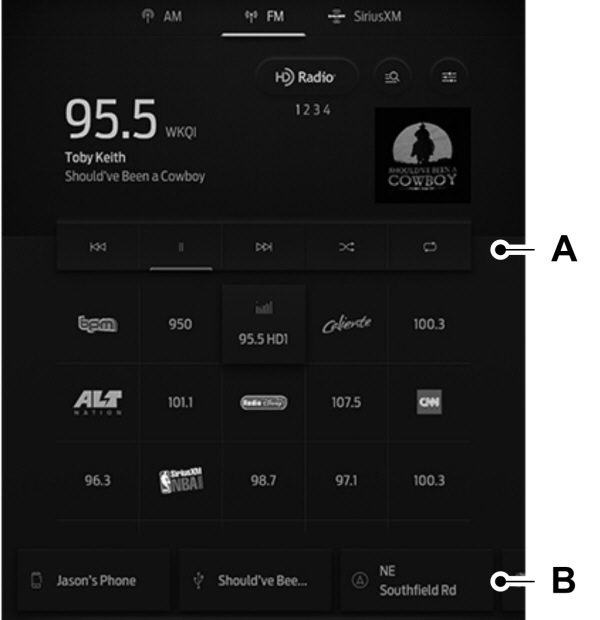
A Application area. Application area.B Card area. |
Application Area
This is the main app area where apps are launched and you can utilize the full functionality of the chosen app.
Card Area
Here you can see recently used applications with limited content. When you select one of these cards, the app will display in the application area with full functionality.
Enabling Apps on an iOS Device
- Follow the instructions to pair and connect your device via Bluetooth® or with a USB cable.
Note: Some apps may run through CarPlay if it is enabled.
- Start a compatible app on your device.
Note: The app must be open on your device to use it through the touchscreen.
- Access the system applications.
- Select the app you wish to use on the touchscreen.
Enabling Apps on an Android Device
- Pair your device to Bluetooth®.
Note: Some apps may run through Android Auto if it is enabled.
- Start a compatible app on your device.
Note: The app must be open on your device to use it through the touchscreen.
- Access the system applications.
- Select the app you wish to use on the touchscreen.
Switching Apple CarPlay On and Off
- Pair your device.
- From the settings menu, press Phone List. See Center Display.
- Select your device.
- Tap the CarPlay icon to switch CarPlay on or off.
Switching Android Auto On and Off
- Pair your device.
- From settings menu, press Phone List. See Center Display.
- Select your device.
- Tap the Android Auto icon to switch Android Auto on or off.
Download Manual