Light features
Lights – features
3-blink turn signal (convenience indicating)
Move the turn signal lever up or down slightly, just to the point of resistance, and then let it go. If you have the 3-blink turn signal (convenience indicating) feature switched on in the Infotainment system, the turn signal flashes three times.
To cancel convenience indicating before the turn signal flashes three times, immediately move the turn signal lever in the opposite direction to the point of resistance and release it.
If the feature is switched off, the turn signal will blink as long as you hold the lever up or down, and go out when you release the lever.
The 3-blink turn signal (convenience indicating) can be deactivated by an authorized Volkswagen dealer or authorized Volkswagen Service Facility.
Daytime running lights (DRL)
The daytime running lights can help to increase the visibility of your vehicle during the day.
Separate lamps or LEDs are installed in the headlights or in the front bumper for the daytime running lights (DRL).
The daytime running lights switch on whenever the ignition is switched on and the light switch is in position or
.
When the daytime running lights are switched on, only these separate lamps come on .
If the light switch is in position , the low-light sensor switches the low beams as well as the instrument and switch lighting on and off automatically.
Daytime running lights (DRL) parking feature
Some models are equipped with a daytime running lights (DRL) parking feature that switches the daytime running lights off when the parking brake is engaged and the ignition is switched on.
| Function | Action |
|---|---|
| Switching the DRL off: | – Switch the ignition on. – Turn the light switch to the – Set the parking brake. |
| Switching the DRL back on: | – Release the parking brake. |
Automatic headlights (


 )
)
Your vehicle may be equipped with automatic headlights (), which are a convenience feature only and cannot always recognize all lighting and driving situations.
If the light switch is in the position, both vehicle lighting and instrument and switch lighting are automatically switched on and off in the following situations :
- Automatic activation: If the low-light sensor registers darkness, for example, when driving through a tunnel or at dusk OR when the rain sensor recognizes rain and switches the windshield wipers on (if equipped).
- Automatic deactivation: If sufficient brightness is registered OR if the windshield wipers have not moved for several minutes.
Static cornering lights
Your vehicle may have fog lights under the front bumper, which on some models are also static cornering lights. On some models the static cornering lights may be integrated in the headlights. At speeds below about 25 mph (40 km/h), the light on one side of the vehicle will come on automatically when you turn a corner. If you turn to the right, the right fog light comes on; turn left and the left fog light comes on. The light dims and goes out when the steering wheel is straightened out again.
When you move the selector lever to Reverse (R), the static cornering lights on both sides of the vehicle may come on so that you can see the area around the vehicle better when backing up.
The static cornering lights work only when the headlights are on. If you are using automatic headlights (headlight switch in the position ), they work only when the headlights have been automatically switched on. The static cornering lights do not come on when the headlight switch is in the
position or when the fog lights themselves have been switched on .
Acoustic warning when lights are not switched off
In the following situation, a warning chime will sound if you switch off the ignition and open the driver door. This is to remind you that lights are still on.
- Light switch in position
.
 WARNING
Crashes and other accidents can happen when you cannot see the road ahead and when you cannot be seen by other motorists.
- Never use daytime running lights (DRL) to see where you are going. DRL are not bright enough to light up the roadway and be seen by other motorists. You will not be able to see far enough ahead for safety, especially at dusk or when it is dark. Always switch on the low-beam headlights at dusk or when it is dark.
- The taillights do not come on when the daytime running lights are switched on. A vehicle without taillights on cannot be seen by others in bad weather, at dusk, or when it is dark.
- If automatic headlights (

In cool or humid weather, the insides of the headlights, the rear lights, and turn signals can temporarily fog up. This is normal and does not affect the service life of the vehicle's lighting system.
Coming Home and Leaving Home features (orientation lighting)
Your vehicle may be equipped with Coming Home/Leaving Home features.
The Coming Home feature must be switched on manually. The Leaving Home feature is controlled automatically by a low-light sensor.
Switching on the Coming Home feature
- Switch off the ignition.
- Operate the headlight flasher for about 1 second .
The Coming Home lighting is switched on when the driver door is open.
The delay period starts once the last vehicle door or the trunk lid is closed.
Switching off the Coming Home feature
- The Coming Home feature switches off automatically after the preset delay period is over.
- OR If a vehicle door or the trunk lid is still open about 30 seconds after activation.
- OR The light switch is turned to the
- OR The ignition is switched on.
Switching on the Leaving Home feature
- Unlock the vehicle.
The Leaving Home feature is switched on when the light switch is in the position and the low-light sensor registers darkness.
Switching off the Leaving Home feature
- The Leaving Home feature switches off automatically after the preset delay period is over.
- OR When the vehicle is locked.
- OR The light switch is turned to the
- OR The ignition is switched on.
If the Coming Home feature is switched on and the driver door is opened, no warning chime will sound to alert you that the lights are still on.
Ambient (background) lighting
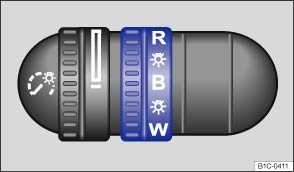
Fig. 87 Thumbwheel next to the steering wheel.
Ambient (background) lighting (if equipped)
When the ignition and the headlights are switched on, ambient lights in the roof console light up.
There may also be lighting in the footwells.
Ambient (background) lighting in the doors
Some vehicles are equipped with ambient lighting in the doors that comes on when the ignition or headlights are switched on.
| Turn the thumbwheel to the desired position : | |
|---|---|
| Position | Ambient lighting color |
| R | Red |
| B | Blue |
| W | White |
| – | Ambient lighting in the doors switched off |
Download Manual