Cruise control
 Introduction to the subject
In this chapter you will find information on the following subjects:
Your vehicle may be equipped with cruise control, which helps maintain an individually stored constant speed when driving above about 15 mph (20 km/h).
Cruise control slows down the vehicle only by reducing the flow of fuel to the engine, not by braking .
 WARNING
Using the cruise control when it is not possible to drive safely at a constant speed can be dangerous and can lead to an accident and serious personal injuries.
- Never use cruise control when driving in heavy or varying traffic or when you cannot keep a safe distance between you and the vehicles ahead of you.
- Never use cruise control on steep, winding, or slippery roads (such gravel roads, wet roads, or snowy or icy roads) or on roads with standing water.
- Never use cruise control when driving off-road or on unpaved roads.
- Always adjust your speed and the distance you keep between you and the vehicles ahead of you to the road, traffic, weather, and visibility conditions.
- To help prevent unintended operation of cruise control, switch the system off when it is not being used.
- It is dangerous to use the Resume feature when the previously set speed is too high for the existing road, traffic, or weather conditions.
- When going downhill, the cruise control may not be able to maintain a constant speed. The vehicle will speed up because of its own weight. Downshift and/or use the foot brake to slow the vehicle.
Indicator lights
Read and follow the introductory information and safety information first
| Lights up | Possible cause |
|---|---|
| Cruise control is regulating the speed. | |
When the ignition is switched on, several warning and indicator lights come on briefly for a function check. They go out after a few seconds.
Display
Different cruise control versions are available. The stored speed is shown in the instrument cluster display on some equipment versions.
WARNING
Failure to heed warning lights and instrument cluster text messages can cause the vehicle to break down in traffic and result in a collision and serious personal injury.
- Never ignore warning lights or text WARNINGS.
- Always stop the vehicle as soon as it is safe to do so.
 NOTE
NOTE
Failure to heed warning lights or text WARNINGS can result in vehicle damage.
Cruise control operation
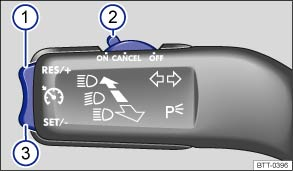
Fig. 108 On the left side of the steering column: Cruise control buttons and switches (if equipped).
Read and follow the introductory information and safety information first
| In order to: | You must: | Result: |
|---|---|---|
| Switch on cruise control. | Move switch ② to the |
System is switched on, but does not regulate vehicle speed until a speed is set. |
| Set cruise control to current vehicle speed. | Press button ③ |
Current vehicle speed is set; cruise control helps to maintain this speed. |
| Temporarily deactivate cruise control. | Move switch ② to the OR: depress the brake or clutch pedal. |
Cruise control is temporarily deactivated. The speed is still stored in the memory. |
| Resume speed stored in cruise control. | Press button ① |
Cruise control resumes speed previously set. |
| Increase set speed (while cruise control is actively controlling vehicle speed). | Press button ① |
The vehicle will accelerate until the new higher speed is reached and saves the new higher speed in the memory. |
| Press and hold button ① |
||
| Reduce set speed (while cruise control is actively controlling vehicle speed). | Press button ③ |
Cruise control will slow the vehicle down without braking by reducing the flow of fuel to the engine until the new lower speed is reached and saves the new lower speed in the memory. |
| Press and hold button ③ |
||
| Switch off cruise control. | Move switch ② to the |
System is switched off. The set speed is deleted. |
Driving downhill with cruise control
If cruise control cannot maintain constant speed while driving downhill, slow the vehicle with the foot brake and downshift if necessary.
Automatic deactivation
Cruise control speed regulation is automatically deactivated or temporarily interrupted:
- If the system detects an error that could affect the function of the cruise control.
- If the vehicle has accelerated and goes faster than the stored speed for a longer time.
- If the brake or clutch pedal is depressed.
- If an airbag deploys.
- If the selector lever is shifted to Neutral (N). The cruise control will not deactivate when shifting between D, S, and Tiptronic mode.
Download Manual