Key
Your vehicle uses a keyless ignition system. The ignition system consists of a key fob with Remote Keyless Entry (RKE) and a START/STOP push button ignition system. The Remote Keyless Entry system consists of a key fob and Keyless Enter-N-Go feature if equipped.
Note:
The key fob may not be found if it is located next to a mobile phone, laptop or other electronic device; these devices may block the key fob’s wireless signal.
The Remote Keyless Entry key fob also contains an emergency key, which stores in the rear of the key fob.
The emergency key allows for entry into the vehicle should the battery in the vehicle or the key fob become depleted. The emergency key is also for locking the glove compartment. You can keep the emergency key with you when valet parking.
To remove the emergency key, slide the mechanical latch on the back of the key fob sideways with your thumb and then pull the key out with your other hand.
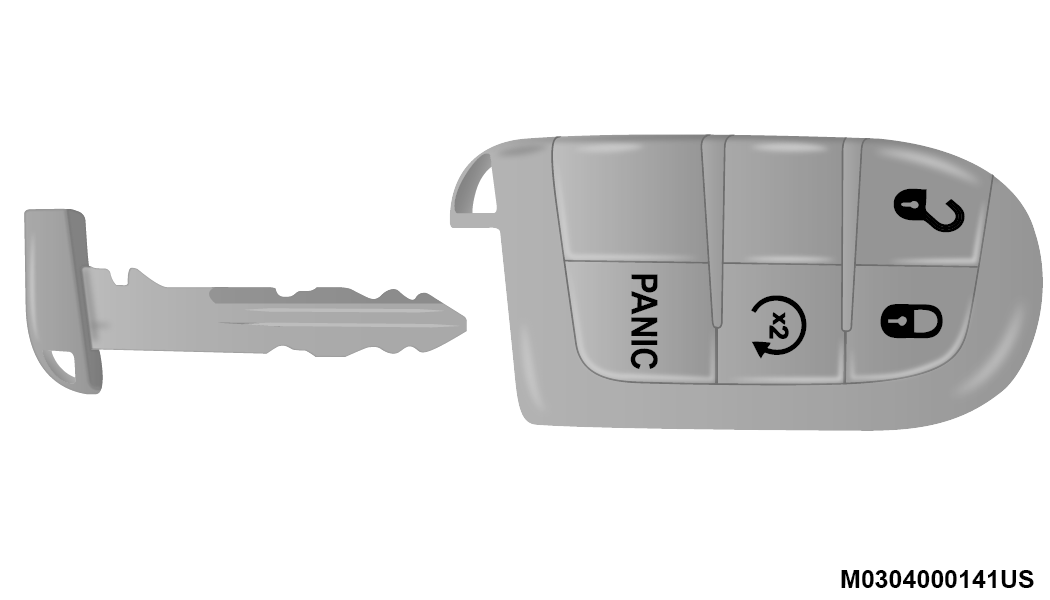
Emergency Key Removal
Note:
You can insert the double-sided emergency key into the lock cylinders with either side up.
The Remote Keyless Entry system allows you to lock or unlock the doors, open the liftgate, or activate the Panic Alarm from distances up to approximately 66 ft (20 m). The key fob does not need to be pointed at the vehicle to activate the system.
Note:
Driving at speeds 2 mph (4 km/h) and above disables the system from responding to all key fob buttons for all key fobs.
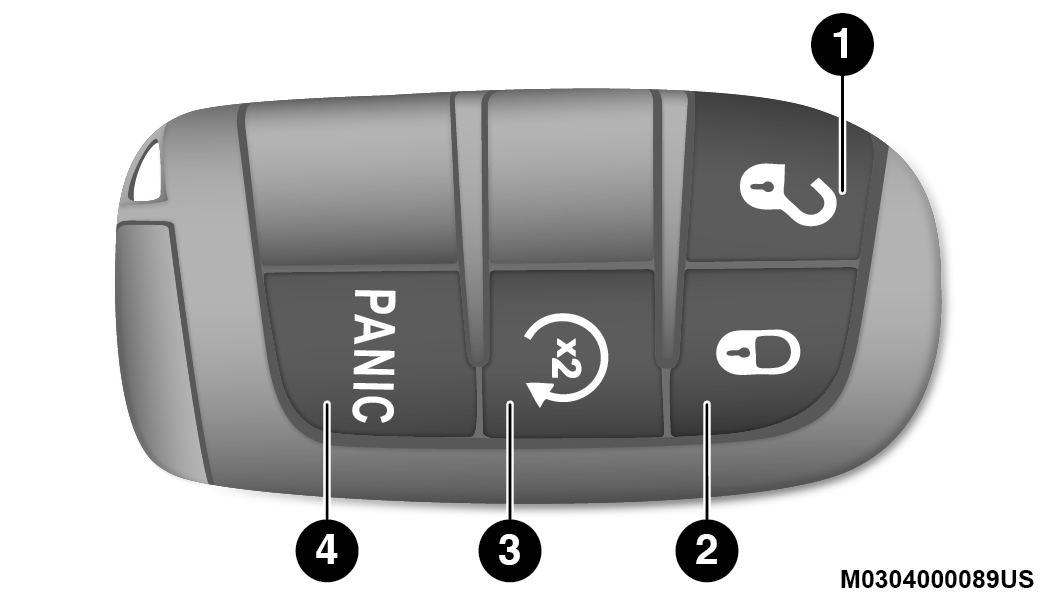
Key Fob
|
1 — Unlock |
|
2 — Lock |
|
3 — Remote Start |
|
4 — Panic Button |
Backup Starting Method
In case the ignition switch does not change with the push of a button, the key fob may have a low or fully depleted battery.
In a situation of a low or fully depleted battery, a backup method can be used to operate the ignition switch. Put the nose side of the key fob (side opposite of the emergency key) against the START/STOP ignition button and push to operate the ignition switch.
TO UNLOCK THE DOORS AND LIFTGATE
Push and release the unlock button on the key fob once to unlock the driver's door or twice within five seconds to unlock all doors and the liftgate.
All doors can be programmed to unlock on the first push of the unlock button. Refer to “Uconnect Settings” in “Multimedia” for further information.
Note:
If the vehicle is unlocked by a key fob, and no door is opened within 60 seconds, the vehicle will re-lock and if equipped, the security alarm will arm.
The turn signal lights will flash twice to acknowledge the unlock signal. The illuminated entry system will be activated.
1st Push Of Key Fob Unlock Button
This feature lets you program the system to unlock either the driver's door or all doors on the first push of the unlock button on the key fob. To change the current setting, refer to “Uconnect Settings” in “Multimedia” for further information.
Note:
If the vehicle is equipped with Passive Entry, refer to “Keyless Enter-N-Go — Passive Entry” in “Doors” in this chapter for further information.
HEADLIGHT ILLUMINATION ON APPROACH
This feature activates the headlights for up to 90 seconds when the doors are unlocked with the key fob. The time for this feature is programmable, on vehicles equipped, through Uconnect Settings. To change the current setting, refer to “Uconnect Settings” in “Multimedia” for further information.
TO LOCK THE DOORS AND LIFTGATE
Push and release the lock button on the key fob to lock all doors and liftgate.
The turn signal lights will flash and the horn will chirp to acknowledge the signal. Refer to “Uconnect Settings” in “Multimedia” for further programmable information.
If the vehicle is equipped with Passive Entry, refer to “Keyless Enter-N-Go — Passive Entry” in “Doors” in this chapter for further information.
Vehicles Equipped With Keyless Enter-N-Go — Passive Entry
If one or more doors are open, or the liftgate is open, the doors will lock. The doors will unlock again automatically if the key is left inside the passenger compartment, otherwise the doors will stay locked.
SOUND HORN WITH LOCK
This feature will cause the horn to chirp when the doors are locked with the key fob. This feature can be turned on or turned off. To change the current setting, refer to “Uconnect Settings” in “Multimedia” for further information.
USING THE PANIC ALARM
To turn the Panic Alarm feature on or off, push the Panic button on the key fob. When the Panic Alarm is activated, the turn signals will flash, the horn will pulse on and off, and the interior lights will turn on.
The Panic Alarm will stay on for three minutes unless you turn it off by either pushing the Panic button a second time or drive the vehicle at a speed of 15 mph (24 km/h) or greater.
Note:
-
The interior lights will turn off if you place the ignition in the ACC or ON/RUN position while the Panic Alarm is activated. However, the exterior lights and horn will remain on.
-
You may need to be less than 35 ft (11 m) from the vehicle when using the key fob to turn off the Panic Alarm due to the radio frequency noises emitted by the system.
KEY FOB BATTERY REPLACEMENT
The recommended replacement battery is one CR2032 battery.
Note:
-
Perchlorate Material – special handling may apply. See www.dtsc.ca.gov/hazardouswaste/perchlorate .
-
Do not touch the battery terminals that are on the back housing or the printed circuit board.
-
Remove the emergency key by sliding the mechanical latch on the back of the key fob sideways with your thumb and then pull the key out with your other hand.
Emergency Key Removal
-
Insert the tip of the emergency key or a #2 flat blade screwdriver into the slot and gently pry the two halves of the key fob apart. Make sure not to damage the seal during removal.
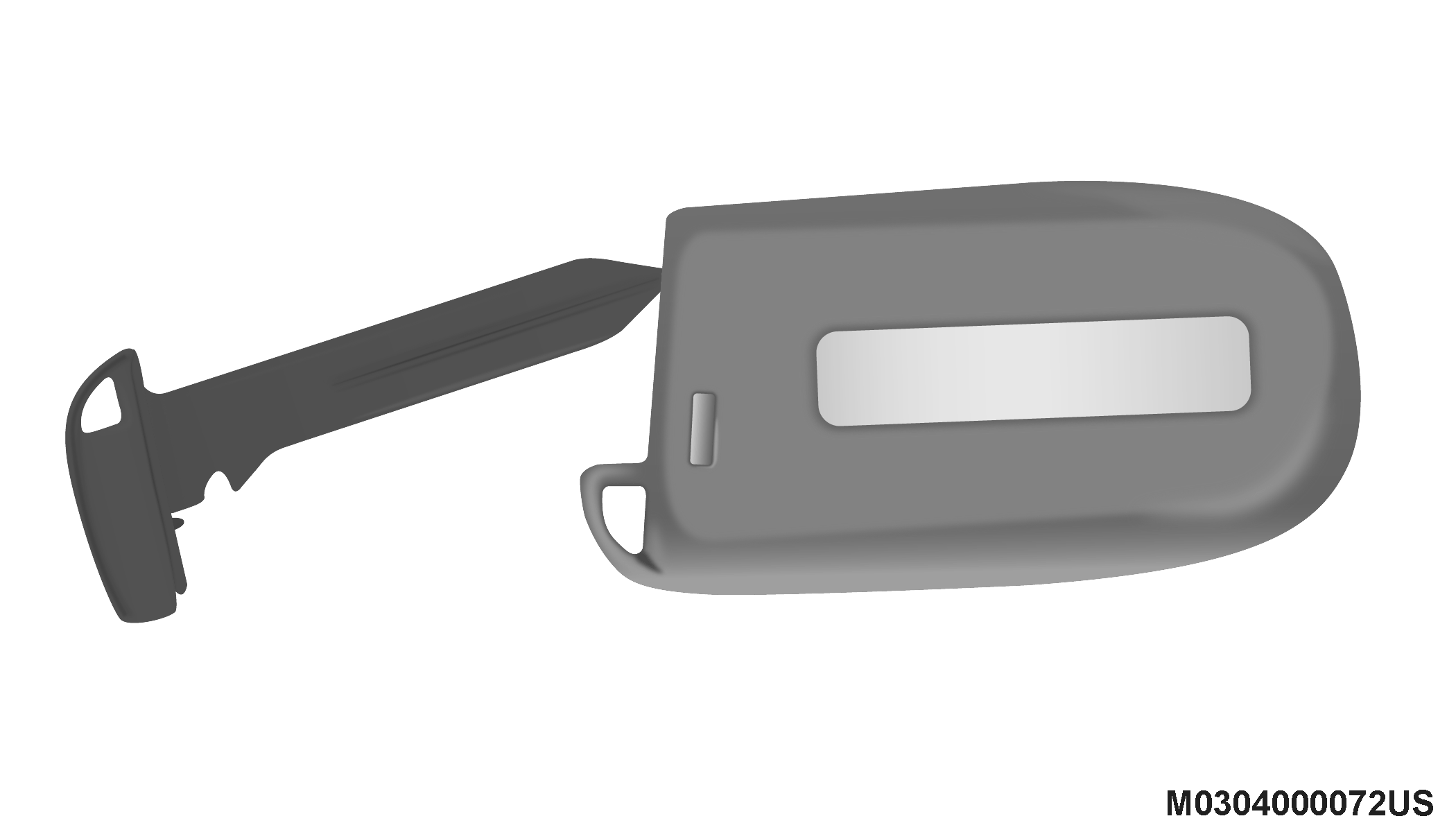
Separating Key Fob Case
-
Remove the battery by turning the back cover over (battery facing downward) and tapping it lightly on a solid surface such as a table or similar, then replace the battery. When replacing the battery, match the (+) sign on the battery to the (+) sign on the inside of the battery clip, located on the back cover. Avoid touching the new battery with your fingers. Skin oils may cause battery deterioration. If you touch a battery, clean it with rubbing alcohol.
-
To assemble the key fob case, snap the two halves together.
PROGRAMMING ADDITIONAL KEY FOBS
Programming the key fob may be performed by an authorized dealer.
Note:
Once a key fob is programmed to a vehicle, it cannot be repurposed and reprogrammed to another vehicle.
GENERAL INFORMATION
The following regulatory statement applies to all Radio Frequency (RF) devices equipped in this vehicle:
This device complies with Part 15 of the FCC Rules and with Innovation, Science and Economic Development Canada license-exempt RSS standard(s). Operation is subject to the following two conditions:
-
This device may not cause harmful interference, and
-
This device must accept any interference received, including interference that may cause undesired operation.
Le présent appareil est conforme aux CNR d`Innovation, Science and Economic Development applicables aux appareils radio exempts de licence. L'exploitation est autorisée aux deux conditions suivantes:
-
l'appareil ne doit pas produire de brouillage, et
-
l'utilisateur de l'appareil doit accepter tout brouillage radioélectrique subi, même si le brouillage est susceptible d'en compromettre le fonctionnement.
La operación de este equipo está sujeta a las siguientes dos condiciones:
-
es posible que este equipo o dispositivo no cause interferencia perjudicial y
-
este equipo o dispositivo debe aceptar cualquier interferencia, incluyendo la que pueda causar su operación no deseada.
Note:
Changes or modifications not expressly approved by the party responsible for compliance could void the user’s authority to operate the equipment.
Download Manual