Volkswagen Car-Net: Connecting you and your vehicle
 Introduction to the subject
In this chapter you will find information on the following subjects:
Volkswagen Car-Net services are provided by Verizon Telematics, Inc. (VzT) and are available only on select models. Automatic Crash Notification (ACN) may be engaged for up to 6 months without activating a trial or paid subscription; Manual Emergency Call service and all other Volkswagen Car-Net services require a trial or paid subscription. Volkswagen Car-Net may collect location information. See applicable Terms of Service and Privacy Policy available at www.vw.com/carnet for details.
Data Collection and Privacy
Vehicle location information is transmitted to Volkswagen and our Volkswagen Car-Net service provider, Verizon Telematics, Inc. (VzT), anytime you press a Volkswagen Car-Net in-car button, when an ACN event occurs or periodically in connection with the operation of Volkswagen Car-Net.
Unless Volkswagen Car-Net equipment is disabled in the vehicle, it is possible for Volkswagen and VzT to determine the car’s location if required to do so by law, court order, subpoena or other legal requirement. For more information, please contact the Volkswagen Car-Net Response Center at 1-877-820-2290.
Calls may be monitored or recorded.
Volkswagen collects, processes, transmits, uses and shares information about you and your vehicle in accordance with the Volkswagen Car-Net Terms of Service and Privacy Policy. See the Volkswagen Car-Net Terms of Service and Privacy Policy at (http://www.vw.com/carnet) for more details.
More information:
- Declaration of Compliance
 WARNING
Application software and Volkswagen Car-Net services that are unsuitable or improperly used can cause accidents, serious personal injury and vehicle damage.
- Volkswagen Car-Net services can be used only where adequate cellular and GPS signals are available
- Volkswagen recommends using only services and application software that are provided by Volkswagen or Verizon Telematics, Inc. (VzT) specifically for your vehicle.
- Protect the mobile device and its application software from misuse.
- Never modify application software and Volkswagen Car-Net services.
- Always read and heed the operating instructions for the mobile device.
WARNING
Driver distraction causes accidents, collisions and serious personal injury! Using application software and Volkswagen Car-Net services while driving can distract the driver from traffic.
- Always drive attentively and responsibly.
Volkswagen Car-Net service
Read and follow the introductory information and safety information first
Your vehicle has equipment to enable Volkswagen Car-Net, a suite of connected vehicle services that makes driving and owning a Volkswagen vehicle more convenient. Volkswagen Car-Net allows you to seamlessly connect your car and your life by offering the following services:
- Safe & Secure – Receive support and assistance in the moment of need.
- Family Guardian – Keep track of family members driving your vehicle.
- Remote Vehicle Access – Interact with your vehicle through your Volkswagen Car-Net iPhone® app, computer or a Volkswagen Car-Net Customer Specialist (text and data rates apply).
- Diagnostics & Maintenance – Manage your vehicle health with diagnostic checks and service scheduling.
You can access Volkswagen Car-Net services via your Volkswagen Car-Net iPhone® app (text and data rates apply) and the Volkswagen Car-Net website (http://www.vw.com/carnet). Android® mobile app not available at time of publication. If you have a question or would like to subscribe, please either press the button in your vehicle or contact the Volkswagen Car-Net Response Center at 1-877-820-2290. For more information or to log on to your Volkswagen Car-Net account, visit http://www.vw.com/carnet.
Note: Please review the Volkswagen Car-Net Terms of Service and Privacy Policy at http://www.vw.com/carnet.
Subscription required
Automatic Crash Notification (ACN) may be engaged for up to 6 months, starting from the date of new vehicle sale, without activating a trial or paid subscription.
The Manual Emergency Call service and all other Volkswagen Car-Net features require a trial or paid subscription. To begin your trial or paid subscription, authentication and activation are required. For more information, please visit the website (http://www.vw.com/carnet), press the button in the 3-button module in your vehicle or contact the Volkswagen Car-Net Response Center at 1-877-820-2290.
The LED light in the 3-button module will be green during the trial period and whenever you have an active subscription. The LED light will go off if the trial period is over and the customer has not subscribed to the Volkswagen Car-Net services. The LED light will be red only during a VW Car-Net hardware malfunction or fault .
Once a trial or paid Volkswagen Car-Net subscription has been activated, please advise all who use the vehicle that different kinds of data can be sent and received automatically by the vehicle, including speed, location and more.
WARNING
Vehicle health reports do not replace the information provided by the vehicle warning and indicator lights. Failure to heed warning lights and instrument cluster text messages can cause the vehicle to break down in traffic and result in a collision and serious personal injury.
- Never ignore warning lights or text WARNINGS.
- Always stop the vehicle as soon as it is safe to do so.
- Park the vehicle at a safe distance from moving traffic and where no part of the hot catalytic converter and exhaust system can come into contact with flammable materials under the vehicle, such as dry grass, brush, spilled fuel, etc.
- A broken down vehicle presents a high accident risk for itself and others. Switch on emergency flashers and set up a warning triangle to warn oncoming traffic.
- Before opening the engine hood, always switch off the engine and let the engine cool down.
- Always be very careful when working in the engine compartment, which is a potentially dangerous area in any motor vehicle and can cause serious personal injury.
 NOTE
NOTE
Failure to heed warning lights or text WARNINGS can result in vehicle damage.

Volkswagen collects, processes, transmits, uses and shares information about you and your vehicle in accordance with the Volkswagen Car-Net Terms of Service and Privacy Policy. See the Volkswagen Car-Net Terms of Service and Privacy Policy at http://www.vw.com/carnet for more details.
Volkswagen Car-Net services use a system based on a wireless communication network. If all technical and other conditions are met and Volkswagen Car-Net still does not work properly, please try using the service again later.
Features
Read and follow the introductory information and safety information first
The following listed features are available after Volkswagen Car-Net registration either through the 3-button module , a mobile device , the Volkswagen Car-Net website (http://www.vw.com/carnet) or by contacting the Volkswagen Car-Net Response Center at 1-877-820-2290. They are divided into 4 categories: Safe & Secure, Family Guardian, Remote Vehicle Access and Diagnostics & Maintenance Services. Always refer to the Volkswagen Car-Net website for the most up-to-date information regarding Volkswagen Car-Net services.
| Safe & Secure: | ||
|---|---|---|
| Feature | Description | |
| Automatic Crash Notification (ACN) | Automatic Crash Notification is initiated in the event of airbag deployment or rollover. When the feature is activated the Volkswagen Car-Net Response Center is notified of your location and contacts your vehicle to determine the risk of injury and to dispatch help. Help is dispatched even if the Volkswagen Car-Net Response Center does not connect to the vehicle's occupants. Automatic Crash Notification may be engaged for up to 6 months without activating a trial or paid subscription. | |
| Manual Emergency Call | In the case of an emergency, press the |
|
| Roadside Assistance | Press the |
|
| Stolen Vehicle Location Assistance For use by law enforcement authorities only. See Terms of Service at www.vw.com/carnet for details. |
After you have reported your vehicle as stolen to law enforcement, you may provide the case information to the Volkswagen Car-Net Response Center. Once the information has been verified, the VW Car-Net Customer Specialist will be able to provide law enforcement with vehicle location data sent by the VW Car-Net module. | |
| Family Guardian: | ||
|---|---|---|
| Feature | Description | |
| Boundary Alert | By logging on to your Volkswagen Car-Net account, you can designate an area on a map as a “virtual fence.” The vehicle owner can then choose notification channels (text message or email) for receiving alerts when the vehicle crosses the defined boundary (texts and data rates apply). | |
| Speed Alert | Volkswagen Car-Net can be configured to inform the vehicle owner whenever the vehicle exceeds a speed set by the owner. The owner can select to be informed through multiple channels, including text messages and email (text and data rates apply). | |
| Remote Vehicle Access: | ||
|---|---|---|
| Feature | Description | |
| Remote Door Unlock | You can send a request to unlock the vehicle doors through your Volkswagen Car-Net iPhone® app, the Volkswagen Car-Net website or by calling the Volkswagen Car-Net Response Center (text and data rates apply). If none of the vehicle doors are opened within about 30 seconds, the car will lock again. | |
| Remote Honk and Flash | You can send a honk and flash signal to the car using the Volkswagen Car-Net website or the VW Car-Net iPhone® app (text and data rates apply). The car will honk the horn and blink the headlights and emergency flashers for up to 10 seconds. | |
| Last Parked Location | You can locate your last parked location using your Volkswagen Car-Net iPhone® app (text and data rates apply). | |
| Destinations Only applicable for vehicles equipped with a factory-installed navigation system. |
Points of Interest (POIs) or other destinations can be imported remotely into the factory-installed navigation system (if equipped) from a computer or the Volkswagen Car-Net iPhone® app (text and data rates apply). These destinations can be called up and used by the navigation system. | |
| Destination Download Only applicable for vehicles equipped with a factory-installed navigation system. |
Press the |
|
| Remote Status Check | Current information about the vehicle can be viewed through a computer or your Volkswagen Car-Net iPhone® app (text and data rates apply). You can find out if the doors, luggage compartment and engine hood are open or closed, whether the car lights are on or off, the level of fuel in the tank, when the vehicle needs to be serviced next and more. | |
| Diagnostics & Maintenance: | ||
|---|---|---|
| Feature | Description | |
| Dealer Scheduling | Press the |
|
| Vehicle Health Report | View a vehicle health report to proactively manage maintenance and other services and to receive up-to-date diagnostics in a monthly email report or by immediate request. | |
WARNING
Refer to your vehicle's warning and indicator lights for the most current diagnostic information. Always consult this manual for maintenance guidelines. Failure to heed warning lights and instrument cluster text messages can cause the vehicle to break down in traffic and result in a collision and serious personal injury.
- Never ignore warning lights or text WARNINGS.
- Always stop the vehicle as soon as it is safe to do so.
- Park the vehicle at a safe distance from moving traffic and where no part of the hot catalytic converter and exhaust system can come into contact with flammable materials under the vehicle, such as dry grass, brush, spilled fuel, etc.
- A broken down vehicle presents a high accident risk for itself and others. Switch on emergency flashers and set up a warning triangle to warn oncoming traffic.
The Volkswagen Car-Net website (http:// www.vw.com/carnet) contains the most up-to-date information and instructions about Volkswagen Car-Net services.
- Please regularly visit the website to learn about changes to services and new features.
- Volkswagen Car-Net features can be modified, discontinued, deactivated, reactivated or expanded without any further notice.
Application software (“apps”)
Read and follow the introductory information and safety information first
Many mobile devices are equipped to load application software (apps) into the device. Apps can make it possible to display additional information on the factory-installed Radio or Navigation system or activate, control or deactivate specific vehicle features.
Application software, its usage and the wireless connection required to use application software may be billable services. Apps may be provided by third parties. Therefore you should refer to the terms of use and privacy statements associated with the apps for information about how the apps collect, use and share information about you, your vehicle or your mobile device.
The application software provided may be designed to be used for a variety of purposes and be specific to your vehicle and country . The content, range of software provided and application software provider can vary. Some application software is also subject to the availability of services provided by third parties. In order for some application software to work, wireless service reception must be strong enough to handle the data exchange involved (text and data rates apply).
Application software descriptions may be provided by the service provider.
Due to the multitude of mobile devices and fast pace of software development, the application software provided may not run on all mobile devices and their operating systems. This may even apply for the same model of a mobile device. For example, application software may run on version 2 of the device's operating system but not on version 3.
Application software can be modified, discontinued, deactivated, reactivated or expanded without any further notice.
In order for some application software to work, the wireless or cable connection between the factory-installed Radio or Navigation system and a compatible, functioning mobile device must be strong enough and uninterrupted.
NOTE
Volkswagen is not responsible for vehicle damage caused by inferior-quality or malicious application software, poorly programmed application software, insufficient wireless service reception, data loss during transmission or misuse of mobile devices.
3-button module
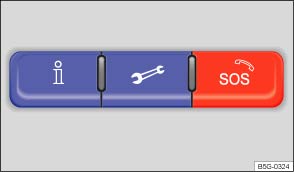
Fig. 14 In the roof console: 3-button module to access Volkswagen Car-Net service operators.
Read and follow the introductory information and safety information first
The buttons in the 3-button module provide access to several Volkswagen Car-Net features and pressing a button will initiate a connection to the Volkswagen Car-Net Response Center. Calls may be monitored or recorded. In general, the Volkswagen Car-Net Customer Specialist will end the call.
| Function | |
|---|---|
| Press and hold for longer than 2 seconds: Connects to the Volkswagen Car-Net Response Center and a Volkswagen Car-Net Customer Specialist. Press again: End the call. |
|
| Press and hold for longer than 2 seconds: Assistance in the event of a breakdown by connecting to the Volkswagen Roadside Provider. Press again: End the call. |
|
| Press and hold for longer than 2 seconds: Activate emergency call. Press again: End the call. |
LED light in the 3-button module
The LED light in the 3-button module will be green during the trial period and whenever you have an active subscription. The LED light will go off if the trial period is over and the customer has not subscribed to the Volkswagen Car-Net Services. The LED light will be red only during a VW Car-Net hardware malfunction or fault.
WARNING
Application software and Volkswagen Car-Net services that are unsuitable or improperly used can cause accidents, serious personal injury and vehicle damage.
- Volkswagen Car-Net services can be used only where adequate cellular and GPS signals are available
- Volkswagen recommends using only services and application software that are provided by Volkswagen or Verizon Telematics, Inc. (VzT) specifically for your vehicle.
- Protect the mobile device and its application software from misuse.
- Never modify application software and Volkswagen Car-Net services.
- Always read and heed the operating instructions for the mobile device.
WARNING
Driver distraction causes accidents, collisions and serious personal injury! Using application software and Volkswagen Car-Net services while driving can distract the driver from traffic.
- Always drive attentively and responsibly.
NOTE
The system does not support simultaneous Volkswagen Car-Net and mobile phone calls via the mobile phone package.
- When a Volkswagen Car-Net service is accessed through the 3-button module call buttons any calls on a mobile device connected to the vehicle’s mobile phone package will be automatically disconnected.
- Initiating or accepting a call on a mobile device connected to the vehicle's mobile phone package could end any connection to the Volkswagen Car-Net Response Center made through the
,
, or
buttons.
- Calls on a mobile device connected to the vehicle's mobile phone package cannot be accepted or initiated during an automated emergency connection to the Volkswagen Car-Net Response Center; for example, because an airbag has deployed.
Download Manual