Power locking system
 Introduction to the subject
In this chapter you will find information on the following subjects:
The power locking system works properly only when all doors and the rear hatch are completely closed. When the driver door is open, the vehicle cannot be locked with the remote control vehicle key.
For vehicles equipped with the Keyless Access with push-button start, the vehicle can be locked only if the ignition is switched off and the driver door is closed.
Leaving the vehicle unlocked for longer periods of non-use (for example, in your garage) can cause the vehicle battery to drain so that the engine can no longer be started.
More information:
- Exterior views
- Volkswagen Information System
- Vehicle key set
- Doors
- Rear hatch
- Power windows
- Power sunroof
- Trailer towing
- Emergency closing and opening
 WARNING
Improper use of power locks can result in serious personal injury.
- The power locking button locks all doors. Locking the doors from the inside can help prevent unintended door opening during a collision and can also prevent unwanted entry from the outside. Locked doors can, however, delay assistance to vehicle occupants and rescue from the outside in an accident or other emergency.
- Never leave children or anyone who cannot help themselves behind in the vehicle. All doors can be locked from the inside with the power lock button. This could leave people trapped in the vehicle in an emergency. Depending on the time of year, people trapped in the vehicle can be exposed to very high or very low temperatures.
- A closed vehicle can become very hot or very cold, depending on the season. Particularly in the summer, heat buildup in the passenger and luggage compartment of a parked vehicle can result in temperatures in the vehicle that are much higher than the outside temperatures. Temperatures can quickly reach levels that can cause unconsciousness and death, particularly to small children.
- Never allow passengers to remain in a locked vehicle. In an emergency any person still inside the vehicle might not be able to get out.
Indicator light in the driver door
Read and follow the introductory information and safety information first
The indicator light for the power locking system is in the driver door .
| After the vehicle is locked | Meaning |
|---|---|
| The red LED light flashes for about 2 seconds in short intervals, then slower. | The vehicle is locked. |
| Red LED light flashes for about 2 seconds in short intervals, then lights up continuously for about 30 seconds. | Locking system malfunction. See an authorized Volkswagen dealer or an authorized Volkswagen Service Facility. |
 NOTE
NOTE
Failure to heed warning lights or text WARNINGS can result in vehicle damage.
Description of the power locking system
Read and follow the introductory information and safety information first
The power locking system lets you unlock and lock all doors, the rear hatch, and the fuel filler flap:
- From the outside with the vehicle key .
- From the outside with Keyless Access (if equipped) .
- From the inside with the power locking button .
Certain central locking functions can be turned on and off in the Infotainment system by pressing the button followed by the
and Open and close function keys , or by an authorized Volkswagen dealer or authorized Volkswagen Service Facility.
The doors and the rear hatch can be locked manually if the remote control vehicle key or the power locking system is not working .
Automatic locking (Auto lock)
The vehicle locks automatically when it reaches a speed of about 10 mph (15 km/h). When the vehicle is locked, the indicator light comes on in the power locking button .
Automatic unlocking (Auto unlock)
All doors automatically unlock when you switch off the ignition and open a door from inside the vehicle. On vehicles with automatic transmission, the doors will also unlock when the selector lever is in Park (P) or the ignition is switched off. Auto unlock works only if the vehicle has been automatically locked with the Auto lock feature. The indicator light goes out in the power locking button when the doors unlock .
Locking the vehicle after airbag inflation
If the airbags are activated during a collision, the entire vehicle is unlocked. Depending on the severity of the damage, the vehicle can be locked after a collision when the airbags have deployed as follows:
| Function | Action |
|---|---|
| Locking the vehicle with the power locking button: | – Switch the ignition off. – Open and close a door once. – Press the power locking button |
| Locking the vehicle with the remote control vehicle key: | – Switch the ignition off. OR: Remove the vehicle key from the ignition. – Open a door once. – Lock the vehicle with the remote control vehicle key. |

If the vehicle key buttons or the power locking buttons are pushed repeatedly in quick succession, the power locking system is switched off for a brief period to help keep it from being overloaded. The vehicle is then unlocked for about 30 seconds. Unless a door or the rear hatch is opened during this time, the vehicle is automatically locked afterwards.
Unlocking or locking the vehicle from the outside
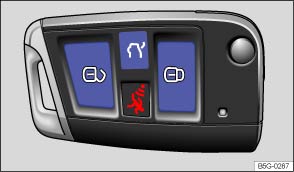
Fig. 21 Remote control vehicle key with panic button.
Read and follow the introductory information and safety information first
| Function | Using the buttons on the remote control vehicle key |
|---|---|
| Unlock the vehicle. | Press the |
| Lock the vehicle. | Press the |
| Unlock the rear hatch. | Press the |
Note: Depending on the settings for the power locking system that have been set in the Infotainment system, it may be necessary to press the button on the remote control vehicle key twice to unlock all doors and the rear hatch .
The vehicle key unlocks or locks the vehicle only when the battery in the remote control vehicle key has enough power, and the remote control vehicle key is within a few yards/meters of the vehicle.
- All turn signals flash once and the horn beeps once to confirm that the vehicle has been locked. On appropriately equipped vehicles, the horn beep can be disabled in the Infotainment system by pressing the
button followed by the
and Open and close function keys .
- All turn signals flash twice to confirm that the vehicle has been unlocked.
If the turn signals do not flash to confirm locking, one or more doors or the rear hatch is not locked.
If the driver door is open, the vehicle cannot be locked with the remote control vehicle key.
If the vehicle was unlocked with the remote control vehicle key and the door or the rear hatch has not been opened within a few seconds, the vehicle is automatically locked again. This feature helps prevent you from leaving the vehicle unlocked unintentionally.
Unlocking or locking the vehicle from the inside
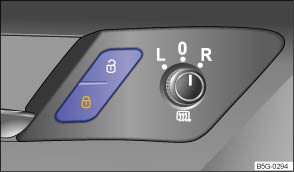
Fig. 22 In the driver and passenger doors: Power locking button.
Read and follow the introductory information and safety information first
| Press button : | |
|---|---|
| Unlock the vehicle. | |
| Lock the vehicle. | |
The power locking button works whether the ignition is switched on or off but only when all doors are closed.
If the vehicle is locked with the vehicle key, the power locking button is deactivated.
If the vehicle is locked with the power locking button:
- The yellow indicator light
in the power locking button comes on to indicate that all doors are locked .
- If the vehicle is equipped with an anti-theft alarm, the system is not turned on.
- Opening doors or the rear hatch from the outside is not possible, at a traffic light, for example.
- Doors can be unlocked and opened separately from inside the vehicle by pulling the door handle to open the door. The indicator light
- An open driver door will not be locked. This helps keep the driver from being locked out of the vehicle.
The vehicle is unlocked if you push the button while the vehicle is standing still. It is also unlocked when you switch off the ignition and open a door from inside the vehicle (Auto unlock). On vehicles with automatic transmission, the doors will also unlock when the selector lever is in Park (P) or the ignition is switched off.
Unlocking or locking the vehicle with Keyless Access
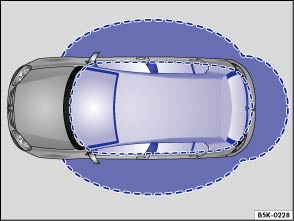
Fig. 23 Ranges of the Keyless Access system. Outside the vehicle: Unlocking range. Inside the vehicle: Starting range.
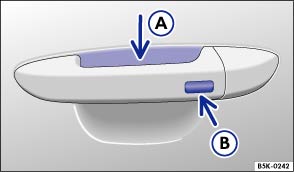
Fig. 24 Keyless Access system: Sensor for unlocking Ⓐ on the inside of the front door handles. Sensor for locking Ⓑ on the outside of the front door handles.
Read and follow the introductory information and safety information first
Your vehicle may be equipped with Keyless Access with push-button start, a keyless starting and locking system that unlocks and locks the vehicle without active use of a remote control vehicle key. All you have to do is touch a sensor surface on one of the front outside door handles or push the Volkswagen emblem on the rear hatch when a valid remote control vehicle key is within range .
General information
When a valid vehicle key comes within range , the Keyless Access system recognizes a valid vehicle entry request as soon as a door handle sensor is touched on the driver or front passenger door or the button on the rear hatch is pressed. The following functions are then enabled without active use of the remote control vehicle key:
- Keyless Entry: Unlocking the vehicle with the sensor surfaces on the outside door handles of the driver or front passenger door or by using the Volkswagen emblem on the rear hatch.
- Keyless Go: Start the engine and drive. For this, you just have to press the starter button and a valid remote control vehicle key must be inside the vehicle .
- Keyless Exit: Locking the vehicle via the door handle sensor on the driver or front passenger door .
The power locking system works like the standard unlocking and locking system. Only the way that the systems are operated is different.
All turn signals flash twice to confirm that the vehicle has been unlocked and once to confirm that it has been locked.
The vehicle will lock again in a few seconds if you do not open one of the doors or the rear hatch.
Unlocking and opening doors (Keyless Entry)
- Grasp the door handle of the driver or front passenger door so that you touch the unlocking sensor surface .
- Open the door.
Closing and locking doors (Keyless Exit)
- Switch the ignition off.
- Close the driver door.
- Touch the sensor surface in the door handle on the driver or front passenger door . The vehicle is locked. The door being locked must be closed.
Unlocking and locking the rear hatch
If the vehicle is locked and a valid remote control vehicle key is within range of the rear hatch, it unlocks automatically when opened.
Open and close the rear hatch as you would a standard rear hatch .
The rear hatch locks automatically when it is closed except in the following situations:
- The vehicle is completely unlocked.
- The most recently used vehicle key is inside the vehicle. All turn signals flash four times.
Locking with a second vehicle key
If the vehicle is locked from the outside with a second valid vehicle key, any key located inside the vehicle cannot start the engine . A key that was inside the vehicle when it was locked from the outside can be reactivated by pressing the button on the deactivated key .
Automatic deactivation of sensors
If a sensor on the door handle of a locked vehicle is activated too often, for instance by a bush or hedge that rubs against the vehicle, the sensors in the door handle on that side of the vehicle are switched off for a short time.
The door handle sensors become active again if one of the following events occurs:
- A short time has passed.
- OR: The vehicle is unlocked using the
button in the remote control vehicle key.
- OR: The rear hatch is opened.
- OR: The vehicle is mechanically unlocked with the vehicle key.
Convenience features
To use the convenience closing feature to close all power windows and the sunroof, hold your finger on the lock sensor surface on the outside of the door handle for a few seconds until the windows and sunroof close.
Remove your finger from the lock sensor surface to stop the function.
Pinch protection is active during convenience closing of the windows and the power sunroof.
In the Infotainment system, you can turn the convenience features on and off or select which doors unlock when the door handle unlocking surface is grasped by pressing the button followed by the
and Open and close function keys .
NOTE
The door handle sensor surfaces can be activated by a strong stream of water or steam if a valid vehicle key is within range of the vehicle.
- All windows may open if you turn the spray of water or steam away from and then back onto the door handle sensor surface in quick succession. If at least one power window is opened and the sensor is continuously activated, convenience closing is started.
The door may not open if the outside and inside door handles are used at the same time.
If the vehicle battery or the battery in the remote control vehicle key is weak or dead, it might not be possible to unlock and lock the vehicle using Keyless Access. The vehicle can still be manually locked or unlocked with the key bit .
A driver message appears in the instrument cluster display if there is no remote control vehicle key inside the vehicle or if the system does not recognize the remote control vehicle key. The key may not be recognized, for example, if it is covered by something that interferes with the signal (such as a briefcase), or if the remote control vehicle key battery is weak. Electronic devices such as mobile phones can also interfere with the signal.
Dirt on the door handles that contains a lot of salt (especially in winter) can affect the way the door handle sensors work. Cleaning the door handles can help with this problem .
If the automatic transmission is not in Park (P) position, the electronic steering column lock will not lock and the vehicle will not lock via sensors in the front door handles or the remote control vehicle key.
Anti-theft alarm system
Read and follow the introductory information and safety information first
Your vehicle may be equipped with an anti-theft alarm system or pre-equipped for anti-theft alarm system installation. If the vehicle is pre-equipped for installation of the anti-theft alarm system, the alarm system can be retrofitted by an authorized Volkswagen dealer or an authorized Volkswagen Service Facility.
The anti-theft alarm system makes it more difficult for someone to break into or steal the vehicle.
The anti-theft alarm system is automatically activated when the vehicle is locked by pressing the lock button on the remote control vehicle key.
When is the alarm triggered?
The anti-theft alarm system sounds for about 30 seconds and the turn signals flash for up to 5 minutes if the following occurs with respect to the locked vehicle:
- In vehicles with an open lock cylinder: A door unlocked mechanically with the vehicle key bit is opened and the ignition is not switched on within about 15 seconds.
- In vehicles with a covered lock cylinder: A door unlocked mechanically with the vehicle key bit is opened.
- Forcibly opening a door.
- Forcibly opening the engine hood.
- Forcibly opening the rear hatch.
- Switching on the ignition with an invalid key.
- Disconnecting the vehicle battery.
Deactivating the alarm
Unlock the vehicle with the unlock button on the remote control vehicle key or switch on the ignition with a valid remote control vehicle key.
For vehicles with Keyless Access, the alarm can be deactivated by grasping one of the front door handles when a valid vehicle key is in range or by holding the remote control vehicle key to the right of the steering column trim and pressing the starter button .
After the alarm has stopped and the vehicle is opened again in the same or a different area that is protected by the alarm, the alarm is triggered again. For example, the alarm will sound again if the rear hatch is opened after one of the doors has been opened.
The anti-theft alarm system is not activated when the vehicle is locked with the power lock switch on the inside of the driver or front passenger doors.
If the driver door is mechanically unlocked using the vehicle key bit, only the driver door is unlocked, not the entire vehicle. Switching on the ignition deactivates the anti-theft alarm system and activates the central locking button. To unlock the doors, use the central locking button or remote control vehicle key.
If the vehicle battery is dead or weak, the anti-theft alarm system will not work properly.
Download Manual