Rear Assist
 Introduction to the subject
In this chapter you will find information on the following subjects:
Depending on equipment, the vehicle may be equipped with a Rear Assist rearview camera.
A camera in the rear hatch assists the driver while backing up or maneuvering. The camera image is shown together with the orientation lines projected by the system on the screen of the factory-installed Infotainment system.
Rear Assist may take a few seconds to bring up the camera image.
The functions and displays of the Rear Assist camera may vary on vehicles with or without Park Distance Control (PDC) .
More information:
- Exterior views
- Infotainment system
- Park Distance Control
- Parts, accessories, repairs, and modifications
 WARNING
Rear Assist is not able to give you a clear and undistorted view of all areas behind the vehicle.
- The Rear Assist camera has blind spots in which it cannot detect people and objects.
- Always be careful and look around you when parking. The Rear Assist camera cannot show people, animals, and objects in certain situations. Watch out for small children and animals in particular.
- Due to the screen resolution or low-light conditions, the camera may not pick up thin posts, chain-link fences and similar fences, and other objects, or it may not show them clearly.
- The Rear Assist camera lens enlarges and distorts the field of vision and causes objects on the screen to appear altered and imprecise.
- Always keep the camera lens clean and free of snow and ice; do not cover the lens.
WARNING
Rear Assist technology cannot overcome the laws of physics and the limits of the system. Careless or unintentional use of Rear Assist may result in accidents and severe injuries.
- Always adjust your speed and driving style to road, traffic, weather, and visibility conditions.
- Always keep an eye on the parking direction and the vehicle surroundings. The front of the vehicle swings out more than the rear of the vehicle.
- Never pay so much attention to the graphics shown on the screen that you fail to notice what is going on around you.
- Always watch for people, especially small children, animals, and objects, because the Rear Assist camera may not always be able to detect them.
- The system may not be able to clearly show everything behind the vehicle.
- Use Rear Assist only when the rear hatch is completely closed.
 NOTE
NOTE
- The Rear Assist camera shows only two-dimensional images on the screen. Due to the lack of depth of field, it may be difficult or impossible to identify protruding objects or recesses in the road, for example.
- Things like thin rods, fences, posts, and trees may not be detected by the Rear Assist camera and could damage the vehicle.
Special considerations
Read and follow the introductory information and safety information first
Requirements for parking and maneuvering with the Rear Assist camera
Checklist

The rear hatch must be closed.
-
A reliable and clear image must be displayed and the Rear Assist camera lens must be clean .
-
There must be a clear and complete view of the area behind the vehicle.
-
The rear of the vehicle must not be heavily loaded.
-
The driver must be familiar with the system.
-
The position of the Rear Assist camera has not changed, such as after a rear-end collision. If the position of the camera has changed, have the system checked by an authorized Volkswagen dealer or an authorized Volkswagen Service Facility.
Volkswagen recommends practicing parking and maneuvering with Rear Assist in a safe place with little or no traffic or in a parking lot under good visibility and weather conditions to familiarize yourself with the system, the orientation lines, and the way they work.
Rear Assist camera settings
Depending on equipment, various settings, including brightness, contrast, and color, can be adjusted by tapping the function keys - or +, or by moving the corresponding slider.
To change the settings follow these instructions:
- Park the vehicle in a safe place on a firm, level surface.
- Apply the parking brake to help prevent the vehicle from moving .
- Switch on the ignition.
- Switch on the Infotainment system (if not already on) .
- Shift into Reverse (R).
- Tap the
function key.
- Adjust the desired settings in the menu.

It is not possible to open the rear hatch if the Volkswagen emblem is folded out.
Camera
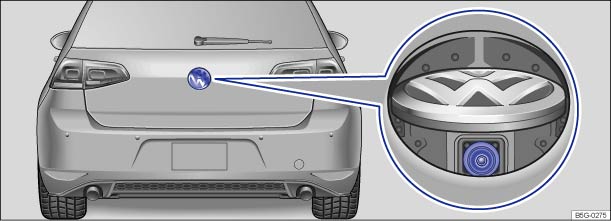
Fig. 138 In the rear hatch: Location of the Rear Assist camera.
Read and follow the introductory information and safety information first
The Rear Assist camera (magnified view) displays only two-dimensional images. Recesses and protruding objects on the ground or protruding parts on other vehicles may be difficult or impossible to identify due to the lack of depth of field.
Objects or another vehicle may seem closer or farther away on the screen than they really are.
| Examples of optical distortion by the camera: |
|---|
| – When driving from a level surface onto an upward or downward slope. |
| – When driving up or down a slope onto a level surface. |
| – If the rear of the vehicle is heavily loaded. |
| – When approaching protruding objects. These objects can disappear from the field of view when backing up. |
Cleaning the camera lens
Keep the camera lens clean and free of snow and ice:
- Park the vehicle in a safe place on a firm, level surface.
- Switch on the ignition (but do not start the engine).
- Apply the parking brake to help prevent the vehicle from moving .
- Shift into Reverse (R).
- Wet the camera lens with a commercially available alcohol-based glass cleaner and clean with a dry cloth .
- Remove snow with a brush.
- Remove ice with deicer spray .
- Shift the vehicle out of Reverse (R).
- Switch off the ignition.
NOTE
- Never use abrasive cleaning agents to clean the camera lens.
- Never remove snow or ice on the camera lens with warm or hot water. This can damage the camera lens.
Operation
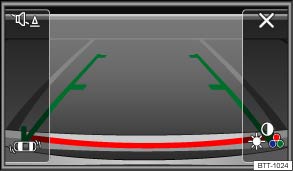
Fig. 139 In the Infotainment system: Rearview camera display (display may vary depending on vehicle equipment).
Read and follow the introductory information and safety information first
| Key for displays | |
|---|---|
| Symbol | Meaning |
| Depending on vehicle equipment: Switch the PDC display on. | |
| Depending on vehicle equipment: Switch the PDC display off. | |
| Close the current display. | |
| Depending on vehicle equipment: Switch the PDC sound on or off. | |
| Setting display: brightness, contrast, color. | |
| Depending on vehicle equipment: Display PDC. | |
Switching the Rear Assist camera on and off.
The Rear Assist rearview camera switches on and off automatically.
| Function | Action with the ignition on | |
|---|---|---|
| Vehicles without Park Distance Control | Vehicles with Park Distance Control | |
| Switch on the display automatically: | Shift into Reverse (R). | |
| Switch off the display automatically: | Switch off the ignition. | |
| OR: drive forward faster than 6 mph (10 km/h) or for longer than 10 seconds. | ||
| OR: Shift out of Reverse (R) and wait about 10 seconds. | OR: Immediately after shifting out of Reverse (R). | |
| Switch off the display manually: | Press one of the Infotainment system buttons or tap the |
|
| OR: Tap the function key |
||
| The PDC full screen mode is displayed . | ||
| Show the display again: | Shift out of Reverse (R), then shift back into Reverse (R). | |
| OR: Tap the function key |
||
Parking
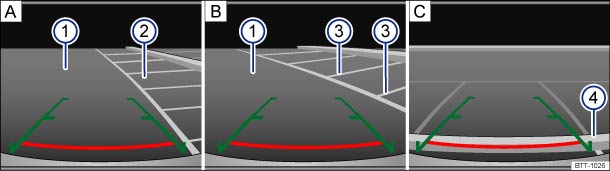
Fig. 140 On the screen: Orientation lines for the parking space behind the vehicle. A: Searching for a parking space, B: Backing into the parking space, C: Maneuvering.
Read and follow the introductory information and safety information first
| Key to diagram : | |
|---|---|
| Meaning | |
| — | Lateral green lines: Projection of the vehicle (widened somewhat) toward the rear. The green lines stop about 6 feet (2 meters) behind the vehicle on the road. |
| — | Horizontal red line: Safety distance (area up to about 16 inches (40 cm) behind the vehicle on the road). |
| ① | Road. |
| ② | Selected parking space. |
| ③ | Side lines of the selected parking space. |
| ④ | Rear boundary of the parking space, such as a curb. |
All references to orientation line length apply to vehicles on a horizontal surface.
Parking using the Rear Assist camera
| Step | Action: |
|---|---|
| 1. | The requirements for parking and maneuvering with the Rear Assist camera must be fulfilled . |
| 2. | Position the vehicle in front of the parking space ② A. |
| 3. | Shift into Reverse (R). |
| 4. | Reverse slowly and steer the vehicle B so that the lateral green orientation lines lead into the parking space ②. |
| Pay attention to the message in the display: Look! Safe to move? | |
| 5. | Align the vehicle in the parking space B so that the green orientation lines are parallel with the parking space ③. |
| 6. | Stop the vehicle C before (or at the very latest, when) the horizontal red line reaches the rear boundary, for example, a curb ④. |
Download Manual