Tire pressure monitoring system (TPMS) (U.S.- spec. models)
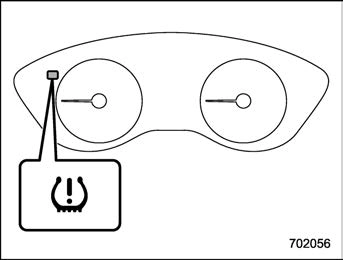
The tire pressure monitoring system pro- vides the driver with a warning message when tire pressure is severely low.
The tire pressure monitoring system will activate only when the vehicle is driven at speeds above 20 mph (32 km/h). Also, this system may not react immediately to a sudden drop in tire pressure (for example, a blow-out caused by running over a sharp object).
NOTE
FCC CAUTION
Changes or modifications not ex- pressly approved by the party respon- sible for compliance could void the user’s authority to operate the equip- ment.
Your vehicle is equipped with an electronic parking brake. You can apply/release the parking brake by operating the parking brake switch.
To apply: Depress the brake pedal and pull up the parking brake switch.
To release: Press the parking brake switch firmly while the ignition switch is in the “ON” position and the brake pedal is depressed.
When the parking brake is applied while the ignition switch is in the “ON” position, the electronic parking brake indicator light and the indicator light on the parking brake switch illuminate. Refer to “Brake system warning light (red)” P175.
ate extremely slowly, the system may detect an error and turn on the brake system warning light. However, this does not indicate a malfunction if the brake system warning light turns off after operating the switch.
After activating the electronic parking brake, you may hear a short sound several minutes after the electronic parking brake indicator light illumi- nates as the system confirms proper engagement. This sound is different from the apply and release sound.
This can occur:
applied after the ignition switch is turned OFF.
This is a normal operating sound under any of these conditions.
! Automatic release function by ac- celerator pedal
The parking brake will be automatically released by depressing the accelerator pedal. However, the automatic release function does not operate under the
following conditions.
If the parking brake is automatically released, the electronic parking brake indicator light and the indicator light on the parking brake switch turn off.
The Auto Vehicle Hold function will auto- matically keep the vehicle stopped even after releasing the brake pedal when the vehicle is at a complete stop, such as at traffic signals. The function will be can- celed by either of the following operations.
NOTE
We recommend turning on the Auto Vehicle Hold function when stopping on an incline. If the Auto Vehicle Hold function is turned off, the vehicle may roll backward when driving off.
Auto Vehicle Hold switch
Auto Vehicle Hold ON indicator light
Press the Auto Vehicle Hold switch when the Auto Vehicle Hold ON indicator light is OFF. Then the Auto Vehicle Hold ON indicator light will illuminate.
Press the Auto Vehicle Hold switch when the Auto Vehicle Hold ON indicator light illuminates. Then the Auto Vehicle Hold ON indicator light will turn off.
press the Auto Vehicle Hold switch, a chirp will sound.
! To operate the Auto Vehicle Hold function
Stop the vehicle by depressing the brake pedal when all of the following conditions are met. Then the Auto Vehicle Hold function will operate.
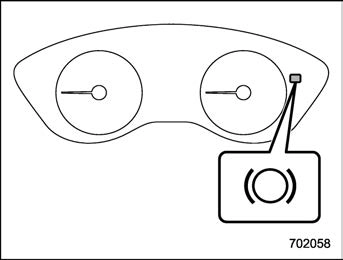
Auto Vehicle Hold operation indicator light
While the vehicle is kept stopped by the Auto Vehicle Hold function, the Auto Vehicle Hold operation indicator light will illuminate.
Perform any of the following operations to release the Auto Vehicle Hold function.
When the Auto Vehicle Hold function is released, the Auto Vehicle Hold operation indicator light will turn off.
Under any of the following conditions, the Auto Vehicle Hold function will be auto- matically released and the electronic parking brake will be automatically ap- plied.
In such cases, the Auto Vehicle Hold
operation indicator light will turn off and the electronic parking brake indicator light will illuminate.
! Tips
electronic parking brake indicator light may flash. In such a case, depress and hold the brake pedal while stopped. Otherwise, the vehicle may move. When getting out of the vehicle, stop the vehicle on a flat surface, then apply the electronic parking brake.
then turn it to the “ON” position.
NOTE
While using the emergency brake:
If the foot brake has a malfunction, you can stop the vehicle by pulling the parking brake switch continuously.
While applying the emergency brake, the electronic parking brake indicator light and the indicator light on the parking brake switch illuminate and a chirp sounds.
If a malfunction occurs in the electronic parking brake system, the brake system warning light turns on. Refer to “Electronic parking brake light” P175.
When parking your vehicle, always per- form the following items.
Never rely on the mechanical friction of the transmission alone to hold the vehicle.
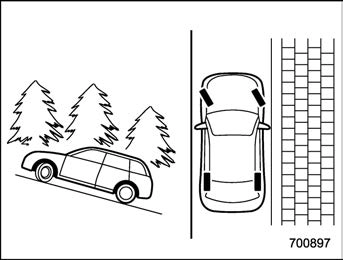
When parking on a hill, always turn the steering wheel. When the vehicle is headed up the hill, the front wheels should be turned away from the curb.
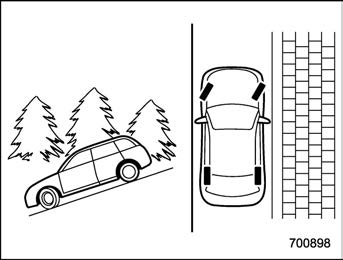
When facing downhill, the front wheels should be turned into the curb.
Download Manual