Driver Monitoring System is introduced as DriverFocus in some countries.
The Driver Monitoring System monitors possible cases when the driver is not paying attention to the forward direction, and also recognizes individual users.
This system warns the driver of inattentive/ drowsy driving, and can support safe and comfortable driving by automatically re- trieving the following settings.
Driver’s position
Climate control setting
Meter setting
Multi-function display setting
When a user is registered, various settings are automatically retrieved when the user enters the vehicle.
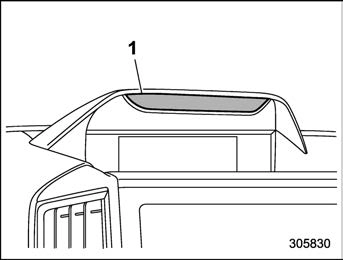
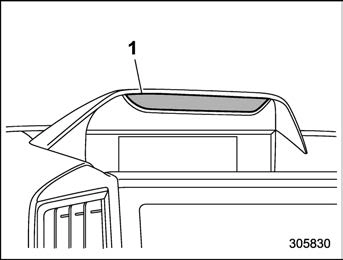
Camera
The user recognition camera does not save images, audio, or video.
The Driver Monitoring System may not operate correctly when sunlight is shining into the vehicle in the following ways.
Sunlight is shining directly (or through glass) onto the user recog- nition camera.
There are shadows on the dri- ver’s face caused by sunlight (or any light with a strong infrared component).
There are large momentary fluc- tuations in the strength of the sun- light (or any light with a strong infrared component) shining on the face.
Correct detection may not be possi- ble when a device that includes an infrared light source (such as a com- mercially available driver monitoring system) is installed in the vehicle interior.
The Driver Monitoring System may
not operate correctly at the following times when the driver is wearing glasses or sunglasses.
The sunglasses do not allow the easy passage of infrared light.
The surrounding scenery is re- flected strongly in the lenses of the glasses or sunglasses.
The eyes are hidden by the frame of the glasses and the user recogni- tion camera cannot detect the eyes.
The light from an infrared light source (LED) is reflected in the lenses of the glasses or sunglasses.
The driver is wearing an eye- patch.
The driver is wearing a hat set deeply over the eyes.
Depending on the type of mask, correct detection of inattentive/drowsy driving may not be possible.
Correct user recognition is not pos- sible if the eyes, nose, or mouth is covered with a mask, muffler, sun- glasses, or other item.
The Driver Monitoring System may not operate correctly when the eye- brows, eyes, nose, or mouth is hidden due to item that is between the face and the system.
If a thick cover is attached to the steering wheel, then depending on the
position set for the tilt/telescopic steer- ing wheel, the cover may block the system’s view of the face, and the system and the Driver Monitoring Sys- tem may not operate correctly.
Do not attach any stickers to the user recognition camera or the infrared light source (LED). If the user recogni- tion camera or infrared light source (LED) is covered by an obstruction, it will not be possible to correctly monitor the driver.
If an accessory is hung from the inside mirror, correct detection may not be possible.
Do not touch the user recognition camera or the infrared light source (LED) directly with your fingers. If there is dirt or a fingerprint on these parts, it will not be possible to correctly monitor the driver. If there is dirt or a fingerprint on these parts, either wipe them with a soft dry cloth, or wipe gently with a damp cloth after first firmly wringing the water out.
If the surface of the user recognition camera or the infrared light source (LED) becomes scratched, correct de- tection may not be possible. Be careful that hard objects do not contact these parts.
If there is condensation on the user recognition camera or the infrared light
source (LED), correct detection may not be possible. If there is condensa- tion on these parts, wipe it away with a soft dry cloth.
When registering a user for user recognition, avoid closing your eyes as much as possible.
If the user recognition success rate is low, it is possible that the user is not correctly registered. Delete the regis- tered data and perform registration again.
If a user frequently drives both with glasses and contact lenses, it is re- commended that registration be per- formed both when wearing glasses and when wearing contact lenses.
User recognition starts immediately after entering the vehicle, however if the user looks downward or at the driver side mirror for a long time, the user may not be recognized.
When one person among twins or another pair of persons with similar facial features is registered, the other person may be incorrectly recognized as the registered user when entering the vehicle.
If the person in the passenger’s seat leans into the driver’s seat, or in other cases when there are two or more faces near the driver’s seat, the system may not operate correctly.
There are cases when the system concludes that the user’s eyes are closed when the user is looking down- ward during driving, such as when checking instruments or the navigation screen. In such cases, the drowsy driving warning buzzer may sound or the system may otherwise not operate correctly.
If the eyes are narrowed when laugh- ing or when there is a dazzling outside light, the system may judge that the eyes are closed and the drowsy driving warning buzzer may sound or the system may otherwise not operate correctly.
The drowsy driving or asleep warn- ing states are recognized from the length of time and percentage of time that the eyes are closed. The drowsy driving warning buzzer will not sound simply when the driver feels sleepy or yawns.
Even when the driver does not feel sleepy, if his or her eyes are closed or if he or she blinks frequently, the drowsy driving warning buzzer may sound.
The inattentive driving warning buz- zer may sound if the driver leans forward or puts his or her head out of the window while driving.
The inattentive driving warning buz- zer will not sound when the vehicle is
stopped or travelling at slow speed even if the driver is not looking ahead.
The Driver Monitoring System col- lects and stores data regarding drivers’ facial features. Facial recognition data is stored locally and does not leave the vehicle. It is not transmitted to or stored by SUBARU or anyone else. The Driver Monitoring System may be disabled and any stored driver data may be deleted by following the instructions below. If the Driver Monitoring System is disabled, it will be unable to provide any of its safety or convenience func- tions.
The functions which are available vary depending on the Driver Monitoring System setting and the user recognition function setting.
Available functions
Driver Monitoring System*1
ON
OFF
User recognition function*2
ON
Inattentive/drowsy driving warning
Available
Not available
User recognition function
Available
Not available
OFF
Inattentive/drowsy driving warning
Available
Not available
User recognition function
Not available
Not available
Available function items
Driver Monitoring System*1
ON
OFF
User recognition function*2
ON
Register User
Available
Not available
Delete User
Available
Not available
Delete All Users
Available
Not available
Update User Set- tings
Available
Not available
Delete Driver Posi- tion
Available
Not available
OFF
Register User
Not available
Not available
Delete User
Available
Not available
Delete All Users
Available
Not available
Update User Set- tings
Not available
Not available
Delete Driver Posi- tion
Not available
Not available
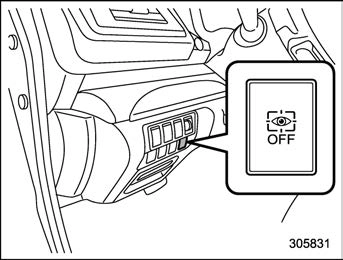
*1: The system can be turned ON/OFF with the Driver Monitoring System OFF switch. Refer to “Driver Monitoring System OFF switch” P388.
*2: The function can be turned ON/OFF in the multi-function display customization settings. Refer to “User Recognition settings” P223.
The functions which are available vary depending on whether or not the user is registered.
Available functions
When a user is registered, it is possible to retrieve the following settings.
Seat position and outside mirror angle Retrieves the registered seat position and outside mirror angle.
Reverse tilt angle
Retrieves the registered reverse tilt-down outside mirror angle.
Combination meter display basic screen
Displays the screen which the user had selected at the time when he/she last exited the vehicle.
Fuel consumption screen
Displays the average fuel economy for past driving by that user.
Multi-function display basic screen
Displays the screen which the user had selected at the time when he/she last exited the vehicle.
Fuel consumption screen
Displays the average fuel economy for past driving by that user.
Customization linked with the user recognition function
Air conditioner settings
Retrieves the air conditioner temperature, outlet mode, and other settings which the user had selected at the time when he/she last exited the vehicle.
! Driver Monitoring System ON/OFF status
Retrieves the Driver Monitoring System ON/OFF status which the user had se- lected at the time when he/she last exited the vehicle.
*: When the Driver Monitoring System is OFF, the Driver Monitoring System continues to store the conditions from immediately before the Driver Monitoring System was turned OFF even if the screen was selected and the setting was changed.
Inattentive/drowsy driving warning
While driving, the Driver Monitoring Sys- tem monitors possible cases of driver inattention or drowsiness and warns the driver.
When the inattentive/drowsy driving warn- ing activates, the buzzer sounds and an interrupt display appears.
The inattentive/drowsy driving warn- ing operates regardless of the status of the user recognition function.
The inattentive driving warning does not activate when the turn signal is operating or when the select lever is in the “R” position.
When the pre-crash brake OFF in- dicator is illuminated on the combina- tion meter display, the inattentive driv- ing warning activates at the same timing as usual even when a vehicle ahead or obstacle is detected. For details about the EyeSight system, refer to the Owner’s Manual supple- ment for the EyeSight system.
! Inattentive driving warning
When the system monitors that the driver may be inattentive, it warns the driver.
When the inattentive driving warning acti- vates, the buzzer sounds and an interrupt display appears on the combination meter display.
When the EyeSight system has detected a vehicle ahead or obstacle in the forward direction, the inattentive driving warning may activate at earlier timing than usual.
Refer to the Owner’s Manual supplement for the EyeSight system.
Possible drowsiness is detected from the amount of driver eyelid closure, and a warning is given to the driver. When the drowsy driving warning activates, the buzzer sounds and an interrupt display appears.
Combination meter display
Multi-function display
Warning chime
Drowsy driving
Beep, beep... (Con- tinues until the driver’s eyes open.)
Very drowsy
Beep, beep, beep, beep, beep (5 times)
Slightly drowsy
—
Beep
Not drowsy
—
—
—
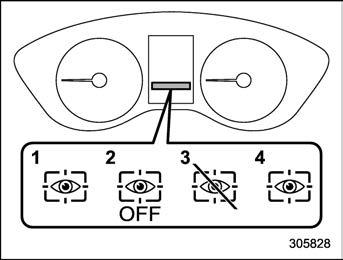
Driver Monitoring System operation in- dicator light (green)
Driver Monitoring System OFF indicator light
Driver Monitoring System temporary stop indicator light
Driver Monitoring System warning light (yellow)
The Driver Monitoring System indicator/ warning indicates the status of the Driver Monitoring System on the combination meter display.
nated, the Driver Monitoring System function cannot be used. In addition, the following items cannot be selected.
Register User
Delete User
Delete All Users
Update User Settings
Delete Driver Position
Automatically retract seat on entry
! Driver Monitoring System operation indicator light (green)
This indicator illuminates when the Driver Monitoring System is operating.
This indicator illuminates when the user has pressed the Driver Monitoring System OFF switch and the Driver Monitoring System is not operating.
This indicator illuminates when the Driver Monitoring System is temporarily stopped.
When the temperature of the main unit of the Driver Monitoring System is
high or low.
When the Driver Monitoring System cannot monitor the driver’s eye move- ment.
When the Driver Monitoring System cannot monitor the driver’s eyebrows, eyes, nose or mouth.
When the camera and the infrared light source (LED) are covered and the Driver Monitoring System cannot moni- tor the driver correctly.
! Driver Monitoring System warning light (yellow)
This warning illuminates when there is a problem with the Driver Monitoring Sys- tem. Contact a SUBARU dealer to have the system inspected.
Using the Driver Monitoring System
When a user is registered with the user recognition function, the Driver Monitoring System performs the following.
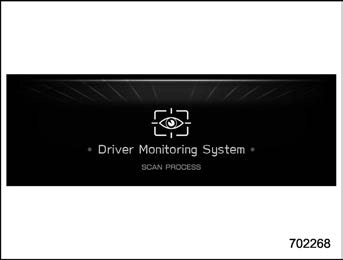
When the door is opened and the push-button ignition switch is OFF, the user recognition screen appears and the Driver Monitoring system starts user re- cognition.
The user recognition screen may not appear when the door is opened in some cases, such as when only a short time has passed after the push-button ignition switch was turned OFF. In such cases, user recognition starts when the door is closed however the user recognition screen does not appear.
Sit in the driver’s seat and face forward for a few moments.
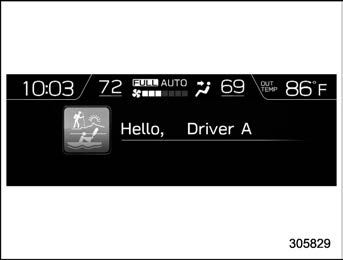
When user recognition is completed, the Hello screen appears on the multi- function display.
At this time, the seat position, outside mirror angle, air conditioner settings, combination meter display basic screen, multi-function display basic screen, and customization settings all change based on the user information.
When a multi-function display op- eration switch is pressed, the user recognition screen is canceled, how- ever user recognition continues.
When the select lever is not in the
“P” position, the seat position will not change even when user recognition is completed.
If user recognition fails, perform recognition again following the instruc- tions, refer to “When a user is not recognized” P387.
User recognition is not performed while driving.
If the seat position or outside mirror angle are in motion at the time when user recognition is completed, then it is not possible to retrieve the seat posi- tion, outside mirror angle, or reverse tilt-down outside mirror angle.
If any of the following operations is performed while retrieving of the seat position or outside mirror angle, re- trieving of the seat position and outside mirror angle is canceled.
The power seat adjustment switch was operated.
The outside mirror adjustment switch was operated.
The “SET” button was pressed.
The “1” or “2” button was pressed.
The select lever was moved to a position other than “P” position.
! When a user is not recognized
In the following case, user recognition may not be possible and “User recognition stopped” may be displayed.
There is an object blocking the camera.
Remove the obstacle and follow the reference procedure to perform user re- cognition again.
Refer to “Repeat facial scan” P218.
Camera
User recognition may not be possi- ble when there is dirt or fingerprints on the user recognition camera. To clean, either wipe using a soft cloth or else wipe gently using a moistened cloth that has been thoroughly wrung out.
When the synchronized user func- tion is turned OFF, manual repeat facial scan is not possible.
Registering and deleting a user
Users can be registered in the Driver Monitoring System, and registered users can be deleted. For the user registration and delete procedures, refer to “Driver Monitoring System settings” P218.
When the Driver Monitoring System OFF indicator, Driver Monitoring Sys- tem temporary stop indicator, or Driver Monitoring System warning is illumi- nated, the following items cannot be selected.
Register User
Delete User
Delete All Users
User information can also be deleted by resetting the multi-function display to the factory default settings. When the settings are reset to the factory default settings, all user information is deleted. The settings cannot be reset to the factory default settings when the Driver Monitoring System is OFF.
Registering and deleting dri- ver position personalization
At the time when a user is registered, the seat position, outside mirror angle, and reverse tilt-down outside mirror angle are registered at the same time. To change the setting for the seat position, outside mirror angle, or reverse tilt-down outside mirror angle, refer to “Driver Monitoring System settings” P218.
Start the user registration after ad- justing the seat position, outside mirror angles, and reverse tilt-down outside mirror angle. If they are adjusted during user registration, it may be disrupted. Refer to “Power seat” P36 or “Out- side mirrors” P251.
If the ignition switch is turned to the “OFF” position before user registration is complete, the information of the adjusted seat position, outside mirror angles, and reverse tilt-down outside mirror angle will not be saved.
When the user recognition setting is OFF, or when the Driver Monitoring System OFF indicator, Driver Monitor- ing System temporary stop indicator, or Driver Monitoring System warning is illuminated, the following items cannot be selected.
Update User Settings
Delete Driver Position
The driver position can be registered or deleted only when a registered user is sitting in the driver’s seat and user recognition is completed.
& Driver Monitoring System ON/OFF settings
NOTE
When the vehicle is stopped and the driver’s door is opened and closed, the Driver Monitoring System automati- cally turns ON regardless of the push- button ignition switch status.
After the Driver Monitoring System was turned OFF, if the Driver Monitoring System is turned ON while the driver’s door is open, user recognition may not occur correctly.
When the Driver Monitoring System is turned OFF after user recognition was completed, the user recognition function stores the Driver Monitoring System ON/OFF state.
! Driver Monitoring System OFF switch
When the Driver Monitoring System OFF switch is pressed, the Driver Monitoring System turns OFF. When the Driver Monitoring System is turned OFF, the Driver Monitoring System OFF indicator on the combination meter display will illuminate. To turn the Driver Monitoring System ON, press the Driver Monitoring System OFF switch again.
The Driver Monitoring System User recog- nition function can be turned ON/OFF. For the setting procedure, refer to “Driver Monitoring System settings” P218.
The user recognition function setting cannot be changed for each individual user.
The default setting for the user recognition function is ON.
When the user recognition function is turned OFF, the following items cannot be selected.
Repeat facial scan
Register User
Update User Settings
Delete Driver Position
! Automatically retract seat on entry
The automatically retract seat on entry which automatically slides back the dri- ver’s seat when the driver’s door is unlocked and opened. This function can be turned ON/OFF. For the setting proce- dure, refer to “Driver Monitoring System settings” P218.
If the seat position is not registered in the access key fob memory, the automatically retract seat on entry function can be used.
Even when the automatically retract seat on entry setting is ON, the auto- matically retract seat on entry function automatically turns OFF when the user
recognition function is OFF.
Automatically retract seat on entry cannot be selected when the Driver Monitoring System OFF indicator, Dri- ver Monitoring System temporary stop indicator, or Driver Monitoring System warning is illuminated.
This function will operate if the seat is in front of the center of the seat sliding mechanism.
Certification for Driver Mon- itoring System U.S.-spec. models
NOTE
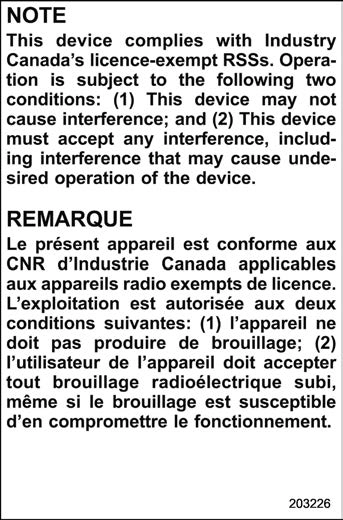
This device complies with part 15 of the FCC Rules. Operation is subject to the following two conditions: (1) This de- vice may not cause harmful interfer- ence, and (2) this device must accept any interference received, including interference that may cause undesired operation.
– Canada-spec. models
– Mexico-spec. models
Driving tips
8-1. New vehicle break-in driving – the first
1,000 miles (1,600 km) 392
8-2. Fuel economy hints 392
8-3. Engine exhaust gas (carbon monoxide) 392
8-4. Catalytic converter 393
8-5. Periodic inspections 394
8-6. Driving in foreign countries 394
8-7. Driving tips for AWD models 394
8-8. On-road and off-road driving 396
8-9. Winter driving 398
8-10. Loading your vehicle 402
8-11. Trailer hitch (dealer option) 406
8-12. Trailer towing 408
392 New vehicle break-in driving – the first 1,000 miles (1,600 km)



 recognition function is OFF.
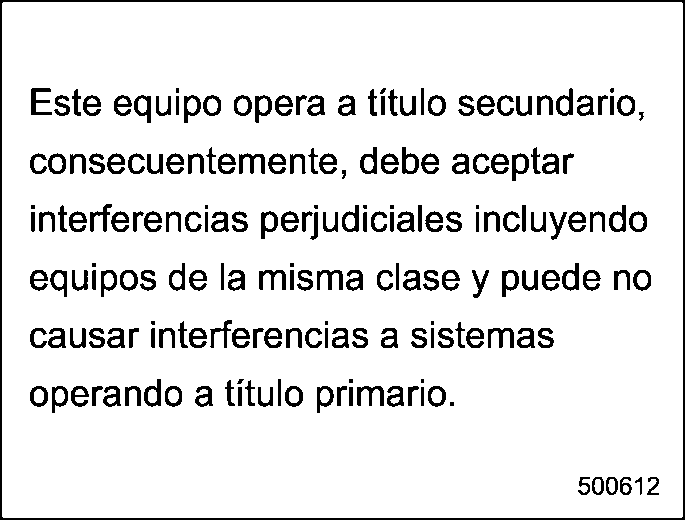 – Mexico-spec. models