The BSD/RCTA consists of rear radar with Blind Spot Detection and Rear Cross Traffic Alert.
These functions enable the system to detect objects or vehicles to the rear, drawing attention to the driver when changing a lane or when driving in reverse.
& System features
BSD/RCTA consists of the following func- tions.
To detect a vehicle in a blind spot on an adjacent lane or a vehicle approaching at high speeds (Blind Spot Detection).
To detect a vehicle approaching from the right or left while reversing the vehicle (Rear Cross Traffic Alert).
The system uses radar sensors for the above functions.
NOTE
Operating range
The system warns the driver of dangers as follows.
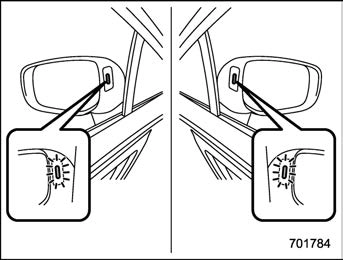
If the system detects a vehicle in the blind spot, the BSD/RCTA approach in- dicator light(s) on the outside mirror(s) will illuminate.
BSD/RCTA approach indicator light
If the driver operates the turn signal lever in the direction which the BSD/RCTA approach indicator light is illuminating, the corresponding BSD/RCTA approach indi- cator light will flash.
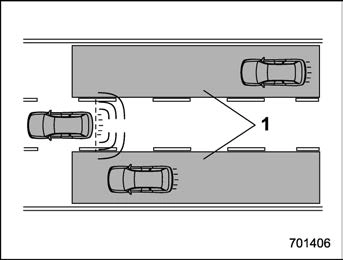
Operating range
The system warns the driver of dangers as follows.
If the system detects a vehicle ap- proaching at a high speed in the neighbor- ing lanes, the BSD/RCTA approach indi- cator light(s) on the outside mirror(s) will illuminate.
If the driver operates the turn signal lever in the direction which the BSD/RCTA approach indicator light is illuminating, the corresponding BSD/RCTA approach indi- cator light will flash.
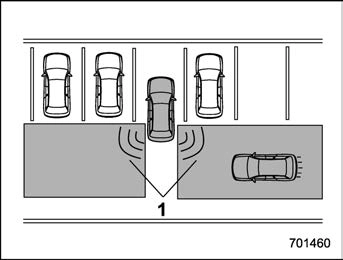
1) Operating range
The system notifies the driver of another vehicle approaching from either side when driving in reverse. This feature helps the driver check the rear and side areas of the vehicle when moving backward.
If the system detects a vehicle approach- ing from either side while moving back- ward, it warns the driver of dangers in the following way.
The BSD/RCTA approach indicator light(s) on the outside mirror(s) flashes.
A warning buzzer sounds.
An icon appears on the rear view camera screen (audio/navigation monitor)
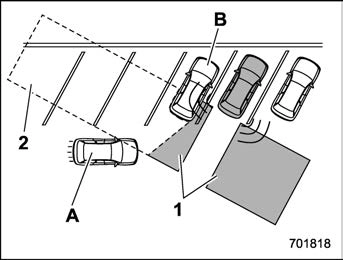
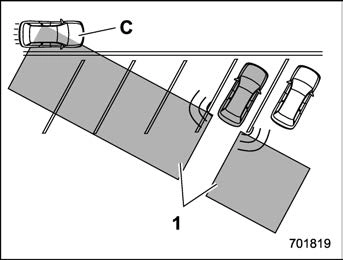
Since the detectability of RCTA is limited, the RCTA may not operate properly in angled parking.
Example 1
The detection range of the radar sensors
Area out of detection range of the radar sensors
Vehicle that may not be detected.
Parked vehicle
vehicle.
Example 2
The detection range of the radar sensors
Vehicle that may be detected.
(C) is passing in front of your vehicle. Always be sure to check the surround- ings when reversing the vehicle.
System operation
! Operating conditions
The BSD/RCTA will operate when all of the following conditions are met.
The ignition switch is in the “ON” position.
The BSD/RCTA warning indicator and BSD/RCTA OFF indicator are turned off.
The Eyesight warning indicator is off.
The vehicle is driven at speeds above 7 mph (12 km/h) (except when reversing).
The select lever is in the “R” position (when reversing).
The BSD/RCTA will not operate in the following situations.
The BSD/RCTA OFF indicator is on.
The vehicle speed is below 6 mph (10 km/h) even when the BSD/RCTA OFF indicator remains off (except when rever- sing).
In the following case, the BSD/RCTA will stop operating and the BSD/RCTA warning indicator will appear. If the BSD/RCTA warning indicator appears, have your vehicle inspected at a SUBARU dealer as soon as possible.
– When a malfunction occurs in the system, including the BSD/RCTA
approach indicator light.
In the following cases, the BSD/ RCTA will temporarily stop operating (or may stop operating) and the BSD/ RCTA OFF indicator will appear.
When the radar sensor becomes significantly misaligned (If the or- ientation of the radar sensor is shifted for any reason, readjust- ment is required. Have the sensor adjusted at a SUBARU dealer.)
When a large amount of snow or ice sticks to the rear bumper sur- face around the radar sensors.
When the vehicle is driven on a snow-covered road or in an envir- onment in which there are no ob- jects around (such as in a desert) for a long time.
When the temperature around the radar sensors increased exces- sively due to long driving on uphill grades in summer, etc.
When the temperature around the radar sensors becomes extremely low.
When the vehicle battery voltage lowers.
When an overvoltage occurs in the vehicle battery.
When the above conditions are cor-
rected, the BSD/RCTA will resume op- eration and the BSD/RCTA OFF indica- tor will disappear. However, if the BSD/ RCTA OFF indicator has appeared for a prolonged time, have the system in- spected at a SUBARU dealer as soon as possible.
The detectability of the radar sen- sors is restricted. The BSD/RCTA de- tection may be impaired and the system may not operate properly under the following conditions.
When the rear bumper around the radar sensors is distorted.
When ice, snow or mud adheres to the rear bumper surface around the radar sensors.
When stickers, etc. are affixed on the areas of the radar sensors on the rear bumper.
During adverse weather condi- tions such as rain, snow or fog
When driving on wet roads such as snow-covered roads or through puddles
The radar sensors may not detect or may have difficulty detecting the fol- lowing.
Small motorcycles, bicycles, pe- destrians, stationary objects on the road or road side, etc.
Vehicles with body shapes that
the radar may not reflect (vehicles with a low body height such as sports cars or a trailer with no cargo).
Vehicles that are not approaching your vehicle even though they are in the detection area (either on a neighboring lane to the rear or be- side your vehicle when reversing). (The system determines the pre- sence of approaching vehicles based on data detected by the radar sensors.)
Vehicles traveling at significantly different speeds
Vehicles driving parallel to your vehicle at almost the same speed for a prolonged time
Oncoming vehicles
Vehicles in a lane beyond the neighboring lane
Vehicles travelling at a signifi- cantly lower speed that you are trying to overtake
On a road with extremely narrow lanes, the system may detect vehicles driving in a lane next to the neighboring lane.
When the 8-inch audio/navigation system is performing a software up- date, the RCTA warning icons may not be displayed on the audio/navigation
screen until the update is complete.
BSD/RCTA approach indica- tor light/warning buzzer
When the BSD/RCTA is active, the BSD/ RCTA approach indicator light will operate to alert the driver when there are vehicles in the neighboring lanes. When reversing the vehicle, the BSD/RCTA approach indicator light and warning buzzer will operate to alert the driver that a vehicle is approaching from the left or right side.
BSD/RCTA approach indicator light
It is mounted in each side of the outside mirrors.
The indicator light will illuminate when a vehicle approaching from behind is de-
tected.
The indicator light will flash to warn the driver of dangers under the following conditions.
While the indicator light illuminates, if you operate the turn signal lever toward the side in which this light turned on.
When reversing the vehicle while the system detects a vehicle approaching from either side.
When the headlights are turned on, the brightness of the BSD/RCTA approach indicator light will be reduced.
You may have difficulty recognizing the BSD/RCTA approach indicator light under the following conditions.
When affected by direct sunlight
When affected by the headlight beams from the vehicles behind
While the illumination brightness control dial is in the fully upward position, even if the headlights are turned on, the brightness of the BSD/ RCTA approach indicator light will not be reduced. For details about the illumination brightness control dial, refer to “Illumination brightness con-
trol” P166.
! BSD/RCTA approach warning buz- zer (only when reversing)
A warning buzzer sounds along with flashing of the BSD/RCTA approach in- dicator light to warn the driver of dangers.
The setting of the warning buzzer volume can be changed by operating the combi- nation meter display (color LCD). For details, refer to “Menu screens” P197.
In the following cases, operation of the BSD/RCTA approach indicator light and the warning buzzer may be delayed or the system may fail to issue these warnings.
When a vehicle moves to the neigh- boring lane from a lane next to the neighboring lane.
When driving on a steep incline or on repeated sharp uphill and downhill grades
When going beyond a pass
When both your vehicle and a vehicle driving on a neighboring lane are driving on the far side of each lane.
When several narrowly-spaced ve- hicles are approaching in a row.
In low radius bends (tight bends or
when making turns at an intersection)
When there is a difference in height between your lane and the neighboring lane.
Immediately after the BSD/RCTA is activated by pressing the BSD/RCTA OFF switch.
Immediately after the select lever is shifted to the “R” position.
When extremely heavy cargo is loaded in the cargo area.
During reversing, operation of the BSD/ RCTA approach indicator light and the warning buzzer may be delayed or the system may fail to issue these warnings under the following conditions.
When backing out of an angled parking space
When a large-sized vehicle is parked next to your vehicle. (That vehicle prevents the propagation of radar waves.)
When reversing on sloped roads
When reversing at a high speed
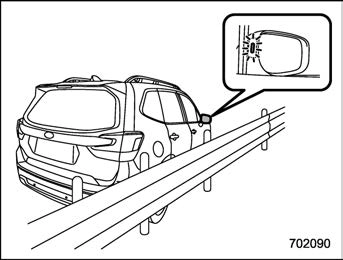
The BSD/RCTA approach indicator light may illuminate when driving close to solid objects on the road or road side (such as guardrails, tunnels or sidewalls).
The BSD/RCTA approach indicator light may flash when turning at an inter- section in urban areas or a multilane intersection.
The BSD/RCTA approach indicator light may flash and the warning buzzer may sound if a building or a wall exists in the reversing direction.
In the following cases, the system may detect a vehicle driving two lanes away from your vehicle.
When you are driving on the near side of the lane of the corresponding vehicle.
When the vehicle driving two lanes
away is driving on the near side of its lane from your vehicle.
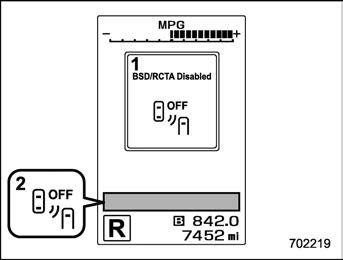
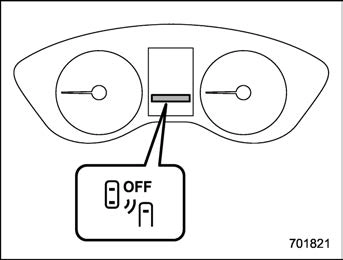
BSD/RCTA OFF indicator
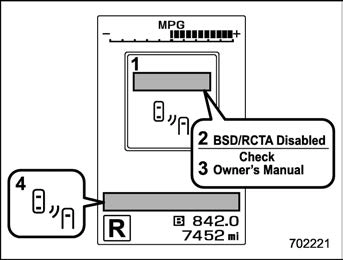
BSD/RCTA temporary stop message
BSD/RCTA OFF indicator
This display appears when the system is used under the following conditions.
Extremely high or low temperatures
When abnormal voltage exists for the vehicle battery.
When the radar sensor is significantly misaligned.
Once the above conditions are corrected, the system will recover from the temporary stop condition and the indicator will dis-
appear. If the indicator remains displayed for a prolonged time, have the system inspected at a SUBARU dealer.
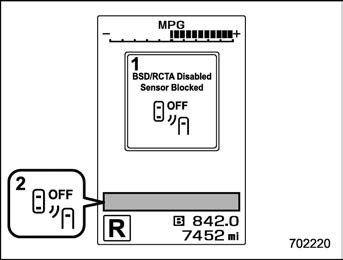
BSD/RCTA temporary stop message due to reduced radar sensitivity
BSD/RCTA OFF indicator
This display appears when the detectabil- ity of the radar sensors is reduced. Once the condition is corrected, the system will recover from the temporary stop condition and the indicator will disappear. If the indicator remains displayed for a pro- longed time, have the system inspected at a SUBARU dealer.
BSD/RCTA malfunction message
At first, this message will appear
Then this message will appear
BSD/RCTA warning indicator
This display appears when a malfunction occurs in the system. Contact a SUBARU dealer and have the system inspected.
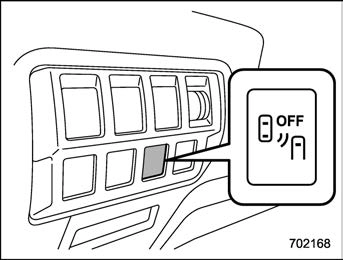
BSD/RCTA OFF switch
BSD/RCTA OFF switch
BSD/RCTA OFF indicator
If the BSD/RCTA OFF switch is pressed, the BSD/RCTA OFF indicator appears on the combination meter, and the BSD/
RCTA is deactivated.
Press the switch again to activate the BSD/ RCTA. The BSD/RCTA OFF indicator will disappear.
When this occurs, the BSD/RCTA ap- proach indicator light on the side of the rearview mirror illuminates for a few seconds and then turns off.
In the following cases, the system may not operate properly due to blocked radar waves. Press the BSD/ RCTA OFF switch to deactivate the system.
When towing a trailer
When a bicycle carrier or other carrier item is fitted to the rear of the vehicle.
When using a chassis dynam- ometer or free roller device, etc.
When running the engine and making the wheels rotate while lifting up the vehicle
If the ignition switch is turned to the “LOCK”/“OFF” position, the last known status of the system is maintained. For example, if the ignition switch is turned to the “LOCK”/“OFF” position with the BSD/RCTA deactivated, the BSD/RCTA will remain deactivated the next time the ignition switch is turned to the “ON”
position.
& Certification for the BSD/ RCTA
! U.S.-spec. models
FCC ID: OAYSRR3A
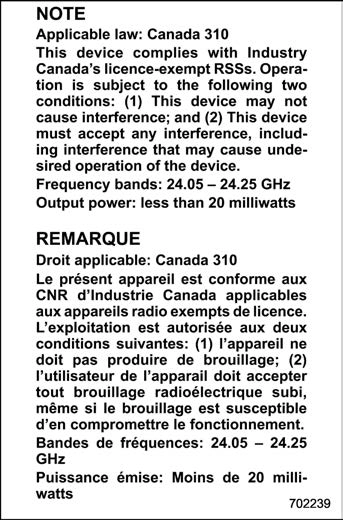
! Canada-spec. models
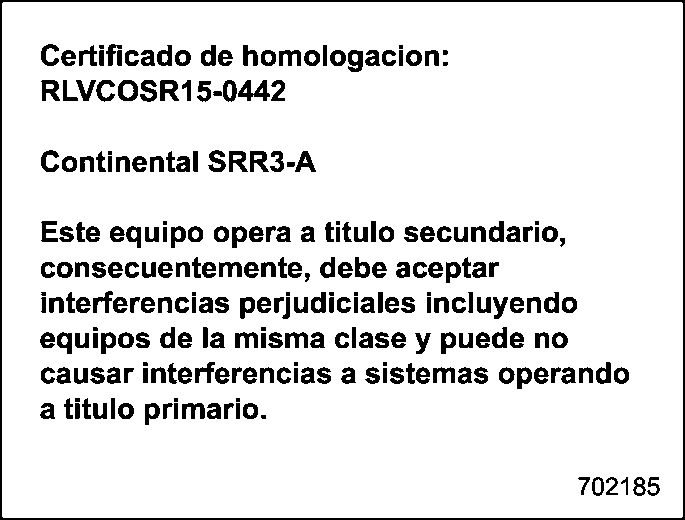
! Mexico-spec. models
& Handling of radar sensors
Sensors
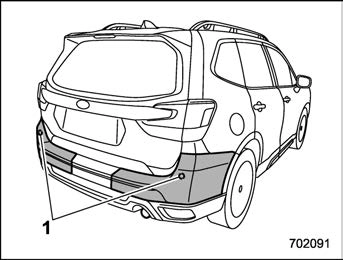
The radar sensors, one on each side of the vehicle, are mounted inside the rear bumper.
To ensure correct operation of the BSD/ RCTA, observe the following precautions.
Always keep the bumper surface near the radar sensors clean.
Do not affix any stickers or other items on the bumper surface near the radar sensors.
Do not modify the bumper near the radar sensors.
Do not paint the bumper near the radar sensors.
Do not expose the bumper near the radar sensors to strong impacts. If a
sensor becomes misaligned, a system malfunction may occur, including the in- ability to detect vehicles entering the detection areas. If any strong shock is applied to the bumper, be sure to contact your SUBARU dealer for inspection.