Pre-collision assist
 WARNING: You are responsible for controlling your vehicle at all times. The system is designed to be an aid and does not relieve you of your responsibility to drive with due care and attention. Failure to follow this instruction could result in the loss of control of your vehicle, personal injury or death. WARNING: The system does not detect vehicles that are driving in a different direction, pedestrians at night, cyclists or animals. Failure to take care may result in the loss of control of your vehicle, serious personal injury or death. WARNING: The system does not operate during hard acceleration or steering. Failure to take care may lead to a crash or personal injury. WARNING: The system may fail or operate with reduced function during cold and severe weather conditions. Snow, ice, rain, spray and fog can adversely affect the system. Keep the front camera and radar free of snow and ice. Failure to take care may result in the loss of control of your vehicle, serious personal injury or death. WARNING: In situations where the vehicle camera has limited detection capability, this may reduce system performance. These situations include but are not limited to direct or low sunlight, vehicles at night without tail lights, unconventional vehicle types, pedestrians with complex backgrounds, running pedestrians, partly obscured pedestrians, or pedestrians that the system cannot distinguish from a group. Failure to take care may result in the loss of control of your vehicle, serious personal injury or death. WARNING: The system cannot help prevent all crashes. Do not rely on this system to replace driver judgment and the need to maintain a safe distance and speed. WARNING: You are responsible for controlling your vehicle at all times. The system is designed to be an aid and does not relieve you of your responsibility to drive with due care and attention. Failure to follow this instruction could result in the loss of control of your vehicle, personal injury or death. WARNING: The system does not detect vehicles that are driving in a different direction, pedestrians at night, cyclists or animals. Failure to take care may result in the loss of control of your vehicle, serious personal injury or death. WARNING: The system does not operate during hard acceleration or steering. Failure to take care may lead to a crash or personal injury. WARNING: The system may fail or operate with reduced function during cold and severe weather conditions. Snow, ice, rain, spray and fog can adversely affect the system. Keep the front camera and radar free of snow and ice. Failure to take care may result in the loss of control of your vehicle, serious personal injury or death. WARNING: In situations where the vehicle camera has limited detection capability, this may reduce system performance. These situations include but are not limited to direct or low sunlight, vehicles at night without tail lights, unconventional vehicle types, pedestrians with complex backgrounds, running pedestrians, partly obscured pedestrians, or pedestrians that the system cannot distinguish from a group. Failure to take care may result in the loss of control of your vehicle, serious personal injury or death. WARNING: The system cannot help prevent all crashes. Do not rely on this system to replace driver judgment and the need to maintain a safe distance and speed. |
USING THE PRE-COLLISION ASSIST SYSTEM
The Pre-Collision Assist system is active at speeds above approximately 3 mph (5 km/h) and pedestrian detection is active at speeds up to 50 mph (80 km/h).

If your vehicle is rapidly approaching another stationary vehicle, a vehicle traveling in the same direction as yours, or a pedestrian within your driving path, the system is designed to provide three levels of functionality:
- Alert
- Brake Support
- Active Braking
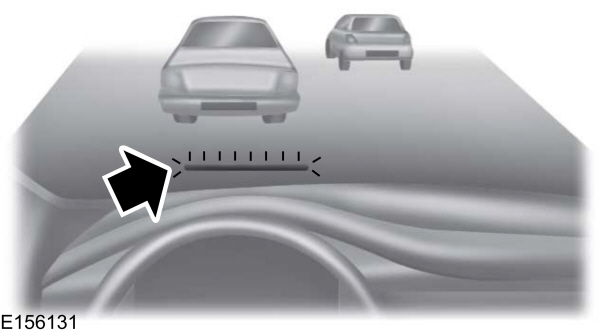
Alert: When active, a flashing visual warning appears and an audible warning tone sounds.
Brake Support: The system is designed to help reduce the impact speed by preparing the brakes for rapid braking. The system does not automatically apply the brakes. If you press the brake pedal, the system could apply additional braking up to maximum braking force, even if you lightly press the brake pedal.
Active Braking: Active braking may activate if the system determines that a collision is imminent. The system may help the driver reduce impact damage or avoid the crash completely.
Note: If you perceive Pre-Collision Assist alerts as being too frequent or disturbing, then you can reduce the alert sensitivity, though the manufacturer recommends using the highest sensitivity setting where possible. Setting lower sensitivity would lead to fewer and later system warnings.
DISTANCE INDICATION AND ALERT
Distance Indication and Alert is a function that provides a graphical indication of the time gap to other preceding vehicles traveling in the same direction. The Distance Indication and Alert screen in the information display shows a graphic similar to the one that follows.
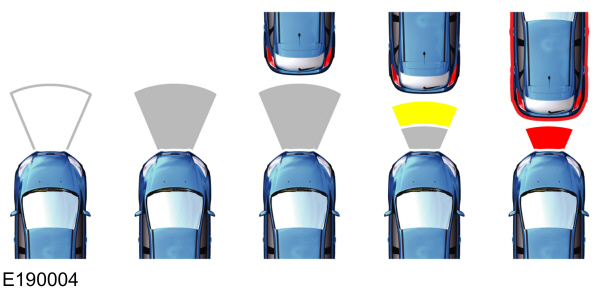
If the time gap to a preceding vehicle is small, a red visual indication displays.
Note: Distance Indication and Alert deactivates and the graphics do not display when adaptive cruise control is active.
| Speed | Sensitivity | Graphics | Distance Gap | Time Gap |
| 62 mph (100 km/h) | Normal | Grey | >82 ft (25 m) | >0.9sec |
| 62 mph (100 km/h) | Normal | Yellow | 56–82 ft (17–25 m) | 0.6sec — 0.9sec |
| 62 mph (100 km/h) | Normal | Red | <56 ft (17 m) | <0.6sec |
ADJUSTING THE PRE-COLLISION ASSIST SETTINGS
You can adjust the following settings by using the information display controls.
- You can change Alert and Distance Alert sensitivity to one of three possible settings.
- You can switch Distance Indication and Alert on or off.
- If required, you can switch Active Braking on or off.
Note: Active braking automatically turns on every time you switch the ignition on.
BLOCKED SENSORS
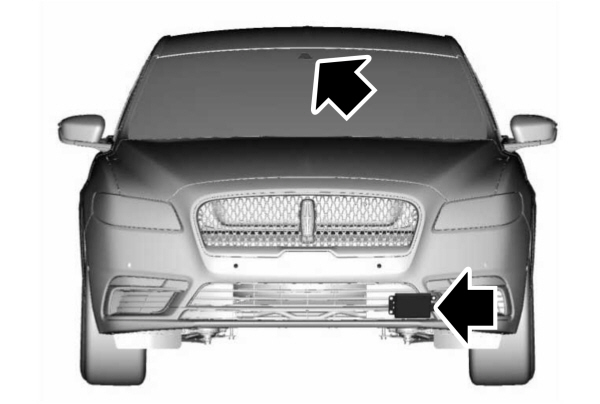
If a message regarding a blocked sensor or camera appears in the information display, the radar signals or camera images are obstructed. The radar sensor is located behind a fascia cover near the driver side of the lower grille. With an obstructed radar, the Pre-Collision Assist system does not function and cannot detect a vehicle ahead. With the front camera obstructed, the Pre-Collision Assist system does not respond to pedestrians or stationary vehicles and the system performance on moving vehicles reduces. The following table lists possible causes and actions for when this message displays.
| Cause | Action |
|---|---|
| The surface of the radar in the grille is dirty or obstructed in some way. | Clean the grille surface in front of the radar or remove the object causing the obstruction. |
| The surface of the radar in the grille is clean but the message remains in the display. | Wait a short time. It may take several minutes for the radar to detect that there is no obstruction. |
| Heavy rain, spray, snow, or fog is interfering with the radar signals. | The Pre-Collision Assist system is temporarily disabled. Pre-Collision Assist should automatically reactivate a short time after the weather conditions improve. |
| Swirling water, or snow or ice on the surface of the road may interfere with the radar signals. | The Pre-Collision Assist system is temporarily disabled. Pre-Collision Assist should automatically reactivate a short time after the weather conditions improve. |
| Radar is out of alignment due to a front end impact. | Contact an authorized dealer to have the radar checked for proper coverage and operation. |
| The windshield in front of the camera is dirty or obstructed in some way. | Clean the outside of the windshield in front of the camera. |
| The windshield in front of the camera is clean but the message remains in the display. | Wait a short time. It may take several minutes for the camera to detect that there is no obstruction. |
Note: Proper system operation requires a clear view of the road by the camera. Have any windshield damage in the area of the camera's field of view repaired.
Note: If something hits the front end of your vehicle or damage occurs, the radar sensing zone may change. This could cause missed or false vehicle detections. Contact an authorized dealer to have the radar checked for proper coverage and operation.
Note: If your vehicle detects excessive heat at the camera or a potential misalignment condition, a message may display in the information display indicating temporary sensor unavailability. This message deactivates automatically when operational conditions return to normal. For example, when the ambient temperature around the sensor decreases or the sensor automatically recalibrates successfully.
Download Manual