Moonroof (if equipped)
 WARNING: Do not leave children unattended in your vehicle and do not let them play with the moonroof. Failure to follow this instruction could result in personal injury. WARNING: When closing the moonroof, verify that it is free of obstruction and make sure that children and pets are not in the proximity of the roof opening. WARNING: Do not leave children unattended in your vehicle and do not let them play with the moonroof. Failure to follow this instruction could result in personal injury. WARNING: When closing the moonroof, verify that it is free of obstruction and make sure that children and pets are not in the proximity of the roof opening. |
TYPE 1
The sliding shade can be manually opened or closed when the moonroof is closed. Pull the shade toward the front of the vehicle to close it.
The moonroof controls are on the overhead console and have a one-touch open and close feature. To stop it during one-touch operation, touch the control a second time.
OPENING AND CLOSING
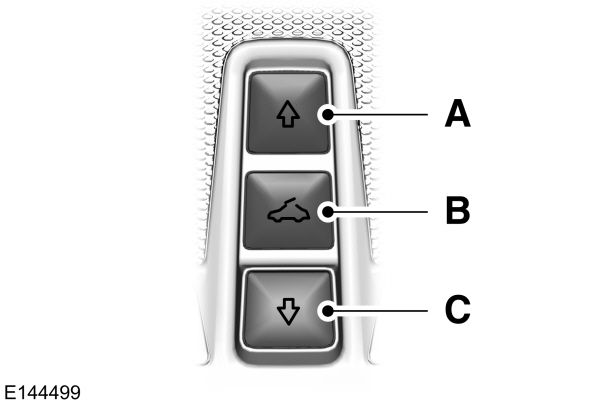
A Open OpenB VentC Close |
Press A to open the moonroof. It will stop short of the fully opened position.
Note: This position helps to reduce wind noise or rumbling which may happen with the moonroof fully open. Press A again to fully open the moonroof.
Press C to close the moonroof.
VENTING THE MOONROOF
Press and release to close the sunshade. If fully open, the sunshade stops after covering the rear glass panel. Press and release again to fully close the sunshade.
BOUNCE-BACK
The moonroof reverses some distance if an obstacle is detected while closing.
Press and hold C within two seconds of a bounce-back event to override this function.
TYPE 2
Note: With the panoramic moonroof fully open and vehicle speed increasing to about 50 mph (80 km/h), the moonroof opening panel closes about 8 in (20 cm) to reduce excessive wind noise at higher speeds. This feature only functions one time per key cycle, so that you can open the glass further if desired.
The moonroof controls are on the overhead console and have a one-touch open and close feature. To stop its movement during one-touch operation, press the control a second time.
OPENING AND CLOSING
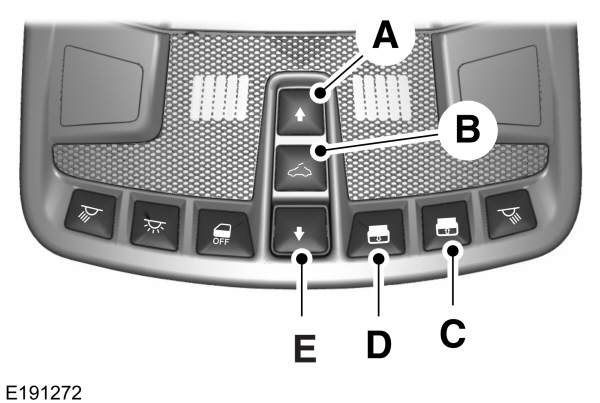
| A Moonroof open. B Moonroof vent.C Sunshade open.D Sunshade close.E Moonroof close. |
MOONROOF OPEN
Press and release to open the moonroof.The moonroof stops short of the fully opened position.Press and release the control again to open the moonroof fully.
MOONROOF VENT
Press and release to vent the moonroof.
SUNSHADE OPEN
Press and release to open the sunshade. The sunshade opens with the moonroof. You can also open the sunshade with the moonroof closed.
Note: The sunshade stops short of its fully opened position for the comfort of rear passengers. To open the sunshade fully, press the control again.
SUNSHADE CLOSE
Press and release to close the sunshade. If fully open, the sunshade stops after covering the rear glass panel. Press and release again to fully close the sunshade.
MOONROOF CLOSE
Press and release to close the moonroof from either the open or vent positions.
BOUNCE-BACK
The moonroof reverses some distance if an obstacle is detected while closing.
To override this feature, press and hold the moonroof close control within two seconds after the roof comes to a stop following a bounce-back reversal or two successive reversals.
Download Manual