Keyless entry
SECURICODE™ KEYLESS ENTRY KEYPAD
The keypad is located near the driver window. It is invisible until you touch it, then it lights up so you can see and touch the appropriate buttons.
Note: If you enter your entry code too fast on the keypad, the unlock function may not work. Re-enter your entry code more slowly.
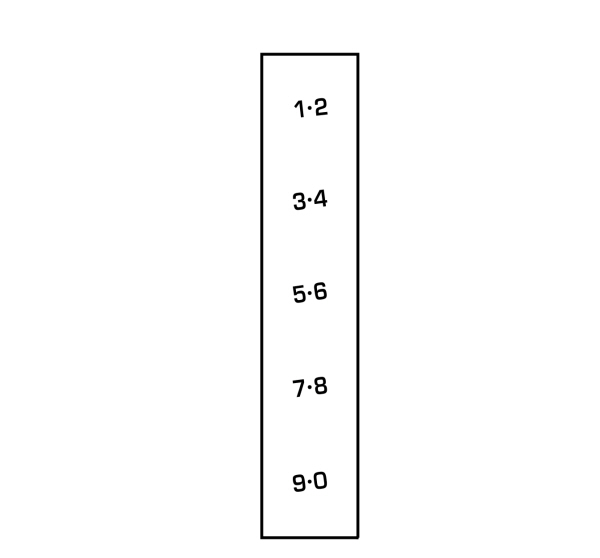
You can use the keypad to:
- Lock or unlock the doors.
- Program and erase personal entry codes.
- Arm and disarm the anti-theft alarm.
- Release the trunk.
Note: The keypad does not operate a power decklid.
You can operate the keypad with the factory-set 5-digit entry code. The code is located on the owner’s wallet card in the glove box and is available from an authorized dealer. You can also create up to five of your own 5-digit personal entry codes.
PROGRAMMING A PERSONAL ENTRY CODE
To create your own personal entry code:
- Enter the factory-set code.
- Press 1·2 on the keypad within five seconds.
- Enter your personal 5-digit code. You must enter each number within five seconds of each other.
- Press 1·2 on the keypad to save personal code 1.
The doors lock then unlock to confirm that programming was successful.
To program additional personal entry codes, repeat Steps 1-3, then for Step 4:
- Press 3·4 to save personal code 2
- Press 5·6 to save personal code 3
- Press 7·8 to save personal code 4
- Press 9·0 to save personal code 5.
You may also program a personal entry code using the touchscreen. See Settings.
Tips:
- Do not set a code that uses five of the same number.
- Do not use five numbers in sequential order.
- The factory-set code works even if you have set your own personal code.
ERASING A PERSONAL CODE
- Enter the factory-set 5-digit code.
- Press and release 1·2 on the keypad within five seconds.
- Press and hold 1·2 for two seconds. You must do this within five seconds of completing Step 2.
If you complete this successfully, you have erased all personal codes and only the factory-set 5-digit code works.
ANTI-SCAN FEATURE
The keypad goes into an anti-scan mode if you enter the wrong code seven times (35 consecutive button presses). This mode disables the keypad for one minute and the keypad lamp flashes.
The anti-scan feature turns off after:
- One minute of keypad inactivity.
- Pressing the unlock button on the remote control.
- Switching the ignition on.
- Unlocking your vehicle using intelligent access.
UNLOCKING AND LOCKING THE DOORS
TO UNLOCK THE DRIVER DOOR
Enter the factory-set 5-digit code or your personal code.You must press each number within five seconds of each other. The interior lamps illuminate.
Note: All doors unlock if you enable the all door unlocking mode. See Locking and Unlocking.
TO UNLOCK ALL DOORS
Enter the factory-set code or your personal code, then press 3·4 within five seconds.
TO LOCK ALL DOORS
Press and hold 7·8 and 9·0 at the same time with the driver door closed. You do not need to enter the keypad code first.
TO RELEASE THE TRUNK
Enter the factory-set code or your personal code, then press 5·6 within five seconds.
Note: The keypad does not operate a power decklid.
DISPLAYING THE FACTORY SET CODE
Note: You need to have two programmed intelligent access keys for this procedure.
To display the factory-set code in the information display:
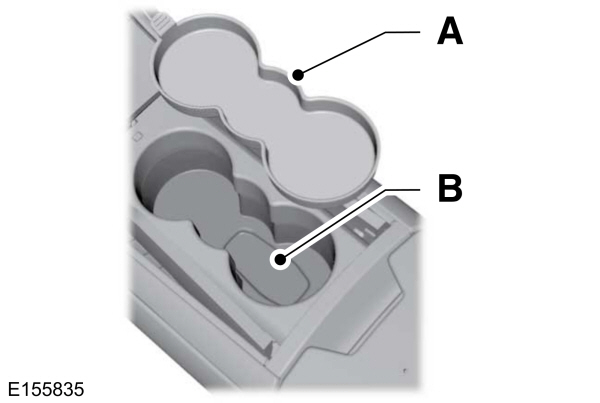
- Remove the rubber covering (A) from the cupholder. With the buttons facing upwards and the unlock button facing the front of the vehicle, place the first intelligent access in the backup slot (B).
- Press the START/STOP button once and wait a few seconds.
- Press the START/STOP button again and remove the key.
- Insert the second programmed key into the backup slot, and then press the START/STOP button.
The factory-set code appears in the information display for a few seconds.
Note: The code may not display until after any other warning messages first display.
Download Manual