Passive anti-theft system
Note: The system is not compatible with non-Ford aftermarket remote start systems.Use of these systems may result in vehicle starting problems and a loss of security protection.
Note: Metallic objects, electronic devices or a second coded key on the same key chain may cause vehicle starting problems if they are too close to the key when starting your vehicle.Prevent these objects from touching the coded key while starting your vehicle.Switch the ignition off, move all objects on the key chain away from the coded key and restart your vehicle if a problem occurs.
Note: Do not leave a duplicate coded key in your vehicle.Always take your keys and lock all doors when leaving your vehicle.
SECURILOCK
The system helps prevent your vehicle from starting unless you use a coded key programmed to your vehicle. Using the wrong key may prevent your vehicle from starting. A message may appear in the information display.
If you are unable to start your vehicle with a correctly coded key, it is not operating properly. A message may appear in the information display.
AUTOMATIC ARMING
Your vehicle arms immediately after switching the ignition off.
AUTOMATIC DISARMING
Switching the ignition on with a coded key disarms your vehicle.
REPLACEMENT KEYS
Note: Your vehicle comes equipped with two intelligent access keys.
The intelligent access key functions as a programmed key that operates the driver door lock and activates the intelligent access with push button start system, as well as a remote control.
If your programmed transmitters are lost or stolen and you do not have an extra coded key, have your vehicle towed to an authorized dealer. You need to erase the key codes from your vehicle and program new coded keys.
Store an extra programmed key away from your vehicle in a safe place to help prevent any inconveniences. See your authorized dealer to purchase additional spare or replacement keys.
PROGRAMMING A SPARE INTELLIGENT ACCESS KEY
Note: You can program a maximum of four intelligent access keys to your vehicle.
You must have two previously programmed intelligent access keys inside your vehicle and the new unprogrammed intelligent access keys readily accessible.See an authorized dealer to have the spare key programmed if two previously programmed keys are not available.
Make sure that your vehicle is off before beginning this procedure. Make sure that you close all the doors before beginning and that they remain closed throughout the procedure.Perform all steps within 30 seconds of starting the sequence.Stop and wait for at least one minute before starting again if you perform any steps out of sequence.
Read and understand the entire procedure before you begin.
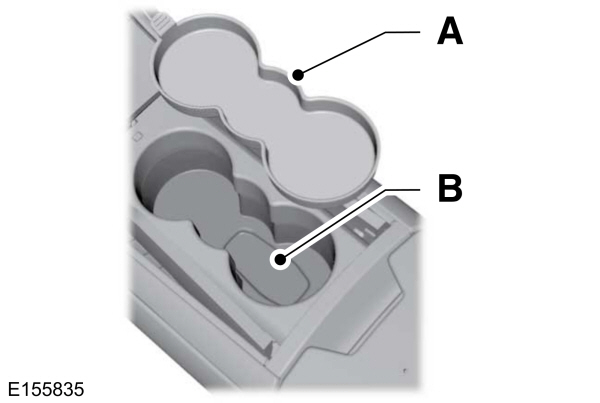
- Remove the rubber covering (A) from the cupholder. With the buttons facing upwards and the unlock button facing the front of the vehicle, place the first intelligent access in the backup slot (B).
- Press the push button ignition switch.
- Wait five seconds and then press the push button ignition switch again.
- Remove the intelligent access key.
- Within 10 seconds, place a second programmed intelligent access key in the backup slot.Press the push button ignition switch.
- Wait five seconds and then press the push button ignition switch again.
- Remove the intelligent access key.
- Place the unprogrammed intelligent access key in the backup slot and press the push button ignition switch.
Programming is now complete.Verify the remote control functions operate and your vehicle starts with the new intelligent access key.
If programming was not successful, wait 10 seconds and repeat Steps 1 through 7. If you are still unsuccessful, take your vehicle to your authorized dealer.
ANTI-THEFT ALARM
The system will warn you of an unauthorized entry to your vehicle. It will be triggered if any door, the luggage compartment or the hood is opened without using the key, remote control or keyless entry keypad.
The direction indicators will flash and the horn will sound if unauthorized entry is attempted while the alarm is armed.
Take all remote controls to an authorized dealer if there is any potential alarm problem with your vehicle.
ARMING THE ALARM
The alarm is ready to arm when there is not a key in your vehicle. Electronically lock your vehicle to arm the alarm.
DISARMING THE ALARM
Disarm the alarm by any of the following actions:
- Unlock the doors or luggage compartment with the remote control or keyless entry keypad.
- Switch your vehicle on or start your vehicle.
- Use a key in the driver door to unlock your vehicle, then switch your vehicle on within 12 seconds.
Note: Pressing the panic button on the remote control will stop the horn and signal indicators, but will not disarm the system.