Climate Controls
The Climate Control system allows you to regulate the temperature, air flow, and direction of air circulating throughout the vehicle. The controls are located on the touchscreen (if equipped) and on the instrument panel below the radio.
AUTOMATIC CLIMATE CONTROL DESCRIPTIONS AND FUNCTIONS
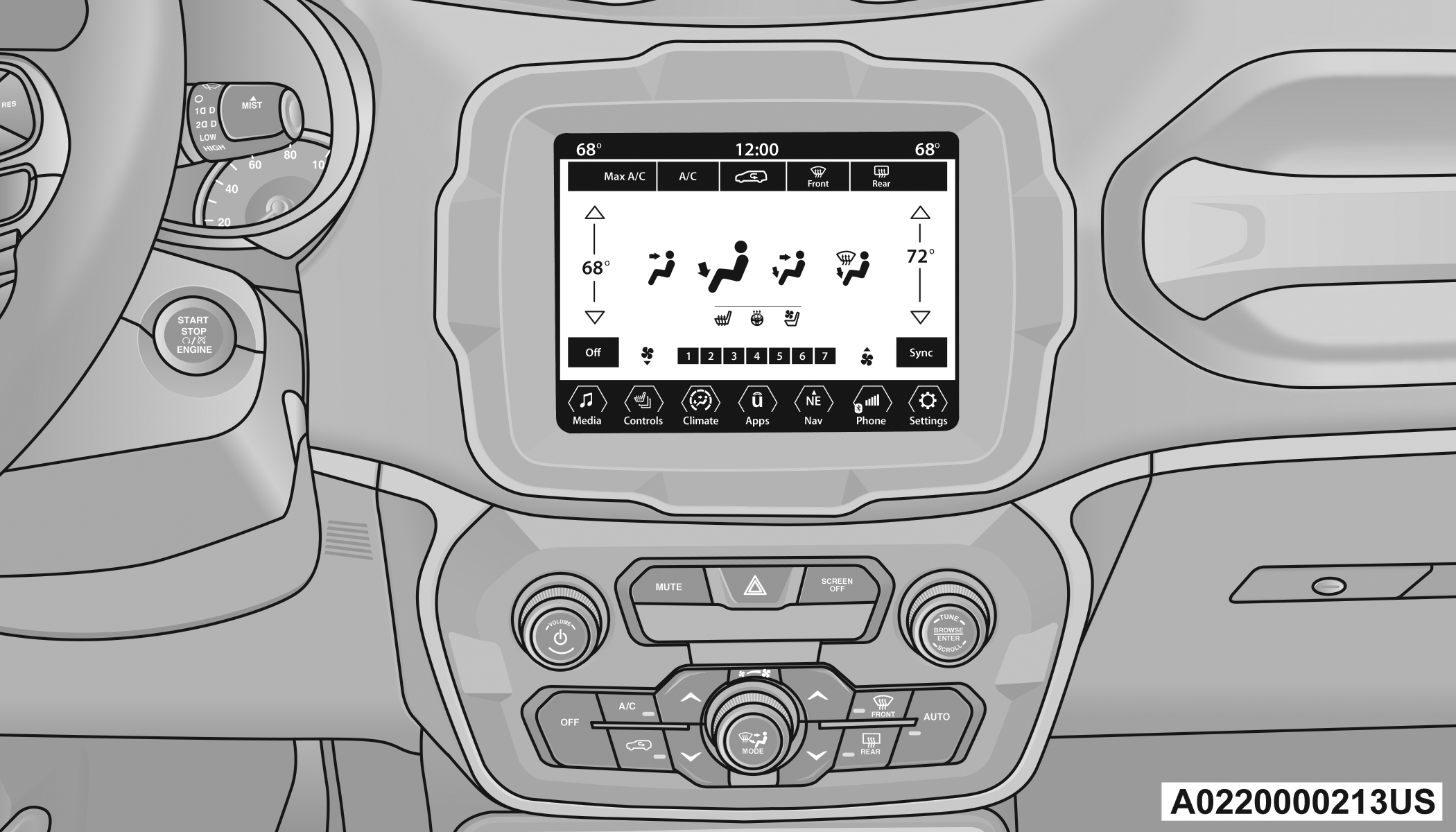
Uconnect 4C NAV with 8.4-inch Display Automatic Climate Controls
MAX A/C BUTTON
 Press and release the MAX A/C button on the touchscreen to change the current setting to the coldest output of air. The MAX A/C indicator illuminates when MAX A/C is on. Pressing the button again will cause the MAX A/C operation to exit.
Note:
The MAX A/C button is only available on the touchscreen.
A/C BUTTON
 Press and release the A/C button on the touchscreen, or push the button on the faceplate to change the current setting. The A/C indicator illuminates when A/C is ON.
The Air Conditioning (A/C) button allows the operator to manually activate or deactivate the air conditioning system. When the air conditioning system is turned on, dehumidified air will flow through the outlets into the cabin.
If your air conditioning performance seems lower than expected, check the front of the A/C condenser (located in front of the radiator), for an accumulation of dirt or insects. Clean with a gentle water spray from the front of the radiator and through the condenser. If the problem persists, please contact an authorized dealer.
RECIRCULATION BUTTON
 Press and release this button on the touchscreen, or push the button on the faceplate, to change the system between recirculation mode and outside air mode. The Recirculation indicator and the A/C indicator illuminate when the Recirculation button is pressed. Recirculation can be used when outside conditions such as smoke, odors, dust, or high humidity are present. Recirculation can be used in all modes. Recirculation may be unavailable (button on the touchscreen grayed out) if conditions exist that could create fogging on the inside of the windshield. The A/C can be deselected manually without disturbing the mode control selection. Continuous use of the Recirculation mode may make the inside air stuffy and window fogging may occur. Extended use of this mode is not recommended. Recirculation mode may automatically adjust to optimize customer experience for warming, cooling, dehumidification, etc.
In cold weather, use of Recirculation mode may lead to excessive window fogging. The Recirculation feature may be unavailable if conditions exist that could create fogging on the inside of the windshield.
AUTO BUTTON
 Press and release this button on the touchscreen, or push the button on the faceplate, to change the current setting. The AUTO indicator illuminates when AUTO is on. This feature automatically controls the interior cabin temperature by adjusting distribution and amount of airflow. Air Conditioning (A/C) may be active during AUTO operation to improve performance. Toggling this function will cause the system to switch between manual override mode and automatic modes .
FRONT DEFROST BUTTON
 Press and release the touchscreen button, or push and release the button on the faceplate, to change the current airflow setting to Defrost mode. The Front Defrost indicator illuminates when Front Defrost is on. Air comes from the windshield and side window demist outlets. When the defrost button is selected, the blower level may increase. Use Defrost mode with maximum temperature settings for best windshield and side window defrosting and defogging. When toggling the front defrost mode button, the Climate Control system will return to the previous setting.
REAR DEFROST BUTTON
 Press and release the button on the touchscreen, or push and release the button on the faceplate, to turn on the rear window defroster and the heated outside mirrors (if equipped). The Rear Defrost indicator illuminates when the rear window defroster is on. The rear window defroster automatically turns off after 20 minutes.
CAUTION:
Failure to follow these cautions can cause damage to the heating elements:
Use care when washing the inside of the rear window. Do not use abrasive window cleaners on the interior surface of the window. Use a soft cloth and a mild washing solution, wiping parallel to the heating elements. Labels can be peeled off after soaking with warm water.
Do not use scrapers, sharp instruments, or abrasive window cleaners on the interior surface of the window.
Keep all objects a safe distance from the window.
DRIVER AND PASSENGER UP AND DOWN BUTTONS
These buttons provide the driver and passenger with independent temperature control.
 Push the red button on the faceplate or touchscreen or press and slide the temperature bar towards the red arrow button on the touchscreen for warmer temperature settings.
 Push the blue button on the faceplate or touchscreen or press and slide the temperature bar towards the blue arrow button on the touchscreen for cooler temperature settings.
SYNC BUTTON
 Press the SYNC button on the touchscreen to toggle the Sync feature on/off. The SYNC indicator is illuminated when SYNC is on. SYNC is used to synchronize the passenger temperature setting with the driver temperature setting. Changing the passenger temperature setting while in SYNC will automatically exit this feature.
Note:
The SYNC button is only available on the touchscreen.
BLOWER CONTROL
 Blower Control is used to regulate the amount of air forced through the Climate Control system. There are seven blower speeds available. Adjusting the blower will cause automatic mode to switch to manual operation. The speeds can be selected using either the blower control knob on the faceplate or the buttons on the touchscreen.
Faceplate
The blower speed increases as you turn the blower control knob clockwise from the lowest blower setting. The blower speed decreases as you turn the blower control knob counterclockwise.
Touchscreen
Use the small blower icon to reduce the blower setting and the large blower icon to increase the blower setting. Blower can also be selected by pressing the blower bar area between the icons.
MODE CONTROL
 Select Mode by pressing one of the Mode buttons on the touchscreen to change the airflow distribution mode. The airflow distribution outlets are: instrument panel outlets, floor outlets, defrost outlets, and demist outlets.
PANEL MODE
 Air comes from the outlets in the instrument panel. Each of these outlets can be individually adjusted to direct the flow of air. The air vanes of the center outlets and outboard outlets can be moved up and down or side to side to regulate airflow direction. There is a shut-off wheel located below the air vanes to shut off or adjust the amount of airflow from these outlets.
BI-LEVEL MODE
 Air comes from the instrument panel outlets and floor outlets. A slight amount of air is directed through the defrost and side window demister outlets.
Note:
Bi-Level mode is designed under comfort conditions to provide cooler air out of the panel outlets and warmer air from the floor outlets.
FLOOR MODE
 Air comes from the floor outlets. A slight amount of air is directed through the defrost, side window demister outlets, and panel outboard outlets.
MIX MODE
 Air is directed through the floor, defrost, and side window demister outlets. This setting works best in cold or snowy conditions that require extra heat to the windshield. This setting is good for maintaining comfort while reducing moisture on the windshield. A slight amount of air is also directed through the panel outboard outlets.
CLIMATE CONTROL OFF BUTTON
 Press and release this button to turn the Climate Control ON/OFF.
AUTOMATIC TEMPERATURE CONTROL (ATC)
AUTOMATIC OPERATION
-
Push the AUTO button on the faceplate, or the AUTO button on the touchscreen on the Automatic Temperature Control (ATC) Panel.
-
Adjust the temperature you would like the system to maintain, by adjusting the driver, and passenger temperatures. Once the desired temperature is displayed, the system will achieve and automatically maintain that comfort level.
-
When the system is set up for your comfort level, it is not necessary to change the settings. You will experience the greatest efficiency by simply allowing the system to function automatically.
Note:
It is not necessary to move the temperature settings. The system automatically adjusts the temperature, mode, and fan speed to provide comfort as quickly as possible.
The temperature can be displayed in U.S. or Metric units by selecting the U.S./Metric customer programmable feature within Uconnect Settings.
To provide you with maximum comfort in the automatic mode, during cold start-ups, the blower fan will remain on low until the engine warms up. The fan will engage immediately if the Defrost mode is selected, or by changing the front blower knob setting.
MANUAL OPERATION OVERRIDE
This system offers a full complement of manual override features. The AUTO symbol in the front ATC display will be turned off when the system is being used in the manual mode.
CLIMATE VOICE COMMANDS
Adjust vehicle temperatures hands-free and keep everyone comfortable while you keep moving ahead.
Push the VR button on the steering wheel. After the beep, say one of the following commands:
“Set the driver temperature to 70 degrees”
“Set the passenger temperature to 70 degrees”
Did You Know: Voice Command for Climate may only be used to adjust the interior temperature of your vehicle. Voice Command will not adjust the heated seats or steering wheel if equipped.
OPERATING TIPS
Refer to the chart at the end of this section for suggested control settings for various weather conditions.
SUMMER OPERATION
The engine cooling system must be protected with a high-quality antifreeze coolant to provide proper corrosion protection and to protect against engine overheating. OAT coolant (conforming to MS.90032) is recommended.
WINTER OPERATION
To ensure the best possible heater and defroster performance, make sure the engine cooling system is functioning properly and the proper amount, type, and concentration of coolant is used. Use of the Air Recirculation mode during Winter months is not recommended, because it may cause window fogging.
VACATION/STORAGE
For information on maintaining the Climate Control system when the vehicle is being stored for an extended period of time, see .
WINDOW FOGGING
Vehicle windows tend to fog on the inside in mild, rainy, and/or humid weather. To clear the windows, select Defrost or Mix mode and increase the front blower speed. Do not use the Recirculation mode without A/C for long periods, as fogging may occur.
OUTSIDE AIR INTAKE
Make sure the air intake, located directly in front of the windshield, is free of obstructions, such as leaves. Leaves collected in the air intake may reduce airflow, and if they enter the air distribution box, they could plug the water drains. In Winter months, make sure the air intake is clear of ice, slush, and snow.
CABIN AIR FILTER
The Climate Control system filters out dust and pollen from the air. Contact an authorized dealer to service your cabin air filter, and to have it replaced when needed.
Note:
In the Red Special Series models, the cabin air filter was treated with a biocide substance having antibacterial and antiviral properties based on the active ingredient, citric acid.
STOP/START SYSTEM — IF EQUIPPED
While in an Autostop, the Climate Control system may automatically adjust airflow to maintain cabin comfort. Customer settings will be maintained upon return to an engine running condition.
WINDSHIELD WIPER DE-ICER — IF EQUIPPED
The windshield wiper de-icer is a heating element located at the base of the windshield.
It operates automatically once the following conditions are met:
The wiper de-icer activates automatically during a cold weather manual start with full defrost, and when the ambient temperature is below 40°F (4.4°C).
The wiper de-icer activates automatically when the Rear Defrost is operating and the ambient temperature is below 40°F (4.4°C).
When Remote Start is active and the outside ambient temperature is less than 40°F (4.4°C), the Windshield Wiper De-Icer will activate. Exiting Remote Start will resume its previous operation. If the Windshield Wiper De-Icer was active, the timer and operation will continue.
OPERATING TIPS CHART
Note:
The following chart is for Manual Override Operation, otherwise run in AUTO.
|
WEATHER |
CONTROL SETTINGS |
|
Hot Weather And Vehicle Interior Is Very Hot |
Set the mode control to |
|
Warm Weather |
Turn |
|
Cool Sunny |
Operate in |
|
Cool & Humid Conditions |
Set the mode control to |
|
Cold Weather |
Set the mode control to |
 (Panel Mode),
  (A/C) on, and blower on high. Roll down the windows for a minute to flush out the hot air. Adjust the controls as needed to achieve comfort.
 (Bi-Level Mode).
 (Floor Mode) and turn
  (Mix Mode).
Download Manual