Volkswagen Digital Cockpit Basic version
Overview of Volkswagen Digital Cockpit Basic version
The Digital Cockpit is a digital instrument cluster with a high-resolution TFT color display. By selecting different views, e.g. tachometer, and different displays in the main display area and in the secondary display areas, further content can be shown. The term “Volkswagen Digital Cockpit Basic version” is used to refer to the digital instrument cluster in the following.
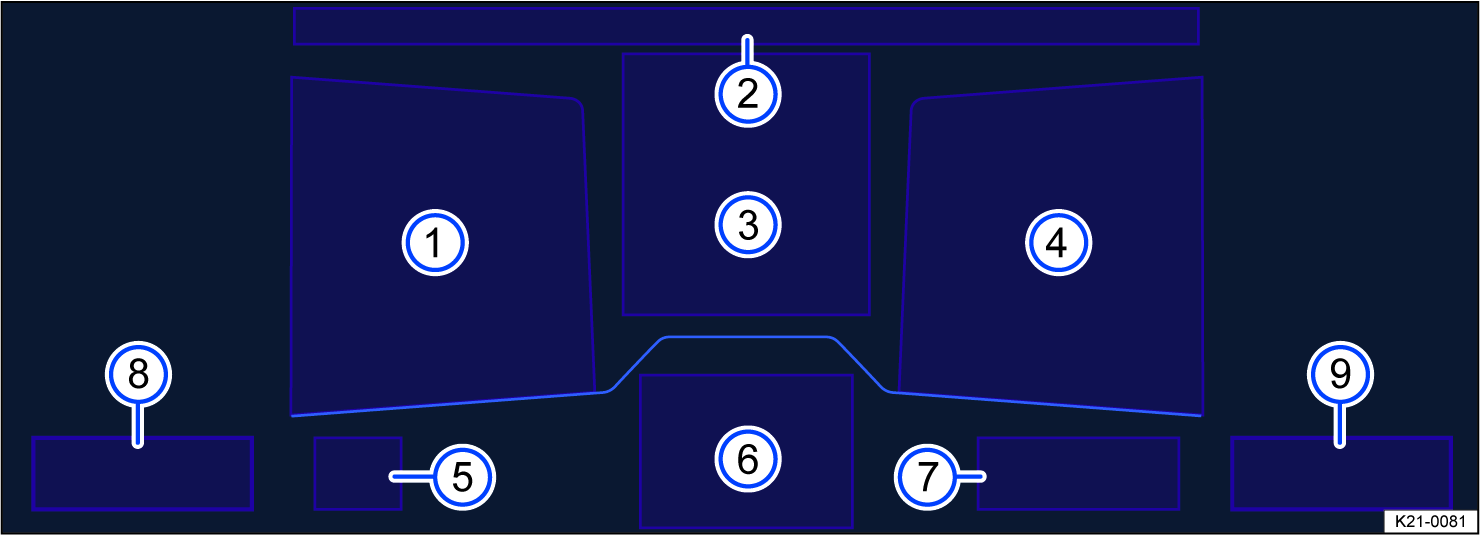
Fig. 12 Volkswagen Digital Cockpit Basic Version in the instrument panel (general example).
 Secondary display area.
 Time, compass and temperature.
 Main display area.
 Secondary display area.
 Currently engaged gear or selector lever level.
 Active driver assistance.
 Range.
 Coolant temperature gauge.
 Fuel gauge.
Operating the Volkswagen Digital Cockpit Basic version
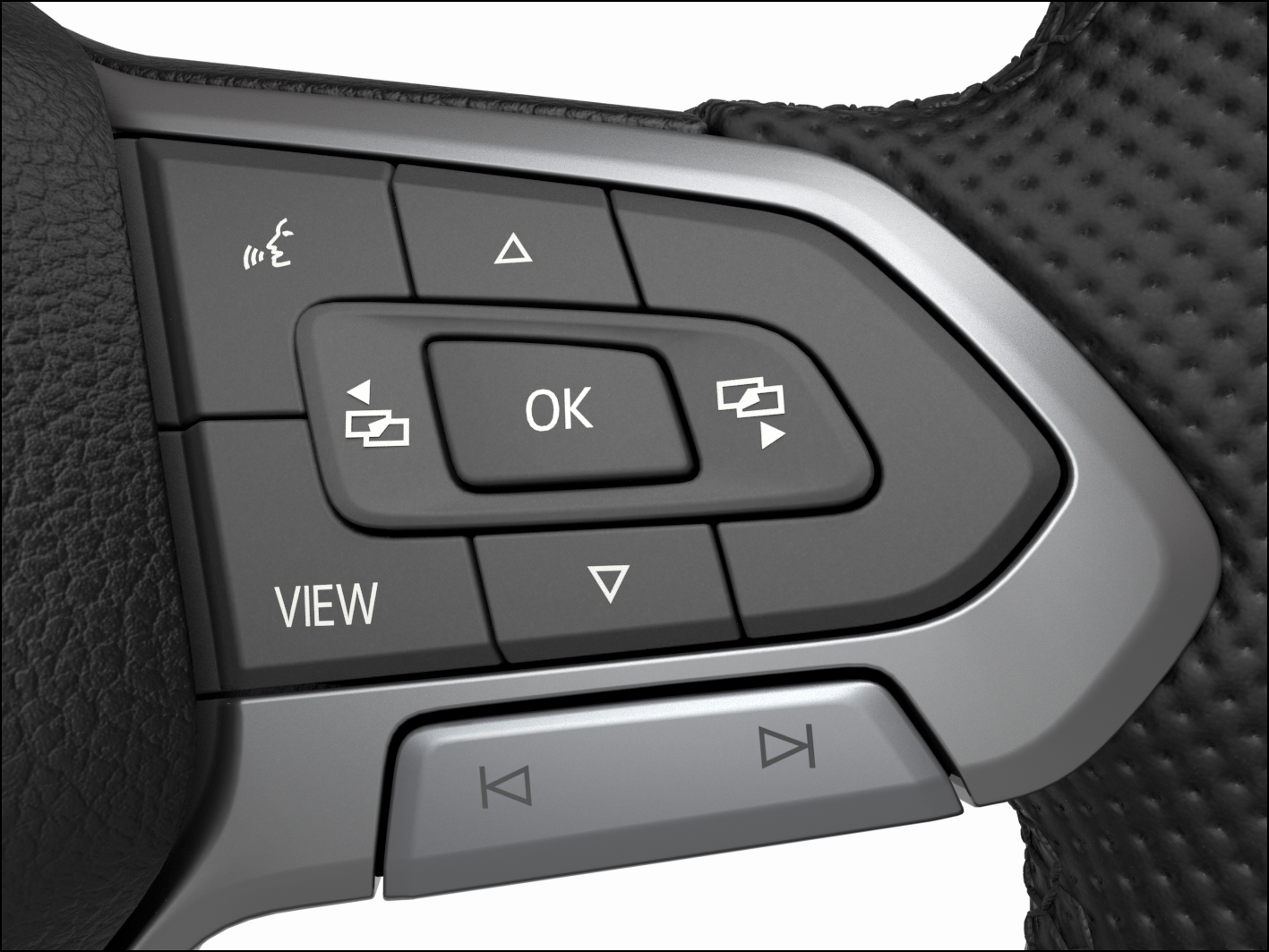
Fig. 13 Right side of the multi-function steering wheel: buttons for operating the menus and information displays in the Volkswagen Digital Cockpit Basic Version (version 1).
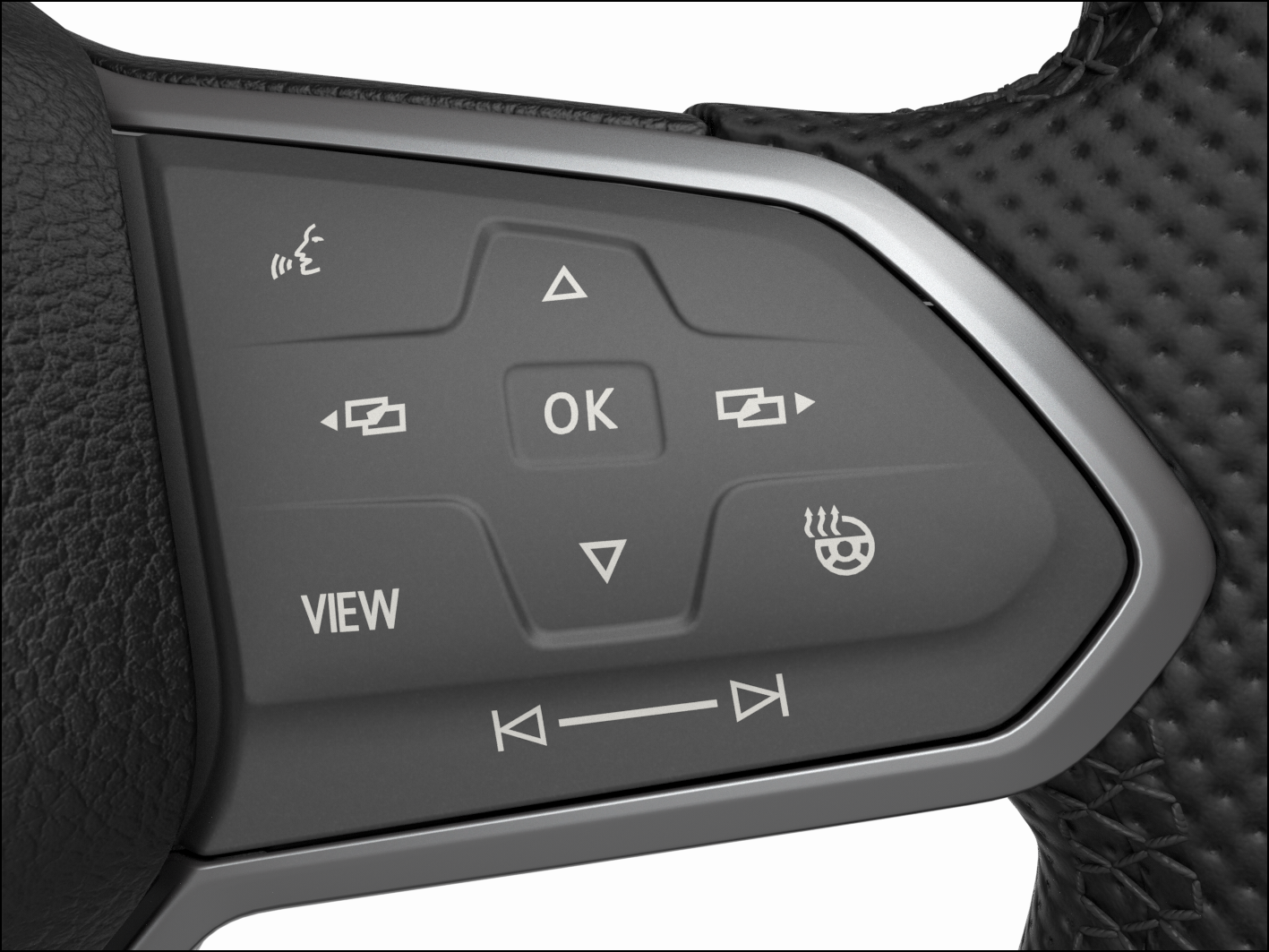
Fig. 14 Right side of the multi-function steering wheel: buttons for operating the menus and information displays in the Volkswagen Digital Cockpit Basic Version (version 2).
Vehicles with multi-function steering wheel: Menus cannot be accessed when a priority 1 warning message is displayed ⇒ Warning and information texts. You can confirm and hide some messages using the  button on the multi-function steering wheel fig. 13, fig. 14.
Views in the main display area
-
Vehicles with multi-function steering wheel: Press the
 button to switch the main display.
The following views can be shown in the display area:
- Digital view
- Digital speedometer with secondary displays.
- Speed
- Classic display of the speedometer as a dial.
- Tachometer
- Classic display of the tachometer as a dial.
Depending on the vehicle equipment, the amount of information shown and the scope thereof may vary.
 After switching off the ignition, a display is shown with information on the vehicle status, e.g. total mileage.
In the speed and tachometer views, an additional secondary display can be configured in the center of the dial.
Selecting secondary displays
Vehicles with multi-function steering wheel: The secondary displays can be configured or hidden independently of each other. Various driving data, navigation information or information about audio playback or cell phone interfaces can be shown on the secondary displays. To select the secondary displays, proceed as follows:
-
Select the right or left secondary display area using the
 or
or  buttons.
 -
Select the preferred secondary display using the
 and
and  arrow buttons.
 -
Confirm your selection with the
button.
Selecting secondary displays in the dial
To select a secondary display with the dial view set, proceed as follows:
Vehicles with multi-function steering wheel:
-
Select the preferred secondary display using the
and arrow buttons. -
Confirm your selection with the
button.
If warning messages about malfunctions appear when the ignition is switched on, settings or information displays may not appear as described. If the malfunction persists, contact a suitably qualified professional. Volkswagen recommends contacting an authorized Volkswagen dealer or authorized Volkswagen Service Facility.
 WARNING
If the driver is distracted while driving, accidents and serious injuries can occur.
-
Never operate the Volkswagen Digital Cockpit Basic Version while driving.
-
Only adjust any settings in the Volkswagen Digital Cockpit Basic Version and Infotainment system when the vehicle is stationary.
Volkswagen Digital Cockpit Basic Version information displays
Possible displays
Different information may be shown in the main display and secondary display areas of the Volkswagen Digital Cockpit Basic version, depending on the vehicle equipment:
-
Open doors, hood and trunk lid.
-
Odometer displays.
-
Phone information.
-
Outside temperature display.
-
Compass display.
-
Selector lever position.
-
Gear recommendation ⇒ Gear recommendation.
-
Speed warning for winter tires.
-
Depending on the vehicle equipment: Fuel-efficient driving
 . Status display for Active Cylinder Management (ACT) ⇒ Eco tips.
 -
Engine code ().
-
Radiator fan run-on indicator.
-
Warning and information texts.
-
Warning and indicator lights.
-
Time and date.
-
Digital speed.
-
Navigation information.
-
Radio information.
-
Driving data menu, e.g. Travel time/distance driven.
-
Service interval display.
-
Status display for the start-stop system ⇒ Start/Stop system.
-
Driver assistance systems display.
-
Engine oil temperature.
-
Destination information.
An arrow behind the entry in the configuration menu indicates a submenu. You can adjust further settings in the submenu.
Open doors, hood and trunk lid
If, after unlocking the vehicle and while driving, any doors and/or the hood or trunk lid are open, this is displayed in the Volkswagen Digital Cockpit and an audible signal may also sound.
Selector lever position for automatic transmission
The selector lever position and, depending on the driving mode, the gear that is engaged, are shown on the selector lever and in the Volkswagen Digital Cockpit. The gear shift pattern is displayed when the brake or the selector lever in the instrument cluster are actuated.
Outside temperature display
When outside temperatures are colder than approximately +4°C (+39°F), a snowflake symbol also appears on the outside temperature display  . This symbol remains on until the outside temperature rises above +43 °F (+6 °C).
In the following situations, the temperature displayed may be higher than the actual outside temperature due to heat radiating from the engine:
-
When the vehicle is stationary
-
When the driving speed is very low
The measurement range is from -45 °C (-49 °F) to +169 °F (+76 °C)
WARNING
Streets and bridges may be icy when outside temperatures are above the freezing point.
-
The
snowflake symbol indicates a possible risk of black ice. -
Black ice may also be present when outside temperatures are above +39 °F (+4 °C) when the
snowflake symbol is not displayed. -
Never rely solely on the outside temperature display.
Gear recommendation
A recommendation to select a fuel-saving gear may be displayed in the Volkswagen Digital Cockpit while driving ⇒ Gear recommendation.
Speed warning for winter tires
If the set maximum speed is exceeded, this will be shown in the digital instrument cluster.
Settings for the speed warning can be adjusted in the vehicle settings in the Infotainment system ⇒ Winter tires.
Fuel-efficient driving
If the vehicle is driving in a fuel-efficient manner, this will be indicated in the Volkswagen Digital Cockpit while driving .
Engine code
-
Open the service menu ⇒ Service menu.
-
Select the Engine code () menu item.
Radiator fan run-on indicator
This indicator appears after the ignition has been switched off, if the radiator fan continues to run.
The radiator fan may continue running due to:
-
Exhaust gas post-treatment, through particulate filter regeneration, for example.
-
Active brake cooling after descent.
-
Dissipation of engine heat after high load, e.g. trailer mode.
Phone information
If the Phone secondary display is activated and a cell phone is connected via Bluetooth, the Bluetooth symbol  will be displayed in the Volkswagen Digital Cockpit. The
  symbol also indicates the charge level of the mobile device.
An arrow behind the entry in the configuration menu indicates a submenu. In the submenu, a list of the most recent phone calls is shown and you have the option to call the displayed contacts back.
Compass display
If the Compass secondary display is activated, the direction in which you are currently driving is shown as a blue arrow with a depiction of the vehicle and a compass.
Destination information
When route guidance is activated, the Destination information secondary display shows the predicted journey time and distance from the destination in miles or km.
Navigation information
When route guidance is activated, the Navigation instruction auxiliary display shows the direction of travel as an arrow.
An arrow behind the entry in the configuration menu indicates a submenu.
The submenu lists your home address and a list of your most recent destinations. Route guidance can be started with the button.
Some displays in the Volkswagen Digital Cockpit may be hidden due to events that occur suddenly, e.g. incoming phone calls.
Depending on the equipment, some settings and displays may also appear in the Infotainment system.
If there are multiple warning messages, the symbols will appear consecutively for several seconds. The symbols will appear until the malfunction is corrected.
If warning messages about malfunctions appear when the ignition is switched on, settings or information displays may not appear as described. If the malfunction persists, contact a suitably qualified professional. Volkswagen recommends contacting an authorized Volkswagen dealer or authorized Volkswagen Service Facility.
Download Manual