Automatic transmission
DSG® automated transmission system function
Description
The vehicle is equipped with a DSG® automated transmission.
The DSG® automated transmission is a transmission with dual-clutch technology that switches automatically. A dual clutch and two mutually independent gear train halves permit very fast shifting without loss of traction force. The DSG® automated transmission combines the performance and economic efficiency of a manual transmission with the comfort and convenience of a conventional automatic gearbox.
System function
When driving, engine force is transmitted through the transmission to the drive axles. The power transmission between the engine and transmission must be interrupted to change a gear. The clutch is needed for this.
In the case of the DSG® automated transmission with its two gear train halves, the engine force is always on a gear train half when driving. When changing a gear, the next highest or next lowest gear is already engaged in the second gear train half without a load. Then the clutch of the load-free gear is closed and the other gear is opened at the same time. This permits very fast shifting.
Thanks to its design, the DSG® automated transmission is more efficient than an automatic gearbox. While the torque converter of an automatic gearbox is in use the entire time, the DSG® automated transmission can open when idling and therefore save fuel. Due to its efficiency, its low weight and intelligent control, the DSG® automated transmission normally permits the same or improved fuel consumption in comparison to a manual transmission.
As is the case for the manual transmission, also the clutch in the DSG® automated transmission is subject to wear. Depending on the type of DSG® automated transmission, regular maintenance is required, further information is available at ⇒ Service. In the case of an error in the gear train half, the DSG® automated transmission also offers the option to switch off a gear train half and continue driving with the other gear train half ⇒ Troubleshooting. The transmission must then be checked immediately by suitably qualified professionals. Volkswagen recommends contacting an authorized Volkswagen dealer or authorized Volkswagen Service Facility.
Automatic transmission: selecting the selector lever position
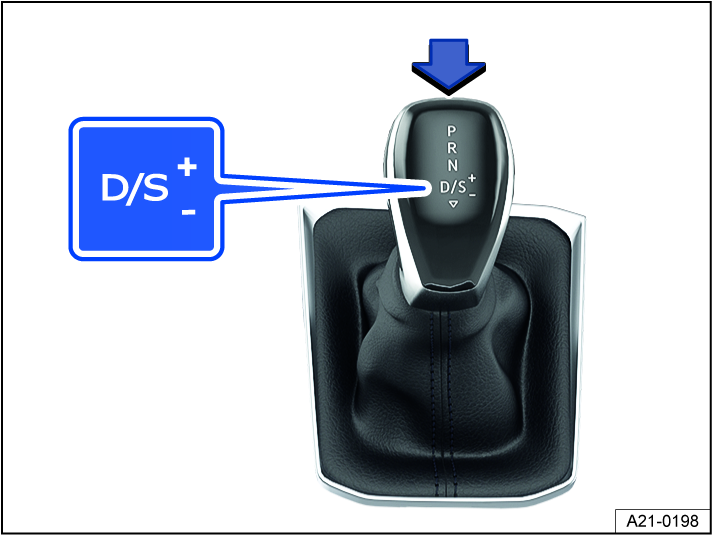
Fig. 101 Selector lever with lock button (arrow) on an automatic transmission.
When the ignition is switched on, the selected gear is shown in the instrument cluster display.
 – Parking lock
The drive gears are locked. Only select this gear when the vehicle is stationary.
To move the selector lever out of this position when the ignition is switched on, press the brake pedal and press the lock button on the selector lever.
 – Reverse gear
Reverse gear is selected. Only select this gear when the vehicle is stationary.
 – Neutral
The transmission is in the neutral setting. No power is transferred to the wheels and the engine braking effect is not available.


 – Drive
gear: normal program.
The transmission upshifts and downshifts automatically when in the forward driving gears. The shifting time depends on the engine load, the personal driving style, and the driving speed.
gear: sport program.
The driving gears automatically upshift later and downshift earlier than in D gear in order to fully utilize the engine power reserves. The shifting time depends on the engine load, the personal driving style, and the driving speed.
To switch between D and S gears, tap the selector lever toward the rear  fig. 101.
The selector lever will always move back to the D/S selector lever position. This also applies when in the tiptronic shift gate ⇒ Shifting using tiptronic.
Selector lever lock
The selector lever lock prevents you from selecting a gear accidentally when in the P or N position, causing the vehicle to roll.
To release the selector lever lock, switch the ignition on and press the brake pedal. Then press the lock button on the selector lever handle in the direction of the arrow fig. 101.
If you skip position N, e.g. by shifting from reverse gear directly to D/S, the selector lever will not be locked. This makes it possible to free the vehicle when it is stuck by “rocking” it. If the lever remains in position N for more than approx. 1 second when the vehicle is traveling at less than approx. 3 mph (5 km/h) and the brake pedal has not been pressed, the selector lever lock will engage.
 WARNING
Engaging the incorrect gear can cause you to lose control of the vehicle, which could lead to accidents and serious injuries.
-
Never press the accelerator pedal when engaging a gear.
-
If you release the brake pedal while the engine is running and a gear is engaged, the vehicle will start moving.
-
Never shift to reverse gear R while driving or engage the P parking lock while driving.
WARNING
Unintentional vehicle movements can cause serious injuries.
-
As the driver, never leave the driver seat when the engine is running and a gear is engaged. If you have to leave the vehicle while the engine is running, always set the electronic parking brake and move the selector lever to the P position.
-
When the engine is running and the D/S or R gear is engaged, hold the vehicle with the brake pedal. Even at idle speed, power is still being transmitted and the vehicle will “creep”.
-
Never shift into reverse gear R or engage the parking lock P while the vehicle is moving.
-
Never leave the vehicle in selector lever position N. The vehicle will roll downhill regardless of whether the engine is running or not.
 NOTICE
If the electronic parking brake is not switched on when the vehicle is stationary and the brake pedal is released when the parking lock P is engaged, the vehicle may move forward or backward a few inches.
 If N is engaged by mistake while driving, remove your foot from the accelerator pedal. Wait until the engine is at idle speed in neutral before shifting into a drive gear.
If the selector lever is left for a long period of time in any position other than P when the engine is switched off, the 12 V vehicle battery will drain.
Shifting using tiptronic
The tiptronic mode allows you to shift gears manually on an automatic transmission.
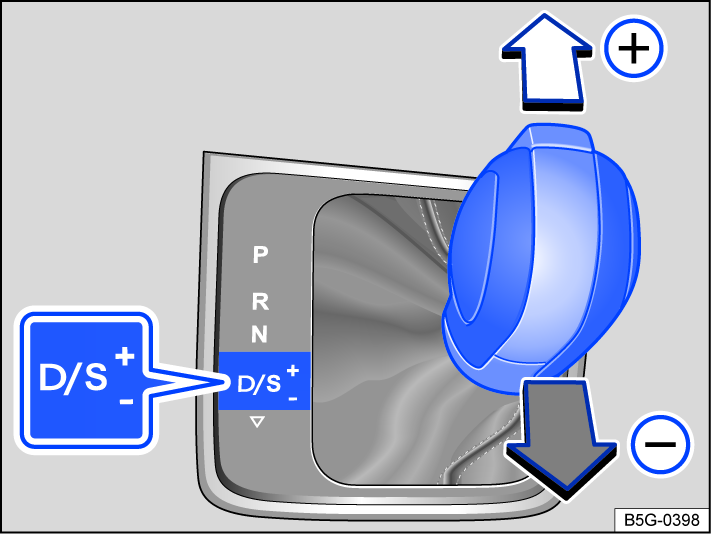
Fig. 102 Selector lever in Tiptronic position.
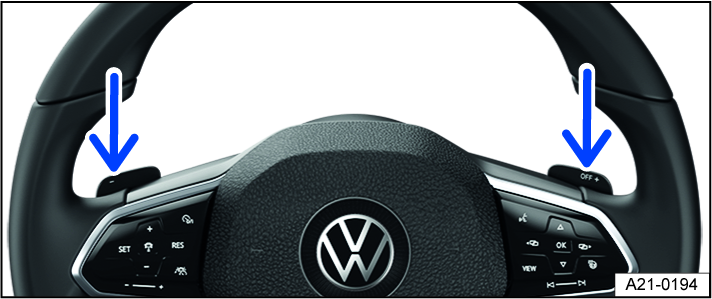
Fig. 103 Steering wheel with shift paddles for Tiptronic.
When shifting in the tiptronic program, the gear currently engaged is maintained. This applies until the system shifts gears automatically due to the current driving situation.
Using tiptronic with the selector lever
-
Press the selector lever from the selector lever position
 to the right to the tiptronic position.
 -
Tap the selector lever forward
 or to the rear
  to upshift or downshift fig. 102.
The lock button on the selector lever must not be pressed when tapping the selector lever within the tiptronic shift gate.
Operating Tiptronic with the shift paddles
-
Pull the right shift paddle toward the steering wheel to shift up fig. 103.
-
Pull the left shift paddle toward the steering wheel to shift down.
-
Pull the right shift paddle toward the steering wheel for about a second to leave the tiptronic program.
The Tiptronic program ends automatically if you do not operate the shift paddles for some time and the selector lever is not in the Tiptronic gate.
NOTICE
When accelerating, the transmission automatically upshifts to the next gear shortly before the maximum permissible engine RPM is reached.
NOTICE
When downshifting manually, the transmission only shifts if it is no longer possible to over-rev the engine.
Driving with an automatic transmission
The transmission shifts up and down automatically when in the forward driving gears.
Driving on an incline
The steeper the incline, the lower the gear that you should select. Lower gears increase the engine braking effect. Never let the vehicle roll down mountains or hills in the N neutral setting.
-
Reduce your speed.
-
Push the selector lever to the right out of the D/S selector lever position into the tiptronic shift gate ⇒ Shifting using tiptronic.
-
Tap the selector lever back to downshift.
Or: Downshift using the shift paddles on the steering wheel ⇒ Shifting using tiptronic.
Stopping and starting to drive uphill
The steeper the hill, the lower the gear that you should select.
If you stop on a hill with a gear selected, always press the brake pedal or set the electronic parking brake to prevent the vehicle from rolling away. Only release the brake pedal or the electronic parking brake once you start driving ⇒  .
.
Coasting with a DSG® automated transmission
When coasting, the vehicle's momentum is used to save fuel with predictive driving. The engine does not slow down the vehicle, so it can roll for a longer period. The function is only available in selector lever position D/S and within a speed range of around 25–80 mph (40–130 km/h).
If the brake is engaged while rolling, the engine remains switched off until the vehicle comes to a complete stop.
When rolling without braking, the engine starts again automatically when the vehicle reaches “creeping pace”.
The engine may restart automatically to ensure the engine restarts safely and there is a secure supply of electricity to the vehicle electrical system.
Triggering the coasting feature
-
In the driving mode selection, select the Eco driving mode ⇒ Selecting the driving mode.
-
Take your foot off the accelerator. The engine is disengaged and in neutral. The vehicle is rolling without any engine braking effect.
Interrupting coasting
-
Press the brake pedal firmly.
Or: Press the accelerator pedal or brake pedal briefly.
Or: Pull one of the shift paddles toward the steering wheel.
Or: Push the selector lever into the tiptronic position.
Or: Change driving modes from Eco.
Kick-down
The kickdown function makes maximum acceleration possible in selector lever position D/S or in the Tiptronic position.
When you press the accelerator pedal all the way down, the automatic transmission downshifts into a lower gear, depending on the vehicle speed and engine RPM. This utilizes the full acceleration power of the vehicle ⇒  .
.
With kick-down, the automatic upshift to the next gear only occurs if the maximum predefined engine RPM is reached.
On vehicles with driving mode selection, if the Eco driving mode is selected ⇒ Selecting the driving mode and the accelerator pedal is pushed past the pressure point, the engine power is controlled so that the vehicle achieves maximum acceleration.
Launch Control Program
Depending on the vehicle equipment, vehicles with automatic transmission have a Launch Control Program. The Launch Control Program provide maximum acceleration from a standstill.
-
Switch off the ASR ⇒ Switching the braking support system on and off.
-
Use your left foot to press down on the brake pedal and hold it.
-
Move the selector lever to the D/S selector lever position in gear S or into the tiptronic position.
Or: on vehicles with Driving Mode Selection, select the Sport⇒ Selecting the driving mode.
-
Use your right foot to press down on the accelerator pedal until an engine speed of approx. 3200 rpm is reached.
-
Take your left foot off the brake ⇒
. The vehicle starts with maximum acceleration. -
Switch ASR back on after acceleration!
WARNING
Fast acceleration can cause traction loss and sliding, especially on slippery roads. This could cause loss in vehicle control, accidents, and serious injuries.
-
Always adapt your driving style to the flow of traffic.
-
Only use the kick-down function or accelerate quickly when the visibility, weather, road, and traffic conditions allow it, and when other road users will not be endangered by the vehicle's acceleration and driving style.
-
Please note that the drive wheels can continue to spin and the vehicle can slide if the traction control system is switched off, especially if the road is slippery.
-
Switch the traction control system back on after the acceleration.
-
Only use the Launch Control Program when road and traffic conditions permit it.
WARNING
Never let the brakes “rub” too often and too long or press the brake pedal too often and too long. Prolonged braking causes the brakes to overheat. This can considerably reduce braking performance, increase braking distance and possibly lead to a total brake system malfunction.
NOTICE
-
If you stop on inclines when a gear is engaged, do not press the accelerator pedal to prevent the vehicle from rolling away. This can cause the automatic transmission to overheat and can damage it.
-
Never let the vehicle roll in the N selector lever position, especially when the engine is stopped. The automatic transmission is not lubricated and this can damage it.
-
Vehicles with the Launch Control Program: All vehicle components are put under intense strain when accelerating with the Launch Control Program. This can cause increased wear.
NOTICE
Never let the brakes “rub” by pressing the pedal lightly when braking is not really necessary. This increases wear.
Troubleshooting
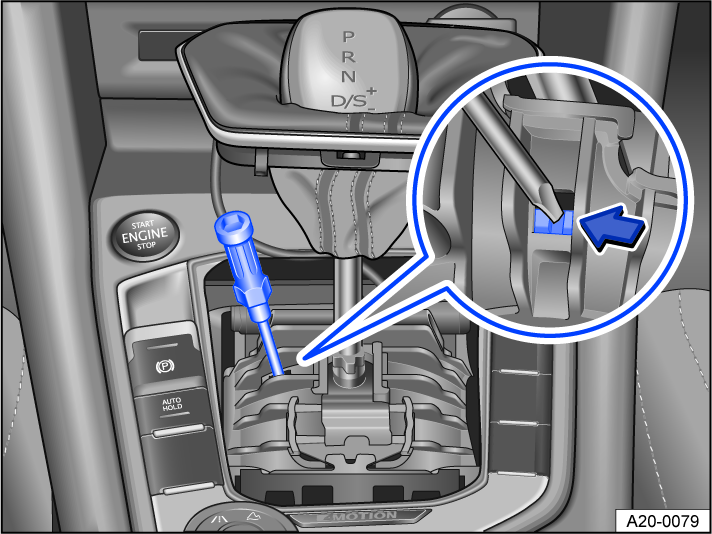
Fig. 104 Manually release the Automatic Shift Lock (ASL) (variant 1).
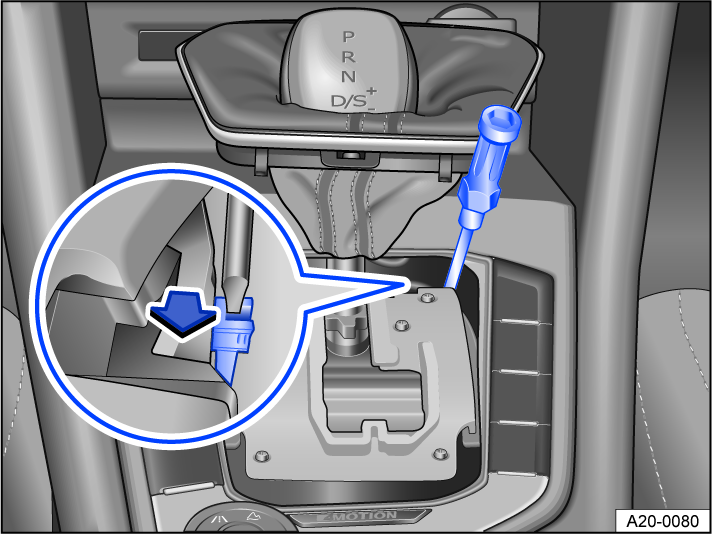
Fig. 105 Manually release the Automatic Shift Lock (ASL) (variant 2).
 The engine is not starting
The green indicator light turns on.
The brake pedal was not pressed, for example when trying to shift to another gear using the selector lever.
-
Press the brake pedal to select a gear.
Driving is restricted by the lock button
The green indicator light blinks.
The lock button in the selector lever is not engaged.
-
Check if the lock button is locked.
-
Lock the lock button into place if necessary.
Driving is restricted by the selector lever lock
The green indicator light blinks. A message is also displayed.
In rare cases, the Automatic Shift Lock (ASL) may not lock in vehicles with a DSG® automated transmission.
The engine will then be disabled to prevent the vehicle from going into motion unintentionally.
-
Press and release the brake pedal again.
 Transmission overheating
The yellow indicator light turns on.
An audible warning may also sound. Where applicable, a message will appear in the instrument cluster display.
The DSG® automated transmission can become heated, for example to frequent start-ups, allowing the vehicle to “creep” forward for long distances, or in stop-and-go traffic.
 Do not continue driving!
-
Let the transmission cool down with engaged parking lock
⇒ . -
If the indicator light does not turn off, do not continue driving.
-
Contact an authorized Volkswagen dealer or authorized Volkswagen Service Facility for assistance. Otherwise, the transmission could become severely damaged.
Selector lever lock emergency release
If there is a loss of power, for example, the 12 V vehicle battery is drained and the vehicle should be towed, then the selector lever lock must be released manually. Contact an authorized Volkswagen dealer or authorized Volkswagen Service Facility for assistance.
The emergency release is located under the shift gate cover.
Remove the cover on the shift gate:
-
Set the electronic parking brake. If you cannot set the electronic parking brake, the vehicle must be secured another way to prevent it from rolling.
-
Switch the ignition off.
-
Pull the cover near the selector lever boot upward carefully with the wires connected fig. 104 or fig. 105.
-
Fold the cover upward over the selector lever.
Manually release the selector lever lock:
-
Press the release lever in the direction of the fig. 104 or fig. 105 arrow and hold in this position.
-
Press the lock button forward into the selector lever handle and move the selector lever to the
position. -
After releasing the cover manually, carefully press into the center console while making sure the wires are in the correct position.
Emergency program
If all of the selector lever position displays have a gray background on the instrument cluster display, this means there is a system malfunction. The DSG® automated transmission runs in emergency mode. The vehicle can still be driven in emergency mode, but only at a reduced speed and not in all gears.
With the DSG® automated transmission, it may no longer be possible to drive in reverse gear in some cases.
In all cases, have the DSG® automated transmission checked immediately by suitably qualified professionals. Volkswagen recommends contacting an authorized Volkswagen dealer or authorized Volkswagen Service Facility.
Vehicle is not moving even when a drive gear is engaged
If the vehicle does not move in the desired direction, the system may not have engaged the drive position correctly.
-
Press the brake pedal and select the drive position again.
-
If the vehicle still does not move in the desired direction, there is a system malfunction. See an authorized Volkswagen dealer or authorized Volkswagen Service Facility for assistance to have the system checked.
WARNING
Never release the parking lock once the electronic parking brake is switched off. Otherwise, the vehicle may start to move unexpectedly on inclines or hills, which could then lead to accidents and serious injuries.
NOTICE
If you allow the vehicle to roll for a long period of time or at high speed with the engine off and the selector lever in the position, the DSG® automated transmission will be damaged, e.g. in the case of towing.
NOTICE
-
Immediately stop the vehicle safely or drive faster than approx. 20 km/h (approx. 12 mph) the first time the vehicle indicates that the transmission is overheating.
-
Stop the vehicle safely and switch off the engine as soon as possible if the message and audible warning are repeating approximately every 10 seconds. Let the transmission cool down.
-
Only continue driving when the audible warning stops to reduce the risk of damaging the transmission. As long as the transmission is overheated, avoid starting the vehicle and driving slowly, like at walking speeds.
Download Manual