Seat functions
Center armrest
Front center armrest
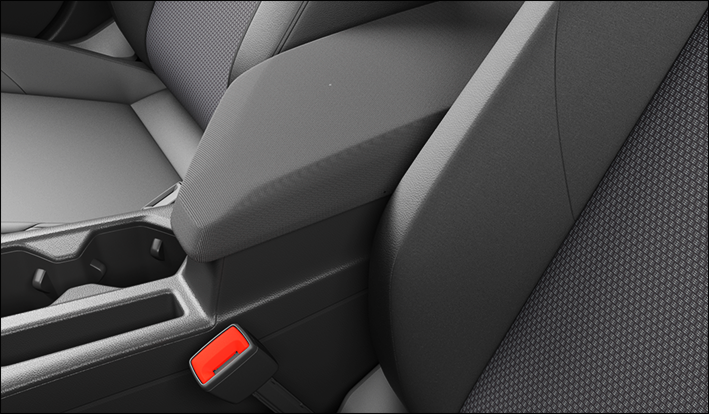
Fig. 75 Plastic support of the center armrest.
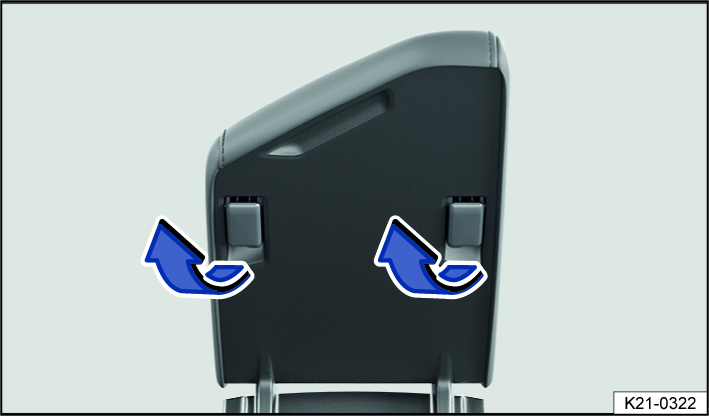
Fig. 76 Front center armrest.
-
To raise : Pull the center armrest fig. 75 upward and fold the plastic supports in the direction of the arrow fig. 76. Then press the center armrest down.
-
To lower : Pull the center armrest fig. 75 upward and fold the plastic supports in the opposite direction to the arrow fig. 76. Then press the center armrest down.
 WARNING
If the front center armrest is opened all the way or not completely closed, it can limit the driver’s ability to move his or her arms, which can cause accidents and serious injuries.
-
Always keep the storage compartments closed while driving.
-
Never allow an adult or child to ride on the center armrest. This incorrect seating position can cause serious injuries.
Rear center armrest

Fig. 77 Folding center armrest in the rear.
There may be a folding armrest in the backrest of the rear center seat.
-
To fold forward : pull the center armrest in the direction of the arrow using the loop fig. 77.
-
To fold back : fold the center armrest upward in the opposite direction of the arrow fig. 77 and press it all the way toward the seat backrest.
Passengers must not sit in the center rear seat when the center armrest is folded down.
WARNING
To reduce the risk of injuries while driving, the rear center armrest must always be folded up.
-
If the center armrest is folded down, the center rear bench seat must never be used by either adults or children. Doing so would create an incorrect seating position that could result in serious injuries.
Memory function
Memory buttons
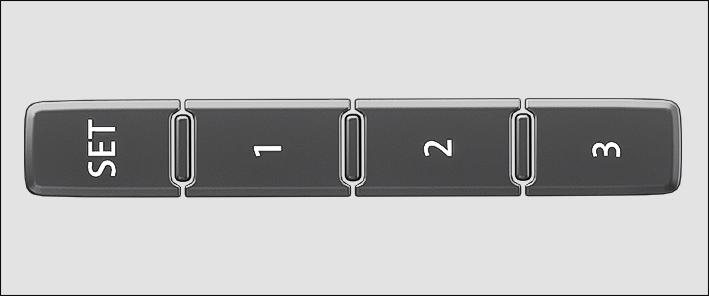
Fig. 78 On the outer side of the driver’s seat: memory buttons.
Driver seat and outside mirror settings can be saved and called up using the memory buttons.
Storing the driver's seat and outside mirror settings for driving forward
-
Set the electronic parking brake.
-
Shift the transmission to neutral.
-
Switch the ignition on.
-
Adjust the driver's seat and outside mirror.
-
Press the
 fig. 78 button for longer than ten seconds.
 -
Press the desired memory button within approximately ten seconds.
A chime will confirm that the settings were saved.
Storing the front passenger's outside mirror settings for driving in reverse
-
Set the electronic parking brake.
-
Shift the transmission to neutral.
-
Switch the ignition on.
-
Press the desired memory button fig. 78.
-
Select the reverse gear.
-
Adjust the front passenger's outside mirror so that the edge of the curb can be seen clearly, for example.
The selected mirror position will be stored automatically and assigned to the vehicle key that was used to unlock the vehicle.
Recalling driver's seat and outside mirror settings
-
When the vehicle is stationary, the ignition is switched off, and a door is open, press the respective memory button briefly.
After approximately ten minutes, the stored positions can no longer be adjusted automatically. The adjustment process will be canceled if one of the memory buttons is pressed again.
Or: When the ignition is switched on or the door is closed, press and hold the respective memory button until the stored position is reached.
The front passenger's outside mirror automatically leaves the position stored for driving in reverse once you begin driving forward at speeds of at least approx. 15 km/h (approx. 10 mph) or when you turn the knob for the outside mirrors from the R position to another position.
 If you open the driver door more than approximately ten minutes after the vehicle is unlocked, the driver seat and the outside mirrors will not be adjusted automatically.
WARNING
Improper use of seat functions can cause injuries.
-
Before beginning a journey always adjust to the correct seat position and maintain this throughout the journey. This also applies to all passengers.
-
Set the memory function only with the vehicle stationary.
-
Always keep your hands, fingers, feet and other parts of your body clear of the area in which the seats operate and move during adjustment.
Download Manual