Sport displays
Lap timer in the instrument cluster
The lap timer offers the option to measure and save the individual lap times on a race course manually in the vehicle as well as compare these times to the best times previously recorded.
Depending on the equipment, the lap timer can be displayed in the instrument cluster.
The following main menus can be displayed:
-
Lap timer.
-
Lap (with current lap specification).
-
Statistics.
Switching between menus
-
Press the
 or
or  button on the multi-function steering wheel.
For example, the following list will show the layout of the menus in the instrument cluster display. The actual scope of the menus and the names of individual menu items depend on the instrument cluster version and the vehicle electronics.
Menu displays and functions
Lap timer menu:
- Start
- The time measurement of a lap is started.
- Since start
- The time measurement begins when the vehicle begins to drive. If it is already moving, the time measurement starts when the vehicle comes to a stop in the meantime.
- Statistics
- An overview of the laps previously recorded is displayed.
Lap menu:
- Stop
- The active time measurement is paused. The lap is not finished.
- Resume
- The paused time measurement is resumed.
- Split time
- A split time is displayed for approximately five seconds. The active time measurement continues to run simultaneously.
- New lap
- The time of the current lap is stopped and a new lap is started. The time for the finished lap is transferred to the statistics.
- Cancel lap
- The time measurement is stopped and discarded. The current lap will not be recorded in the statistics.
- End
- The time measurement is finished. The lap will be recorded in the statistics.
Statistics menu:
- Back
- The display switches back to the previous menu.
- Reset
- All saved statistics data is reset.
The previously driven lap times are displayed in the Statistics menu. If the maximum lap number of 99 laps or the maximum total duration of 99 hours, 59 minutes and 59 seconds is reached, a new time measurement can be started before the statistics are reset.
 WARNING
Driver distraction can cause accidents and injuries.
-
Only adjust lap timer presets and open the statistics when the vehicle is stationary.
-
Only operate the lap timer while driving if the driving situation is easy to control and monitor.
Infotainment system lap timer
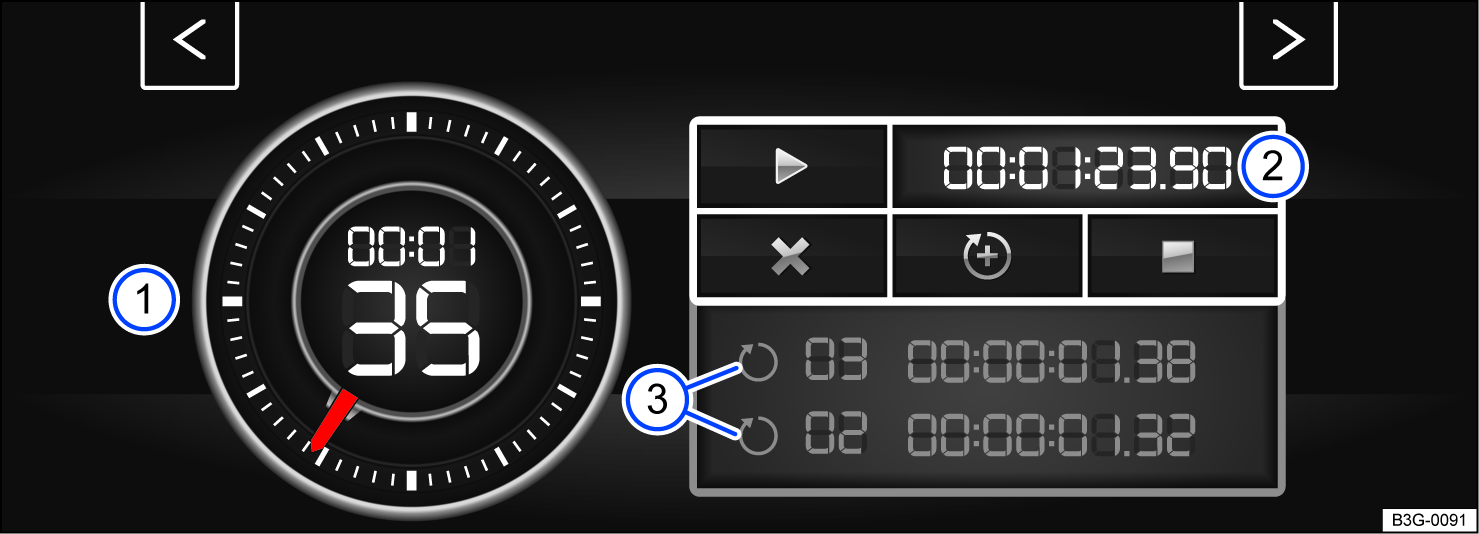
Fig. 19 On the Infotainment system screen: lap timer with stopwatch, function key, and lap times.
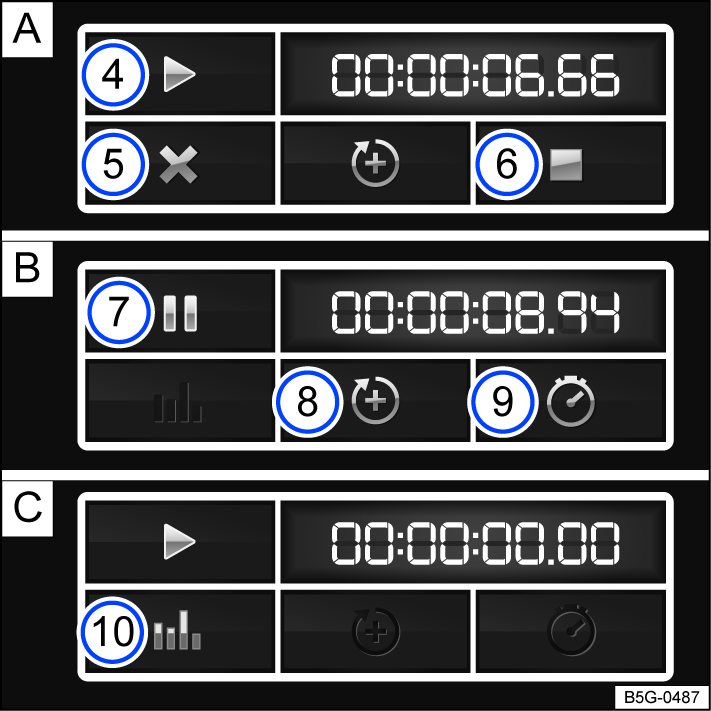
Fig. 20 Function key on the Infotainment system screen: time measurement when the lap is  stopped,
  running, and
  finished.
 Stopwatch
 Function key with current lap time
 Saved lap times
 Start or resume time measurement; this is only possible when the ignition is switched on. Tap Start to begin the time measurement. The time measurement starts automatically once the vehicle moves forward. If the data has been reset in the statistics, a new first round can be started.
 Cancel the current lap. The lap time is deleted. --: --:--.-- is displayed in the statistics.
 End the time measurement.
 Stop the time measurement or cancel the current lap (when the time measurement is running).
 Start new lap. The last lap time is saved and a new lap time starts. The total time of the laps is displayed in the statistics.
 Display the split time. The stopwatch stops for several seconds and the split time is displayed.
 Display the statistics after ending or canceling the time measurement: number of laps, total time, fastest and slowest lap, average lap time of all laps, all lap times). Tap Reset to reset the statistics.
 A maximum of 99 laps and a maximum duration of 99 hours, 59 minutes and 59 seconds can be recorded. If one of these limits is reached, data in the statistics must be deleted before starting another time measurement.
Opening the lap timer
-
Depending on vehicle equipment, press the
 button or function key.
Or: press the
 button or function key.
Or: tap the
 function key.
 -
Tap the Vehicle function key.
Or: tap Auto function key.
-
Tap the Selection function key.
-
Tap the Sport function key.
The performance monitor will be displayed.
-
Tap one of the arrow buttons in the performance monitor to switch to the lap timer.
You can switch between the lap timer and performance monitor using the arrow buttons.
Measuring lap times
The stopwatch measures the lap time in two areas:
The red needle and the number in the center indicate the running time in seconds, and the smaller display in the inner area shows minutes and hours.
The display on the right side shows the current lap time with an accuracy of 1/100 of a second. If no laps with split times have been saved yet in the lap timer, then there is no difference between the stopwatch and the lap time.
WARNING
Driver distraction can cause accidents and injuries.
-
Only adjust lap timer presets and open the statistics when the vehicle is stationary.
-
Only operate the lap timer while driving if the driving situation is easy to control and monitor.
Performance monitor
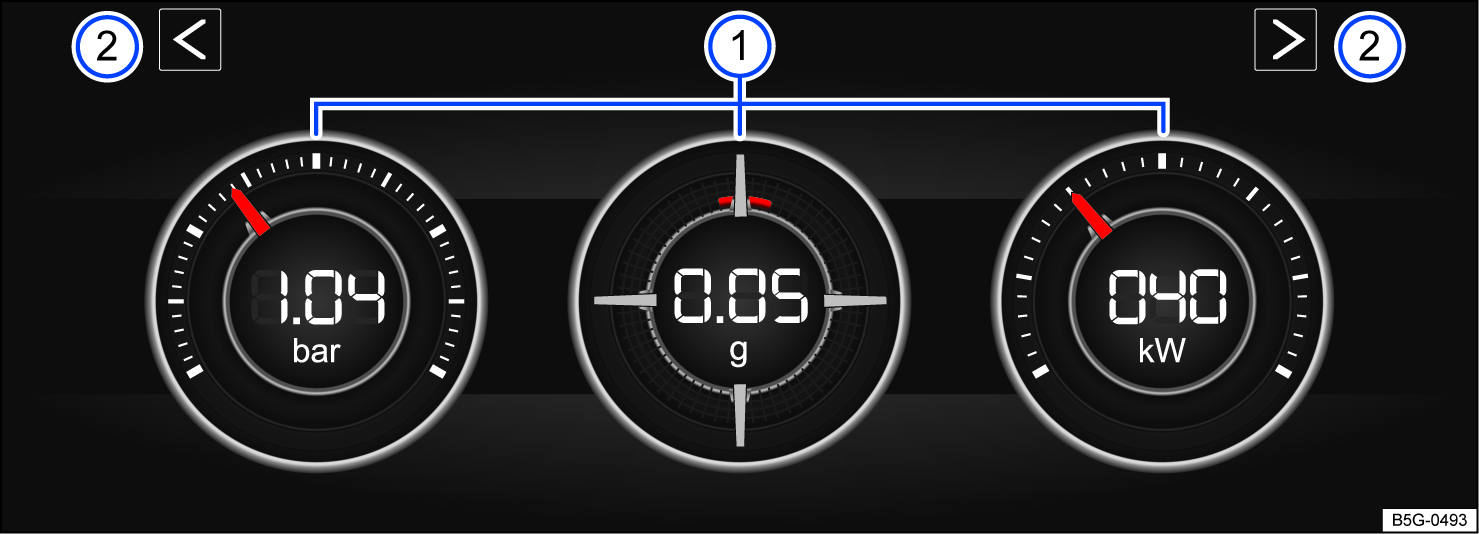
Fig. 21 On the Infotainment system screen: performance monitor.
- Displays
- Arrow buttons to switch to the lap timer
The performance monitor is a display for sporty driving. The digital instruments show values in real time for engine power, temperature, and acceleration that are determined by sensors in the vehicle. This gives the driver an overview of the driving dynamics.
Opening the performance monitor
-
Depending on the version, press the
button or function key in the Infotainment system. -
Tap the Vehicle function key.
-
Tap the Selection function key.
-
Tap the Sport function key.
If you want to switch between the performance monitor and the lap timer, tap one of the left or right arrow buttons above the instruments fig. 21.
Selecting instruments and adjusting units
The display can show a maximum of three instruments at the same time. Every instrument can be selected for any display area fig. 21 (left, center, right).
-
To switch between instruments, swipe upward above the display.
The instrument that is currently selected will disappear and a new instrument will appear.
The units on some instruments can be adjusted in the Infotainment system ⇒ Vehicle settings menu.
The following instruments can be displayed:
-
Boost pressure indicator: the boost pressure indicator fig. 21 (left) displays the boost pressure between the turbocharger and the engine in bar. The farther to the right that the needle on the scale is, the more engine power is being used.
-
Accelerometer (g-meter): the accelerometer (g-meter) fig. 21 (center) displays the acceleration value in the center area in “g”. The red marking in the tab area shows the intensity of the acceleration and the direction of the force. The force in effect is contrary to the physical laws. For example, if you drive to the left, the red marking will move in the right area of the instrument and vice versa. When accelerating, the red marking will move downward. When braking, the red marking will move upward. The intensity of acceleration is indicated by the position of the red marking from the inside to the outside. If you accelerate faster, the red marking will disappear from the center area.
-
Power gauge: the power gauge fig. 21 (right) shows the engine power that is being currently used as a digital value displayed on the surrounding scale in kW.
-
Engine coolant temperature gauge: when engine load is heavy and outside temperatures are high, the gauge may move farther to the right. This is not a cause for concern as long as the
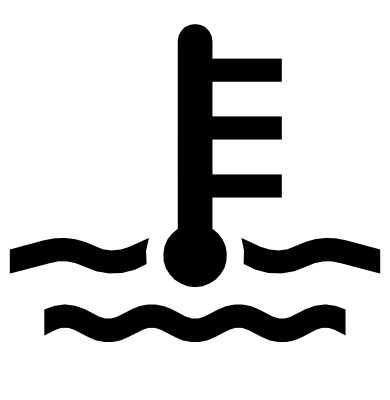 indicator light in the instrument cluster display is off or blinking ⇒ Checking the engine oil level and adding oil.
 -
Oil temperature gauge: the needle stays in the center area under normal driving conditions. If the pointer is in the left, lower area, the engine operating temperature has not yet been reached. If the engine operating temperature has not been reached yet, avoid excessive high speeds and acceleration. Engine coolant temperature gauge: when engine load is heavy and outside temperatures are high, the gauge may move farther to the right. This is not a cause for concern as long as the
 indicator light in the instrument cluster display is off or blinking ⇒ Troubleshooting.
Adjusting the display areas to the driving situation
You can select the three instruments that best fit your individual driving style and the driving situation.
WARNING
Driver distraction can cause accidents and injuries. Operating the Infotainment system can distract you from traffic.
-
Always drive attentively and responsibly.
 NOTICE
Avoid high engine speeds, full acceleration, and heavy engine loads after starting the engine when it is cold.
Because of the methods that are used to determine power in the vehicle, the displayed values may not be completely precise.
Download Manual