Operating a Bluetooth® enabled portable player
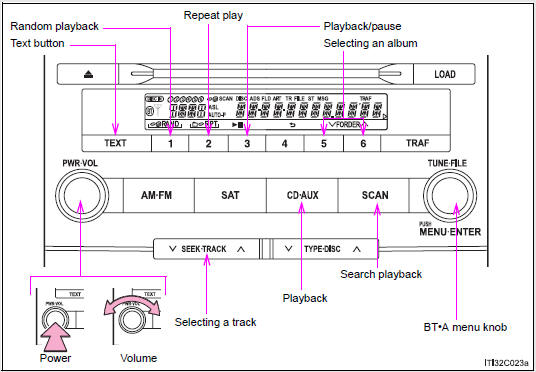
Selecting an album
To select the desired album, press  (∨) or
  (∧).
(∧).
Selecting tracks
Press “∧” or “∨” on  to select the desired track.
Playing and pausing tracks
To play or pause a track, press  (
( ).
).
Fast-forwarding and rewinding tracks
To fast-forward or rewind, press and hold “∧” or “∨” on  until you hear a beep.
Random playback
Press  (RAND).
To cancel, press  (RAND) again.
Repeat play
Press  (RPT).
To cancel, press  (RPT) again.
Scanning tracks
Press  .
.
To cancel, press  again.
Switching the display
Press  .
.
Each time the button is pressed, the display changes in the following order: Elapsed time → Album title → Track title → Artist name
Using the steering wheel audio switches
- Bluetooth® audio system functions
Depending on the portable player that is connected to the system, certain functions may not be available.
- Display
- Error messages
“Memory Error”: This indicates a problem in the system.
Setting up a Bluetooth® enabled portable player
Registering a portable player in the Bluetooth® audio system allows the system to function. The following functions can be used for registered portable players:
- Functions and operation procedures
- Pattern A
To enter the menu for each function, follow the steps below using a voice command or  :
:
- Registering a portable player
1. “Setup” → 2. “Bluetooth Audio Setup (BT•A Setup)” → 3. “Pair Audio Player (Pair Audio)”
- Selecting a portable player to be used
1. “Setup” → 2. “Bluetooth Audio Setup (BT•A Setup)” → 3. “Connect Audio Player (Connect)”
- Changing the registered name of a portable player
1. “Setup” → 2. “Bluetooth Audio Setup (BT•A Setup)” → 3. “Change Name”
- Listing the registered portable players
1. “Setup” → 2. “Bluetooth Audio Setup (BT•A Setup)” → 3. “List Audio Players (List Audios)”
- Changing the passkey
1. “Setup” → 2. “Bluetooth Audio Setup (BT•A Setup)” → 3. “Set Passkey”
- Deleting a registered portable player
1. “Setup” → 2. “Bluetooth Audio Setup (BT•A Setup)” → 3. “Delete Audio Player (Delete Audio)
- Pattern B
STEP 1
Press  to select “BT•A MENU”.
STEP 2
Press the talk switch or select “BT•A Setup” using  .
.
STEP 3
Select one of the following functions using a voice command or  .
.
- Registering a portable player “Pair Audio Player (Pair Audio)”
- Selecting a portable player to be used “Connect Audio Player (Connect)”
- Changing the registered name “Change Name”
- Listing the registered portable players “List Audio Players (List Audios)”
- Changing the passkey “Set Passkey”
- Deleting a registered portable player “Delete Audio Player (Delete Audio)”
Registering a portable player
Select “Pair Audio Player (Pair Audio)” using a voice command or , and perform the procedure for registering a portable player.
Selecting a portable player to be used
STEP 1
Select “Connect Audio Player (Connect)” using a voice command or  .
.
- Pattern A
STEP 2
Select the portable player to be used by either of the following methods, and select “Confirm” by using a voice command or  :
:
- Press the talk switch and say the name of the desired portable player.
- Press the talk switch and say “List Audio Players”. When the name of the desired portable player is read aloud, press the talk switch.
- Pattern B
STEP 2
Select the portable player to be used using  .
.
- Pattern A
STEP 3
Press the talk switch and say “From Car” or “From Audio player”, and select “Confirm” by using a voice command or  .
.
- Pattern B
STEP 3
Select “From Car” or “From Audio”, using  .
.
If “From Car” is selected, the portable player will be automatically connected whenever the “ENGINE START STOP” switch is in either ACCESSORY or IGNITION ON mode.
Changing the registered name of a portable player
STEP 1
Select “Change Name” using a voice command or .
- Pattern A
STEP 2
Select the name of the portable player to be changed by either of the following methods, and select “Confirm” using a voice command or :
- Press the talk switch and say the name of desired portable player.
- Press the talk switch and say “List Audio Players”. When the name of the desired portable player is read aloud, press the talk switch.
- Pattern B
STEP 2
Select the desired portable player name to be changed using .
STEP 3
Press the talk switch or select “Record Name” using , and say the new name.
STEP 4
Select “Confirm” using a voice command or .
Listing the registered portable players
Select “List Audio Players (List Audios)” using a voice command or . The list of registered portable players will be read aloud.
When listing is complete, the system returns to “BT•A Setup”.
Pressing the talk switch while the name of a portable player is being read aloud selects the portable player, and the following functions will become available:
- Selecting a portable player: “Connect Audio Player (Connect)”
- Changing a registered name: “Change Name”
- Deleting a portable player: “Delete Audio Player (Delete Audio)”
Changing the passkey
STEP 1
Select “Set Passkey” using a voice command or .
- Pattern A
STEP 2
Press the talk switch, say a 4 to 8-digit number, and select “Confirm” using a voice command or .
- Pattern B
STEP 2
Select a 4 to 8-digit number using .
The number should be input 1 digit at a time.
STEP 3
When the entire number to be registered as a passkey has been input, press again.
If the number to be registered has 8 digits, pressing of the knob is not necessary.
Deleting a registered portable player
STEP 1
Select “Delete Audio Player (Delete Audio)” using a voice command or .
- Pattern A
STEP 2
Select the portable player to be deleted by either of the following methods and select “Confirm” using a voice command or :
- Press the talk switch and say the name of the desired portable player.
- Press the talk switch and say “List Audio Players”. When the name of the desired portable player is read aloud, press the talk switch.
- Pattern B
Select the desired portable player to be deleted using .
If the portable player to be deleted is paired as a Bluetooth® phone, the registration of the mobile phone can be deleted at the same time.
A voice guidance instruction to delete a mobile phone is heard.
Select “Yes” or “No” using a voice command or .
(Bluetooth® phone )
- The number of portable players that can be registered
Up to 2 portable players can be registered in the system.
Download Manual