Multi-terrain Select
Multi-terrain Select is a system that assists drivability in off-road situations.
Select a mode that most closely matches the type of terrain on which you are driving from among 5 modes.
Brake control can be optimized in accordance with the selected mode.
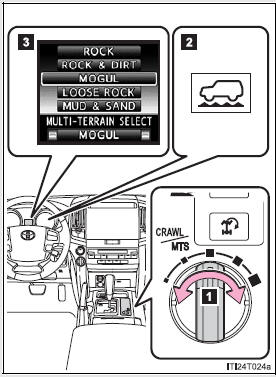
- Multi-terrain Select mode select switch
- Multi-terrain Select indicator
- Multi-information display
Displays status information including operating status and road type selection.
- Selectable modes
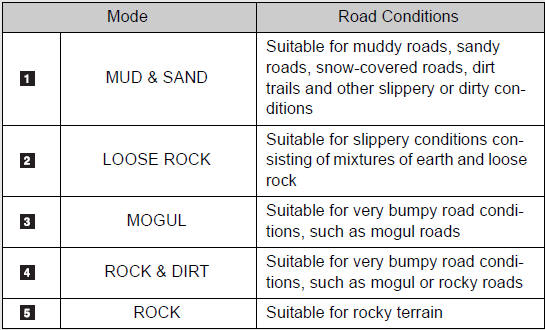
A mode which matches the road conditions can be selected from among the following 5 modes.
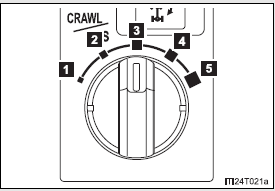
- MUD & SAND
- LOOSE ROCK
- MOGUL
- ROCK & DIRT
- ROCK
- Multi-terrain Select control starting conditions
When all of the following conditions are satisfied, the Multi-terrain Select indicator will come on, the mode select screen will be displayed on the multi-information display, and Multi-terrain Select control will begin.
- The four-wheel drive control switch is in “L4”
- Both Active TRAC and VSC are not off.
- Crawl Control is off.
- Switching modes
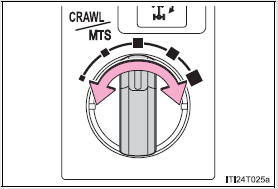
Operate the Multi-terrain Select mode select switch during Multi-terrain Select control to select a mode.
Once the mode is confirmed, the mode name will be displayed and the control will switch.
Statement on the multi-information display
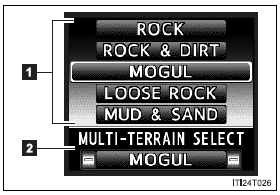
- Mode selection
Display the Multi-terrain Select mode.
The display switches in accordance with the pressing of the DISP switch or the conditions of each system.
- Mode status
Display the name of the selected mode.
- Automatic system cancelation
In the following situations, the Multi-terrain Select indicator will go off, and Multi-terrain Select will be canceled automatically.
- When the four-wheel drive control switch is in “H4”.
- When Active TRAC and VSC are off.
- When Crawl Control is on.
- When it is difficult to generate traction
MUD & SAND mode provides the largest amount of tire slippage, followed by LOOSE ROCK, MOGUL, ROCK & DIRT and ROCK mode.
Drivability can be improved by selecting a mode which provides a smaller amount of tire slippage than the current mode when the amount of tire slippage is large, or conversely selecting a mode which provides a larger amount of tire slippage than the current mode when the amount of tire slippage is small.
- When the vehicle is stuck
Switching the transfer and differential For the operation of the following functions, refer to the following pages.
- Four-wheel drive system
- Center differential lock
- When the brake system operates continuously
The brake system may overheat. In this case, a buzzer will sound, either the “TRAC OFF” will be displayed on the multi-information display, and Multi-terrain Select will be temporarily inoperable. In this event, stop the vehicle immediately in a safe place, and allow the brake system to cool down sufficiently.
(There is no problem with continuing normal driving.) After a short time, the message on the multi-information display will go off, and you will be able to use Multi-terrain Select.
- When there is a malfunction in the system
The slip indicator light will come on. Have the vehicle inspected by your Toyota dealer immediately.
| CAUTION
Observe the following precautions to avoid an accident that could result in death or serious injuries:
|
| NOTICE
The Multi-terrain Select is intended for use during off-road driving. Do not use the system at any other time. |
Download Manual