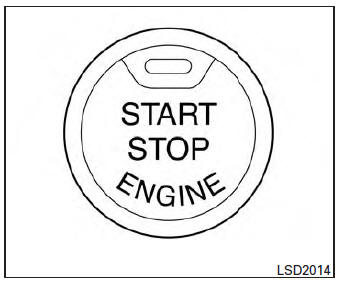
Push-Button Ignition Switch (if so equipped)
| WARNING
Do not operate the push-button ignition switch while driving the vehicle except in an emergency. (The engine will stop when the ignition switch is pushed 3 consecutive times in quick succession or the ignition switch is pushed and held for more than 2 seconds.) If the engine stops while the vehicle is being driven, this could lead to a crash and serious injury. |
When the ignition switch is pushed without depressing the brake pedal or the clutch pedal (MT), the ignition switch position will illuminate as follows:
Push center
- once to change to ACC.
- two times to change to ON.
- three times to return to OFF.
The ignition switch will automatically return to the LOCK position when any door is either opened or closed with the switch in the OFF position.
The ignition lock is designed so that the ignition switch position cannot be switched to OFF until the shift lever is moved to the P (Park) position or N (Neutral) position (MT).
When the ignition switch cannot be pushed toward the OFF position, proceed as follows:
- Move the shift lever into the P (Park) position or N (Neutral) position (MT).
- Push the ignition switch. The ignition switch position will change to the ON position.
- Push the ignition switch again to the OFF position.
The shift lever can be moved from the P (Park) position if the ignition switch is in the ON position and the brake pedal is depressed.
If the battery of the vehicle is discharged, the push-button ignition switch cannot be moved from the LOCK position.
Some indicators and warnings for operation are displayed in the meter. See “Warning/indicator lights and audible reminders” in the “Instruments and controls” section.
Operating range
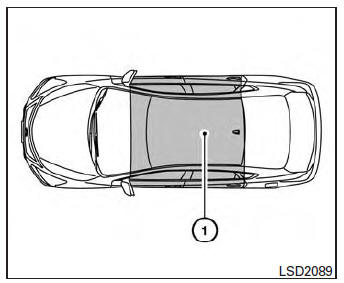
The Intelligent Key functions can only be used when the Intelligent Key is within the specified operating range.
When the Intelligent Key battery is almost discharged or strong radio waves are present near the operating location, the Intelligent Key system’s operating range becomes narrower and may not function properly.
If the Intelligent Key is within the operating range, it is possible for anyone, even someone who does not carry the Intelligent Key, to push the ignition switch to start the engine.
The operating range of the engine start function is inside of the vehicle 1 .
- The luggage area is not included in the operating range, but the Intelligent Key may function.
- If the Intelligent Key is placed on the instrument panel, inside the glove box, storage bin or door pocket, the Intelligent Key may not function.
- If the Intelligent Key is placed near the door or window outside the vehicle, the Intelligent Key may function.
Push-button ignition switch positions
LOCK (Normal parking position):
The ignition switch can only be locked in this position.
The ignition switch will be unlocked when it is pushed to the ACC position while carrying the Intelligent Key or with the Intelligent Key inserted in the port.
The ignition switch will lock when any door is opened or closed with the ignition switched off.
OFF:
The ignition switch is in the OFF position when the engine is turned off using the ignition switch.
No lights will illuminate on the ignition switch.
ACC (Accessories):
This position activates electrical accessories, such as the radio, when the engine is not running.
ACC has a battery saver feature that will turn the ignition switch to the OFF position after 30 minutes under the following conditions:
- all doors are closed.
- shift lever is in P (Park).
The battery saver feature will be cancelled if any of the following occur:
- any door is opened.
- shift lever is moved out of P (Park).
- ignition switch changes position.
ON (Normal operating position):
This position turns on the ignition system and electrical accessories.
CAUTION
Do not leave the vehicle with the ignition switch in ACC or ON positions when the engine is not running for an extended period.
This can discharge the battery.
Emergency engine shut off
To shut off the engine in an emergency situation while driving, perform the following procedure:
- Rapidly push the push-button ignition switch 3 consecutive times in less than 1.5 seconds, or
- Push and hold the push-button ignition switch for more than 2 seconds.
NISSAN Intelligent Key® battery discharge
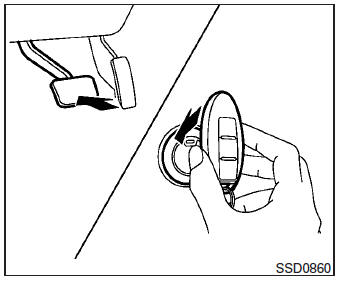
If the battery of the NISSAN Intelligent Key® is discharged, or environmental conditions interfere with the Intelligent Key operation, start the engine according to the following procedure:
- Place the shift lever in the P (Park) position.
- Firmly apply the foot brake.
- Touch the ignition switch with the Intelligent Key as illustrated. (A chime will sound.) After step 3 is performed, when the ignition switch is pushed without depressing the brake pedal, the ignition switch position will change to ACC.
- Push the ignition switch while depressing the brake pedal within 10 seconds after the chime sounds. The engine will start.
NOTE:
- When the ignition switch is pushed to the ACC or ON position or the engine is started by the above procedure, the Intelligent Key battery discharge indicator appears in the vehicle information display even when the Intelligent Key is inside the vehicle. This is not a malfunction. To turn off the Intelligent Key battery discharge indicator, touch the ignition switch with the Intelligent Key again.
- If the Intelligent Key battery discharge indicator appears, replace the battery as soon as possible. See “Battery Replacement” in the “Maintenance and do-it-yourself” section.
NISSAN vehicle immobilizer system
The NISSAN Vehicle Immobilizer system will not allow the engine to start without the use of the registered key.
If the engine fails to start using a registered key (for example, when interference is caused by another registered key, an automated toll road device or automatic payment device on the key ring), restart the engine using the following procedure:
- Leave the ignition switch in the ON position for approximately 5 seconds.
- Place the ignition switch in the OFF or LOCK position, and wait approximately 10 seconds.
- Repeat steps 1 and 2.
- Restart the engine while holding the device (which may have caused the interference) separate from the registered key.
If the no start condition re-occurs, NISSAN recommends placing the registered key on a separate key ring to avoid interference from other devices.
Download Manual