Meters and gauges
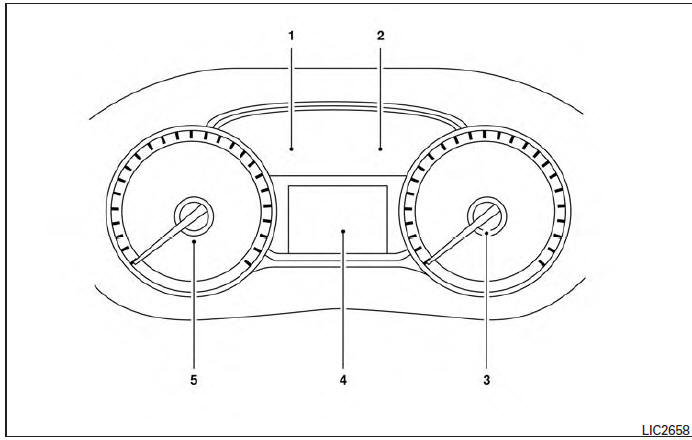
- Engine coolant temperature gauge
- Fuel gauge
- Speedometer
- Odometer/twin trip odometer/trip computer/fuel economy/Eco Pedal Indicator
- Tachometer
Speedometer and odometer
Speedometer
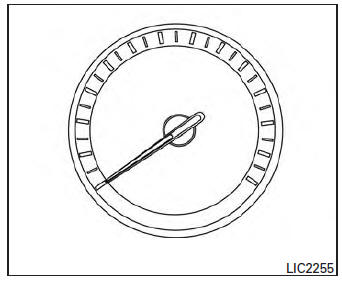
The speedometer indicates the vehicle speed.
Odometer/Twin trip odometer
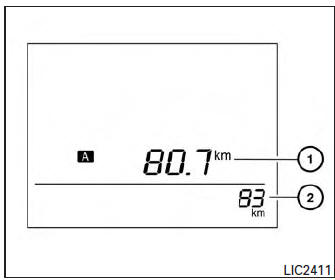
The odometer 2 and the twin trip odometer 1 are displayed when the ignition switch is placed in the ON position.
The odometer records the total distance the vehicle has been driven.
The twin trip odometer records the distance of individual trips.
To switch between the odometer and the twin trip odometers press the  button on the
steering wheel.
Changing the display:
Push the button on the steering
wheel to change the display as follows: Accel guide/Average fuel economy→Instant fuel economy/Average fuel economy → Average fuel economy→Average speed→Distance to empty → Trip A → Trip B
Resetting the trip odometer:
Push the  button on the steering
wheel for more than 1 second to reset the currently displayed trip odometer to zero.
Loose fuel cap warning message
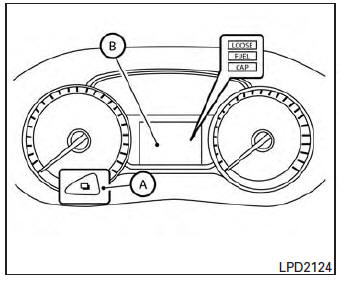
Push the reset button A for more than 1 second to reset the LOOSE FUEL CAP warning message B after the fuel cap has been tightened.
For additional information see “Fuel-filler cap” in the “Pre-driving checks and adjustments” section of this manual.
Check tire pressure warning message
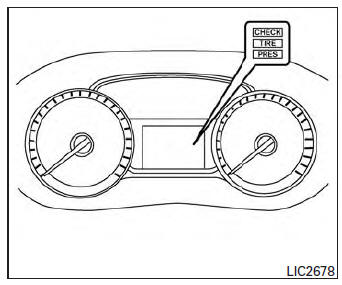
The CHECK TIRE PRES warning message is displayed when the low tire pressure warning light is illuminated and low tire pressure is detected.
Check and adjust the tire pressure to the recommended COLD tire pressure shown on the Tire and Loading Information label. The CHECK TIRE PRES warning message turns off when the low tire pressure warning light turns off.
The low tire pressure warning light remains illuminated until the tires are inflated to the recommended COLD tire pressure. The CHECK TIRE PRES warning message is displayed each time the ignition switch is placed in the ON position as long as the low tire pressure warning light remains illuminated. For more information see “Low tire pressure warning light” in the “Instruments and controls” section, “Tire Pressure Monitoring System (TPMS)” in the “Starting and driving” and “Wheels and tires” section in the “Maintenance and do-it-yourself” section of this Owner’s Manual.
Tachometer
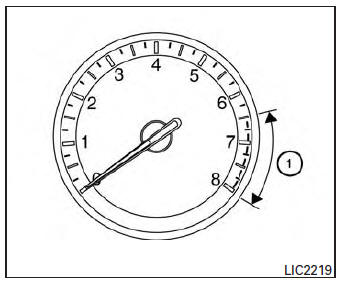
The tachometer indicates engine speed in revolutions per minute (rpm). Do not rev engine into the red zone 1 .
CAUTION
When engine speed approaches the red zone, reduce engine speed. Operating the engine in the red zone may cause serious engine damage.
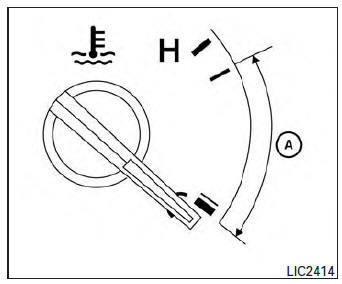
Engine coolant temperature gauge
NOTE:
The ignition switch must be placed in the ON position for the gauge to give a reading.
The gauge indicates the engine coolant temperature.
The engine coolant temperature is within the normal range when the reading is within the zone A shown in the illustration.
The engine coolant temperature varies with the outside air temperature and driving conditions.
CAUTION
If the gauge indicates a coolant temperature near the hot (H) end of the normal range, reduce vehicle speed to decrease the temperature. If the gauge is over the normal range, stop the vehicle as soon as safely possible. If the engine is overheated, continued operation of the vehicle may seriously damage the engine. See “If your vehicle overheats” in the “In case of emergency” section for immediate action required
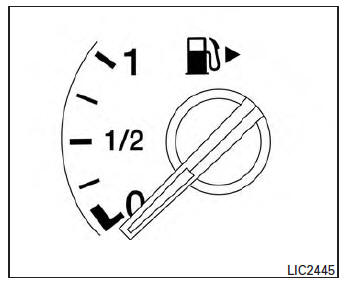
Fuel gauge
NOTE:
The ignition switch must be placed in the ON position for the gauge to give a reading.
The gauge indicates the approximate fuel level in the tank.
The gauge may move slightly during braking, turning, acceleration, or going up or down hills.
The low fuel warning light comes on when the amount of fuel in the tank is getting low.
Refill the fuel tank before the gauge registers 0 (Empty).
The indicates that the
fuel-filler door is located on the passenger’s side of the vehicle.
CAUTION
- If the vehicle runs out of fuel, the

Malfunction Indicator Light (MIL) may come on. Refuel as soon as possible.After a few driving trips. the

light should turn off. If the light remains on after a few driving trips, have the vehicle inspected by a NISSAN dealer. - For additional information, see “Malfunction Indicator Light (MIL)” in this section.
Trip computer
When the ignition switch is placed in the ON position, the modes of the  trip
trip
computer can be selected by pressing the button on the steering wheel. The following modes can be selected:
- Trip A
- Trip B
- ECO Pedal Indicator
- Instant fuel economy
- Average fuel economy
- Average speed
- Distance to empty
- Trip computer reset
Trip A
Measures the distance of one specific trip.
Trip B
Measures the distance of a second specific trip.
ECO Pedal Indicator Display
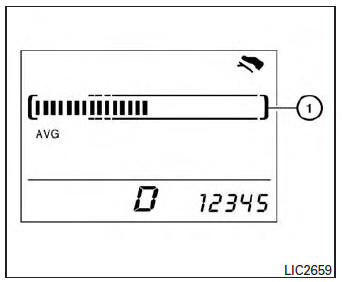
Use the ECO Pedal Indicator 1 for improving fuel economy.
When the ECO Pedal Indicator bar is in the green range, it displays the recommended accelerator pedal position to optimize fuel economy.
If the ECO Pedal Indicator bar is out of green range, the vehicle will not provide optimized fuel economy.
NOTE:
The ECO Pedal Indicator’s bar is not displayed when the cruise control is in operation.
Instant fuel economy
The instant fuel economy mode shows the instant fuel economy. The display updates instantly when driving.
Average fuel economy
The average fuel economy mode shows the average fuel economy since the last reset. Resetting is done by pressing the  button on
the steering wheel for more than approximately 1 second. The display is updated every 30 seconds.
At about the first 1/3 mile (500 m) after a reset, the display shows (----).
Average speed
The average speed mode shows the average vehicle speed since last reset. Resetting is done by pressing the  button on the
steering wheel for more than approximately 1 second. The display is updated every 30 seconds. The first 30 seconds after a reset, the display shows (----).
Distance to empty
The distance to empty (dte) mode provides you with an estimation of the distance that can be driven before refueling. The dte is constantly being calculated, based on the amount of fuel in the fuel tank and the actual fuel economy.
The display is updated every 30 seconds.
NOTE:
When driving uphill or rounding curves, the fuel in the tank shifts, which may momentarily change the display.
Trip computer reset
To reset Trip A, Trip B, AVG/mpg, or AVG/mph, go to the desired mode on the trip computer and hold the  button on the steering
wheel for more than 3 seconds.
Outside temperature display
The outside temperature function provides a display of the outside temperature when the ignition switch is placed in the ON position.
The display of positive temperatures is unsigned (blank), negative temperatures are prefixed with a minus sign.
Download Manual