Battery replacement
CAUTION
Be careful not to allow children to swallow the battery or removed parts.
Keyfob (if so equipped)
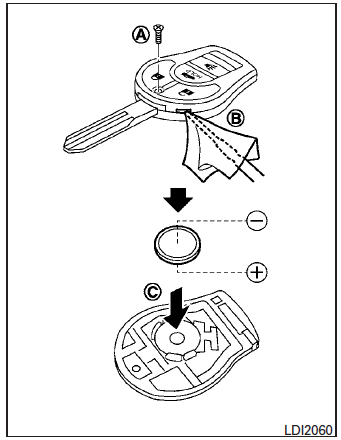
Replace the battery in the keyfob as follows:
- Remove the screw A .
- Insert a small screwdriver into the slit of the corner B and twist it to separate the upper part from the lower part. Use a cloth to protect the casing.
- Replace the battery with a new one.
- Do not touch the internal circuit and electric terminals as doing so could cause a malfunction.
- Make sure that the + side faces the bottom of the case C .
Recommended battery: CR1620 or equivalent.
- Close the lid and install the screw securely.
- Operate the buttons to check its operation.
See a NISSAN dealer if you need assistance for replacement.
If the battery is removed for any reason other than replacement, perform step 5.
- An improperly disposed battery can hurt the environment. Always confirm local regulations for battery disposal.
- The keyfob is water-resistant; however, if it does get wet, immediately wipe completely dry.
- The operational range of the keyfob extends to approximately 33 ft (10 m) from the vehicle. This range may vary with conditions.
Operation is subject to the following two conditions: (1) This device may not cause harmful interference, and (2) this device must accept any interference received, including interference that may cause undesired operation of the device.
FCC Notice: For USA: This device complies with Part 15 of the FCC Rules. Operation is subject to the following two conditions: (1) This device may not cause harmful interference, and (2) this device must accept any interference received, including interference that may cause undesired operation.
Note:
Changes or modifications not expressly approved by the party responsible for compliance could void the user’s authority to operate the equipment.
For Canada: This device complies with RSS-210 of Industry Canada. Operation is subject to the following two conditions: (1) this device may not cause interference, and (2) this device must accept any interference, including interference that may cause undesired operation of the device.
NISSAN Intelligent Key® (if so equipped)
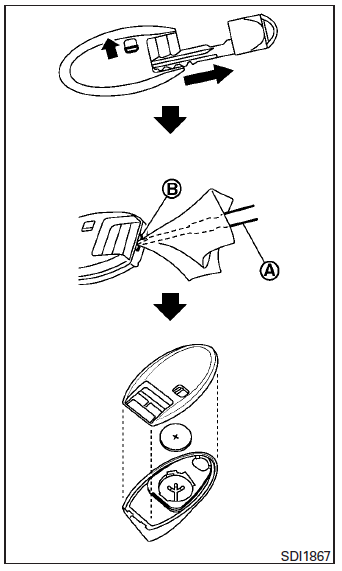
Replace the battery in the Intelligent Key as follows:
- Remove the mechanical key from the Intelligent Key.
- Insert a small screwdriver A into the slit B of the corner and twist it to separate the upper part from the lower part. Use a cloth to protect the casing.
- Replace the battery with a new one.
Recommended battery: CR2025 or equivalent.
- Do not touch the internal circuit and electric terminals as doing so could cause a malfunction.
- Hold the battery by the edges. Holding the battery across the contact points will seriously deplete the storage capacity.
- Make sure that the + side faces the bottom of the case.
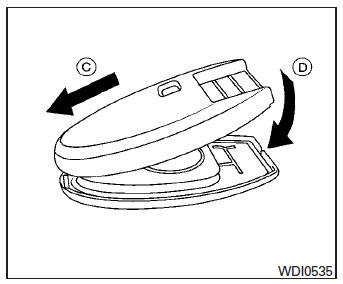
- Close the lid securely as illustrated C D .
- Operate the buttons to check the operation.
See a NISSAN dealer if you need assistance for replacement.
FCC Notice: For USA: This device complies with Part 15 of the FCC Rules. Operation is subject to the following two conditions: (1) This device may not cause harmful interference, and (2) this device must accept any interference received, including interference that may cause undesired operation.
Note:
Changes or modifications not expressly approved by the party responsible for compliance could void the user’s authority to operate the equipment.
For Canada: This device complies with RSS-210 of Industry Canada. Operation is subject to the following two conditions: (1) this device may not cause interference, and (2) this device must accept any interference, including interference that may cause undesired operation of the device.
Download Manual