Entertainment system
Vehicle features and options
This chapter describes model-specific equipment, systems, and functions that are currently available, or may become available in the future, even if they are not present in the vehicle.
Additional information:
Vehicle equipment.
Control elements
Depending on the vehicle type, the following buttons are installed on the center console or on the instrument panel:
|
Button |
Function |
|---|---|
|
|
Adjusting volume. |
|
|
Change the entertainment source. |
|
|
Press once: changes the station/track. Press and hold: fast forward/rewind the track. |


Sound output
Safety information

Do not adjust the volume too high

Volume and sound output
On the instrument panel:
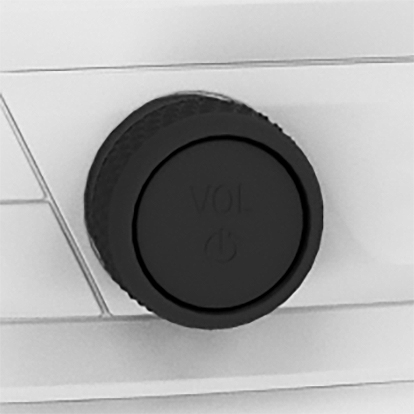
Turn the button to adjust the volume.
Press the button to switch off the sound output. Pressing the button again restores the previous volume setting.
Audio recording playback is stopped during muting.
Entertainment sources
General information
The possible entertainment sources depend on the country and equipment.
Radio.
USB audio.
Bluetooth audio.
Apple CarPlay.
Android Auto.
Third-party apps, e.g., Spotify or YouTube:
 Apps menu
"All apps"
Select desired app.
Additional information:
Applications/apps
Changing the entertainment source
Via the button in the center console:

Press the button.
The most recently selected entertainment source is used.
Press button again.
A list of all currently available entertainment sources is displayed.
Select the desired entertainment source.
Download Manual