Driving
Vehicle features and options
This chapter describes model-specific equipment, systems, and functions that are currently available, or may become available in the future, even if they are not present in the vehicle.
Additional information:
Vehicle equipment.
Start/Stop button
Principle
Pressing the Start/Stop button switches drive-ready state on or off.
General information
Manual transmission: the drive-ready state is switched on when you depress the clutch pedal while pressing the Start/Stop button.
M Steptronic Sport transmission: the drive-ready state is switched on when you depress the brake pedal while pressing the Start/Stop button.
Pressing the Start/Stop button again switches the drive-ready state back off and standby state is switched back on.
Additional information:
Drive-ready state.
Standby state.
Driving off
Turn on drive-ready state.
Apply gear position.
Driving off.
Auto Start/Stop function
Principle
Animation: Auto Start/Stop function

The Auto Start/Stop function helps save fuel. The system switches off the engine during a stop, for instance in traffic jam or at traffic lights. Drive-ready state remains switched on. The engine starts automatically for driving off.
General information
After each engine start using the Start/Stop button, the Auto Start/Stop function is ready.
The function is activated at low speeds.
Engine stop
Functional requirements
The engine is switched off automatically when stopping under the following conditions:
Manual transmission:
Neutral is engaged and the clutch pedal is not pressed.
The driver's seat belt is buckled or the driver's door is closed.
M Steptronic Sport transmission:
The selector lever is in selector lever position D.
The brake pedal remains depressed while the vehicle is at a standstill or the vehicle is held by Automatic Hold.
The driver's seat belt is buckled or the driver's door is closed.
M Steptronic Sport transmission: Manual engine stop
If the engine was not switched off automatically when the vehicle stopped, the engine can be switched off manually:
Depress the brake pedal forcefully again from the current pedal position.
Engage selector lever position P.
When all functional preconditions are fulfilled, the engine switches off.
Air conditioning system when the engine is switched off
The air flow from the air conditioning system is reduced when the engine is switched off.
Display in the instrument cluster

The display in the instrument cluster indicates that the Auto Start/Stop function is ready for an automatic engine start.
Indications on the control display
Total time with switched-off engine
The total time for which the Auto Start/Stop function has switched off the engine is displayed in the trip data.
The total time is automatically reset every time the vehicle is refueled.
Functional limitations
The engine is not switched off automatically in the following situations:
In case of a steep downhill grade.
The brake pedal was not depressed hard enough.
When the ambient temperature is high and automatic climate control is switched on.
The vehicle interior has not yet been heated or cooled as desired.
When window condensation is possible and automatic climate control is switched on.
Engine or other parts are not at operating temperature.
Engine cooling is required.
The wheels are at a sharp angle or the steering wheel is being turned.
Vehicle battery is heavily discharged.
At higher elevations.
Hood is unlocked.
The Automatic Parking Assistant is activated.
For stop-and-go traffic.
M Steptronic Sport transmission: selector lever in position N, S, or R.
After driving in reverse.
Starting the engine
Functional requirements
The engine starts automatically under the following preconditions:
Manual transmission:
By pressing the clutch pedal.
M Steptronic Sport transmission:
By releasing the brake pedal.
When Automatic Hold is activated: step on the accelerator pedal.
Driving off
Accelerating as usual after starting the engine.
Safety mode
After the engine switches off automatically, it will not start again automatically if any one of the following conditions are met:
The driver's seat belt is unbuckled and the driver's door is open.
Hood was unlocked.
Some indicator lights illuminate for a varied length of time.
The engine can only be started via the Start/Stop button.
System limits
Even if driving off was not intended, the deactivated engine starts up automatically in the following situations:
With excessive warming of the interior when cooling is turned on.
With excessive cooling of the interior when heating is turned on.
When window condensation is possible and automatic climate control is switched on.
In case of a steering operation.
M Steptronic Sport transmission:
When changing selector lever position from D or P.
In case of seriously discharged vehicle battery.
When starting an oil level measurement.
Deactivating the system manually
Principle
The engine is not automatically switched off.
The engine is started during an automatic engine stop.
Via button
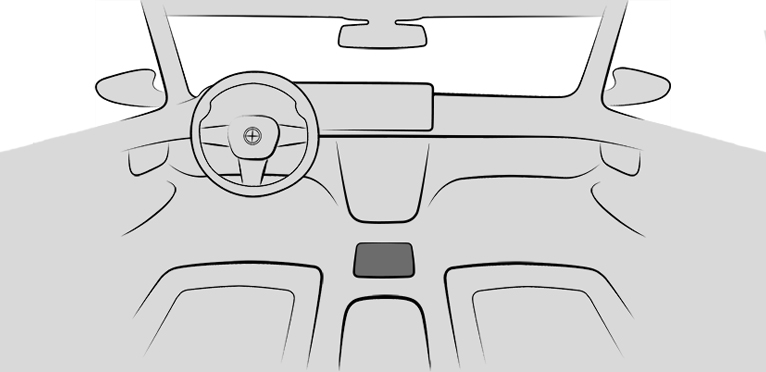

Press the button.
LED is illuminated: Auto Start/Stop function is deactivated.
LED off: Auto Start/Stop function is enabled.
Via iDrive
 Apps menu
"Vehicle"
"Driving settings"
"Drivetrain and chassis"
"Auto Start/Stop"
Select the desired setting.
M Steptronic Sport transmission: via selector lever position
The Auto Start/Stop function is also disabled in selector lever position S.
Using the M1/M2 buttons on the steering wheel
The Auto Start/Stop function can be activated/deactivated using the M1 or M2 buttons on the steering wheel.
Additional information:
M Setup menu.
Switching off the vehicle during an automatic engine stop
If the engine stops automatically, the vehicle can be parked safely, for example to leave it.
Manual transmission:
Press the Start/Stop button.
Drive-ready state is switched off.
Standby state is switched on.
Shift into first gear or reverse.
Set the parking brake.
M Steptronic Sport transmission:
Press the Start/Stop button.
Drive-ready state is switched off.
Standby state is switched on.
Selector lever position P is engaged automatically.
Set the parking brake.
Automatic deactivation
In certain situations, the Auto Start/Stop function is deactivated automatically for safety reasons, for instance if no driver is detected.
Malfunction
The Auto Start/Stop function no longer switches off the engine automatically. A Check Control message is displayed. You may continue driving. Have the vehicle checked by an authorized service center or another qualified service center or repair shop.
Manual transmission
Safety information

Observe before exiting the vehicle

Shifting into 5th or 6th gear
Shift pattern
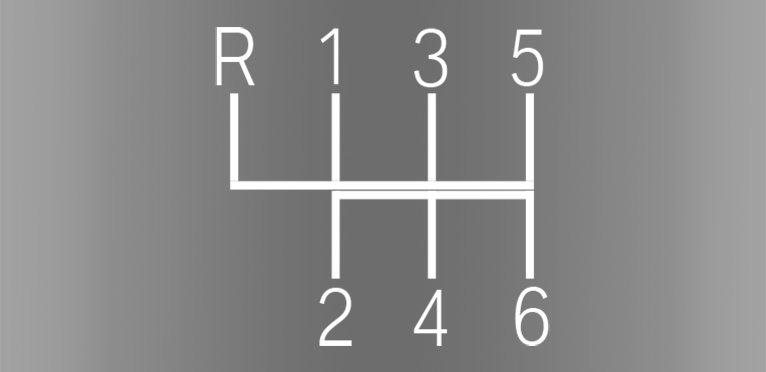
1–6: forward gears.
R: reverse gear.
Shifting
Gear Shift Assistant
When the Gear Shift Assistant is activated, the rpm will be adjusted automatically during a shifting operation for a fast gear change.
The system is automatically active when the vehicle is turned on.
The Gear Shift Assistant can be deactivated/activated via the M Setup menu.
Additional information:
M Setup menu.
Reverse gear
Select only when the vehicle is stationary.
To overcome the resistance push the gearshift lever dynamically to the left and engage reverse gear with a forward shifting movement.
Rolling or pushing the vehicle
In some situations, the vehicle is to roll without its own power, for instance in a car wash, or be pushed.
Turn on standby state.
Press on the clutch pedal and shift out of a forward gear or reverse.
Release the parking brake.
M Steptronic Sport transmission
General information
The M Steptronic Sport transmission is operated via the selector lever or the two shift paddles on the steering wheel.
The following functions are available:
Various driving programs: Drive mode or sequential mode.
Low Speed Assistant.
Various Drivelogic programs.
Launch Control.
Upshifting display, Shift lights.
Safety information
Securing the vehicle against rolling away
Overview
Selector lever
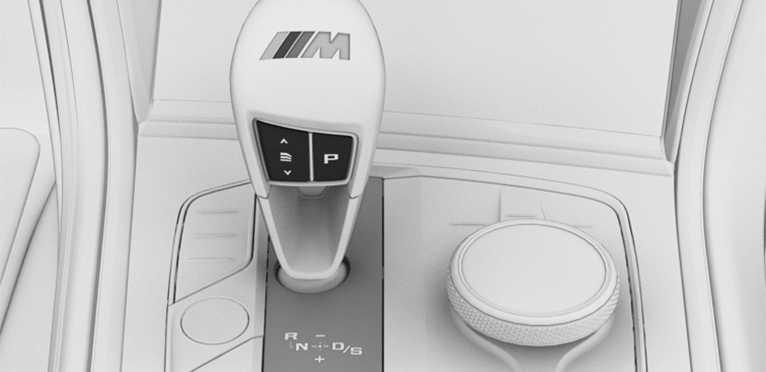
Selector lever functions
|
Icon |
Function |
|---|---|
|
|
DriveLogic modes. |
|
R |
Reverse gear. |
|
N |
Neutral. |
|
|
Center position, forward position. |
|
- |
Downshifting, manual. |
|
+ |
Upshifting, manual. |
|
D/S |
Drive mode or sequential mode. |
|
P |
Parking. |


Selector lever positions
D is Drive mode
Selector lever position for driving. All gears for forward travel are activated automatically.
S is Sequential mode
Selector lever position for driving. All gears for forward travel must be shifted manually.
R is reverse
Engage selector lever position R only when the vehicle is stationary.
N Neutral
In selector lever position N, the vehicle may be pushed or roll without power, for instance, in car washes.
P Park
Selector lever position, for instance for parking the vehicle. The transmission blocks the drive wheels in selector lever position P.
Engage selector lever position P only when the vehicle is stationary.
Selector lever position P is engaged automatically in situations such as the following:
After the drive-ready state or standby state is switched off and selector lever position D/S or R is engaged.
After the standby state has been switched off when selector lever position N is engaged.
The driver's seat belt is unbuckled, the driver's door is opened, and the brake pedal is not pressed while the vehicle is stationary and the selector lever is set to D/S or R.
Engaging a selector lever position
General information
To prevent the vehicle from creeping after you select a gear position or reverse, maintain pressure on the brake pedal until you are ready to drive off.
The engaged selector lever position is displayed in the instrument cluster and on the selector lever.
Functional requirements
Only when the drive-ready state is switched on and the brake pedal is depressed is it possible to change from selector lever position P to another selector lever position.
Engaging selector lever position D/S, N, R
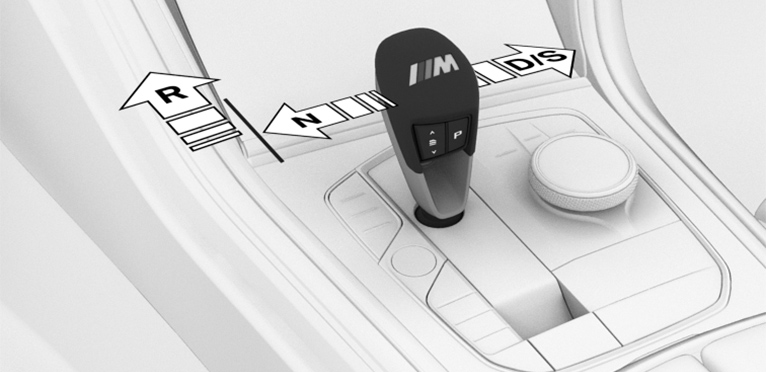
With the driver's seat belt fastened, press on the brake pedal and pull or push the selector lever in the required direction. The selector lever automatically returns to the center position when released.
In selector lever position R, the selector lever locks.
Engaging selector lever position P
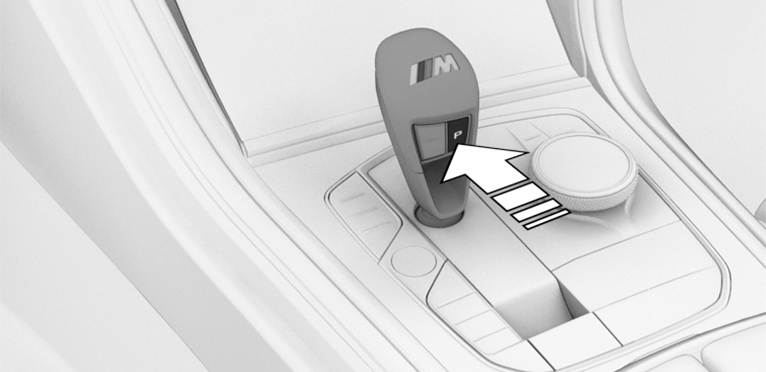
Press button P.
Rolling or pushing the vehicle
General information
In some situations, the vehicle is supposed to roll without its own power for a short distance, for instance in a car wash or to be pushed.
Engaging selector lever position N
Do not switch off standby state in the car wash
Switch on drive-ready state while pressing on the brake pedal.
If necessary, release the parking brake.
If necessary, deactivate Automatic Hold.
Automatic Hold.
Depress the brake pedal.
Engage selector lever position N.
Switch off drive-ready state.
In this way, standby state remains switched on, and a Check Control message is displayed.
The vehicle can roll.
Selector lever position P is engaged automatically after approximately 35 minutes.
If the system is not operational, you may not be able to change the selector lever position.
Electronically unlock the transmission lock, if needed.
Additional information:
Electronic unlocking of the transmission lock.
Kickdown
Kickdown is used to achieve maximum drive power in Drive mode.
Step on the accelerator pedal beyond the resistance point at the full throttle position.
Drive mode D/S
Principle
In Drive mode, all forward gears are automatically changed.
Activating Drive mode
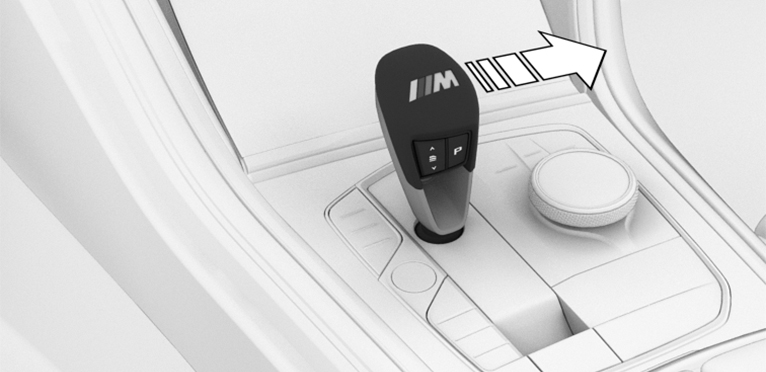
Push the selector lever out of the center position in the D/S direction.
Drive mode is activated. The engaged gear is displayed in the instrument cluster along with a D, e.g., 1 D.
Deactivating Drive mode
Push the selector lever out of Drive mode in the D/S direction. Sequential mode is activated.
The engaged gear is displayed in the instrument cluster, e.g., 1.
Sequential mode D/S
Principle
In sequential mode, it is possible to shift gears manually using the selector lever or the shift paddles without letting off the gas.
General information
Shortly before falling below a gear-dependent minimum speed, the transmission is automatically downshifted.
Once the maximum engine speed is attained, upshifting is not automatically performed in sequential mode and the kickdown is deactivated.
It is also possible to drive off in 2nd gear; for instance, on icy roads.
Activating sequential mode
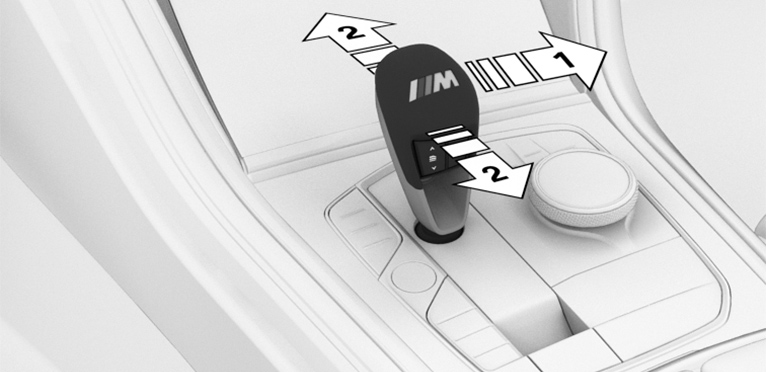
Push the selector lever out of Drive mode in the D/S direction, arrow 1, or shift via the selector lever, arrows at 2.
Sequential mode is activated. The engaged gear is displayed in the instrument cluster, e.g., 1.
Deactivating sequential mode
Push the selector lever out of the center position in the D/S direction. Drive mode is activated.
The engaged gear is displayed in the instrument cluster along with a D, e.g., 1 D.
Gear change
Principle
Manual gear-shifting is possible via the shift paddles or the selector lever in sequential mode.
The shift paddles on the steering wheel allow you to change gears quickly while keeping both hands on the steering wheel.
General information
Shifting
Gears will only be shifted at appropriate engine and road speeds; for instance, downshifting is not possible if the engine speed is too high.
The lowest possible gear is selected by simultaneously operating the kickdown and moving the selector lever forward or actuating the left shift paddle.
Temporary sequential mode
After a shift paddle is actuated in Drive mode, the system temporarily switches to sequential mode.
After conservative driving in sequential mode without acceleration or shifting via the shift paddles for a certain amount of time, the transmission switches back to Drive mode.
Permanent sequential mode
Sequential mode remains permanently active if it was active before the shift paddle was actuated.
Switching to Drive mode
It is possible to switch to Drive mode as follows: pull and hold the right shift paddle.
Switching via the selector lever
Upshifting: pull the selector lever rearwards.
Downshifting: press the selector lever forward.
A shift in Drive mode causes a switch to Sequential mode.
Switching via the shift paddles
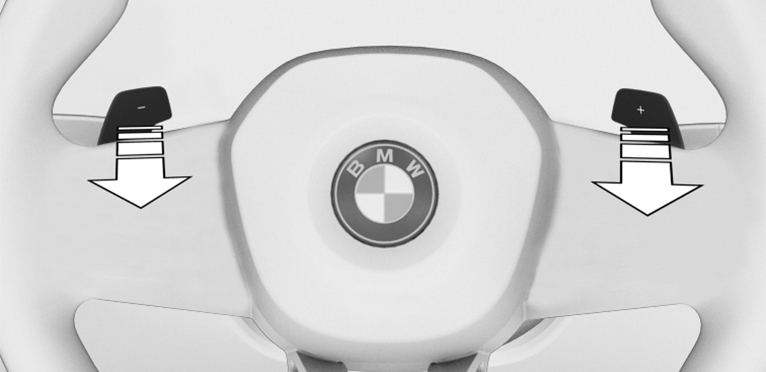
Upshift: pull right shift paddle.
Downshift: pull left shift paddle.
Display on the selector lever
The actually engaged transmission position can deviate from the selector lever position in some situations. The display in the selector lever flashes.
Observe the display in the instrument cluster in these cases.
Displays in the instrument cluster
Drive mode
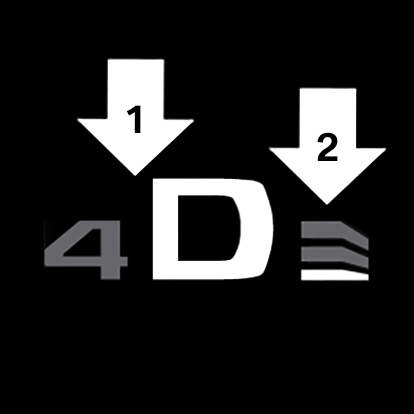
Engaged gear together with a D, arrow 1.
Selected Drivelogic program, arrow 2.
Sequential mode
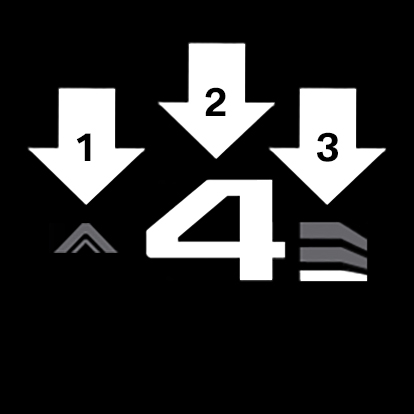
Gear shift indicator, arrow 1.
Engaged gear, arrow 2.
Selected Drivelogic program, arrow 3.
Notice
When the outside temperature is very low, the display may not work. Current driving direction is recognizable at the engaged selector lever position.
Low Speed Assistant
Principle
The Low Speed Assistant gives assistance at very low speeds. The vehicle moves at walking speed.
General information
Use the Low Speed Assistant for maneuvering or in stop-and-go traffic.
The Low Speed Assistant can also be used for rocking the vehicle free in the snow. To do this, change over between reverse gear and forward gear without stepping on the brakes in the process.
Activating
Switch on drive-ready state while pressing on the brake pedal.
If necessary, release the parking brake.
If necessary, deactivate Automatic Hold.
Engage selector lever position D/S or R.
Release brake.
In 1st and 2nd gear and in reverse, the vehicle rolls at minimum speed.
Deactivating
Decelerate the vehicle to a stop.
Drivelogic
Principle
Drivelogic changes the gear-shifting characteristics of the M Steptronic Sport transmission. For example, the shifting points are changed in Drive mode and the shifting times in sequential mode.
General information
Three Drivelogic programs are available.
Whenever you switch between Sequential mode and Drive mode, the last program selected is enabled.
If drive-ready state is switched on after the vehicle has been idle, DriveLogic program D1 is enabled in Drive mode.
Drivelogic programs
|
Program |
Drive mode |
Sequential mode |
|---|---|---|
|
|
Efficient driving. |
Comfortable shifting operations. |
|
|
Fast driving. |
Sporty, fast shifting operations. |
|
|
Sporty driving. |
Maximum shifting speed, Launch Control. |
 D1/S1
D1/S1 D2/S2
D2/S2Selecting a DriveLogic program
Via the rocker switch on the selector lever

Press the rocker switch repeatedly until the desired DriveLogic program is displayed on the instrument cluster.
Via iDrive
It is possible to configure the required DriveLogic program for buttons M1 or M2.

Press the button.
"M1 CONFIGURATION" or "M2 CONFIGURATION"
"Transmiss."
Selecting the desired DriveLogic program
"D1" to "D3": Drive mode.
"S1" to "S3": sequential mode.
The setting is immediately applied with active M1 or M2 configuration.
To activate the desired configuration with the selected settings, press the corresponding button on the steering wheel:


Additional information:
M Setup menu.
Display in the instrument cluster
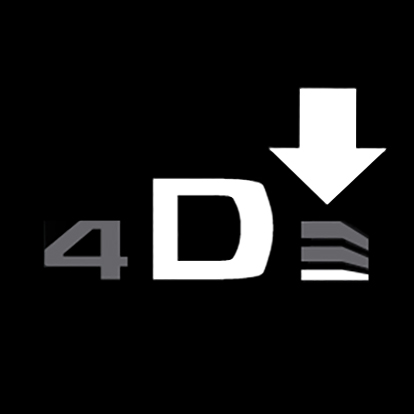
The DriveLogic program selected corresponds to the number of illuminated fields.
Electronic unlocking of the transmission lock
General information
Unlock the transmission lock electronically, e.g., to maneuver the vehicle out of a hazardous area in the event of a malfunction.
Unlocking is possible, if the starter can crank the engine.
Before unlocking the transmission lock, set the parking brake to prevent the vehicle from rolling away.
Engaging selector lever position N
Press and hold down brake pedal.
Press the Start/Stop button. The starter must audibly start. Hold the Start/Stop button pressed.
With your free hand, press and hold the selector lever in selector lever position N, until selector lever position N is displayed in the instrument cluster.
A Check Control message is displayed.
Release Start/Stop button and selector lever.
Release brake, as soon as the starter stops.
Maneuver the vehicle from the hazardous area and secure it against rolling away.
Additional information:
Tow-starting/towing.
Launch Control
Principle
Launch Control enables optimum acceleration on roads with good traction under dry surrounding conditions.
General information
The use of Launch Control causes premature component wear since this function represents a very heavy load for the vehicle.
Do not use Launch Control during the break-in.
Do not steer the steering wheel when driving off with Launch Control.
Additional information:
Break-in.
Functional requirements
Launch Control is available when the engine is at operating temperature. The engine is at operating temperature after an uninterrupted trip of at least 6 miles/10 km.
Starting with launch control
Manual transmission
Turn on drive-ready state.
Activate M Dynamic Mode.
M Dynamic Mode (MDM).
Step on the clutch pedal.
Engage first gear.
Press the accelerator pedal all the way down.
A destination flag is displayed in the instrument cluster.
Preparing Launch Control. An appropriate Check Control message is displayed.
Keep the accelerator pedal in this position.
The starting engine speed adjusts. With sufficiently high starting torque, the Launch Control is active.
An appropriate Check Control message is displayed.
Disengage the clutch quickly within approx. 6 seconds. The vehicle accelerates.
Observe the Shift lights and upshift on time.
M Steptronic Sport transmission
Turn on drive-ready state.
Deactivate the Dynamic Stability Control.
Dynamic Stability Control.
Without xDrive: select sequential mode with gear 2 and Drivelogic program S3.
With xDrive: select sequential mode with gear 1 and Drivelogic program S3.
With your left foot, forcefully press down on the brake.
Press and hold down the accelerator pedal beyond the resistance point at the full throttle position, kickdown.
A destination flag is displayed in the instrument cluster.
Preparing Launch Control. An appropriate Check Control message is displayed.
Keep the accelerator pedal in this position.
The starting engine speed adjusts. With sufficiently high starting torque, the Launch Control is active.
An appropriate Check Control message is displayed.
Now release the brake. The vehicle accelerates.
Upshifting occurs automatically as long as the destination flag is displayed and the accelerator pedal is not released.
Repeated use during a trip
After Launch Control has been used, it is necessary to drive a certain distance before Launch Control can be used again. Launch Control adjusts to the surrounding conditions, when used again.
After using Launch Control
To support driving stability, reactivate Dynamic Stability Control as soon as possible.
System limits
Manual transmission: if drive-off is delayed, the Launch Control is automatically terminated to protect the engine.
The best acceleration figures are reached with sport tires at operating temperature.
An experienced driver may be able to achieve better acceleration values in DSC OFF mode.
Parking brake
Principle
The parking brake is used to prevent the vehicle from rolling away when it is parked.
Safety information
Observe before exiting the vehicle
Do not leave children or animals unattended in the vehicle
Overview
Button in the vehicle

Parking brake
Setting the parking brake
With a stationary vehicle
Pull the switch.
The LED illuminates.

The indicator light in the instrument cluster illuminates red.
The parking brake is set.
While driving
Use while driving serves as an emergency braking function.
Pull the switch and hold it. The vehicle brakes hard while the switch is being pulled.
The indicator light in the instrument cluster illuminates red, a signal sounds, and the brake lights illuminate.
A Check Control message is displayed.
The parking brake is engaged when the vehicle is stationary.
With Emergency Stop Assistant
Briefly pull the switch to trigger the Emergency Stop Assistant.
Additional information:
Emergency Stop Assistant.
Releasing the parking brake
Releasing the parking brake manually
Turn on drive-ready state.
Manual transmission: press the switch while the brake pedal is depressed.
M Steptronic Sport transmission: press the switch while the brake is depressed or selector lever position P is set.
The LED and the indicator light go out.
The parking brake is released.
Releasing the parking brake automatically
The parking brake is released automatically when you drive off.
The LED and the indicator light go out.
Malfunction
If the parking brake fails or malfunctions, secure the vehicle so that it does not roll away before you exit.
A Check Control message is displayed.
Secure the vehicle against rolling away, for instance with a wheel chock, after getting out of the vehicle.
After a power interruption
To reestablish parking brake operability after a power interruption, an initialization may be required.
Turn on standby state.
Pull the switch while stepping on the brake pedal or while selector lever position P is set and then push.
This process may take a few seconds. Some mechanical sounds associated with this process are normal.
The indicator light is no longer illuminated as soon as the parking brake is ready for operation again.
M Steptronic Sport transmission: Automatic Hold
Principle
Automatic Hold assists the driver by automatically setting and releasing the brake such as when moving in stop-and-go traffic.
The vehicle is automatically held in place when it is stationary.
On uphill grades the system prevents the vehicle from rolling back when driving off.
General information
The parking brake is automatically engaged under the following conditions:
Drive-ready state is switched off.
The driver's door is opened while the vehicle is stationary.
The moving vehicle is brought to a standstill using the parking brake.
Safety information
Observe before exiting the vehicle
Do not leave children or animals unattended in the vehicle
Deactivate Automatic Hold
Overview
Button in the vehicle

Automatic Hold
Activating Automatic Hold
Turn on drive-ready state.
Press the button.
The LED illuminates.

The indicator light illuminates green.
Automatic Hold is activated.
After every vehicle restart, the last selected setting is active.
Automatic Hold holding the vehicle
Automatic Hold is activated and the driver’s door is closed.

After stopping, the vehicle is automatically secured against rolling away as soon as the indicator light illuminates green.
Driving off
Press the accelerator pedal to drive off.
The brake is released automatically and the indicator light of the parking brake is no longer illuminated.
Automatic parking brake application
The parking brake is automatically set if drive-ready state is switched off while the vehicle is being held by Automatic Hold or if the vehicle is exited.
The indicator light changes from green to red.
The parking brake is not set automatically if the drive-ready state was switched off while the vehicle was coasting. Automatic Hold is temporarily deactivated in this case.
Deactivate Automatic Hold
Press the button.
The LED goes out.
The indicator light goes out.
Automatic Hold is switched off.
If the vehicle is being held by Automatic Hold, also press on the brake pedal when switching off.
M Engine Dynamics Control
Principle
M Engine Dynamics Control affects the vehicle engine's response to movements of the accelerator pedal.
Overview
Button in the vehicle
SETUP
Programs
|
Program |
Response characteristics |
|---|---|
|
"EFFICIENT" |
Efficient, comfortable. Minimal consumption. Ideal, for instance in city traffic or on snow. |
|
"SPORT" |
Sporty, dynamic. |
|
"SPORT PLUS" |
Spontaneous, direct. Maximum dynamics. |
The SPORT and SPORT PLUS programs change the sound characteristics of the exhaust system. The sound takes on a sporty nature.
Selecting a program
Using the button
Press the button and select the desired program on the control display.
Via iDrive
M Engine Dynamics Control settings can be configured in M setup.
Additional information:
M Setup.
Display in the instrument cluster

When the display for M Setup is activated in the instrument cluster, the selected program is displayed.
Additional information:
Central display area
Sound control
Principle
The sound control function changes the sound characteristics of the exhaust system.
General information
When sound control is switched on, the sound of the exhaust system takes on a sporty nature.
When sound control is switched off, the sound is focused on comfort.
During the engine warm-up phase, sound control does not have any effect on the sound of the exhaust system.
Additional information:
High-performance engine.
Overview
Button in the vehicle

Sound control
Activate/deactivate the function
Using the button
Press button to activate or deactivate the sound control.
Depending on the equipment, a Check Control message is displayed when the Sound Control is turned on or an LED will illuminate in the button.
Via iDrive
Sound control settings can be configured in M Setup.
Additional information:
M Setup.
Download Manual