Driving stability control systems
Vehicle features and options
This chapter describes model-specific equipment, systems, and functions that are currently available, or may become available in the future, even if they are not present in the vehicle.
Additional information:
Vehicle equipment.
Antilock Braking System
Principle
The Antilock Braking System prevents locking of the wheels while braking.
You remain able to steer your vehicle even during full braking, which increases active driving safety.
General information
The Antilock Braking System is ready after each time drive-ready state is turned on.
Malfunction
The warning light on the instrument cluster illuminates.
A Check Control message is displayed.
The Antilock Braking System is not available.
Steerability is limited during full braking.
Have the vehicle checked immediately by an authorized service center or another qualified service center or repair shop.
Brake assistant
The brake assistant automatically applies maximum braking assistance when the brake pedal is depressed quickly. This reduces the braking distance to a minimum for full braking.
To make full use of braking assistance, do not reduce the pressure on the brake pedal during full braking.
Drive-off assistant
Principle
The drive-off assistant supports driving off on uphill grades.
Driving off
Hold the vehicle by depressing the brake pedal.
Release the brake pedal and drive off quickly.
After the brake pedal is released, the vehicle is held in place for approx. 2 seconds.
Depending on the vehicle loading, the vehicle may roll back slightly.
In order to prevent rolling back when driving off, use the parking brake.

Pull and release switch before driving off.
The parking brake is set.
Step on the accelerator pedal sufficiently to drive off.
M Setup
Principle
The SETUP button is used to configure various driving dynamics and drive systems.
General information
When the drive-ready state is switched on after the idle state, an efficient vehicle condition is active by default.
Overview
Button in the center console
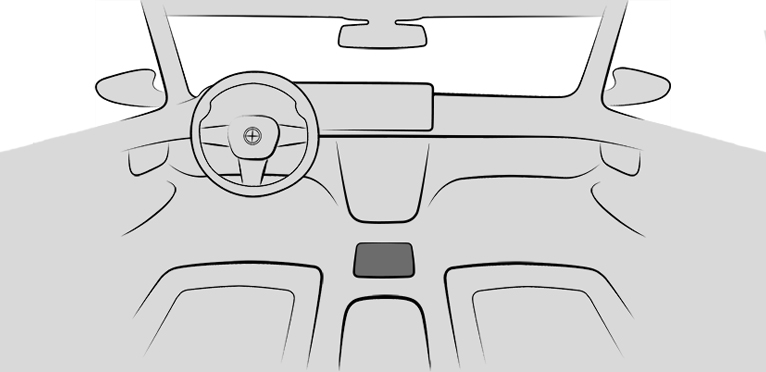

SETUP
Buttons on the steering wheel
|
Button |
Function |
|---|---|
|
|
M1 configuration |
|
|
M2 configuration |
Settings
|
Icon |
System |
|---|---|
|
|
"Engine": M Engine Dynamics Control programs. |
|
|
Manual transmission: "Gear Shift Assistant": RPM change at gear change. Gear Shift Assistant. |
|
|
"Chassis": programs of Adaptive M suspension. |
|
|
"Steering": programs of Servotronic. |
|
|
"Brake": programs of brake. |
|
|
"M Traction Control": M Traction Control. |

The following systems can also be configured for M1/M2:
|
Icon |
System |
|---|---|
|
|
"Auto Start/Stop": Auto Start/Stop function. |
|
|
M Steptronic Sport transmission: "Drivelogic": shift modes and Drivelogic programs. Drivelogic. |
|
|
"DSC": Dynamic Stability Control and M Dynamic Mode. |
|
|
"M Sound": Sound Control. |

Operation via SETUP
General information
The settings from the SETUP button are applied directly. The settings are not saved.
Configuring M Setup
Press the button.
Select the desired setting.
Operation via M1/M2
General information
The settings for the driving dynamics and drive systems can be configured for the M1/M2 buttons and retrieved if required.
With activated M1 or M2 configuration, any changes to the setting are immediately applied.
When M1/M2 is deactivated or reset, the driving dynamics and drive systems are reset to their default settings.
Safety information

Modify your driving style and intervene as needed

Configuring M1/M2
Press the button.
"M1 CONFIGURATION" or "M2 CONFIGURATION"
Select the desired setting.
The individual settings are stored for the configuration currently in use.
Alternatively, current system settings can be directly saved to M1 or M2. To do this, press and hold the desired button on the steering wheel until an acoustic signal sounds.
Activating M1/M2
Press the corresponding button on the steering wheel:

Activate M1.

Activate M2.
"M1 CONFIGURATION" or "M2 CONFIGURATION": If DSC OFF or M Dynamic Mode is set, a message is displayed on the instrument cluster. This message is confirmed by pressing the button again.
Disabling M1/M2
Press the corresponding button on the steering wheel.
Resetting M1/M2
Press the button.
"M1 CONFIGURATION" or "M2 CONFIGURATION"
"Reset"
"Reset M1 settings."
To cancel resetting: "Cancel"
Display in the instrument cluster
|
Icon |
Description |
|---|---|
|
|
Icon illuminates: corresponding configuration is activated. |
|
|
Icon illuminates and "Function cannot currently be activated." appears: Configuration cannot be activated due to current driving situation. Reactivate configuration when the lettering is not illuminated. |
M MODE
Principle
Driver assistance and collision warning systems can be adapted to the situation via M MODE.
The display on the instrument cluster and the Head-up display view change with the selected drive mode.
General information
The following driving modes are available:
"ROAD"
"SPORT"
Depending on the equipment:
"TRACK"
The view on the instrument cluster changes depending on the selected drive mode.
Safety information
Observe surrounding traffic and adapt driving style
Indicators and warnings do not absolve the driver from personal responsibility
Overview
Button in the vehicle
M MODE
Driving modes
ROAD drive mode
All available collision warning systems are switched on.
All available driver assistance systems are active.
ROAD drive mode is activated after drive-ready state is switched on.
SPORT drive mode
Depending on the equipment, the following systems are deactivated:
Lane departure warning.
Side collision mitigation.
Manual Speed Limiter.
Cruise control.
Active Cruise Control with Distance Control.
Steering Assistant.
Assisted Driving Mode Plus.
Lane Change Assistant.
The vehicle automatically switches to ROAD driving mode when you activate certain systems.
Depending on vehicle equipment:
TRACK driving mode
In addition to the deactivated systems in SPORT drive mode, the following systems are deactivated, depending on vehicle equipment:
Speed Limit Info with no-passing indicator.
Forward Collision Mitigation.
Active Blind Spot Detection.
Rear-end collision preparation.
Hazard flashing with hard braking right before standstill is deactivated.
Control display is switched off.
The functions of the entertainment system are switched off.
Selecting the driving mode
ROAD and SPORT drive modes can only be enabled when drive-ready state is switched on.
TRACK drive mode can only be enabled when the vehicle is stationary or driving at a very low speed.
Press the button.
Select the desired setting.
In addition, the collision warning systems can be adjusted.
Additional information:
Collision warning systems.
Servotronic
Principle
Servotronic is a speed-dependent power steering function.
The system provides the steering force with more support at low speeds than at higher ones. This makes it easier to park, for instance, and makes steering firmer when driving at faster speeds.
Furthermore, the steering force adapts to the driving mode to convey a firm, sporty feel or a comfortable steering response.
Overview
Button in the vehicle
SETUP
Programs
|
Program |
Steering force tuning |
|---|---|
|
"COMFORT" |
Low steering forces, good roadway feedback. |
|
"SPORT" |
High steering forces, maximum roadway feedback. |
Selecting a program
Using the button
Press the button and select the desired program on the control display.
Via iDrive
Servotronic settings can be configured in M Setup.
Additional information:
M Setup.
Display in the instrument cluster
When the display for M Setup is activated in the instrument cluster, the selected program is displayed.
Additional information:
Central display area
Brake
Principle
The sensitivity of the brake pedal motions to the braking response can be adjusted.
Overview
Button in the vehicle
SETUP
Programs
|
Program |
Response characteristics |
|---|---|
|
"COMFORT" |
Comfortable braking. |
|
"SPORT" |
Sensitive braking. |
Selecting a program
Using the button
Press the button and select the desired program on the control display.
Via iDrive
Brake settings can be configured in M Setup.
Additional information:
M Setup.
Display in the instrument cluster
When the display for M Setup is activated in the instrument cluster, the selected program is displayed.
Additional information:
Central display area
Dynamic Stability Control
Principle
Animation: Dynamic Stability Control

Dynamic Stability Control helps keep the vehicle on a steady course in critical driving situations. The drive power is reduced depending on the situation, and wheels can be braked individually.
General information
The system detects the following unstable driving conditions, for instance:
Skidding, which can lead to oversteering.
Loss of adhesion of the front wheels, which can lead to understeering.
Safety information
Also observe surrounding traffic and adapt driving style
Do not deactivate the Dynamic Stability Control when driving with a roof load
Overview
Button in the vehicle
Dynamic Stability Control
Activating/deactivating Dynamic Stability Control
General information
Dynamic Stability Control is automatically activated whenever drive-ready state is switched on.
If Dynamic Stability Control is deactivated, driving stability is limited when accelerating and cornering.
To support driving stability, reactivate Dynamic Stability Control as soon as possible.
Activating/deactivating the system
Press the button to open the menu.
"DSC OFF"
Dynamic Stability Control is deactivated.
Press the button again to reactivate Dynamic Stability Control.
Depending on vehicle equipment, the following programs can be displayed and selected immediately after disabling Dynamic Stability Control:
M Traction Control.
M Drift Analyzer.
Dynamic Stability Control settings can be configured in M Setup.
Additional information:
M Setup.
Displays in the instrument cluster

View when Dynamic Stability Control is deactivated.
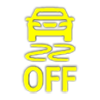
Indicator light illuminates: Dynamic Stability Control is deactivated.
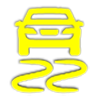
Warning light flashes: Dynamic Stability Control is regulating the driving and brake power. The vehicle is stabilized. Reduce speed and modify your driving style to the driving circumstances.
Warning light illuminates: Dynamic Stability Control has failed or is initializing. Driving stabilization is restricted or has failed.
If the warning light illuminates continuously, have the vehicle checked immediately by an authorized service center or another qualified service center or repair shop.
Automatic program change
Dynamic Stability Control can be activated automatically by Forward Collision Mitigation depending on the situation. Deactivate Forward Collision Mitigation as necessary.
Additional information:
Forward Collision Mitigation with brake intervention.
M Dynamic Mode
Principle
M Dynamic Mode allows a ride with high longitudinal and lateral acceleration but with limited driving stability.
Only in the absolute limit range does the system intervene for stabilization by reducing the engine power and by brake interventions on the wheels. In this driving condition, additional steering corrections may be necessary.
General information
Depending on vehicle equipment, the active M xDrive mode is: "4WD SPORT" when M Dynamic Mode is activated.
You may find it useful to briefly activate the system under the following special circumstances:
When rocking the vehicle free from deep snow or driving off from loose ground.
With an increased need for dynamics or longitudinal acceleration, for instance when driving on a race track.
To support driving stability, reactivate Dynamic Stability Control.
Safety information
Observe surrounding traffic and intervene where appropriate
Overview
Button in the vehicle
Dynamic Stability Control
Activate/deactivate the function
Press the button to open the selection.
"MDM"
M Dynamic Mode is activated.
Press the button again to reactivate Dynamic Stability Control.
Display in the instrument cluster
|
Icon |
Description |
|---|---|
|
|
Display active and warning light illuminates: M Dynamic Mode is activated. |
|
|
Dynamic Stability Control warning light also flashes: M Dynamic Mode controls the driving and brake power. |
|
|
Indicator and warning lights illuminate: The M Dynamic Mode or the Dynamic Stability Control has malfunctioned. |
M Traction Control
Principle
M Traction Control permits the gradual adjustment of the wheel-slip behavior of the rear wheels during acceleration by regulating the driving power accordingly.
General information
If Dynamic Stability Control is deactivated after an idle state, the M Traction Control level OFF/Level 0 is set.
Safety information
Observe surrounding traffic and adapt driving style
Overview
Button in the vehicle
SETUP
Functional requirement
Dynamic Stability Control is deactivated and, depending on vehicle equipment, M xDrive mode 2WD is activated.
Additional information:
Dynamic Stability Control.
Selecting settings
Using the button
Press the button.
"M Traction Control"
Select the desired setting:
OFF/Level 0: support switched off. Wheels may spin strongly with severe oversteering.
Level 10: maximum support. Wheels may spin slightly with slight oversteering.
Via iDrive
M Traction Control settings can be configured in M Setup.
Additional information:
M Setup.
Displays in the instrument cluster
|
Icon |
Description |
|---|---|
|
|
Display is active and indicator light illuminates: The Dynamic Stability Control is deactivated. |
|
|
Dynamic Stability Control warning light also flashes: M Traction Control is regulating the drive power. |
|
|
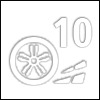
M Traction Control level display. |
|
|
Indicator light flashes: M Traction Control level is changed. |

M Drift Analyzer
Principle
The M Drift Analyzer detects and evaluates when the vehicle is moved in the drift.
General information
For safety reasons, the use of the M Drift Analyzer is only permitted outside of public road traffic and under suitable ambient conditions.
Higher mechanical and thermal loads while drifting lead to increased wear. This wear is not covered by the warranty. Check the tire condition and the tire tread depth before driving off.
The data can be recorded as individual drifts or as total distance in a drift session.
M Traction Control assists the driver depending on the setting.
Additional information:
M Traction Control.
Safety information
Observe surrounding traffic and adapt driving style
Overview
Button in the vehicle
Dynamic Stability Control
Activating/deactivating the system
General information
Dynamic Stability Control is deactivated when the M Drift Analyzer is activated.
The system detects independently when a single drift starts and ends.
Depending on vehicle equipment, the active M xDrive mode is: "2WD" when M Drift Analyzer is activated.
Deactivating M Drift Analyzer activates Stability Control and 4WD mode.
Using the button
Press the button.
"DSC OFF"
"M Drift Analyzer"
"Activate"
Confirm message.
Via iDrive
 Apps menu
"Vehicle"
"M Drift Analyzer"
"Activate"
If necessary, "Activate anyway"
Set the M Traction Control level
Apps menu
"Vehicle"
"M Drift Analyzer"
"M Traction Control"
Select the desired setting.
Displays
Indications on the control display
The following information is shown on the control display:
Values from the last and best drift.
Drift angle performance values.
Displays in the instrument cluster
The following icons are shown on the instrument cluster and, depending on vehicle equipment, on the Head-up display:
|
Icon |
Description |
|---|---|
|
|
Assessment of the current drift. The number of stars that can be reached varies depending on the selected M Traction Control level. The better the drift, the more stars are filled out. |
|
|
Current drift is the best drift. |
|
|
M Drift Analyzer is activated. |
|
|
For an optimal drift, apply the accelerator pedal less. |



Reset the data
Apps menu
"Vehicle"
"M Drift Analyzer"
"Reset"
Active M differential
The active M differential provides for continuously variable locking of the rear axle differential depending on the driving situation. This prevents an individual rear wheel from spinning even when the Dynamic Stability Control is turned off and in M Dynamic Mode, and thus enables optimum traction in all driving situations.
The driver is responsible adapting his or her driving style to the situation.
Download Manual