Using the air conditioning system and defogger
*: If equipped
Fan speed control switch Temperature control switch “MAX A/C” switch
“A/C” switch
Outside air mode switch Recirculated air mode switch Airflow mode control switch
Rear window defogger and outside rear view mirror defoggers switch*
Windshield defogger switch On/off switch
Rear window defogger switch*
*: If equipped
If “A/C” switch is not pressed, the system will blow ambient tempera- ture air or heated air.
For quick cooling, press the “MAX A/C” switch. The air conditioning will automatically turn on and, if an
417
air outlet position  or
or  is selected, the system will be set to recirculated air mode. While “MAX A/C” is selected, it is not possible to turn off the air conditioning.
Pressing the on/off switch to turns off the fan.
When the fan is off, pressing the on/off switch or turning the fan speed control switch clockwise will turn on the fan.
The airflow mode changes as fol- lows each time the switch is pressed.
defogger operates
The indicator illuminates on the recirculated air mode switch.
The indicator illuminates on the out- side air mode switch.
When the function is on, the indica- tor illuminates on the “A/C” switch.
Press the windshield defogger switch.
Set the outside/recirculated air mode switch to outside air mode if the recirculated air mode is used.
To defog the windshield and the side windows quickly, turn the air flow and temperature up.
To return to the previous mode, press the windshield defogger switch again when the windshield is defogged.
When the windshield defogger switch is on, the indicator illumi- nates on the windshield defogger
switch.
A defogger is used to defog the rear window.
Press the rear window defogger switch.
The defogger will automatically turn off after a while.
When the rear window defogger switch is on, the indicator illumi- nates on the rear window defogger switch.
Defoggers are used to defog the rear window, and to remove raindrops, dew and frost from the outside rear view mirrors.
Press the rear window and out- side rear view mirror defoggers switch.
The defoggers will automatically turn off after a while.
When the rear window and outside rear view mirror defoggers switch is on, the indicator illuminates on the rear window and outside rear view mirror defoggers switch.
Close all windows. If dust thrown up by the vehicle is still drawn into the vehicle after closing the windows, it is recommended that the air intake mode be set to outside air mode and the fan speed to any setting except off.
Setting to the recirculated air mode temporarily is recommended in pre- venting dirty air from entering the vehicle interior and helping to cool the vehicle when the outside air temperature is high.
The dehumidification function may not operate even when “A/C” switch is pressed.
P.487
419
 : If equipped
Front center
|
|
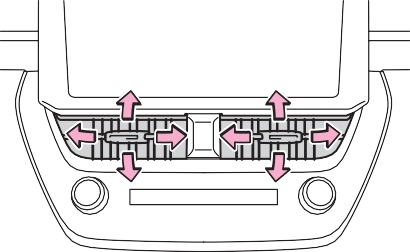
Direct air flow to the left or right, up or down
|
|
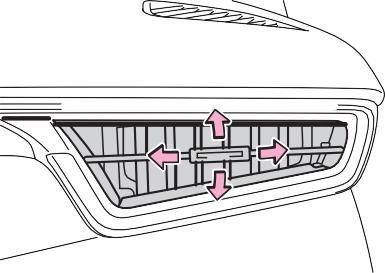
Direct air flow to the left or right, up or down
|
|
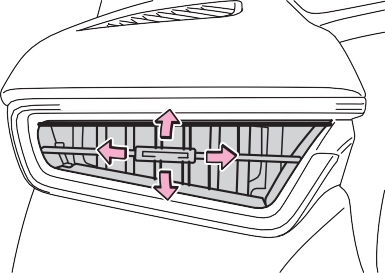
Direct air flow to the left or right, up or down
421
*: If equipped
Outside air mode switch Recirculated air mode switch Eco air conditioning mode switch Airflow mode control switch
Rear window defogger and outside rear view mirror defoggers switch
Windshield defogger switch Off switch
Automatic mode switch
To adjust the temperature set- ting, turn the temperature con- trol switch clockwise (warm) or
counterclockwise (cool).
If “A/C” switch is not pressed, the system will blow ambient tempera- ture air or heated air.
To adjust the fan speed, turn the fan speed control switch clock- wise (increase) or counterclock- wise (decrease).
Pressing the off switch to turns off the fan.
The airflow mode changes as fol- lows each time the switch is pressed.
Switching between outside air and recirculated air modes
The indicator illuminates on the
recirculated air mode switch.
The indicator illuminates on the out- side air mode switch.
When the function is on, the indica- tor illuminates on the “A/C” switch.
Press the windshield defogger switch.
Set the outside/recirculated air mode switch to outside air mode if the recirculated air mode is used. (It may switch automatically.)
To defog the windshield and the side windows quickly, turn the air flow and temperature up.
To return to the previous mode, press the windshield defogger switch again when the windshield is defogged.
When the windshield defogger switch is on, the indicator illumi- nates on the windshield defogger switch.
423
Press the rear window and out- side rear view mirror defoggers switch.
The defoggers will automatically turn off after a while.
When the rear window and outside rear view mirror defoggers switch is on, the indicator illuminates on the rear window and outside rear view mirror defoggers switch.
Press the eco air conditioning mode switch.
When the eco air conditioning mode is on, the indicator illumi- nates on the eco air conditioning mode switch.
defog the windshield effectively.
Close all windows. If dust thrown up by the vehicle is still drawn into the vehicle after closing the windows, it is recommended that the air intake mode be set to outside air mode and the fan speed to any setting except off.
The dehumidification function may
not operate even when “A/C” switch is pressed.
be delayed for a short period of time immediately after the air con- ditioning system is started in auto- matic mode.
P.487
|
Caution |
|
|
Air conditioning sys- tem |
|
|
Air conditioning sys- tem lubricant type |
|
|
|
Requires registered technician to service air conditioning sys- tem |
|
Flammable refrigerant |

Some functions can be customized. (P.580)
|
|
|
To prevent the windshield from fogging up
Do not use the windshield defog- ger switch during cool air opera- tion in extremely humid weather. The difference between the tem- perature of the outside air and that of the windshield can cause the outer surface of the wind- shield to fog up, blocking your vision. When the outside rear view mirror defoggers are operat- ing
Do not touch the outside rear view mirror surfaces, as they can become very hot and burn you. |
 WARNING
|
|
|
To prevent battery discharge
Do not leave the air conditioning system on longer than necessary when the engine is off. When repairing/replacing parts of the air conditioning system
Have repair/replacement per- formed by your Toyota dealer. When a part of the air conditioning system, such as the evaporator, is to be replaced, it must be replaced with a new one. |
 NOTICE
 To stop the operation, press the off switch.
If the fan speed setting or air flow modes are operated, the automatic mode indicator goes off. However, automatic mode for functions other than that operated is maintained.
425
Fan speed is adjusted automati- cally according to the temperature setting and the ambient conditions.
Therefore, the fan may stop for a while until warm or cool air is ready to flow immediately after the auto- matic mode switch pressed.
|
|
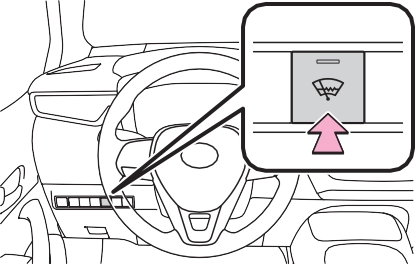
When the windshield wiper de-icer switch is on, the indicator illumi- nates on the windshield wiper
de-icer switch.
The windshield wiper de-icer will automatically turn off after a period of time.
:If equipped
 Adjusting the position of and opening and closing the air outlets
|
|
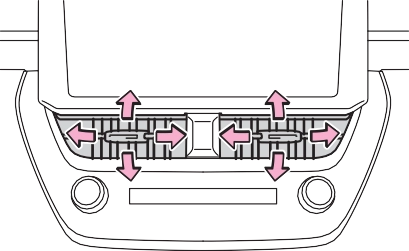
Direct air flow to the left or right, up or down
Front right-hand side
*: If equipped
 Direct air flow to the left or right, up or down
|
|
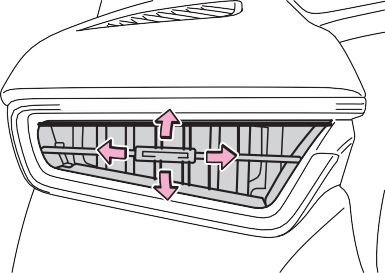
Direct air flow to the left or right, up or down
When the seat heater is on, the indicator illuminates on the seat
427
When the heated steering wheel is on, the indicator illuminates on the heated steering wheel switch.
|
|
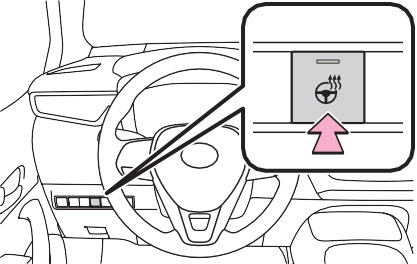
Front
When the seat heater is on, the indicator illuminates on the seat heater switch.
When not in use, put the switch in the neutral position. The indicator will turn off.
Rear
heater switch.
The engine switch is in ON.
|
|
|
To prevent overheating and minor burn injuries
Observe the following precautions when using the seat heaters. Do not cover the seat with a blanket or cushion when using the seat heater.
Do not use seat heater more than necessary.
|
 WARNING
Download Manual