Locking and Unlocking
Remote Control
You can use the remote control at any time.
Unlocking the Doors
The position lamps illuminate when you unlock the doors.When you switch the ignition on, they automatically turn off.
Note: You can unlock the driver door with the key.Use the key when the remote control is not functioning.
Note: When you leave your vehicle unattended for several weeks, the remote control turns off.Your vehicle must be unlocked and the engine started using the key.Unlocking and starting your vehicle once enables the remote control.
One-Stage Unlocking
 Press the button to unlock all doors. The direction indicators will flash. Press the button to unlock all doors. The direction indicators will flash. |
Two-Stage Unlocking
| Press the button to unlock the front doors.Press the button again within three seconds to unlock all doors. The direction indicators will flash. |
Reprogramming the Unlocking Function
When you press the unlock button only the driver and passenger doors unlock. Pressing the unlock button again unlocks all doors.
You can reprogram the unlocking function so that all doors unlock when you press the unlock button once.
- Switch the ignition off.
- Press and hold both the lock and unlock buttons on the remote control until the direction indicators flash twice to confirm the change.
To return to the original unlocking function, repeat the process.
Locking the Doors

Press the button again within three seconds to confirm that all the doors are closed. The doors will lock again, the horn will sound and the direction indicators will flash if all the doors and the liftgate are closed.
Note: If any door or the liftgate is open, or if the hood is open on vehicles with an anti-theft alarm or remote start, the horn does not sound.
Note: Do not use the door latch assembly to attach any accessory, such as handles or steps, as this can cause damage to your vehicle.
Locking and Unlocking the Doors From Inside
The power door lock control is on the driver and front passenger door panels.
 Press the button to lock or unlock all the doors. The lamp illuminates with the doors locked. Press the button to lock or unlock all the doors. The lamp illuminates with the doors locked. |
Opening the Double Rear Doors
Note: If there is a ladder fitted to the rear cargo door, do not open the door fully if the side-loading door is open.
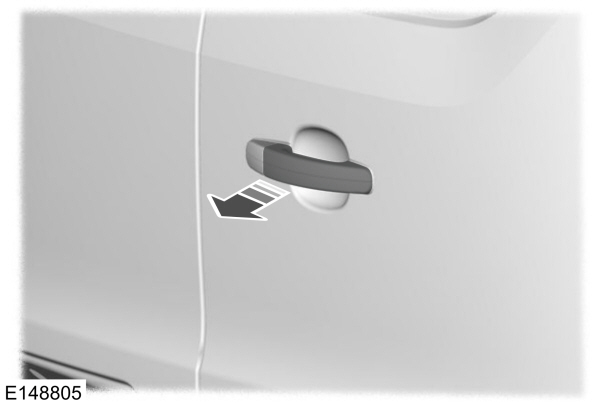
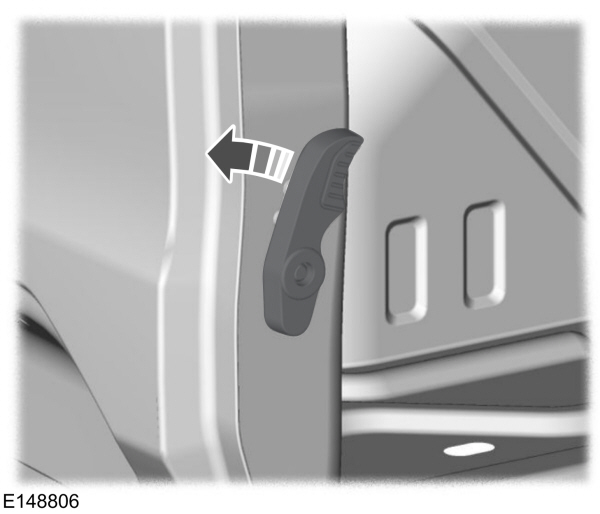
- Open the rear cargo door.
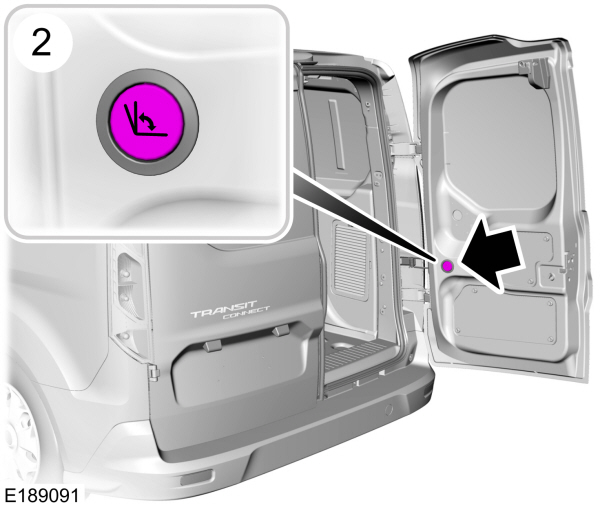
- Press the button.
- Open the cargo door fully.
Locking and Unlocking the Doors with the Key Blade
Note: Do not leave your keys in your vehicle.
Locking with the Key
Turn the top of the key toward the front of your vehicle.
Unlocking with the Key
Turn the top of the key toward the rear of your vehicle.
Unlocking the Doors with the Interior Door Handles
Doors can be unlocked individually by pulling the interior door handles on those doors. Pulling the driver door interior door handle unlocks all the doors, if autounlock has been enabled.
Rear Door Unlocking and Opening
Pull the interior door handle twice to unlock and open a rear door. The first pull unlocks the door and the second pull opens the door.
Smart Unlocks for Integrated Keyhead Transmitter
This helps to prevent you from locking yourself out of your vehicle if the key is still in the ignition.
When you open one of the front doors and lock your vehicle with the power door lock control, all the doors will lock then unlock if the key is still in the ignition.
You can still lock your vehicle with the key in the ignition by pressing the lock button on the remote control even if the doors are not closed.
If both front doors are closed, you can lock your vehicle by any method, regardless of whether the key is in the ignition or not.
Autolock
Autolock locks all the doors and the liftgate when all of the following occur:
- All doors are closed.
- The ignition is on.
- Your vehicle is moving at a speed greater than 4 mph (7 km/h) for more than two seconds.
Autounlock
Autounlock unlocks all the doors when all of the following occur:
- The ignition is on, all doors are closed, and your vehicle is moving at a speed greater than 4 mph (7 km/h) for more than two seconds.
- Your vehicle has come to a stop and you switch the ignition off or to the accessory position.
- The driver door is opened within 10 minutes of you switching the ignition off or to the accessory position.
Note: The doors will not autounlock if your vehicle has been electronically locked after you switch the ignition off and before you open the driver door.
Switching Autounlock On or Off
To switch autounlock on or off, use the information display controls on the steering wheel to select the following:
| Menu Item | Action |
|---|---|
|
Settings |
Press the menu button. |
|
Vehicle Settings |
Press the OK button. |
|
Locks |
Press the OK button. |
|
Autounlock |
Press the OK button. |
Emergency Locking with the Key
Note: If the child safety locks are on and you pull the interior handle, you only switch off the emergency locking, not the child safety lock.You can only open the doors using the external door handle.
Note: When the doors have been unlocked using this method, the doors must be locked individually until the central locking function has been repaired.
If the central locking function does not operate, lock the doors individually using the key in the position shown.
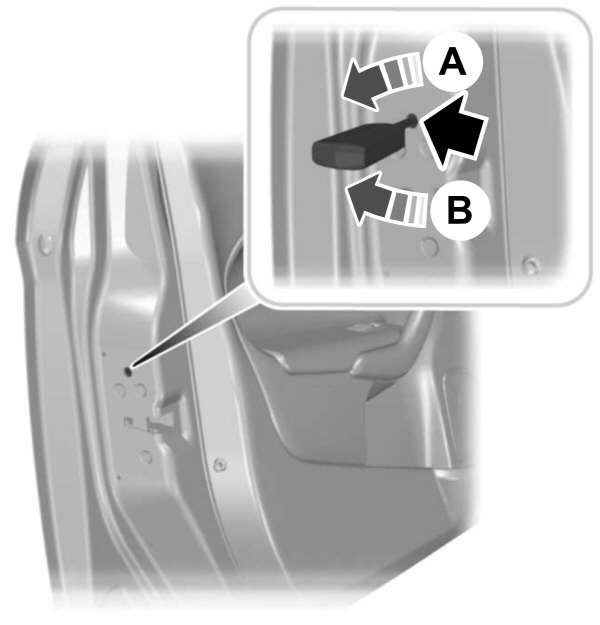
Left-Hand Side
Turn clockwise to lock.
Right-Hand Side
Turn counterclockwise to lock.
Opening the Double Rear Doors From Inside
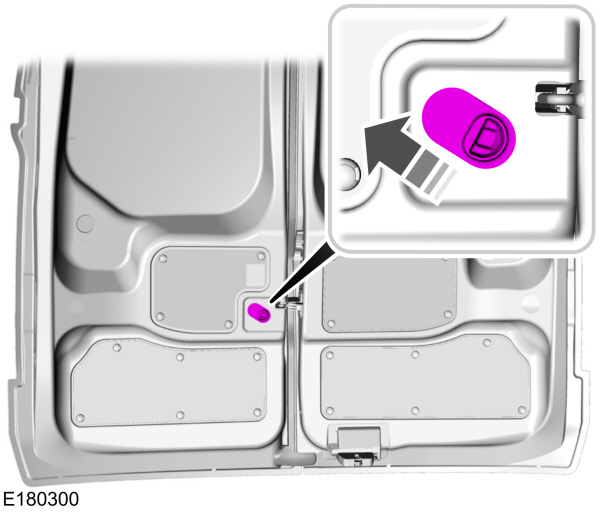
- Slide the release lever upward to open the door. If the vehicle is locked, repeat the step.
- Pull the release lever to open the other door.
Download Manual