Instrument Cluster Display
Your vehicle is equipped with an instrument cluster display, which offers useful information to the driver. With the ignition in the OFF position (and the key removed, for vehicles with mechanical key), opening/closing of a door will activate the display for viewing, and display the total miles or kilometers in the odometer. Your instrument cluster display is designed to display important information about your vehicle’s systems and features. Using a driver interactive display located on the instrument panel, your instrument cluster display can show you how systems are working and give you warnings when they are not. The steering wheel mounted controls allow you to scroll through and enter the main menus and submenus. You can access the specific information you want and make selections and adjustments.
INSTRUMENT CLUSTER DISPLAY LOCATION AND CONTROLS
The vehicle’s instrument cluster is equipped with an instrument cluster display (base or premium cluster), which offers useful information to the driver.
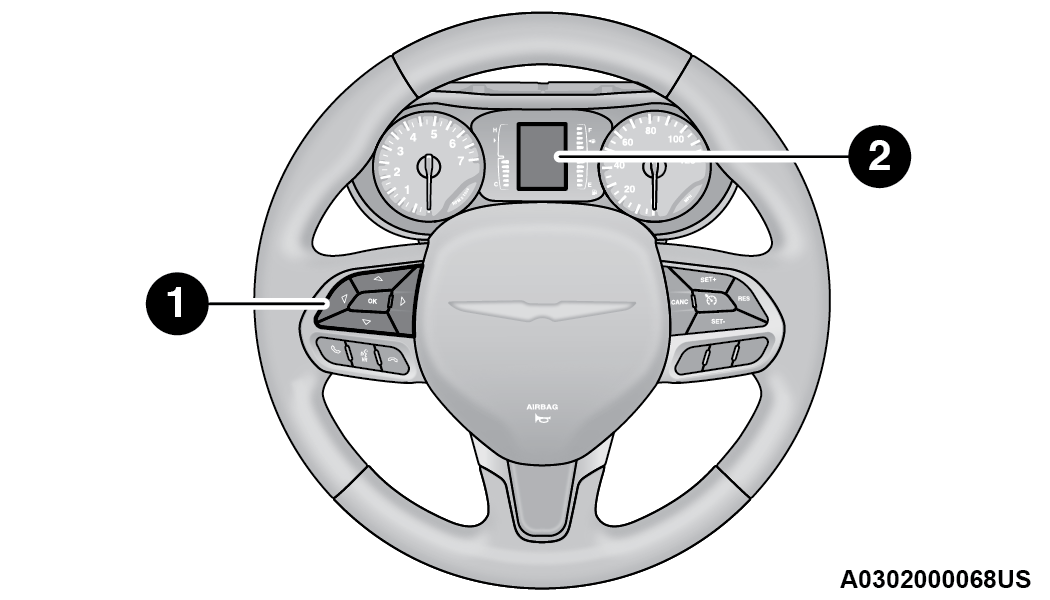
Instrument Cluster Display Location
| 1 – Instrument Cluster Display Controls |
| 2 – Instrument Cluster Display Screen |
The instrument cluster display controls allows the driver to select information by pushing the directional buttons mounted on the steering wheel:
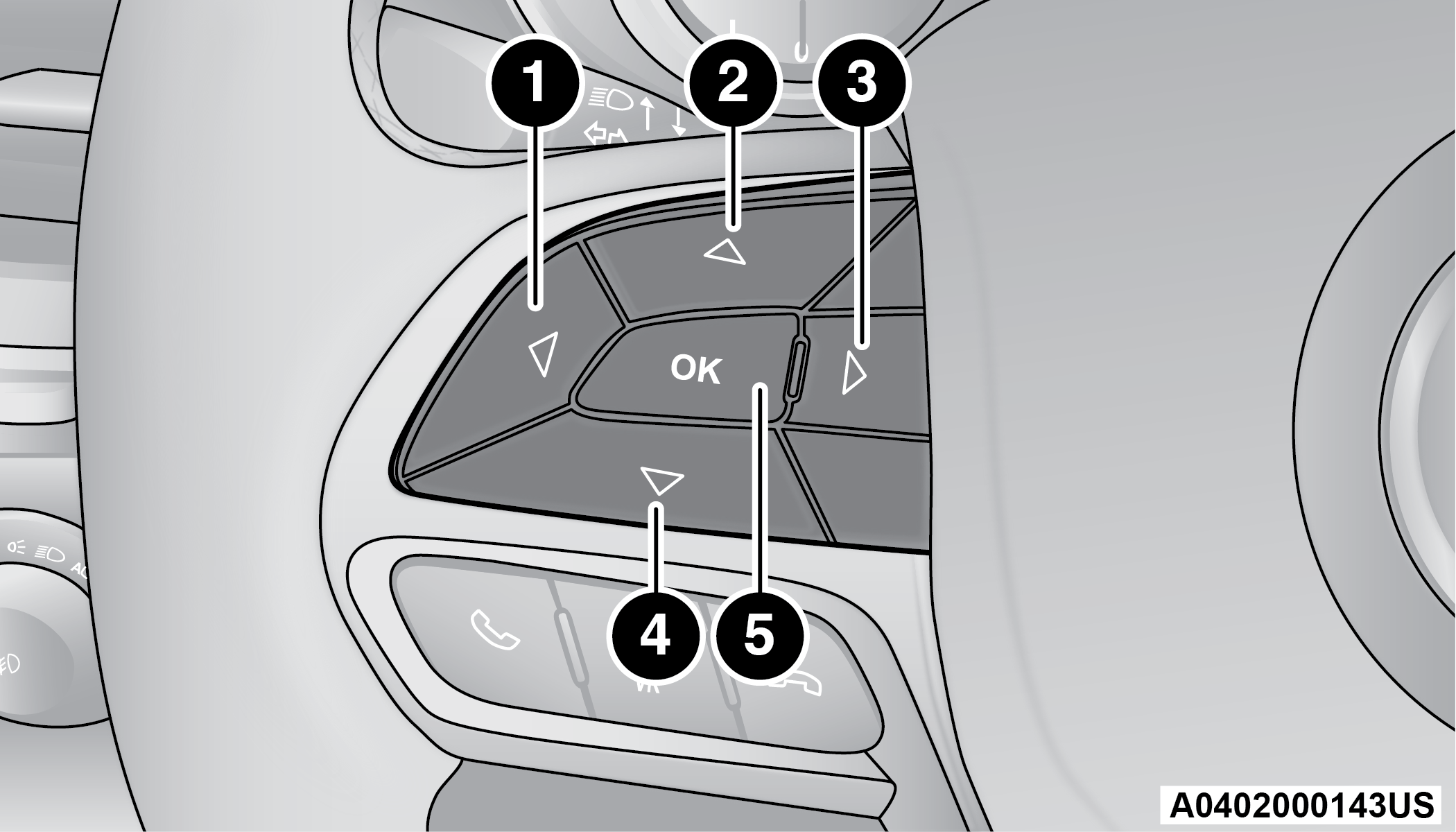
Instrument Cluster Display Controls
| 1 — Left Arrow Button |
| 2 — Up Arrow Button |
| 3 — Right Arrow Button |
| 4 — Down Arrow Button |
| 5 — OK Button |
-
Back / Left Arrow Button
Push and release the left
 arrow button to access the information screens or submenu screens of a main menu item.
 -
Up Arrow Button
Push and release the up
 arrow button to scroll upward through the Main Menu items.
 -
Right Arrow Button
Push and release the right
 arrow button to access the information screens or submenu screens of a main menu item.
 -
Down Arrow Button
Push and release the down
 arrow button to scroll downward through the Main Menu items.
 -
OK Button
Push the OK button to access/select the information screens or submenu screens of a Main Menu item. Push and hold the OK button for two seconds to reset displayed/selected features that can be reset.
ENGINE OIL LIFE
 Engine Oil Life ¹Use this QR code to access your digital experience.
-
Your vehicle is equipped with an engine oil change indicator system. The “Oil Change Required” message will display for approximately five seconds after a single chime has sounded, to indicate it is time to change the engine oil. The engine oil change indicator system is duty cycle based, which means the engine oil change interval may fluctuate, dependent upon your personal driving style.
-
Unless reset, this message will continue to display each time the ignition is cycled to the ON/RUN position.
-
To reset the oil change indicator after performing the scheduled maintenance, refer to the following procedure.
Note:
This procedure should only be performed after scheduled maintenance is completed. Resetting oil life other than when associated with a scheduled maintenance may result in damage due to not properly maintaining the engine oil.
Oil Life Reset
-
Without pressing the brake pedal, push the ENGINE START/STOP button and place the ignition in the ON/RUN position (do not start the vehicle.)
-
Push the OK button to enter the instrument cluster display menu screen.
-
Push and release the down
arrow button to access the ”Vehicle Info” menu screen. -
Push the left
arrow button or rightarrow button to access the “Oil Life” submenu. -
Hold the OK button to reset the “Oil Life” to 100%.
-
Push the up
arrow button to exit the instrument cluster display menu screen.
Secondary Method For Oil Life Reset Procedure
-
Without pushing the brake pedal, place the ignition in the ON/RUN position (do not start the engine).
-
Fully press the accelerator pedal, slowly, three times within 10 seconds.
-
Without pushing the brake pedal, place the ignition in the OFF position.
Note:
If the indicator message illuminates when you start the vehicle, the oil change indicator system did not reset. If necessary, repeat this procedure.
KEYSENSE CLUSTER MESSAGES — IF EQUIPPED
When the KeySense key is in use there will be:

-
Continuous, dedicated telltale
-
Unique Display Splash Screen
With KeySense in use there will be multiple associated messages shown in the following table:
|
Setting |
Instrument Cluster Display Message |
|
None – With vehicle ignition ON |
“KeySense in use. Max vehicle speed set to xx MPH/or km/h” |
|
Max Vehicle Speed |
|
|
Start Up Fuel Alert message |
“Range to empty xxx miles or km” |
|
Early Low Fuel Alert Message |
“Fuel Low” |
|
ParkSense |
“Feature cannot be disabled. KeySense in use” |
|
Blind Spot |
“Feature cannot be disabled. KeySense in use” |
|
Forward Collision Warning |
“Feature cannot be disabled. KeySense in use” |
INSTRUMENT CLUSTER DISPLAY MENU ITEMS
The instrument cluster display can be used to view the main menu items for several features. Use the up and down arrow buttons to scroll through the driver interactive display menu options until the desired menu is reached "⇨Instrument Cluster Display Location And Controls".
Note:
The instrument cluster display menu items display in the center of the instrument cluster. Menu items may vary depending on your vehicle features.
SPEEDOMETER
Push and release the up or down arrow button until Speedometer is highlighted in the instrument cluster display. Push and release the OK button to toggle between MPH and km/h.
VEHICLE INFO
Push and release the up or downarrow button until Vehicle Info is highlighted in the instrument cluster display. Push the leftor rightarrow button to scroll through the following information submenus:
Tire Pressure
If tire pressure is OK for all tires, a vehicle icon is displayed with tire pressure values in each corner of the icon.
If one or more tires have low pressure, “Inflate Tire To XX” is displayed with the vehicle icon, and the tire pressure values in each corner of the icon with the pressure value of the low tire displayed in a different color than the other tire pressure value.
If the Tire Pressure system requires service, “Service Tire Pressure System” is displayed.
Tire PSI is an information only function and cannot be reset "⇨Tire Pressure Monitoring System (TPMS)".
Coolant Temp
Displays the actual coolant temperature.
Transmission Temp
Displays the actual transmission temperature.
Oil Temp — If Equipped
Displays the actual oil temperature.
Oil Pressure
Displays the actual oil pressure.
Oil Life
Displays the remaining engine oil life as a percentage.
To reset the Oil Life, you must hold the OK button. The “Hold OK to Reset” instruction will be displayed at all times, but the following conditions will need to be met in order to reset Oil Life:
-
The ignition must be in the ON/RUN position.
If the conditions are met, holding the OK button will reset the gauge and the numeric display will return to 100%.
If the conditions are not met, a pop-up message will display for five seconds, describing the required conditions, and then the Oil Life screen will reappear.
Battery Voltage
Displays the actual battery voltage.
Engine Hours — If Equipped
Displays the number of hours of engine operation.
DRIVER ASSIST — IF EQUIPPED
Push and release the up or downarrow button until the Driver Assist display icon is highlighted in the instrument cluster display.
-
Adaptive Cruise Control
-
LaneSense
FUEL ECONOMY
Push and release the up or down arrow button until the Fuel Economy Menu item is highlighted in the instrument cluster display. The Fuel Economy Menu will display the following:
-
Two submenu pages that can be toggled between using the left
and right arrow buttons; one with Current Value displayed and one without the Current Value displayed:-
Average Fuel Economy (MPG, L/100 km, or km/L)
-
Range To Empty (miles or km)
-
Current Fuel Economy (MPG, L/100 km, or km/L)
-
The Max and Min values will correspond to the particular engine requirements
-
-
Hold OK to reset average fuel economy information.
TRIP INFO
Push and release the up or down arrow button until the Trip Menu item is highlighted in the instrument cluster display. Push the left or right arrow button to scroll through the Trip A and Trip B submenus. The Trip information will display the following:
-
Distance
-
Average Fuel Economy
-
Elapsed Time
Hold the OK button to reset feature information.
STOP / START – IF EQUIPPED
Push and release the up or down arrow button until the Stop/Start menu title is displayed in the instrument cluster display.
AUDIO
Push and release the up or down arrow button until the Audio Menu displays in the instrument cluster display.
MESSAGES
Push and release the up or down arrow button until Messages is highlighted in the instrument cluster display. This feature shows the number of stored warning messages. Pushing the right arrow button will allow you to see what the stored messages are.
Note:
The pop-up messages indicate the status of the system and/or the conditions that need to be met. Messages remain in the stored stack until condition is cleared.
SCREEN SETUP
Push and release the up or downarrow button until the Screen Setup Menu displays in the instrument cluster display. Push and release the OK button to enter the submenus. The Screen Setup feature allows you to change what information is displayed in the instrument cluster as well as the location that information is displayed.
Base Instrument Cluster Display Screen Setup Options
|
Upper Left or Upper Right |
||
|
None |
Compass |
Outside Temp |
|
Time |
Range |
Average (MPG, L/100km, or km/L) |
|
Current (MPG, L/100km, or km/L) |
||
|
Center |
||
|
None |
Compass |
Outside Temp |
|
Time |
Range |
Average (MPG, L/100km, or km/L) |
|
Current (MPG, L/100km, or km/L) |
Trip A Distance |
Trip B Distance |
|
Audio |
Menu Title |
Digital Speed |
Defaults
-
Restore
-
Cancel
Premium Instrument Cluster Display Screen Setup Options
|
Lower Left or Lower Right |
||
|
None |
Compass |
Outside Temp |
|
Time |
Range |
Average (MPG, L/100km, or km/L) |
|
Current (MPG, L/100km, or km/L) |
Trip B Distance |
Trip A Distance |
|
Upper Center |
||
|
None |
Compass |
Outside Temp |
|
Time |
Range |
Average (MPG, L/100km, or km/L) |
|
Current (MPG, L/100km, or km/L) |
Digital Speed |
Menu Title |
|
Trip A Distance |
Trip B Distance |
Audio/Phone |
Odometer
-
Show
-
Hide
Defaults
-
Restore
-
Cancel
BATTERY SAVER ON/BATTERY SAVER MODE MESSAGE — ELECTRICAL LOAD REDUCTION ACTIONS — IF EQUIPPED
This vehicle is equipped with an Intelligent Battery Sensor (IBS) to perform additional monitoring of the electrical system and status of the vehicle battery.
In cases when the IBS detects charging system failure, or the 12 Volt vehicle battery conditions are deteriorating, electrical load reduction actions will take place to extend the driving time and distance of the vehicle. This is done by reducing power to or turning off non-essential 12 Volt electrical loads. Load reduction will be functional when the vehicle propulsion system is active.
The vehicle may not be running depending on the High Voltage (HV) battery State Of Charge (SOC) or temperature. It will display a message if there is a risk of battery depletion to the point where the vehicle may stall due to lack of electrical supply, or will not restart after the current drive cycle.
When 12 Volt load reduction is activated, the message “Battery Saver On” or “Battery Saver Mode” will appear in the instrument cluster display.
These messages indicate the vehicle battery has a low state of charge and continues to lose electrical charge at a rate that the charging system cannot sustain.
Note:
-
The charging system is independent from load reduction. The charging system performs a diagnostic on the charging system continuously.
-
If the Battery Charge Warning Light is on it may indicate a problem with the charging system "⇨Battery Charge Warning Light".
The following are electrical loads that may be switched off (if equipped), and vehicle functions which can be affected by load reduction:
-
Heated Seat/Vented Seats/Heated Wheel
-
Heated/Cooled Cup Holders — If Equipped
-
Rear Defroster And Heated Mirrors
-
HVAC System
-
115 Volts AC Power Inverter System
-
Audio and Telematics System
Loss of the battery charge may indicate one or more of the following conditions:
-
The charging system cannot deliver enough electrical power to the vehicle system because the electrical loads are larger than the capability of charging system. The charging system is still functioning properly.
-
Turning on all possible vehicle electrical loads (e.g. HVAC to max settings, exterior and interior lights, overloaded power outlets +12 Volts, 150W, USB ports) during certain driving conditions (city driving, towing, frequent stopping).
-
Installing options like additional lights, upfitter electrical accessories, audio systems, alarms and similar devices.
-
Unusual driving cycles (short trips separated by long parking periods).
-
The vehicle was parked for an extended period of time (weeks, months).
-
The battery was recently replaced and was not charged completely.
-
The battery was discharged by an electrical load left on when the vehicle was parked.
-
The battery was used for an extended period with the engine not running to supply radio, lights, chargers, +12 Volt portable appliances like vacuum cleaners, game consoles and similar devices.
What to do when an electrical load reduction action message is present (“Battery Saver On” or “Battery Saver Mode”)
During a trip:
-
Reduce power to unnecessary loads if possible:
-
Turn off redundant lights (interior or exterior)
-
Check what may be plugged in to power outlets +12 Volts, 150W, USB ports
-
Check HVAC settings (blower, temperature)
-
Check the audio settings (volume)
-
After a trip:
-
Check if any aftermarket equipment was installed (additional lights, upfitter electrical accessories, audio systems, alarms) and review specifications if any (load and Ignition Off Draw currents).
-
Evaluate the latest driving cycles (distance, driving time and parking time).
-
The vehicle should have service performed if the message is still present during consecutive trips and the evaluation of the vehicle and driving pattern did not help to identify the cause.
Download Manual