Panoramic Sunroof — If Equipped
The Panoramic Sunroof switch is located to the left between the sun visors on the overhead console.
The Power Shade switch is located to the right between the sun visors on the overhead console.
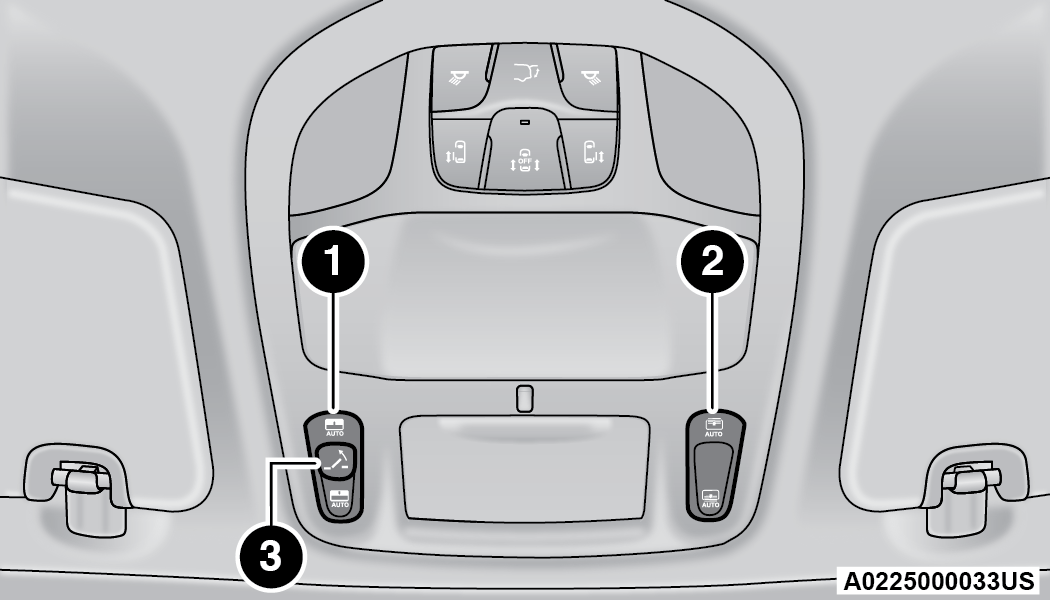
Panoramic Sunroof And Power Shade Switches
|
1 — Sunroof Switch |
|
2 — Power Shade Switch |
|
3 — Vent Button |
WARNING:
-
Never leave children unattended in a vehicle, or with access to an unlocked vehicle. Never leave the key fob in or near the vehicle, or in a location accessible to children. Do not leave the Keyless Enter ‘n Go™ Ignition in the ACC or ON/RUN position. Occupants, particularly unattended children, can become entrapped by the power sunroof while operating the power sunroof switch. Such entrapment may result in serious injury or death.
-
In a collision, there is a greater risk of being thrown from a vehicle with an open sunroof. You could also be seriously injured or killed. Always fasten your seat belt properly and make sure all passengers are also properly secured.
-
Do not allow small children to operate the sunroof. Never allow your fingers, other body parts, or any object, to project through the sunroof opening. Injury may result.
OPENING AND CLOSING THE SUNROOF
Express Open/Close
Push the open switch and release it within one second. The sunroof will open automatically from any position and stop at the full open position. This is called Express Open.
Push the close switch and release it within one second and the sunroof will close automatically from any position. The sunroof will close fully and stop automatically. This is called Express Close.
Note:
-
During Express Open or Express Close operation, any other actuation of the switch will stop the sunroof.
-
If the sunshade is in the closed position when the open switch is pushed, the sunshade will automatically cycle to the halfway open position prior to the sunroof opening.
Manual Open/Close
Push and hold the open switch and the sunroof will open to the full open position.
To close the sunroof, push and hold the close switch.
Any release of the switch during open or close operation will stop the movement and the sunroof will remain in a partially open condition until the sunroof switch is pushed again.
OPENING AND CLOSING THE POWER SUNSHADE — IF EQUIPPED
The sunshade has two programmed open positions: half-open and full-open. When opening the sunshade from the closed position, the sunshade will always stop at the half-open position regardless of express or manual open operation. The switch must be actuated again to continue to the full-open position.
Express Open/Close
Push the sunshade open switch and release it within one second and the sunshade will open to the half-open position and stop automatically. Push and release the sunshade open switch again from the half-open position and the sunshade will open to the full-open position and stop automatically. This is called Express Open.
Push the sunshade close switch and release it within one second and the sunshade will close automatically from any position. If the sunroof is completely closed, the shade will close fully and stop automatically. This is called Express Close.
Note:
-
During Express Open or Express Close operation, any movement of the sunshade switch will stop the shade.
-
If the sunroof is open, the shade will close to the half-open position. Pushing the shade close button again will automatically close both the sunroof and shade completely.
Manual Open/Close
Push and hold the sunshade open switch and the shade will open to the half-open position and stop automatically. Push and hold the sunshade open switch again and the shade will open automatically to the full-open position.
To close the shade, push and hold the sunshade close switch.
Any release of the switch will stop the movement and the sunshade will remain in a partially opened condition until the switch is pushed again.
PINCH PROTECT FEATURE
This feature will detect an obstruction in the closing of the sunroof during the Express Close operation. If an obstruction in the path of the sunroof is detected, the sunroof will automatically retract. Remove the obstruction if this occurs.
Note:
If three consecutive sunroof close attempts result in Pinch Protect reversals, Pinch Protect will disable and the sunroof must be closed in Manual Mode.
VENTING SUNROOF
Push and release the Vent button within one second and the sunroof will open to the vent position. This is called Express Vent, and it will occur regardless of sunroof position.
Note:
If the sunshade is in the closed position when the vent switch is pushed, the sunshade will automatically cycle to the halfway open position prior to the sunroof opening to the Vent position.
IGNITION OFF OPERATION
The power sunroof switch will remain active for up to approximately 10 minutes after the ignition switch is placed in the OFF position. Opening either front door will cancel this feature.
Note:
Ignition off timing is programmable through the Uconnect system "⇨UCONNECT SETTINGS".
SUNROOF MAINTENANCE
Use only a non-abrasive cleaner and a soft cloth to clean the glass panel. Periodically check for and clear out any debris that may have collected in the tracks.
Download Manual