Initial Drive Information
This section provides a brief overview about some of the important features that may or may not be on your specific vehicle.
For more detailed information, refer to each of the features which can be found later in this owner manual.
Remote Keyless Entry (RKE) System
For vehicles with the RKE transmitter, it may work up to 60m (195 ft) away from the vehicle.
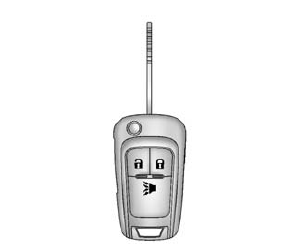
Press the key release button to extend the key blade. The key can be used for the ignition and all locks.
Press  to unlock the driver door
or all doors and the liftgate.
Press  to lock all doors and the
liftgate.
Lock and unlock feedback can be personalized. See Vehicle Personalization on page 5-27.
Press and release  to initiate vehicle
locator.
Press and hold for at least three
seconds to sound the panic alarm.
Press  again to cancel the panic
alarm.
See Keys on page 2-1 and Remote Keyless Entry (RKE) System Operation on page 2-3.
Door Locks
To lock or unlock the doors from outside the vehicle:
- Use the key in the driver door to lock and unlock the door.
- Press
 or
or
 on the Remote Keyless Entry (RKE)
transmitter, if equipped, to lock and unlock the doors. See Remote Keyless Entry (RKE) System Operation on page 2-3.
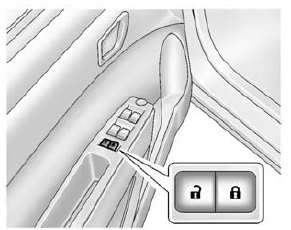
To lock or unlock the doors from inside the vehicle:
- Press or
, if equipped. - Use the lock knob on the top of the door panel.
See Door Locks on page 2-5 and Central Locking System on page 2-6.
Liftgate
To lock or unlock the liftgate from the outside, use the key in the liftgate lock.
If equipped, press  on the RKE transmitter
to unlock all doors and press  to lock.
See Remote Keyless Entry (RKE) System Operation on page 2-3.
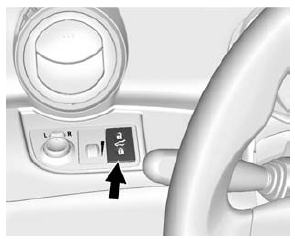
Without RKE
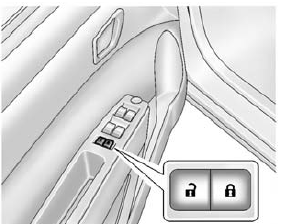
With RKE
To lock or unlock the liftgate from the inside, press  or
or
 .
.
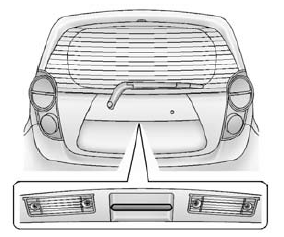
To open the liftgate, pull the handle and lift up.
When closing the liftgate, use the pull cup.
See Liftgate on page 2-8 or Central Locking System on page 2-6.
Windows
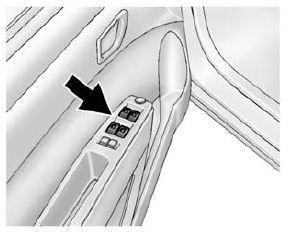
Press the switch down to open the window. Pull the front of the switch up to close it.
The switches work when the vehicle is in ON/RUN, ACC/ACCESSORY, or when Retained Accessory Power (RAP) is active.
See Retained Accessory Power (RAP) on page 9-18 and Power Windows on page 2-14.
Seat Adjustment
Manual Seats
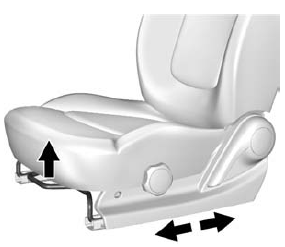
To adjust the seat:
- Lift the bar under the front edge of the seat cushion to unlock the seat.
- Slide the seat to the desired position and release the bar.
- Try to move the seat back and forth to be sure it is locked in place.
See Seat Adjustment on page 3-5.
Seat Height Adjuster
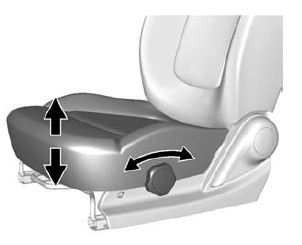
If available, turn the knob to raise or lower the seat.
See Seat Adjustment on page 3-5.
Reclining Seatbacks
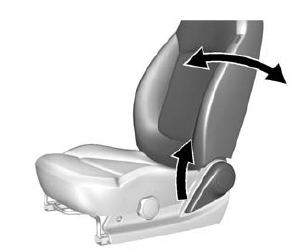
To recline the seatback:
- Lift the lever.
- Move the seatback to the desired position, and then release the lever to lock the seatback in place.
- Push and pull on the seatback to make sure it is locked in place.
To return the seatback to the upright position:
- Lift the lever fully without applying pressure to the seatback, and the seatback will return to the upright position.
- Push and pull on the seatback to make sure it is locked.
See Reclining Seatbacks on page 3-6.
Second Row Seats
The rear seatbacks can be folded down to increase cargo space.
See Rear Seats on page 3-8.
Head Restraint Adjustment
Do not drive until the head restraints for all occupants are installed and adjusted properly.
To achieve a comfortable seating position, change the seatback recline angle as little as necessary while keeping the seat and the head restraint height in the proper position.
See Head Restraints on page 3-2 and Seat Adjustment on page 3-5.
Safety Belts
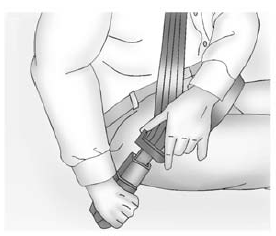
Refer to the following sections for important information on how to use safety belts properly.
- Safety Belts on page 3-10.
- How to Wear Safety Belts Properly on page 3-12.
- Lap-Shoulder Belt on page 3-13.
- Lower Anchors and Tethers for Children (LATCH System) on page 3-40.
Passenger Sensing System
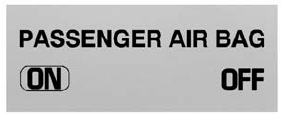
United States
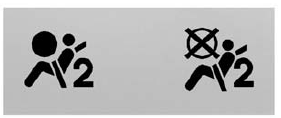
Canada
The passenger sensing system turns off the front outboard passenger frontal airbag and knee airbag under certain conditions. No other airbag is affected by the passenger sensing system. See Passenger Sensing System on page 3-25 for important information.
The passenger airbag status indicator will be visible on the center display when the vehicle is started.
See Passenger Airbag Status Indicator on page 5-11.
Mirror Adjustment
Exterior Mirrors
Manual Outside Mirrors
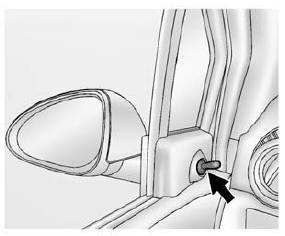
If equipped, move the control up, down, or side to side to adjust the mirror.
See Manual Mirrors on page 2-13.
Power Outside Mirrors
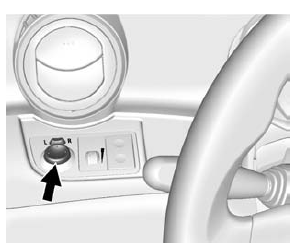
- If equipped, move the selector switch to L (Left) or R (Right) to choose the driver or passenger mirror.
- Move the control up, down, or side to side to adjust the mirror.
- Return the selector switch to the center with done.
See Power Mirrors on page 2-13.
Folding Mirrors
The vehicle has manual folding mirrors. These mirrors can be folded inward to prevent damage when going through an automatic car wash. To fold, pull the mirror toward the vehicle. Push the mirror outward to return it to the original position.
See Folding Mirrors on page 2-13.
Interior Mirror
Adjustment
Push the tab forward to the daytime position, then adjust the rearview mirror for a clear view of the area behind the vehicle.
Manual Rearview Mirror
To avoid glare of the headlamps from behind, pull the tab backward for nighttime use. Push the tab forward for daytime use.
Steering Wheel Adjustment
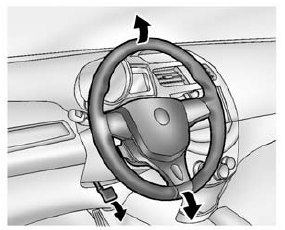
To adjust the steering wheel:
- Pull the lever down.
- Move the steering wheel up or down.
- Pull the lever up to lock the steering wheel in place.
Do not adjust the steering wheel while driving.
Interior Lighting
Dome Lamps
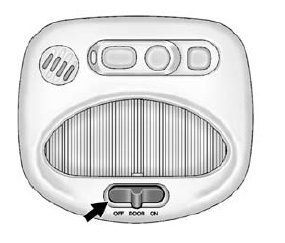
The dome lamp controls are in the overhead console.
Move the control to change the lamp setting.
OFF: Turns the lamps off, even when a door is open.
DOOR: Turns the lamps on automatically when a door is opened.
ON: Turns on the dome lamps.
For more information about interior lighting, see Instrument Panel Illumination Control on page 6-5 or Courtesy Lamps on page 6-5.
Exterior Lighting
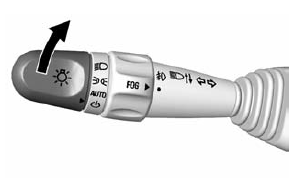
The exterior lamp control is on the turn signal lever on the left side of the steering column.
There are four positions:
 Turns on the headlamps together with
the parking lamps and instrument panel lights.
 Turns on the parking lamps including
all lamps, except the headlamps.
 Turns the exterior lamps on and off
automatically depending on the exterior light.
 Turns all the lamps off, except the
Daytime Running Lamps (DRL).
The DRL automatically turn off when the vehicle is turned off.
See Exterior Lamp Controls on page 6-1 and Daytime Running Lamps (DRL) on page 6-2.
Windshield Wiper/Washer
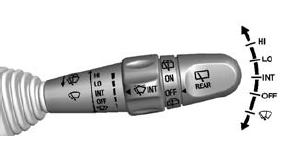
The windshield wiper/washer lever is on the right side of the steering column.
Move the lever to one of the following positions: HI: Use for fast wipes.
LO: Use for slow wipes.
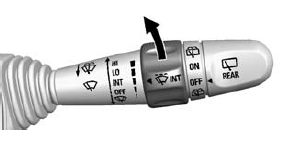
INT: Move the lever up to INT for intermittent wipes, then turn the  INT band up for more frequent wipes
or down for less frequent wipes.
OFF: Use to turn the wipers off.
 : For a single wipe, briefly move
the wiper lever down. For several wipes, hold the wiper lever down.
Windshield Washer
Pull the windshield wiper lever toward you to spray windshield washer fluid and activate the wipers.
Rear Wiper/Washer
If equipped with the rear wiper/ washer, the controls are on the end of the windshield wiper lever.
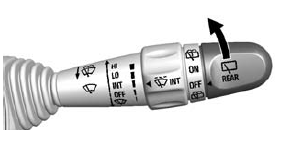
ON: Turns the rear wiper on for continuous wipes.
OFF: Turns the rear wiper off.
 : Sprays washer fluid on the rear
window. The control returns to its ON or OFF starting position when released.
See Windshield Wiper/Washer on page 5-3 or Rear Window Wiper/ Washer on page 5-4 (If Equipped).
Climate Controls
The heating, cooling, and ventilation for the vehicle can be controlled with this system.
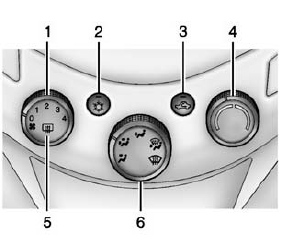
- Fan Control
- Air Conditioning
- Recirculation
- Temperature Control
- Rear Window Defogger
- Air Delivery Mode Control
See Climate Control Systems on page 8-1.
Download Manual