Controls
Steering Wheel Adjustment
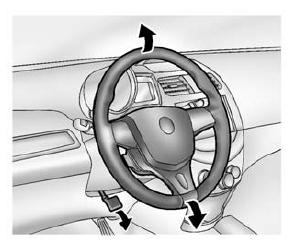
To adjust the steering wheel:
- Pull the lever down.
- Move the steering wheel up or down.
- Pull the lever up to lock the steering wheel in place.
Do not adjust the steering wheel while driving.
Steering Wheel Controls
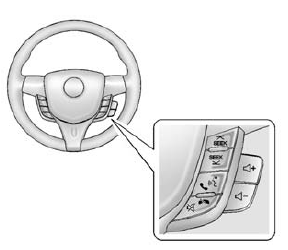
If equipped with audio steering wheel controls, some audio controls can be adjusted at the steering wheel.
 SEEK or SEEK
 (Next/ Previous): Press to go to the
next or previous radio station, song on an iPod®, or file on a USB device (if equipped).
 (Push to Talk): If equipped with
Bluetooth or OnStar, press to interact with those systems. See Bluetooth (Overview) on page 7-19 or Bluetooth (Infotainment Controls) on page 7-21 or OnStar Overview on page 14-1.
 (Mute/End Call): Press to silence
the vehicle speakers only.
Press again to turn the sound on.
If equipped with OnStar or Bluetooth systems, press to decline an incoming call, to end speech recognition, or to end a current call.
 + or
+ or
 - (Volume): Press + or - to
increase or decrease the volume.
Horn
Press  on the steering wheel pad
to sound the horn.
Windshield Wiper/Washer
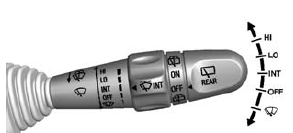
The windshield wiper/washer lever is on the right side of the steering column.
Move the lever to one of the following positions: HI: Use for fast wipes.
LO: Use for slow wipes.
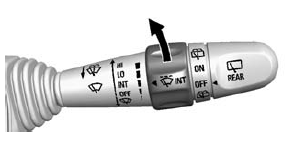
INT (Intermittent Wipes): Move the lever up to INT for intermittent wipes, then turn the  INT band up for more frequent
wipes or down for less frequent wipes.
OFF: Use to turn the wipers off.
 (Mist): For a single wipe, briefly
move the wiper lever down. For several wipes, hold the wiper lever down.
Clear snow and ice from the wiper blades before using them. If frozen to the windshield, carefully loosen or thaw them. Replace damaged wiper blades. See Wiper Blade Replacement on page 10-24.
Heavy snow or ice can overload the wiper motor. A circuit breaker will stop the motor until it cools down.
Wiper Parking
If the ignition is turned to LOCK/ OFF while the wipers are on LO, HI, or INT, they will immediately stop.
If the windshield wiper lever is then moved to OFF before the driver door is opened or within 10 minutes, the wipers will restart and move to the base of the windshield.
If the ignition is turned to LOCK/ OFF while the wipers are performing wipes due to windshield washing, the wipers continue to run until they reach the base of the windshield.
Windshield Washer
Pull the windshield wiper lever toward you to spray windshield washer fluid and activate the wipers.
The wipers will continue until the lever is released or the maximum wash time is reached.
When the windshield wiper lever is released, additional wipes may occur depending on how long the windshield washer had been activated. See Washer Fluid on page 10-19 for information on filling the windshield washer fluid reservoir.
Warning
In freezing weather, do not use the washer until the windshield is warmed. Otherwise the washer fluid can form ice on the windshield, blocking your vision.
Rear Window Wiper/ Washer
If equipped with the rear wiper/ washer, the controls are on the end of the windshield wiper lever.
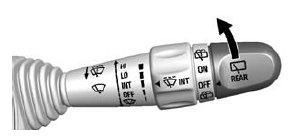
Turn the rear wiper/washer band to operate the rear window wiper/ washer.
ON: Turns the rear wiper on for continuous wipes.
OFF: Turns the rear wiper off.
 (Rear Washer): Sprays washer fluid
on the rear window. The control returns to its ON or OFF starting position when released.
Rear Wiper Arm Assembly Protection
If the vehicle is equipped with an automatic transmission, when using an automatic car wash, move the rear wiper control to OFF to disable the rear wiper. If the transmission is in N (Neutral) and the vehicle speed is very slow, the rear wiper will automatically stop at the base of the rear window.
The wiper operations return to normal when the transmission is no longer in N (Neutral) or the vehicle speed has increased. The rear wiper will also stop when the liftgate is open.
Reverse Gear Wipes
If the rear wiper control is off, the rear wiper will automatically operate continuously when the shift lever is in R (Reverse), and the front windshield wiper is performing low or high speed wipes. If the rear wiper control is off, the shift lever is in R (Reverse), and the front windshield wiper is performing interval wipes, then the rear wiper automatically performs interval wipes.
This feature can be changed. See Vehicle Personalization on page 5-27.
The windshield washer reservoir is used for the windshield and the rear window. Check the fluid level in the reservoir if either washer is not working. See Washer Fluid on page 10-19.
Clock
Radio without Touchscreen
The infotainment system controls are used to access the time and date settings through the menu system. See Operation on page 7-6 for information about how to use the menu system.
Setting the Time and Date
- Press the
 or CONFIG
button and select Time and Date Settings. - Select Set Time or Set Date.
- Turn the MENU/TUNE knob to the desired value.
- Press the MENU/TUNE knob to select the value.
- Turn the MENU/TUNE knob to change the desired value.
- To save and return to the Time Settings menu, press the / BACK button at any time.
Setting the 12/24 Hour Format
- Press the
 or CONFIG
button and select Time and Date Settings. - Select Set Time Format.
- Press the MENU/TUNE knob to select the 12 hour or 24 hour display format.
Setting the Month and Day Format
- Press the
 or CONFIG
button and select Time and Date Settings. - Select Set Date Format.
- Turn the MENU/TUNE knob to the desired setting.
- Press the MENU/TUNE knob to select the DD/MM/YYYY (day/ month/year), MM/DD/YYYY (month/day/year), or YYYY/MM/ DD (year/month/day) display format.
Radio with Touchscreen
The infotainment system controls are used to access the time and date settings through the menu system. See Operation on page 7-6 for information about how to use the menu system.
Setting the Time and Date
- Press
 , and then press
 settings.
 - Press time and date settings, and then set time and date.
- Press
 or
or
 to adjust the value.
 - Press OK.
Setting the 12/24 Hour Format
- Press
 , and then press
 settings.
 - Press time and date settings, and then set time format.
- Select 12/24 HR Format.
Setting the Month and Day Format
- Press
 , and then press
 settings.
 - Press time and date settings, and then set date format.
- Press
 or
or
 to set the date display to DD/MM/YYYY
(day/ month/year), MM/DD/YYYY (month/day/year), or YYYY/MM/ DD (year/month/day) display format.
Power Outlets
The accessory power outlets can be used to plug in electrical equipment, such as a cell phone or MP3 player.
The vehicle has an accessory power outlet in front of the cupholders on the center stack.
Open the cover to access and replace when not in use.
Warning
Power is always supplied to the outlets. Do not leave electrical equipment plugged in when the vehicle is not in use because the vehicle could catch fire and cause injury or death.
Caution
Leaving electrical equipment plugged in for an extended period of time while the vehicle is off will drain the battery. Always unplug electrical equipment when not in use and do not plug in equipment that exceeds the maximum 20 amp rating.
Certain accessory power plugs may not be compatible with the accessory power outlet and could overload vehicle or adapter fuses.
If a problem is experienced, see your dealer.
When adding electrical equipment, be sure to follow the proper installation instructions included with the equipment. See Add-On Electrical Equipment on page 9-39.
Caution
Hanging heavy equipment from the power outlet can cause damage not covered by the vehicle warranty. The power outlets are designed for accessory power plugs only, such as cell phone charge cords.
Download Manual