Subscription
Features
A subscription-based service that provides convenient features, such as collision notification, operator assistance, online security, and important messages about your vehicle.
To subscribe or get more information, contact a dealer or visit Open Web Page (U.S.) or Open Web Page (Canada). Requires enrollment and privacy agreement.
Collision Notification
If your vehicle's airbags deploy or if the unit detects that the vehicle is severely impacted, your vehicle automatically attempts to connect to the AcuraLink operator if there is sufficient cellular coverage. Once connected, information about your vehicle, its positioning, and its condition will be sent to the operator. You can also speak to the operator when connected.
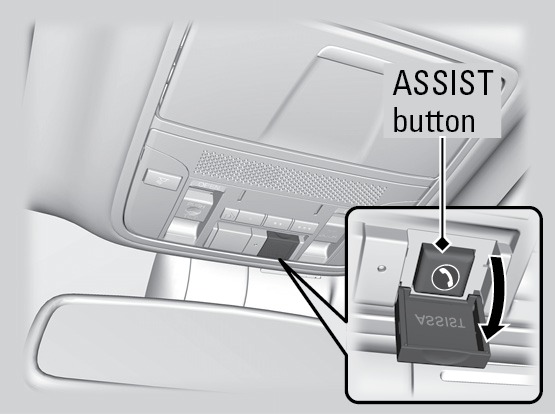
To manually connect to the operator, open the cover on the ceiling console and press ASSIST when the vehicle is on.
Security Features
To use security features, you need your user ID and personal identification number (PIN). Some of these features are also available with the AcuraLink smartphone app. Visit owners.acura.com/apps to download the app.
- Stolen vehicle tracking: Searches and tracks down your vehicle position.
- Remote door lock/unlock: Remotely lock or unlock doors.
- Vehicle finder: Locate your vehicle in large areas, such as a parking lot.
- Security alarm notification: If your vehicle's security system detects tampering, the provider notifies you.
Operator Assistance
Connect to the AcuraLink operator when trying to find a destination or for roadside assistance.
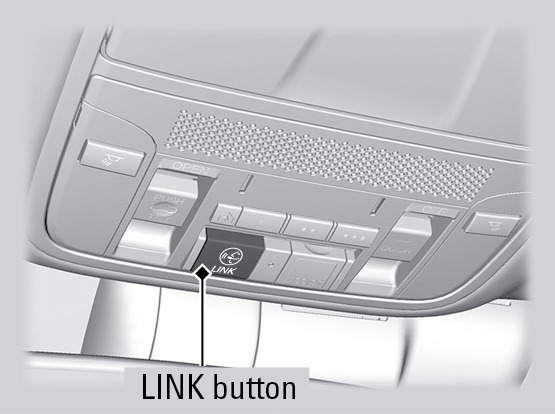
Press LINK to connect to an operator.
- Pairing a Phone
- Basic Navigation Operation
- Acura Total Luxury Care Roadside Assistance
Download Manual