Steps to take in an emergency
WARNING
Observe the following precautions.
Failure to do so may result in death or serious injury.
2WD models: Be sure to transport the vehicle with all four wheels raised off the ground. If the vehicle is towed with the tires contacting the ground, the drivetrain and related parts may be damaged or an accident may occur due to a change in direction of the vehicle.
4WD models: Be sure to transport the vehicle with all four wheels raised off the ground. If the vehicle is towed with the tires contacting the ground, the drivetrain or related parts may be damaged, the vehicle may fly off the truck.
7-2. Steps to take in an emergency
479
NOTICE
Do not tow the vehicle from the rear when the engine switch is in OFF or the key is removed.
The steering lock mechanism is not strong enough to hold the front wheels straight.
Do not tow the vehicle from the rear when the engine switch is off.
The steering lock mechanism is not strong enough to hold the front wheels straight.
the opposite end of the raised vehicle. Without adequate clearance, the 7
vehicle could be damaged while being towed.
Do not tow with a sling-type truck, either from the front or rear.
Do not secure cables or chains to the suspension components.
480 7-2. Steps to take in an emergency
The following may indicate a problem with your transmission. Contact your Toyota dealer or commercial towing service before towing.
From the front
Use a towing dolly under the rear wheels. Release the parking brake.
From the rear
Use a towing dolly under the front wheels.
7-2. Steps to take in an emergency
481
In order to suppress vehicle movement during transportation, set the parking brake and turn the engine switch to OFF.
If a tow truck is not available in an emergency, your vehicle may be temporarily towed using cables or chains secured to the emergency towing hooks. This should only be attempted on hard surfaced roads
for at most 50 miles (80 km) at under 18 mph (30km/h). 7
A driver must be in the vehicle to steer and operate the brakes. The vehicle’s wheels, drive train, axles, steering and brakes must be in good condition.
482 7-2. Steps to take in an emergency
Type A Type B
If the engine does not start, turn the engine switch to ON.
If the engine is not running, the power assist for the brakes and steering will not function, marking steering and braking more difficult.
7-2. Steps to take in an emergency
483
(Water dripping from the air conditioning after use is normal.)
484 7-2. Steps to take in an emergency
7
|
Warning light |
Warning light/Details/Actions |
|
(U.S.A.) (Canada) |
ABS warning light Indicates a malfunction in: The ABS; or
The brake assist system
Have the vehicle inspected by your Toyota dealer immediately. |
|
Low fuel level warning light Standard fuel tank Indicates remaining fuel is approximately 4.0 gal. (15.0 L, 3.3 Imp.gal.) or less Large fuel tank Indicates remaining fuel is approximately 3.8 gal. (14.4 L, 3.2 lmp.gal.) or less Refuel the vehicle. |
|
|
Seat belt reminder light (warning buzzer)*1 Warns the driver and/or front passenger to fasten their seat belts Fasten the seat belt. If the front passenger’s seat is occupied, the front passenger’s seat belt also needs to be fastened to make the warning light (warning buzzer) turn off. |
|
|
Master warning light A buzzer sounds and the warning light comes on and flashes to indicate that the master warning system has detected a malfunction. P. 493 |
|
|
(U.S.A.) (Canada) |
Parking brake warning light (warning buzzer)*2 Indicates that the parking brake is engaged. Release the parking brake. |
7
|
Warning light |
Warning light/Details/Actions |
|
PCS warning light (If equipped) When a buzzer sounds simultaneously: Indicates a malfunction has occurred in the PCS (Pre-Col- lision System). Have the vehicle inspected by your Toyota dealer immediately. When a buzzer does not sound: The PCS (Pre-Collision System) has become temporarily unavailable, corrective action may be necessary. Follow the instructions displayed on the multi-infor- mation display. (P. 258, 493) If the PCS (Pre-Collision System) or VSC (Vehicle Stability Control) system is disabled, the PCS warning light will illu- minate. P. 271 |
|
|
(Yellow) |
LDA (Lane Departure Alert) indicator (If equipped) The indicator comes on and a warning message is dis- played to indicate that the LDA (Lane Departure Alert) system is not available temporarily or has detected a mal- function. P. 493 |
*1: Driver’s seat belt buzzer:
The driver’s seat belt warning buzzer sounds to alert the driver that his or her seat belt is not fastened. Once the engine switch is turned to the “ON” position (vehicles without smart entry & start system) or IGNITION ON mode (vehicles with smart entry & start system), the buzzer sounds. If the seat belt is still unfastened, the buzzer sounds intermittently for a certain period of time after the vehicle reaches a certain speed.
Front passenger’s seat belt buzzer:
The front passenger's seat belt warning buzzer sounds to alert the front passenger that his or her seat belt is not fastened. If the seat belt is unfas- tened, the buzzer sounds intermittently for a certain period of time after the vehicle reaches a certain speed.
*2: Parking brake engaged warning buzzer:
A buzzer will sound if the vehicle is driven at a speed of approximately 3 mph (5 km/h) or more.
This warning light system monitors the airbag sensor assembly, front impact sensors, side impact sensors (front door), side impact sensors (rear), driver’s seat position sensor, driver’s seat belt buckle switch, front passenger occu- pant classification system (ECU and sensors), “AIR BAG ON” indicator light, “AIR BAG OFF” indicator light, front passenger’s seat belt buckle switch, seat belt pretensioners assemblies, airbags, interconnecting wiring and power sources. (P. 42)
First check the following:
If it is, fill the fuel tank immediately.
The light will go off after several driving trips.
If the light does not go off even after several trips, contact your Toyota dealer as soon as possible.
Check the tire inflation pressure and adjust to the appropriate level. Push-
ing the tire pressure warning reset switch will not turn off the tire pressure 7
warning light.
The temporary spare tire is not equipped with a tire pressure warning valve and transmitter. If a tire goes flat, the tire pressure warning light will not turn off even though the flat tire has been replaced with the temporary spare tire. Replace the temporary spare tire with the repaired tire and adjust the tire inflation pressure. The tire pressure warning light will go off after several minutes.
P. 432
If the tire pressure warning light frequently comes on after blinking for 1 minute when the engine switch is turned to ON, have it checked by your Toyota dealer.
In some cases, the buzzer may not be heard because of noisy place or an audio sound.
7-2. Steps to take in an emergency
491
WARNING
Stop your vehicle in a safe place immediately and contact your Toyota dealer. The vehicle will become extremely unstable during braking, and the ABS system may fail, which could cause an accident resulting in death or serious injury.
Be sure to observe the following precautions. Failure to do so could cause a loss of vehicle control and result in death or serious injury.
The tire pressure warning system may not activate immediately.
Each tire, including the spare (if provided), should be checked monthly when cold and inflated to the inflation pressure recommended by the vehicle manufacturer on the vehicle placard or tire inflation pressure label (tire and load information label). (If your vehicle has tires of a dif- ferent size than the size indicated on the vehicle placard or tire inflation
pressure label [tire and load information label], you should determine 7
the proper tire inflation pressure for those tires.)
As an added safety feature, your vehicle has been equipped with a tire pressure monitoring system (TPMS-tire pressure warning system) that illuminates a low tire pressure telltale (tire pressure warning light) when one or more of your tires is significantly under-inflated. Accordingly, when the low tire pressure telltale (tire pressure warning light) illumi- nates, you should stop and check your tires as soon as possible, and inflate them to the proper pressure. Driving on a significantly under- inflated tire causes the tire to overheat and can lead to tire failure. Under-inflation also reduces fuel efficiency and tire tread life, and may affect the vehicle’s handling and stopping ability.
492 7-2. Steps to take in an emergency
WARNING
Please note that the TPMS (tire pressure warning system) is not a sub- stitute for proper tire maintenance, and it is the driver’s responsibility to maintain correct tire pressure, even if under-inflation has not reached the level to trigger illumination of the TPMS low tire pressure telltale (tire pressure warning light).
Your vehicle has also been equipped with a TPMS (tire pressure warn- ing system) malfunction indicator to indicate when the system is not operating properly. The TPMS (tire pressure warning system) malfunc- tion indicator is combined with the low tire pressure telltale (tire pressure warning light). When the system detects a malfunction, the telltale will flash for approximately one minute and then remain continuously illumi- nated. This sequence will continue upon subsequent vehicle start-ups as long as the malfunction exists. When the malfunction indicator is illu- minated, the system may not be able to detect or signal low tire pres- sure as intended.
TPMS (tire pressure warning system) malfunctions may occur for a vari- ety of reasons, including the installation of replacement or alternate tires or wheels on the vehicle that prevent the TPMS (tire pressure warning system) from functioning properly. Always check the TPMS (tire pres- sure warning system) malfunction telltale after replacing one or more tires or wheels on your vehicle to ensure that the replacement or alter- nate tires and wheels allow the TPMS (tire pressure warning system) to continue to function properly.
The master warning light also comes on or flashes in order to indicate that a message is cur- rently being displayed on the multi- information display.
If any of the warning light comes on again after the following actions have been performed, contact your Toyota dealer.
7
494 7-2. Steps to take in an emergency
|
Warning message |
Details/Actions |
|
Engine Stopped Stop In a Safe Place (Flashes) |
Indicates that the engine was stopped while driv- ing. A buzzer also sounds. Stop the vehicle in a safe place such as the shoulder of a road. |
|
Engine Coolant Temp High Stop in a Safe Place See Owner’s Manual |
Indicates that the engine coolant temperature is too high A buzzer also sounds. Immediately stop the vehicle in a safe place and contact your Toyota dealer. |
|
CHECK TRANSMISSION SYSTEM |
Indicates a malfunction in the automatic transmis- sion system A buzzer also sounds. Have the vehicle inspected by your Toyota dealer immediately. |
|
Parking Assist Malfunction (If equipped) |
Indicates a malfunction in the intuitive parking assist The malfunctioning assist-sensor is flashing. Have the vehicle inspected by your Toyota dealer immediately. |
|
Blind Spot Monitor Malfunction Visit Your Dealer (If equipped) |
Indicates a malfunction in the Blind Spot Monitor A buzzer also sounds. Have the vehicle inspected by your Toyota dealer immediately. |
|
|
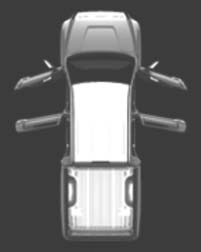
Indicates that one or more of the doors or the hood is not fully closed The system also indicates which doors are not fully closed. If the vehicle reaches a speed of 3 mph (5 km/h), flashes and a buzzer sounds to indicate that the door(s) are not yet fully closed. Make sure that all the doors and the hood are closed. |
7
496 7-2. Steps to take in an emergency
|
Warning message |
Details/Actions |
|
Maintenance Required Soon |
Indicates that all maintenance according to the driven distance on the maintenance schedule* should be performed soon. Comes on approximately 4500 miles (7200 km) after the message has been reset. If necessary, perform maintenance. |
|
Maintenance Required Visit Your Dealer |
Indicates that all maintenance is required to cor- respond to the driven distance on the mainte- nance schedule*. Comes on approximately 5000 miles (8000 km) after the message has been reset. (The indicator will not work properly unless the message has been reset.) Perform the necessary maintenance. Please reset the message after the mainte- nance is performed. (P. 407) |
|
Tire Pressure Warning System Malfunction, Visit Your Dealer |
Indicates a malfunction in the tire pressure warn- ing system. The tire pressure warning light comes on after flashing for 1 minute. Have the vehicle inspected by your Toyota dealer. |
|
(Flashes and then remains on) |
|
|
Cruise Control Malfunction Visit Your Dealer |
Indicates a malfunction in the cruise control sys- tem. Press the “ON-OFF” button once to deacti- vate the system, and then press the button again to reactivate the system.
A buzzer also sounds.
Have the vehicle inspected by your Toyota dealer immediately. |
|
Brake Override Malfunction Visit Your Dealer |
Indicates a malfunction in the Brake Override System. A buzzer also sounds. Have the vehicle inspected by your Toyota dealer immediately. |
|
Accelerator and |
Indicates that the accelerator and brake pedals are being depressed simultaneously, and the Brake Override System is operating. (P. 185) Release the accelerator pedal and depress the brake pedal. |
|
Brake Pedals |
|
|
Pressed |
|
|
Simultaneously |
|
|
|
7
498 7-2. Steps to take in an emergency
|
Warning message |
Details/Actions |
|
Radar Cruise Control Unavailable Clean Sensor (If equipped) |
Indicates that radar cruise control sensor is dirty or covered with ice. A buzzer also sounds. Clean the sensor. |
|
Radar Cruise Control Unavailable (If equipped) |
Indicates that the dynamic radar cruise control system cannot be used temporarily due to bad weather A buzzer also sounds. Use the dynamic radar cruise control sys- tem when it becomes available again. |
|
Rear Cross Traffic Alert Unavailable (If equipped) |
Indicates that the RCTA (Rear Cross Traffic Alert) sensors or the surrounding area on the bumper is dirty or covered with ice (if equipped) A buzzer also sounds. Clean the sensor and its surrounding area on the bumper. |
|
Front Camera Unavailable
(Yellow) (If equipped) |
The operation conditions of the front camera (temperature, etc.) are not met. When the operation conditions of the front camera (temperature, etc.) are met, the fol- lowing systems will become available. (P. 258, 485) PCS (Pre-Collision System)
LDA (Lane Departure Alert) system
Dynamic radar cruise control
Automatic High Beam
|
|
Front Camera Unavailable See Owner’s Manual
(Yellow) (If equipped) |
Indicates that dirt, rain, condensation, ice, snow, etc., are present on the windshield in front of the front camera. The following systems may be sus- pended until the problem shown in the message is resolved. (P. 258, 485) PCS (Pre-Collision System)
LDA (Lane Departure Alert) system
Dynamic radar cruise control
Automatic High Beam
Tum the system off, remove any dirt, rain, condensation, ice, snow, etc., from the windshield, and then turn the system back on. |
7
500 7-2. Steps to take in an emergency
|
Warning message |
Details/Actions |
|
VSC Turned Off Pre-Collision Brake System Unavailable |
Indicates that, since the VSC (Vehicle Stability Control) system was turned off, the pre-collision brake system operation is stopped. Turn the VSC on. (P. 323) |
|
(If equipped) |
|
|
Pre-Collision System Unavailable (If equipped) |
Indicates that the pre-collision system is tempo- rarily unavailable. Please wait until the system returns. If the message does not disappear, the system may be malfunctioning. Have the vehicle inspected by your Toyota dealer immedi- ately. |
|
Pre-Collision System |
|
|
Unavailable |
|
|
Clean Sensor |
Indicates that the pre-collision system sensor is dirty, covered with ice, etc. |
|
Remove any dirt, ice, etc. |
|
|
(If equipped) |
|
|
Rear Cross Traffic Alert Malfunction Visit Your Dealer |
Indicates a malfunction in the RCTA (Rear Cross Traffic Alert). A buzzer also sounds. Have the vehicle inspected by your Toyota dealer. |
|
Trailer Brake Error. |
Indicates that the VSC ECU or G sensor is not communicating with trailer brake control system. Indicates a malfunction in the VSC system. Have the vehicle inspected by your Toyota dealer immediately. |
|
If Towing, Come to a Safe Stop with Manual Controls. |
|
|
Contact dealer. |
|
|
Warning message |
Details/Actions |
|
Trailer Brake Error. |
Indicates that an internal switch failure of trailer brake control system, an over current detected by trailer brake control system. Have the vehicle inspected by your Toyota dealer immediately. Indicates that an internal microprocessor error, output circuit to trailer brakes unintended current, or manual brake output slider is stuck or broken Have the vehicle inspected by your Toyota dealer immediately. |
|
If Towing, Come to a Safe Stop |
|
|
Contact dealer. |
|
|
Trailer Wiring, Type, or Connection fault. |
Indicates that the output circuit has reverse volt- age, or the internal trailer brake control system temperature is too high. Check trailer wiring issue, check trailer connection. If there is still a problem, have the vehicle inspected by your Toyota dealer immediately. |
|
See Owner’s manual. |
|
*: Refer to the separate “Scheduled Maintenance Guide” or “Owner’s Manual Supplement” for the maintenance interval applicable to your vehicle.
In the following cases, the warning message may not be displayed even if vehicle-to-vehicle distance decreases:
the vehicle ahead is traveling more quickly than your vehicle
P. 432
502 7-2. Steps to take in an emergency
|
Interior buzzer |
Exterior buzzer |
Warning message |
Details/Actions |
|
Contin- uous |
- |
Shift into P Position (Flashes) |
The driver’s door was opened when the shift lever was not in P and the engine switch was not turned off. Shift the shift lever to P. |
|
Contin- uous |
Contin- uous |
Shift into P Position Key Not Detected (Flashes) |
The driver’s door was opened and closed while the elec- tronic key was not in the vehi- cle, the shift lever was not in P and the engine switch was not turned off. Shift the shift lever to P. Bring the electronic key back into the vehicle. |
|
Once |
3 times |
Key Not Detected
(Flashes) |
The driver’s door was opened and closed while the elec- tronic key was not in the vehi- cle, the shift lever was in P and the engine switch was not turned off. Turn the engine switch off. Bring the electronic key back into the vehicle. |
|
The electronic key was carried outside the vehicle and a door other than the driver’s door was opened and closed while the engine switch was in a mode other than off. Bring the electronic key back into the vehicle. |
7
504 7-2. Steps to take in an emergency
|
Interior buzzer |
Exterior buzzer |
Warning message |
Details/Actions |
|
Once |
- |
Steering Lock ON (Flashes) |
The steering lock could not be released within 3 seconds of the engine switch being pressed. Press the engine switch while depressing the brake pedal and moving the steering wheel left and right. |
|
Once |
- |
Engine Start: Press Brake Pedal, Touch Engine Switch with Key |
When the doors were unlocked with the mechani- cal key and then the engine switch was pressed, the electronic key could not be detected in the vehicle.
The electronic key could not be detected in the vehicle even after the engine switch was pressed two consecu- tive times.
Touch the electronic key to the engine switch while depressing the brake pedal. |
|
Once |
- |
Engine Start: Press Brake Pedal and Push Engine Switch |
Indicates that: With the engine switch off, the doors were unlocked and then the driver’s door was opened and closed
The engine switch was turned to ACC without start- ing the engine
Press the engine switch while depressing the brake pedal. |
|
Once |
- |
Shift into P Position (Flashes) |
The engine switch has been turned off with the shift lever in a position other than P. Shift the shift lever to P. |
|
Interior buzzer |
Exterior buzzer |
Warning message |
Details/Actions |
|
Once |
- |
Turn Power OFF
(Flashes) |
After the engine switch has been turned off with the shift lever in a position other than P, the shift lever has been shifted to P. Turn the engine switch off. |
|
Once |
- |
Engine Start: Press Brake Pedal, Touch Engine Switch with Key |
During a engine starting pro- cedure in the event that the electronic key was not func- tioning properly (P. 523), the engine switch was touched with the electronic key. Press the engine switch within 10 seconds of the buzzer sounding. |
|
|
|||
|
(Flashes) |
P. 490
7
506 7-2. Steps to take in an emergency
Double Cab models without storage box
Double Cab models with stor- age box
7
508 7-2. Steps to take in an emergency
WARNING
Observe the following precautions.
Improper use of the tire jack may cause the vehicle to suddenly fall off the jack, leading to death or serious injury.
Do not use it on other vehicles, and do not use other tire jacks for replacing tires on this vehicle.
Insert the square head securely until you hear a click to prevent the extension parts from coming apart unexpectedly.
7-2. Steps to take in an emergency
509
7
510 7-2. Steps to take in an emergency
7-2. Steps to take in an emergency
511
7
512 7-2. Steps to take in an emergency
|
Flat tire |
Wheel chock positions |
|
|
Front |
Left-hand side |
Behind the rear right-hand side tire |
|
Right-hand side |
Behind the rear left-hand side tire |
|
|
Rear |
Left-hand side |
In front of the front right-hand side tire |
|
Right-hand side |
In front of the front left-hand side tire |
To protect the wheel and wheel ornament, place a rag between the wrench and the wheel orna- ment, as shown in the illustration.
7-2. Steps to take in an emergency
513
Make sure the jack is positioned on a level and solid place.
When positioning the jack under the rear axle housing, make sure the groove on the top of the jack fits with the rear axle housing.
7
When resting the tire on the ground, place the tire so that the wheel design faces up to avoid scratching the wheel surface.
514 7-2. Steps to take in an emergency
WARNING
Failure to do so may result in serious injury:
After the vehicle has been driven the disc wheels and the area around the brakes will be extremely hot. Touching these areas with hands, feet or other body parts while changing a tire, etc., may result in burns.
Steel wheel: 154 ft·lbf (209 N·m, 21.3 kgf·m)
Aluminum wheel: 97 ft·lbf (131 N·m, 13.4 kgf·m)
7-2. Steps to take in an emergency
515
If foreign matter is on the wheel contact surface, the wheel nuts may loosen while the vehicle is in motion, causing the tire to come off.
Tighten the nuts until the tapered portion comes into loose contact with the disc wheel seat.
Replacing a steel wheel with a steel wheel
Replacing an aluminum wheel with a steel wheel
7
516 7-2. Steps to take in an emergency
154 ft·lbf (209 N·m, 21.3 kgf·m)
7-2. Steps to take in an emergency
517
Then, check to ensure the claw is in the wheel lug nut hole and the holding bracket is centered in the wheel hub.
While raising, secure the tire, tak- ing care that the tire goes straight up without catching on any sur- rounding part, to prevent it from flying forward during a collision or sudden braking.
Tightening torque:
34.7 ft·lbf (46.6 N·m, 4.8 kgf·m) 7
518 7-2. Steps to take in an emergency
Visually check to ensure tire is not hung on surrounding parts.
If looseness or misassembly exists, repeat step 2 and step 3 .
Use the temporary spare tire temporarily, and only in an emergency.
P. 446
As the temporary spare tire is not equipped with the tire pressure warning valve and transmitter, low inflation pressure of the spare tire will not be indicated by the tire pressure warning system. Also, if you replace the temporary spare tire after the tire pressure warning light comes on, the light remains on.
Install the temporary spare tire on one of the front wheels of the vehicle. Perform the following steps and fit tire chains to the rear tires:
1 Replace a front tire with the temporary spare tire.
2 Replace the flat rear tire with the tire removed from the front of the vehicle.
3 Fit tire chains to the rear tires.
7-2. Steps to take in an emergency
519
WARNING
The vehicle speed may not be correctly detected, and the following sys- tems may not operate correctly:
*: If equipped
Also, not only can the following system not be utilized fully, but it may even negatively affect the drive-train components:
Do not drive at speeds in excess of 50 mph (80 km/h) when a temporary
spare tire is installed on the vehicle. 7
The temporary spare tire is not designed for driving at high speeds. Fail- ure to observe this precaution may lead to an accident causing death or serious injury.
520 7-2. Steps to take in an emergency
NOTICE
Do not continue driving with a flat tire.
Driving even a short distance with a flat tire can damage the tire and the wheel beyond repair.
Do not fit tire chains to the temporary spare tire.
Tire chains may damage the vehicle body and adversely affect driving performance.
When removing or fitting the wheels, tires or the tire pressure warning valve and transmitter, contact your Toyota dealer as the tire pressure warning valve and transmitter may be damaged if not handled correctly.
When a tire is repaired with liquid sealants, the tire pressure warning valve and transmitter may not operate properly. If a liquid sealant is used, contact your Toyota dealer or other qualified service shop as soon as possible. Make sure to replace the tire pressure warning valve and transmitter when replacing the tire. (P. 427)
7-2. Steps to take in an emergency
521
Try to restart the engine again following correct starting procedures. (P. 217)
One of the following may be the cause of the problem:
The engine starting system may be malfunctioning due to an electrical problem such as an open circuit or a blown fuse. However, an interim measure is available to start the engine. (P. 522)
522 7-2. Steps to take in an emergency
Contact your Toyota dealer if the problem cannot be repaired, or if repair procedures are unknown.
Even if the engine can be started using the above steps, the system may be malfunctioning. Have the vehicle inspected by your Toyota dealer.
7-2. Steps to take in an emergency
523
Turning the key rearward unlocks the driver’s door. Turning the key once again unlocks the other doors.
If any of the doors is opened or closed while the key is being touched to the switch, an alarm will sound to indicate that the start function cannot detect the key.
In the event that the engine still cannot be started, contact your Toyota dealer.
524 7-2. Steps to take in an emergency
Shift the shift lever to P and press the engine switch as you normally do when stopping the engine.
As the above procedure is a temporary measure, it is recommended that the electronic key battery be replaced immediately when the battery is depleted. (P. 451)
Within 10 seconds of the buzzer sounding, release the brake pedal and press the engine switch.
The engine does not start and modes will be changed each time the switch is pressed. (P. 220)
7-2. Steps to take in an emergency
525
When connecting the jumper (or booster) cables, depending on the situation, the alarm may activate and the doors may lock. (P. 96)
7
526 7-2. Steps to take in an emergency
Once the engine starts, have the vehicle inspected at your Toyota dealer as soon as possible.
The engine cannot be started by push-starting.
The moon roof must be initialized. (P. 181)
The electricity stored in the battery will discharge gradually even when the vehicle is not in use, due to natural discharge and the draining effects of cer- tain electrical appliances. If the vehicle is left for a long time, the battery may discharge, and the engine may be unable to start. (The battery recharges automatically during driving.)
7-2. Steps to take in an emergency
527
If you are unsure what mode the engine switch was in before the battery dis- charged, be especially careful when reconnecting the battery.
WARNING
Observe the following precautions to prevent accidentally igniting the flam- mable gas that may be emitted from the battery:
The battery contains poisonous and corrosive acidic electrolyte, while related parts contain lead and lead compounds. Observe the following pre- 7
cautions when handling the battery:
528 7-2. Steps to take in an emergency
7-2. Steps to take in an emergency
529
Carefully lift the hood after the steam subsides.
If you do not see steam:
Carefully lift the hood.
7
If a large amount of coolant leaks, immediately contact your Toyota dealer.
530 7-2. Steps to take in an emergency
Water can be used in an emer- gency if coolant is unavailable.
Stop the engine immediately and contact your Toyota dealer.
If the fan is operating:
Have the vehicle inspected at the nearest Toyota dealer.
7-2. Steps to take in an emergency
531
7
532 7-2. Steps to take in an emergency
Press to turn off TRAC.
Turn off TRAC and/or VSC if these functions are hampering your attempts to free the vehicle. (P. 321, 323)
7-2. Steps to take in an emergency
533
7
534 7-2. Steps to take in an emergency
Vehicle specifications 8
Maintenance data
(fuel, oil level, etc.) 536
Fuel information 551
Tire information 554
Customizable features 564
Items to initialize 574
Download Manual