Opening, closing and locking the doors
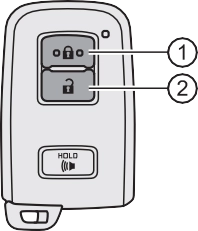
Locks all the doors Unlocks all the doors
Turning the key unlocks the driver’s door. Turning the key again unlocks the other doors.
Closes the moon roof (turn and hold)
Opens the moon roof (turn and hold)
Vehicles with a smart key system
The doors can also be locked and unlocked with the mechanical key. (P. 523)
 Vehicles without a smart key system
Vehicles with a smart key sys- tem
Locks all the doors
Check that the door is securely locked.
Pressing the button unlocks the driver’s door. Pressing the button again within 3 seconds unlocks the other doors.
Grip the driver’s door handle to unlock the door. Grip the passenger’s door handle to unlock all the doors.
Make sure to touch the sensor on the back of the handle.
The doors cannot be unlocked for 3 seconds after the doors are locked.
Check that the door is securely locked.
A buzzer sounds and the emergency flashers flash to indicate that the doors have been locked/unlocked. (Locked: once; Unlocked: twice)
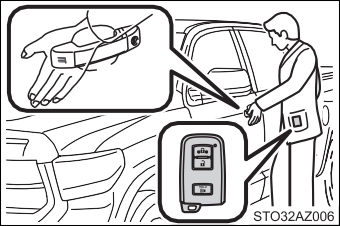 When the door cannot be locked even if the lock sensor on the surface of the door handle is touched by a finger, touch the lock sensor with the palm.
When gloves are being worn, remove the gloves.
If an attempt to lock the doors is made when a door is not fully closed, a buzzer sounds continuously for 5 seconds. Fully close the door to stop the buzzer, and lock the vehicle once more.
If a door is not opened within approximately 60 seconds after the vehicle is unlocked, the security feature automatically locks the vehicle again.
Using the wireless remote control to lock the doors will set the alarm system. (P. 95)
Use the mechanical key to lock and unlock the doors. (P. 523) Replace the battery with a new one if it is depleted. (P. 451)
The front doors can be opened by pulling the inside handle even if the lock buttons are in the lock position.
Move the inside lock button to the lock position. Close the door.
Vehicles with power door lock system:
The door cannot be locked if either of the front doors is open and the key is in the engine switch.
Vehicles with a smart key system
The door cannot be locked if the engine switch is in ACC or ON, or the electronic key is left inside the vehicle.
The key may not be detected correctly and the door may be locked.
Unlock Lock
These locks can be set to prevent children from opening the rear doors. Push down on each rear door switch to lock both rear doors.
|
Function |
Operation |
|
Shift position linked door locking function |
Shifting the shift lever out of P locks all the doors. |
|
Shift position linked door unlocking function |
Shifting the shift lever to P unlocks all the doors. |
|
Speed linked door locking function |
All the doors are locked when the vehicle speed is approximately 12 mph (20 km/h) or higher. |
|
Driver’s door linked door unlocking function |
All the doors are unlocked when the driver’s door is opened within 10 sec- onds after turning the engine switch to OFF. |
1 Pull the handle
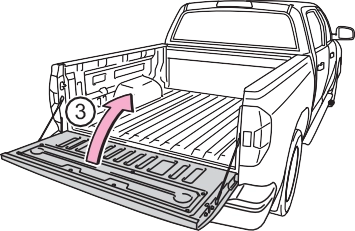
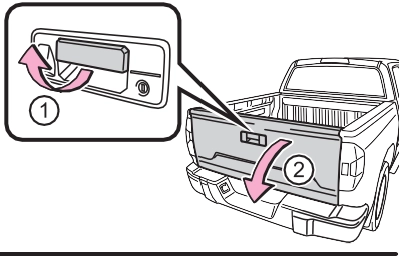 Open the tailgate slowly
The support cables will hold the tailgate horizontal.
After closing the tailgate, try pulling it toward you to make sure it is securely locked.
 Connector cover (Gray)
  Connector cover (White)
Store the connector covers in the glove box in a plastic bag when not using.
Tailgate wire harness con- nector (White)
Frame wire harness connec- tor (Gray)
Attach the connector cover (White) to the frame wire har- ness connector (Gray).
 Connector cover (White)
Frame wire harness connec- tor (Gray)
Open the tailgate.
Pull out the plastic wire protec- tor located in the vehicle bed by pressing the tabs and pulling the protector.
 Plastic wire protector
Pull out the wire harness from the vehicle bed.
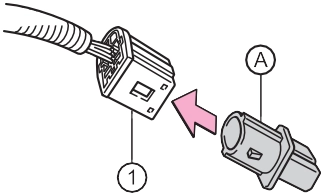 Attach the connector cover (Gray) to the tailgate wire har- ness connector (White).
Tailgate wire harness con- nector (White)
 Connector cover (Gray)
Open the tailgate to the angle where you can release the brackets on the support cables from the lugs on both sides.
Lift the support cable bracket up and slide it off.
To unhook the support cable bracket, keep pulling up the clip on the bracket and unhook the bracket.
Tilt the tailgate to about 45° from vertical and pull up the right side of the tailgate to unhook the right side.
Tilt the tailgate up to 15°.
Slide the tailgate a little to the right to unhook the left side.
To attach the tailgate, follow the removal procedure in reverse order.
step-up loading.
To get on the rear step bumper, use the shaded area in the illustra- tion.
 Antennas outside the cabin
 Antennas inside the cabin
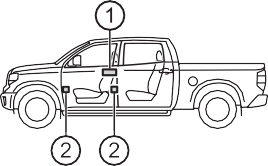
: If equipped
 When locking or unlocking the doors
The system can be operated when the electronic key is within about 2.3 ft. (0.7 m) of the driver’s door handle. (Only the door detecting the key can be oper- ated.)
The system can be operated when the electronic key is inside the vehicle.
A combination of exterior and interior alarms as well as warning messages shown on the multi-information display are used to prevent theft of the vehicle and accidents resulting from erroneous operation. Take appropriate mea- sures in response to any warning message on the multi-information display. (P. 493)
The following table describes circumstances and correction procedures when only alarms are sounded.
|
Alarm |
Situation |
Correction procedure |
|
Exterior alarm sounds once for 5 seconds |
An attempt was made to lock the vehicle while a door was open. |
Close all of the doors and lock the doors again. |
|
An attempt was made to lock the doors using the smart key system while the electronic key was still inside the vehi- cle. |
Retrieve the electronic key from the vehicle and lock the doors again. |
|
|
An attempt was made to lock either front door by opening a door and putting the inside lock button into the lock position, then closing the door by pulling on the outside door handle with the electronic key still inside the vehicle. |
||
|
Interior alarm sounds continuously |
An attempt was made to open the door and exit the vehicle when the shift lever was not in P. |
Shift the shift lever to P. |
|
The engine switch was turned to ACC while the driver’s door was open (or the driver’s door was opened while the engine switch was in ACC). |
Turn the engine switch off and close the driver’s door. |
The battery-saving function will be activated in order to prevent the electronic key battery and the battery from being discharged while the vehicle is not in operation for a long time.
The system will resume operation when
When battery-saving mode is set, battery depletion is minimized by stopping the electronic key from receiving radio waves.
Press  twice while pressing and
holding  . Confirm that the electronic key indicator flashes 4 times.
While the battery-saving mode is set, the
smart key system cannot be used. To cancel the function, press any of the elec- tronic key buttons.
The smart key system uses weak radio waves. In the following situations, the communication between the electronic key and the vehicle may be affected, preventing the smart key system, wireless remote control and engine immobi- lizer system from operating properly. (Ways of coping: P. 523)
Settings (e. g. smart key system) can be changed. (Customizable features: P. 564)
Use the wireless remote control or mechanical key. (P. 128, 523)
For vehicles sold in U.S.A. and New Caledonia FCC ID: HYQ23ABL
FCC ID: HYQ14FBA
NOTE:
This device complies with part 15 of the FCC Rules. Operation is subject to the following two conditions: (1) This device may not cause harmful interfer- ence, and (2) this device must accept any interference received, including interference that may cause undesired operation.
FCC WARNING:
Changes or modifications not expressly approved by the party responsible for compliance could void the user’s authority to operate the equipment.
For vehicles sold in Canada NOTE:
This device complies with Industry Canada’s licence-exempt RSSs. Opera- tion is subject to the following two conditions:
NOTE:
Le pràsent appareil est conforme aux CNR d’Industrie Canada applicables aux appareils radio exempts de licence. L’exploitation est autorisàe aux deux conditions suivantes:
Download Manual