Key information
Keys
Type A Keys
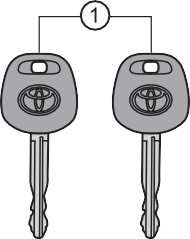 Key number plate
Type B Keys
Operating the wireless remote con-
trol function
Type C Electronic keys
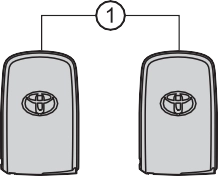 Operating the smart key sys- tem (P. 138)
Key number plate Key
Key number plate
Type B
Pressing the button unlocks the driver’s door. Pressing the button again within 3 seconds unlocks the other doors.
Type C
Pressing the button unlocks the driver’s door. Pressing the button again within 3 seconds unlocks the other doors.
To take out the mechanical key,
push the release button and take the key out.
The mechanical key can only be inserted in one direction, as the key only has grooves on one side.
If the key cannot be inserted in a lock cylinder, turn it over and reat- tempt to insert it.
When  is pressed for longer than about
1 second, an alarm will sound intermit-
tently and the vehicle lights will flash to deter any person from trying to break into or damage your vehicle.
To stop the alarm, press any button on the key (with a wireless remote control func- tion) or electronic key.
Lock the glove box as circumstances demand. (P. 362)
Remove the mechanical key for your own use and provide the attendant with the electronic key only.
Type A and B
New genuine key can be made by your Toyota dealer using the other key and the key number stamped on your key number plate.
Keep the plate in a safe place such as your wallet, not in the vehicle.
Type C
New genuine key can be made by your Toyota dealer. The following are necessary when making new keys.
Mechanical key:
The key number for the mechanical key stamped on the number plate and the other key.
Key:
The key number for key stamped on the key number plate.
Keep the plates in a safe place such as your wallet, not in the vehicle.
There are key number plates for the mechanical key and key respectively. When storing them, keep them in a safe place in a manner to distinguish one from the other (such as markings, etc.).
When bringing an wireless remote control function onto an aircraft, make sure you do not press any button on the key while inside the aircraft cabin. If you are carrying the key in your bag, etc., ensure that the buttons are not likely to be pressed accidentally. Pressing a button may cause the key to emit radio waves that could interfere with the operation of the aircraft.
Type B
The wireless remote control function may not operate normally in the following situations.
Type C
P. 142
Type B
If the wireless remote control function does not operate, the battery may be depleted. Replace the battery when necessary. (P. 451)
Type C
P. 451
The number of keys already registered to the vehicle can be confirmed. Ask your Toyota dealer for details.
Settings (e.g. wireless remote control system) can be changed. (Customizable features: P. 564)
For vehicles sold in the U.S.A. FCC ID: GQ4-52T
FCC ID: GQ4-49R
NOTE:
This device complies with part 15 of the FCC Rules. Operation is subject to the following two conditions: (1) This device may not cause harmful interfer- ence, and (2) this device must accept any interference received, including interference that may cause undesired operation.
FCC WARNING:
Changes or modifications not expressly approved by the party responsible for compliance could void the user’s authority to operate the equipment.
The FCC ID/IC Certification number is affixed inside the equipment. You can find the ID/number when replacing the battery.
For vehicles sold in Canada NOTE:
This device complies with Industry Canada’s license-exempt RSSs. Opera-
tion is subject to the following two conditions: (1) This device may not cause interference; and (2) This device must accept any interference, including interference that may cause undesired operation of the device.
The FCC ID/IC Certification number is affixed inside the equipment. You can find the ID/number when replacing the battery.
NOTE:
Le pràsent appareil est conforme aux CNR d’Industrie Canada applicables aux appareils radio exempts de licence. L’exploitation est autorisàe aux deux conditions suivantes:(1) l’appareil ne doit pas produire de brouillage; (2) l’util- isateur de l’appareil doit accepter tout brouillage radioàlectrique subi, màme si le brouillage est susceptible d’en compromettre le fonctionnement.
L’identification FCC/Ie numàro d’accràditation IC est apposà(e) à l’intàrieur de l’appareil.
P. 145
NOTICE
Carry the electronic key 3.9 in. (10 cm) or more away from electric appli- ances that are turned on. Radio waves emitted from electric appliances within 3.9 in. (10 cm) of the electronic key may interfere with the key, caus- ing the key to not function properly.
Take your vehicle with all the electronic keys provided with your vehicle to your Toyota dealer.
If the electronic key remains lost, the risk of vehicle theft increases signifi- cantly. Visit your Toyota dealer immediately with all remaining electronic keys that was provided with your vehicle.
Download Manual