Tips for operating the audio/visual system
329
track-related information in an MP3 file. This embedded infor- mation can include the track number, track title, the artist’s name, the album title, the music genre, the year of production, comments, cover art and other data. The contents can be freely edited using software with ID3 tag editing functions. Although the tags are restricted to a num- ber of characters, the informa- tion can be viewed when the track is played back.
WMA files can contain a WMA tag that is used in the same way as an ID3 tag. WMA tags carry information such as track title and artist name.
MP3 is an audio compression standard determined by a work- ing group (MPEG) of the ISO (International Standard Organi- zation). MP3 compresses audio data to about 1/10 the size of that on conventional discs.
This is a method of embedding
5-10. Tips for operating the audio/visual system
331
This product includes technol- ogy owned by Microsoft Cor- poration and cannot be used or distributed without a license from Microsoft Licens- ing, Inc.
AAC is short for Advanced Audio Coding and refers to an audio compression technology standard used with MPEG2 and MPEG4.
|
Message |
Explanation |
|
“iPod Error” |
This indicates a problem in the iPod or its con- nection. |
|
“No music files found.” |
This indicates that there is no music data in the iPod. |
|
“Please check the iPod firm- ware version.” |
This indicates that the software version is not compatible. Per- form the iPod firmware updates and try again. |
|
“Unable to authorize the iPod.” |
This indicates that it failed to authorize the iPod. Please check your iPod. |
|
Message |
Explanation |
|
“Music tracks not supported. Please check your portable player.” |
This indicates a problem in the Bluetooth® device. |
If the malfunction is not rectified: Take your vehicle to your Toyota
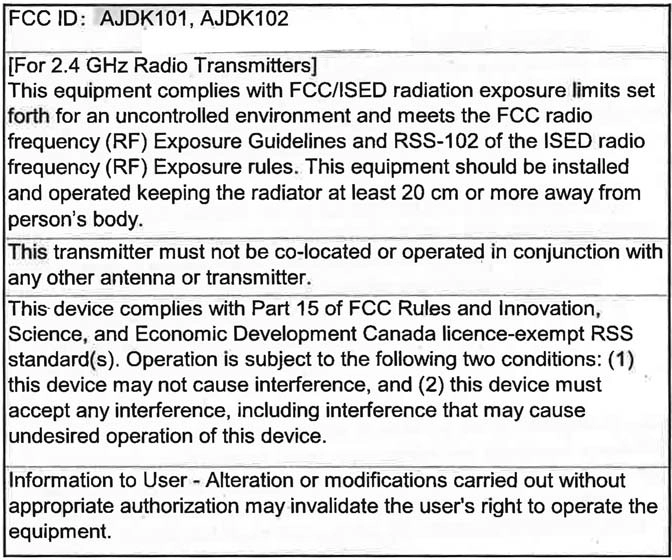
5-10. Tips for operating the audio/visual system
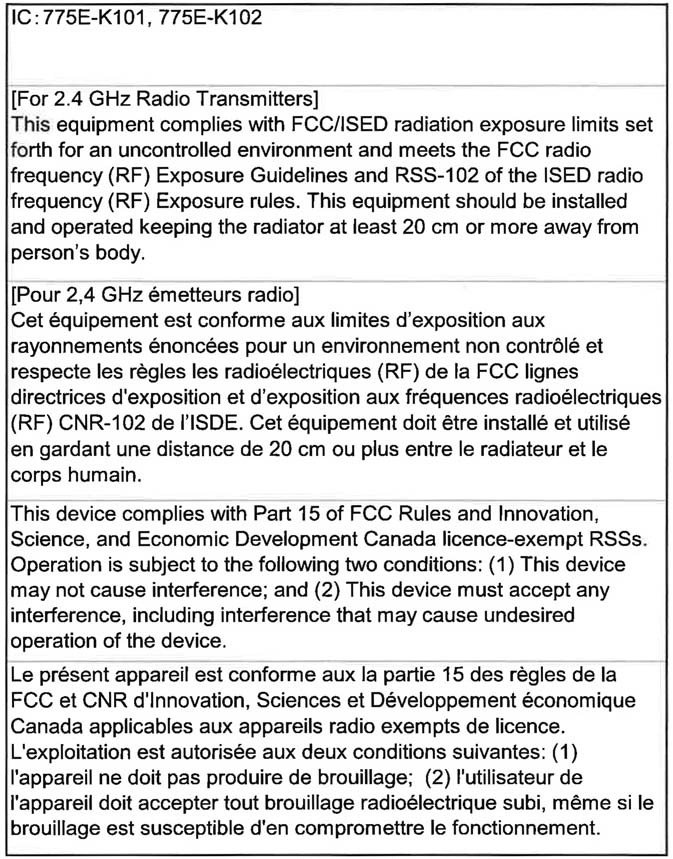 For vehicles sold in Canada
333









5-10. Tips for operating the audio/visual system
335
Total Traffic and Weather Network, a division of TTWN Media Networks, LLC (“TTWN”), owns or holds the rights to the traffic, news, sports, weather, stocks and other data (the “TTWN Data”) and network through which it is delivered, together the “TTN Service”. Use of the TTN Service is subject to the terms of these Device End User Terms.
THE TTWN SERVICE IS INFORMATIONAL ONLY. YOUR USE OF TTWN SERVICE IS AT YOUR SOLE RISK. TTWN DATA IS PROVIDED “AS IS”, “WHERE IS”, AND “WHERE AVAILABLE”. TTWN AND ITS SUPPLIERS AND LICENSORS EXPRESSLY DISCLAIM ALL WARRANTIES WITH RESPECT TO THE TTWN SERVICE (INCLUDING, WITHOUT LIMITATION, THAT THE TTWN DATA WILL BE ERROR- FREE, THAT THE TTWN SERVICE WILL OPERATE WITHOUT INTERRUPTION OR THAT THE TTWN DATA WILL BE ACCURATE), EXPRESS, IMPLIED OR STATUTORY, INCLUDING, WITHOUT LIMITATION, THE IMPLIED WARRANTIES OF MERCHANTABILITY, NON-INFRINGEMENT, FITNESS FOR A PARTICULAR PURPOSE, OR THOSE ARISING FROM A COURSE OF DEALING OR USAGE OF TRADE.
TTWN AND ITS SUPPLIERS AND LICENSORS WILL NOT BE LIABLE TO YOU UNDER ANY LEGAL THEORY, INCLUDING CONTRACT, TORT, NEGLIGENCE OR STRICT LIABILITY, FOR ANY DIRECT, INDIRECT, INCIDENTAL, SPECIAL, PUNITIVE, CONSEQUENTIAL OR EXEMPLARY DAMAGES, INCLUDING BUT NOT LIMITED TO, DAMAGES FOR LOSS OF PROFITS, GOODWILL, USE, DATA OR OTHER INTANGIBLE LOSSES (EVEN IF TTWN, ITS SUPPLIERS OR LICENSORS HAS BEEN ADVISED OF THE POSSIBILITY OF SUCH DAMAGES), RESULTING FROM OR ARISING OUT OF YOUR USE OF, OR YOUR INABILITY TO USE, THE TTWN SERVICE, THIS AGREEMENT, OR ANY OTHER MATTER RELATING TO THE TTWN SERVICE.
SOME JURISDICTIONS DO NOT ALLOW THE EXCLUSION OF CERTAIN WARRANTIES OR THE LIMITATION OR EXCLUSTION OF LIABILITY FOR INCIDENTAL OR CONSEQUENTIAL DAMAGES. ACOORDINGLY, SOME OF THE ABOVE LIMITATIONS MAY NOT APPLY TO YOU.
Download Manual