Opening and closing the windows
Operating the switch moves the windows as follows:
*: To stop the window partway, operate the switch in the opposite direction.
The engine switch is in ON.
The power windows can be oper- ated for approximately 45 seconds after the engine switch is turned to ACC or OFF. They cannot, however, be operated once either front door is opened.
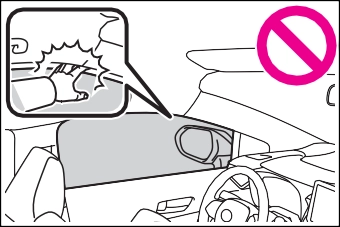
If an object becomes jammed between the window and the win-
dow frame while the window is clos- ing, window movement is stopped and the window is opened slightly.
If an object becomes caught between the door and window while the window is opening, window movement is stopped.
When the jam protection function or catch protection function operates unusually and the door window can- not be opened or closed, perform the following operations with the power window switch of that door.
one-touch closing direction or one-touch opening direction so that the door window can be opened and closed.
one-touch closing direction, and hold it there for approximately 6 seconds or more.
pushing the switch in the
one-touch opening direction, and hold it there for approximately 4 seconds or more.
6 Pull and hold the power window switch in the one-touch closing direction again. After the door window is completely closed, continue holding the switch for a further 1 second or more.
If you release the switch while the window is moving, start again from the beginning.
If the window reverses and cannot be fully closed or opened, have the vehicle inspected by your Toyota dealer.
 Vehicles without a smart key sys- tem: The power windows can be opened and closed using the key.* (P.104)
Vehicles with a smart key system: The power windows can be opened and closed using the mechanical key.* (P.514)
*: These settings must be custom- ized at your Toyota dealer.
Some functions can be customized. (P.548)
|
|
|
Observe the following precau- tions. Failure to do so may result in death or serious injury. |
 WARNING
129
Press the switch.
The indicator will come on and the passenger windows will be locked.
The passenger windows can still be opened and closed using the driver’s switch even if the lock switch is on.
The engine switch is in ON.
The window lock switch is disabled. If necessary, press the window lock switch after reconnecting the bat- tery.
2 Tilts the moon roof down*
*: Lightly press either side of the
*: If equipped
The moon roof stops slightly before the fully open position to reduce wind noise. Press the switch again to fully open the moon roof.
*: Lightly press either side of the moon roof switch to stop the moon roof partway.
moon roof switch to stop the moon roof partway.
The engine switch is in ON.
The moon roof can be operated for approximately 45 seconds after the engine switch is turned to ACC or OFF. It cannot, however, be oper- ated once either front door is opened.
If an object is detected between the moon roof and the frame while the moon roof is closing or tilting down, travel is stopped and the moon roof opens slightly.
The sunshade can be opened and closed manually. However, the sun- shade will open automatically when the moon roof is opened.
Vehicles with a smart key system: The moon roof can be opened and closed using the mechanical key.* (P.514)
*: These settings must be custom- ized at your Toyota dealer.
Perform the following procedure:
131
The moon roof will close, reopen and pause for approximately 10 sec- onds.*2 Then it will close again, tilt up and pause for approximately 1 second. Finally, it will tilt down, open and close.
pletely closed and then release the switch.
If the moon roof does not fully close even after performing the above procedure correctly, have the vehi- cle inspected by your Toyota dealer.
Some functions can be customized. (P.548)
the tilt up position and stops.
The moon roof will pause for approximately 10 seconds in the tilt up position.*2 Then it will adjust slightly and pause for approximately 1 second. Finally, it will tilt down, open and close.
*1: If the switch is released at the incorrect time, the procedure will have to be performed again from the beginning.
*2: If the switch is released after the above mentioned 10 second pause, automatic operation will be disabled. In that case, press and hold the “CLOSE” or “UP” switch, and the moon roof will tilt up and pause for approximately 1 second. Then it will tilt down, open and close. Check to make sure that the moon roof is com-
Driving 4
133
Refueling
Opening the fuel tank cap
.................................. 178
4-5. Using the driving support systems
Toyota Safety Sense 2.0
.................................. 180
PCS (Pre-Collision System)
.................................. 187
LTA (Lane Tracing Assist)
.................................. 195 4
LDA (Lane Departure Alert with steering control) . 205
Dynamic radar cruise con- trol with full-speed range
.................................. 213
Dynamic radar cruise con- trol 223
RSA (Road Sign Assist)
.................................. 233
BSM (Blind Spot Monitor)
.................................. 236
Rear view monitor system
.................................. 241
Driving mode select switch
.................................. 249
Driving assist systems
.................................. 250
4-6. Driving tips
Winter driving tips 255
Download Manual