Disclaimer: Not affiliated with or endorsed by Subaru Motor Company. For informational purposes only. Full Disclaimer

2020 Subaru Impreza Owners Manual - Reverse Automatic Braking System (if equipped)


Reverse Automatic Braking System (if equipped)

Reverse Automatic Braking is a system designed to help avoid collisions or reduce collision damage when reversing the vehicle. If a wall or an obstacle is detected in the reversing direction, the system will notify the driver with a warning sound and may activate the vehicle’s brakes auto- matically.

sonal information or other audio data.

    Distance from the object
    Vehicle speed
    Accelerator pedal operation status
    Brake pedal operation status
    Select lever position
    Outside temperature
    The sensitivity setting of the sonar sensors

SUBARU and third parties contracted by SUBARU may acquire and use the recorded data for the purpose of vehi- cle research and development. SUBARU and third parties contracted by SUBARU will not disclose or provide the acquired data to any other third party except under the following con- ditions.
    The vehicle owner has given his/her consent.
    The disclosure/provision is based on a court order or other legally en- forceable request.
    Data that has been modified so that the user and vehicle cannot be identi- fied is provided to a research institution for statistical processing or similar purposes.
    Reverse Automatic Braking System overview

The system detects objects using sonar sensors installed in the rear bumper.
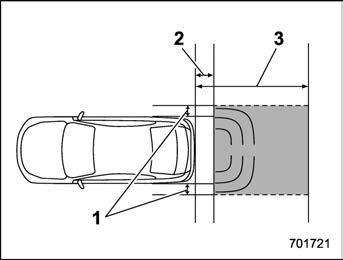
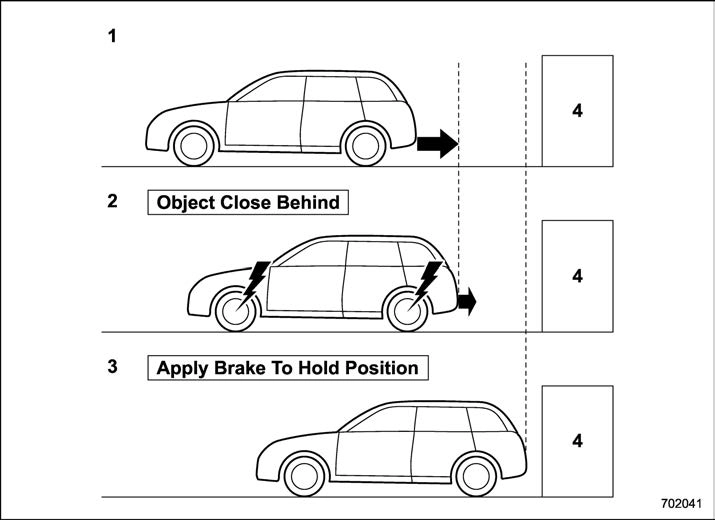
    If the system determines a possible collision with an object in the reversing direction, automatic deceleration will be activated. Also, beeping sounds will acti- vate.
    If the vehicle is further reversed, auto- matic hard braking will be applied and a continuous beeping sound will activate.

    When reversing
    When either strong automatic braking or torque control is applied to prevent collision (in this case, short warning beeps or continuous warning beeps will sound)

    When the vehicle is stopped by the system (in this case, the continuous beep will remain sounding)
    Object (e.g., a wall)

    Detecting range (width): Approximately 6 in (15 cm) outside of the vehicle width
    Range that the system cannot detect: Approximately 20 in (50 cm) behind the rear of the vehicle
    Detecting range (length): Approximately 5 ft (1.5 m) from the rear of the vehicle

The Reverse Automatic Braking system will operate when all of the following conditions are met.
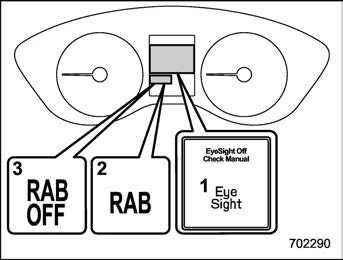
    EyeSight warning indicator
    RAB warning indicator
    RAB OFF indicator
    The ignition switch is in the “ON” position
    The EyeSight warning indicator is off
    The RAB warning indicator is off
    The RAB OFF indicator is off
    The Reverse Automatic Braking sys- tem is set to on
    The select lever is in the “R” position
    The vehicle speed is between 1 to 9 mph (1.5 to 15 km/h)
    In the following cases, the Reverse Automatic Braking system will not operate. Promptly contact a SUBARU dealer to have the system inspected.
    The EyeSight warning indicator is illuminated
    The Reverse Automatic Braking fail indicator is illuminated
    When the Reverse Automatic Brak- ing system OFF indicator is illumi- nated, the Reverse Automatic braking system cannot be operated.
    In the following cases, the system may not be able to properly detect an obstacle. Promptly contact a SUBARU dealer to have the system inspected.
    A sticker, paint, or a chemical is applied to the sonar sensor or the rear bumper near the sonar sensor
    The rear bumper is modified
    The rear bumper has been re- moved and reattached
    The ground clearance is changed due to the vehicle’s loading condi- tion or modification
    The sonar sensor and the area near the sonar sensor are being damaged
    The rear bumper is exposed to strong impact, or the rear bumper is deformed
    When the 8-inch audio/navigation system is performing a software up- date, the Reverse Automatic Braking System may not display the following items on the audio/navigation screen until the update is complete.
    Display Icon on/off Function
    Distance Indicator Image
    Warning Message
    On a steep hill, the system’s auto- matic braking ability will be reduced.
    The system is designed to avoid collisions by automatic hard braking when the vehicle’s reversing speed is less than approximately 3 mph (5 km/h). However, the system does not guaran- tee that the vehicle will be able to avoid collisions in any situation.
    If the vehicle is reversed at an extremely slow speed, the driver’s operation may be prioritized. In this case, automatic braking will not oper- ate.
    The system may not be able to detect the following objects
    Sharp or thin objects such as poles, fences and ropes which may not reflect the sound wave emitted from the sonar sensor
    Objects that are too close to the rear bumper when the select lever is set to the “R” position
    Objects with a surface which may not reflect the sound wave emitted from the sonar sensor such as a chain link fence.
    Objects the system is not designed to detect
    Pedestrians
    Moving objects including moving vehicles
    Objects which absorb sound waves such as cloth or snow
    Objects whose surface has a diagonal angle
    Objects that are low to the ground such as parking blocks
    Objects that are high above the ground such as objects hanging from above
    The system may not be able to properly detect objects or may cause a system malfunction when the follow- ing conditions exist

High frequency sound from other sources are nearby

    Horn sound from another vehicle
    Engine sound from other vehi- cles
    Sound of an air brake
    Vehicle detection equipment or a sonar from another vehicle
    A sound wave with a frequency similar to the vehicle’s system is transmitted nearby
    A vehicle equipped with the same system is reversing toward your reversing direction

Weather conditions

    Extremely high or extremely low temperatures in which the area near the sonar sensor becomes too hot or too cold to operate
    The rear bumper near the sonar sensors is exposed to heavy rain or a significant amount of water
    Fog, snow or sandstorm, etc.
    Air is moving rapidly such as when a strong wind is blowing

Parts attached to the rear bumper near the sonar sensor

    Commercial electronic parts (fog light, fender pole, radio antenna) or commercial attachment parts (trai-

ler hitch, bicycle carrier, bumper guard) are attached

    Parts that emit high frequency sound, such as a horn or speaker, are attached

Vehicle conditions

    Ice, snow or mud is adhered to the rear bumper near the sonar sensor
    The vehicle is significantly in- clined
    The ground clearance is signifi- cantly reduced due to the vehicle’s loading condition, etc.
    When the sonar sensor is mis- aligned due to a collision or an accident

Surrounding environment

    A cloth banner, flag, hanging branch or railroad crossing bars are present in the reversing direc- tion
    When reversing on a gravel or grassy area
    When reversing in an area where objects or walls are adjacent to the vehicle such as narrow tunnels, narrow bridges, narrow roads or narrow garages
    Wheel tracks or a hole is present in the ground of the reversing direction
    When reversing over a drainage cover (grate cover)

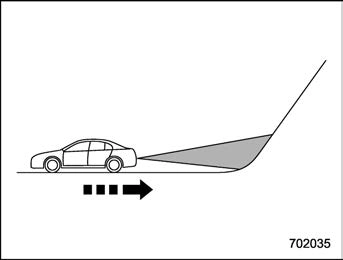
    The path of the reversing direc- tion is inclined such as on a steep uphill
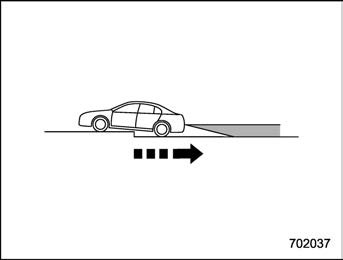
    A curb is present in the reversing direction
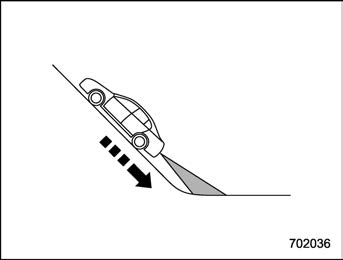
    When reversing downhill

    When reversing on an uneven road
    In circumstances such as the follow- ing, it may not be possible to avoid a collision even when the system oper- ates normally.
    Roads are slippery.
    The tire air pressure is not cor- rect.
    The tires have become worn.
    Tires which are not the desig- nated size are installed.
    Emergency repairs were per- formed using a puncture repair kit.
    The suspension was modified.
    Tire chains are installed.
    Vehicle driving is unstable due to accident or malfunction.
    The brake warning light is illumi- nated.
    Reverse Automatic Braking System operation

When the Reverse Automatic Braking System is in operation, the range between the vehicle and the detected object will be indicated on the audio/navigation monitor. Also, warning sounds will activate in 3 levels to warn the driver of a potential collision.

While the RAB is operating, a warning message is displayed on the audio/navi- gation monitor and the combination meter display (color LCD).

Guideline of detecting range

Alert level

Range of detected object*

Distance indicator

Alarm pattern

Long proximity (ob- ject detected)

35 in (90 cm) or more

Green

No warning sound

Medium proximity alert (approaching the object)

28 to 35 in (70 to 90 cm)

Yellow

Short beeps

Short proximity alert (approaching closer to the object)

20 to 28 in (50 to 70 cm)

Orange

Rapid short beeps

Closest proximity alert (too close to the object)

20 in (50 cm) or less

Red

Continuous beep

*: Range of detection may vary depending on the environmental condition.
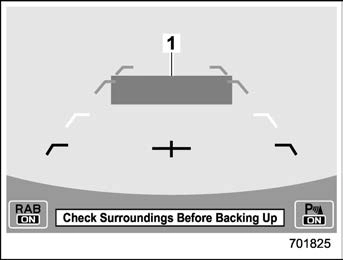
Long proximity alert (object detected)
    Green: 35 in (90 cm) or more

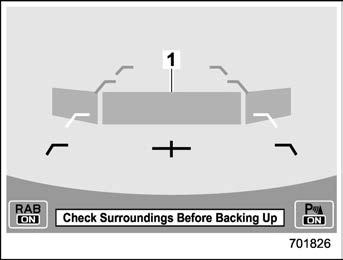
Medium proximity alert (approaching the object)

1) Yellow: 28 to 35 in (70 to 90 cm)
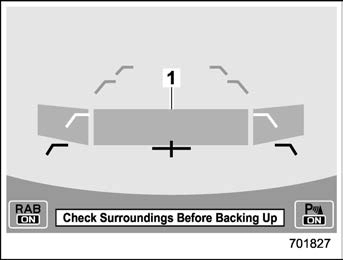
Short proximity alert (approaching the object closer)

1) Orange: 20 to 28 in (50 to 70 cm)
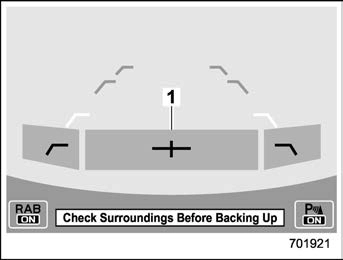
Closest proximity alert (too close to the object)

1) Red: 20 in (50 cm) or less

When an object is detected in the rever- sing direction, the range of detected object will be shown on the audio/navigation monitor.

A warning alarm will sound and, depend- ing on the speed, either torque control to generate engine braking or automatic braking will be applied.
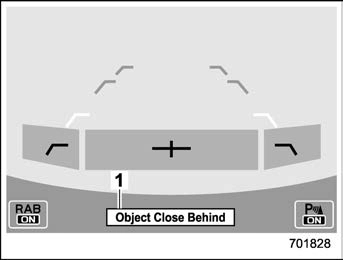
Automatic braking warning

1) Warning message

If the vehicle continues to go in reverse, the system may determine the risk of collision with the object. In this case, short warning beeps or continuous warning beeps will sound and either strong auto- matic braking or torque control will be applied to prevent collision.
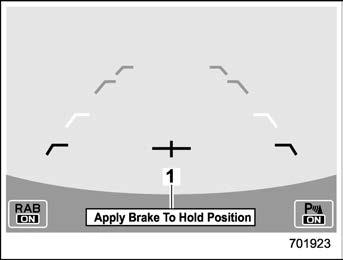
Depress brake pedal warning

    Warning message

Make sure to depress the brake pedal once the vehicle has been stopped by automatic braking. Until the brake pedal is depressed, a message will be displayed on the audio/navigation monitor and the continuous beep will remain sounding.

At this time, a warning message is also displayed on the combination meter dis- play (color LCD).
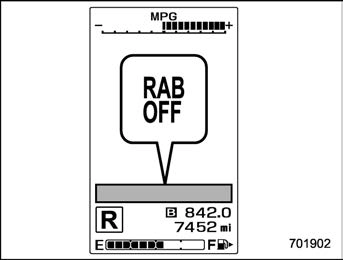
RAB OFF indicator: illuminates when the Reverse Automatic Braking system is turned OFF.

After the brake pedal is depressed, the Reverse Automatic Braking system OFF indicator will illuminate and the system will temporarily stop operating. The Reverse

Automatic Braking system OFF indicator will turn off when the select lever is shifted to a position other than the “R” position. The system will operate again the next

time the select lever is shifted to “R” position.

In circumstances such as the following, the Reverse Automatic Braking system auto- matically stops operating and the Reverse Automatic Braking system OFF indicator illuminates.

    There is ice, snow, mud, or other substance on the sonar sensors.
    The select lever was shifted to R when there is an obstacle located close to the rear bumper.
    A sound with a frequency close to that of the sonar used by the Reverse Auto- matic Braking system was detected.

& Canceling the Reverse Auto- matic Braking system opera- tion

The Reverse Automatic Braking system can be temporarily canceled by any of the following operations.

    Depressing the brake pedal*
    Depressing the accelerator pedal*
    Depressing the accelerator pedal hard (in this case, limited acceleration will be canceled and the vehicle will continue reversing.)
    Shifting the select lever to a position other than the “R” position.

*: While the vehicle is stopped by the automatic braking

& Reverse Automatic Braking system ON/OFF setting

While the select lever is shifted to the “R” position, the below functions of the Re- verse Automatic Braking system can be set by operating the audio/navigation monitor.
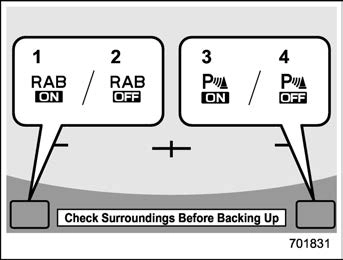
    ON setting key of Reverse Automatic Braking
    OFF setting key of Reverse Automatic Braking
    ON setting key of the object detection warning beeping sound
    OFF setting key of the object detection warning beeping sound

When the ON setting key is shown, the corresponding setting is ON.

Touch and hold the ON setting key to turn the setting OFF.

When the OFF setting is shown, the corresponding setting is OFF.

Touch and hold the OFF setting key to turn the setting ON.

When the Reverse Automatic Braking system is turned OFF, the following in- dicator will illuminate.
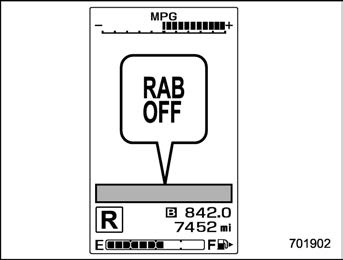
RAB OFF indicator: illuminates when the Reverse Automatic Braking system is turned OFF.

RAB OFF indicator will turn off when the Reverse Automatic Braking system is turned ON.

    When the settings cannot be chan- ged, the ON/OFF setting key will be grayed out.
    The ON/OFF setting key may be greyed out if the Reverse Automatic Braking system malfunctions, etc. In this case, turn the ignition switch to the “LOCK”/“OFF” position and then turn it to the “ON” position again. If the setting cannot be changed even after turning the ignition switch to the “ON” position again, consult your SUBARU dealer.
    The settings will be restored as follows when the select lever is shifted to the “R” position next time.
    Reverse Automatic Braking sys- tem settings: default (ON setting)
    Object detection warning beep- ing sound: the setting selected by operating the combination meter display (color LCD)

Also, the following settings can be chan- ged by operating the combination meter display (color LCD).

    Warning volume
    Sonar audible alarm ON/OFF

For details, refer to “Menu screens”  3- 39.
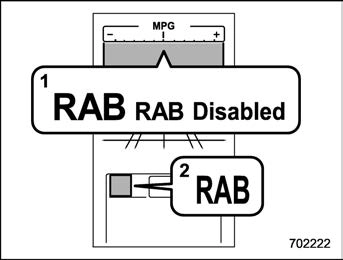
    RAB warning indicator

    RAB malfunction message
    RAB warning indicator

If the Reverse Automatic Braking system malfunctions, the above indicator illumi- nates on the combination meter. Contact the nearest SUBARU dealer for details.

    Handling of the sonar sen- sors

The 4 sonar sensors are located in the rear bumper. To ensure the proper operation of the Reverse Automatic Braking system, observe the following precautions.
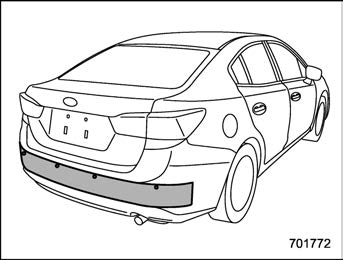
Sedan
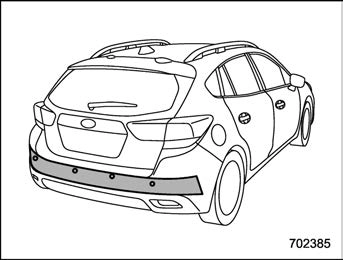
5-door models

    Do not affix any stickers or other items on the sonar sensor or the bumper surface near the sonar sensors.

    Always keep the sonar sensor and the rear bumper surface near the sonar sensors clean.
    Do not modify the rear bumper.
    Do not paint the bumper near the sonar sensors.
    Do not apply strong impacts to the rear bumper near the sonar sensors. If a sensor becomes misaligned, a system malfunc- tion may occur, including inability to detect objects in the reversing direction. If any strong impact is applied to the rear bumper, contact a SUBARU dealer to have the system inspected.
    Do not disassemble the sonar sensors.


Download Manual