Rear View Camera
 WARNING: The rear view camera system is a reverse aid supplement device that still requires the driver to use it in conjunction with the interior and exterior mirrors for maximum coverage. WARNING: Objects that are close to either corner of the bumper or under the bumper, might not be seen on the screen due to the limited coverage of the camera system. WARNING: Reverse your vehicle slowly. Failure to follow this instruction could result in the loss of control of your vehicle, personal injury or death. WARNING: Use caution when the liftgate is ajar. If the liftgate is ajar, the camera will be out of position and the video image may be incorrect. All guidelines disappear when the liftgate is ajar. Failure to follow this instruction could result in personal injury. WARNING: Do not switch the camera features on or off when your vehicle is moving. WARNING: The operation of the camera may vary depending on the ambient temperature, vehicle and road conditions. WARNING: To help avoid personal injury always use caution when in reverse (R) and when using the rear view camera. WARNING: The rear view camera system is a reverse aid supplement device that still requires the driver to use it in conjunction with the interior and exterior mirrors for maximum coverage. WARNING: Objects that are close to either corner of the bumper or under the bumper, might not be seen on the screen due to the limited coverage of the camera system. WARNING: Reverse your vehicle slowly. Failure to follow this instruction could result in the loss of control of your vehicle, personal injury or death. WARNING: Use caution when the liftgate is ajar. If the liftgate is ajar, the camera will be out of position and the video image may be incorrect. All guidelines disappear when the liftgate is ajar. Failure to follow this instruction could result in personal injury. WARNING: Do not switch the camera features on or off when your vehicle is moving. WARNING: The operation of the camera may vary depending on the ambient temperature, vehicle and road conditions. WARNING: To help avoid personal injury always use caution when in reverse (R) and when using the rear view camera. |
The rear view camera provides an image of the area behind your vehicle. During operation, lines appear in the display that represents the path of your vehicle and proximity to objects behind it.
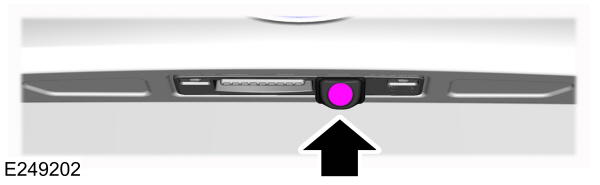
The camera is on the liftgate.
Using the Rear View Camera
The rear view camera system displays what is behind your vehicle when you shift the transmission into reverse (R).
Note: When towing, the camera only sees what you are towing.In some vehicles, the guidelines may disappear when you connect the trailer tow connector.
The system may not correctly operate in any of the following conditions:
- Nighttime or dark areas if the reverse lamps are not operating.
- If the camera is obstructed.Clean the lens with a soft, lint-free cloth and non-abrasive cleaner.
- The camera is misaligned due to damage to the rear of your vehicle.
Rear View Camera Guidelines
| WARNING: Objects above the camera may not be visible. Check the area behind your vehicle when necessary. |
If the vehicle battery is disconnected, the guidelines are not fully functional directly after the battery is reconnected. The guidelines become fully functional after you drive your vehicle as straight as possible for five minutes at a minimum speed of 50 km/h (31 mph).
The system uses three types of guidelines to help you see what is behind your vehicle:
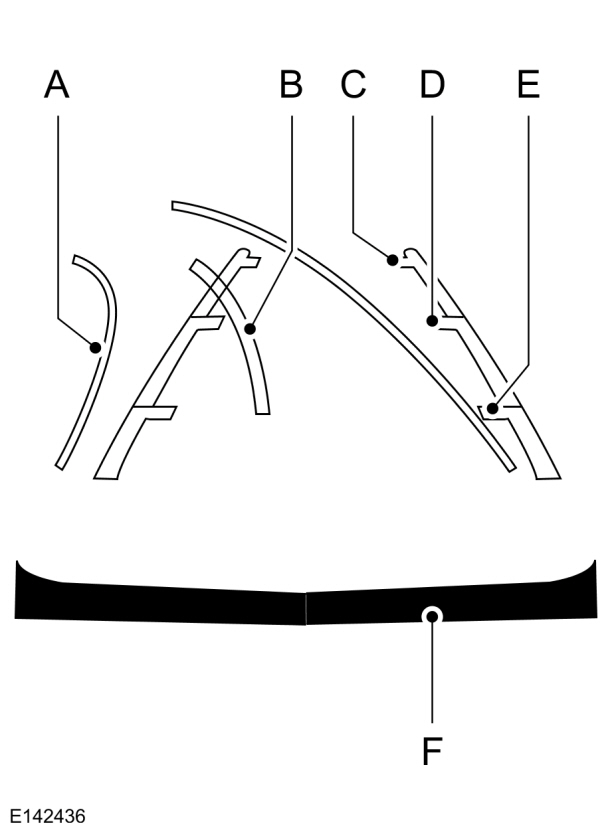
A Active guidelines. Show the intended path of your vehicle when reversing. Active guidelines. Show the intended path of your vehicle when reversing.B Centerline. Helps you align the center of your vehicle with a trailer.C Fixed guidelines. Show the actual path of your vehicle when reversing in a straight line. Green zone.D Fixed guidelines. Show the actual path of your vehicle when reversing in a straight line. Yellow zone.E Fixed guidelines. Show the actual path of your vehicle when reversing in a straight line. Red zone.F Rear bumper. |
Active guidelines are only available with fixed guidelines. To use active guidelines, turn the steering wheel to point the guidelines toward an intended path.If you change the steering wheel position when reversing, your vehicle might deviate from the original intended path.
Note: Guidelines do not display if the liftgate is open.
The fixed and active guidelines fade in and out depending on the steering wheel position.When the steering wheel position is straight the active guidelines do not display. Objects in the red zone are closest to your vehicle and objects in the green zone are further from your vehicle.
Manual Zoom
| WARNING: When manual zoom is on, the full area behind your vehicle may not show. Be aware of your surroundings when using the manual zoom feature. |
Press the zoom in or zoom out symbol to change the view.
Note: Manual zoom is only available when you shift into reverse (R).
Note: The rear bumper remains in the image as a reference point.
Note: Only the centerline shows when you switch on manual zoom.
System Settings
You can adjust the camera settings using the touchscreen.See Settings.
Rear View Camera Delay
You can switch this feature on or off using the touchscreen. The default setting is off.See Settings.
If you switch this feature on, the image continues to display when you shift from reverse (R) until:
- You shift to a forward gear and the vehicle speed sufficiently increases.
- You shift in to park (P).
Enhanced Parking Aids or Park Pilot (If Equipped)
You can switch this feature on or off using the touchscreen.See Settings.
When the reverse sensing system detects an object, it displays red, yellow and green indicators at the top of the image.
Download Manual