Basic HFL Operation
Make and receive phone calls using the vehicle’s audio system, without handling your phone. Visit handsfreelink.com (US) to check phone compatibility. Canada customers can phone (855) 490-7351 for any HandsFreeLink® related inquiry.
To reduce the potential for driver distraction, certain manual functions may be inoperable or grayed out while the vehicle is moving. Voice commands are always available.
- HFL Displays and Controls
- Talk Button Tips
Parent topic: Bluetooth® HandsFreeLink ® (HFL)
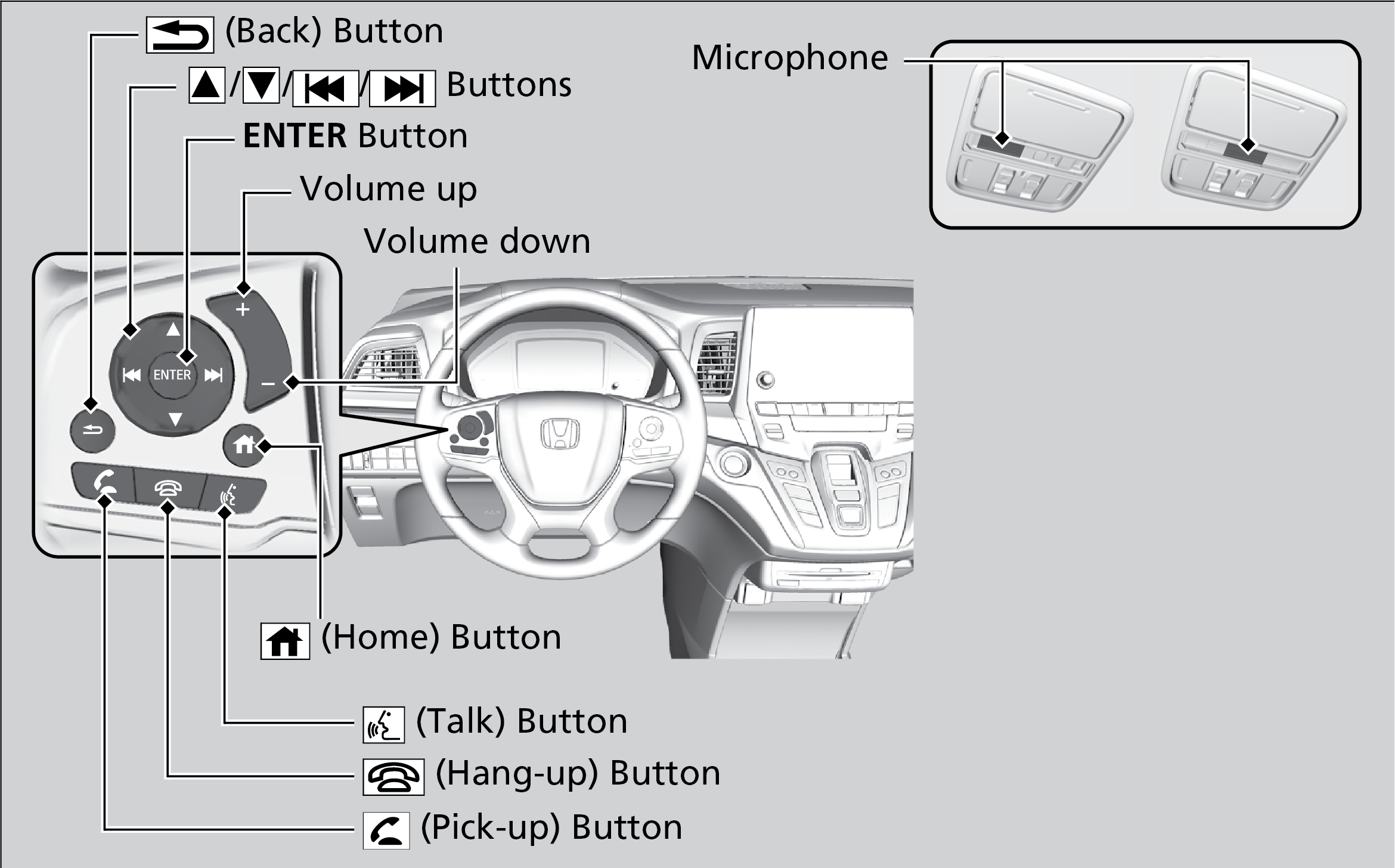
■ HFL Displays and Controls
Use the controls to enter information and make selections.
Models with Display Audio
Parent topic: Basic HFL Operation
■Talk Button Tips
When using the Talk button, wait for the beep before saying a command.
- When using the Talk button, wait until you hear a beep before speaking.
- To bypass the system prompts, simply press the Talk button again to say your command.
- Speak in a clear, natural voice.
- Reduce all background noise.
- Adjust the dashboard vents away from the microphone on the ceiling.
- Close the windows and moonroof*1.
Parent topic: Basic HFL Operation
Download Manual