When Driving
Starting the Engine

-
- Make sure the parking brake is applied.
- The parking brake and brake system indicator (red) comes on for 30 seconds when you pull up to electric parking brake switch.
- Make sure the parking brake is applied.

-
- Check that the transmission is in P, then depress the brake pedal.
- Although it is possible to start the vehicle in N, it is safer to start it in P.
- Check that the transmission is in P, then depress the brake pedal.

-
- Press the ENGINE START/STOP button without depressing the accelerator pedal.
If the Keyless Remote Battery is Weak
If the engine does not start, wait at least 30 seconds before trying again.
Immobilizer System
- Detail
Remote Engine Start*
You can remotely start the engine using the keyless remote.
Carbon monoxide gas is toxic and can rapidly accumulate in closed or even partly enclosed areas.
Breathing it can cause unconsciousness and even kill you.
Never use the remote engine starter with the vehicle parked in a garage or other areas with limited ventilation.
- WARNING
Before using the remote engine start, check your local laws.
This distance may vary by external electrical interference.
- You have disabled a remote engine start setting using the driver information interface* or audio/information screen*.
Settings*
Customized Features Defaulting All the Settings
- The power mode is not in VEHICLE OFF.
- The transmission is in a position other than P.
- The hood is open, or any door or the tailgate is unlocked.
- You have already used the remote twice to start the engine.
- Another registered keyless remote is in the vehicle.
- There is any antenna failure.
- The door is unlocked with the built-in key.
- The engine oil pressure is low.
- The engine coolant temperature is extremely high.
- The security system alarm is not set.
- You do not start the vehicle within 10 minutes of starting the engine with the keyless remote.
- The engine is stopped by using the keyless remote.
- The security system alarm is not set.
- The door is unlocked with the built-in key.
- The hood is open, or any door, or the tailgate is unlocked.
- You press the shift lever release button.
- The engine coolant temperature is extremely high.
- The battery is low.
- The engine oil pressure is low.
- The malfunction indicator lamp comes on if there is a problem with the emissions control systems.
When it is warm outside:
- The climate control system is activated in recirculation mode.
- The defroster is activated at a moderately warm temperature.
- The rear defogger, heated door mirrors*, front seat heaters* and heated steering wheel* are activated.
Rear Defogger/Heated Door Mirror* Button
Front Seat Heaters*
Heated Steering Wheel*
- Detail
To start the engine

-
Press the
 button, then press and hold the
  button.
- Some exterior lights flash once.

-
If the engine starts successfully, some exterior lights flash six times.

-
If the engine does not start, exterior lights will not flash.
- Go within the range, and try again.
When started remotely, the engine automatically shuts off after 10 minutes of idling and/or the brake pedal and ENGINE START/STOP button have not been pressed simultaneously.
To extend the run time for another 10 minutes during the first run, press the button, then press and hold the button.
- Some exterior lights flash six times if a 10-minute extension request was transmitted successfully.
To stop the engine

-
Press and hold the
button for one second.

-
If the engine starts successfully, the exterior lights flash once.

-
When the remote is out of the keyless access system range, the exterior lights will not flash.
The engine will not stop.- Go within the range, and try again.
Starting to Drive
button on the keyless remote*- Depress and hold the brake pedal, then press the ENGINE START/STOP button.
- Keeping your right foot on the brake pedal, put the transmission into D. Select R when reversing.
- With the parking brake applied, release the brake pedal and gently depress the accelerator pedal.
- Make sure the parking brake and brake system indicator (red) goes off.
Parking Brake
button on the keyless remote*When facing downhill, you can start your vehicle more smoothly by manually releasing it with the electric parking brake switch than by releasing it with the accelerator pedal.
- Detail
Hill start assist system
Hill start assist keeps the brake engaged briefly to help prevent the vehicle from rolling on inclines as you move your foot from the brake pedal to the accelerator.
Put the transmission into D, S, or L when facing uphill, or R when facing downhill, then release the brake pedal.
- Detail
Stopping the Engine
You can turn the engine off when the vehicle is completely stopped.
- Put the transmission into P.
- Press the ENGINE START/STOP button.
- A door has been opened, such as when leaving the vehicle.
- The driver’s seat belt is not fastened.
- The transmission is in P.
- Detail
* Not available on all models
Precautions While Driving
NOTICE
Do not change the shift position while pressing the accelerator pedal. You could damage the transmission.
NOTICE
If you repeatedly turn the steering wheel at an extremely low speed, or hold the steering wheel in the full left or right position for a while, the electric power steering (EPS) system heats up. The system goes into a protective mode, and limits its performance. The steering wheel becomes harder and harder to operate. Once the system cools down, the EPS system is restored. Repeated operation under these conditions can eventually damage the system.
- Detail
Driving Guidelines for Your Utility Vehicle
Utility vehicles have a significantly higher rollover rate than other types of vehicles.
To prevent rollovers or loss of control:
- Take corners at slower speeds than you would with a passenger vehicle.
- Avoid sharp turns and abrupt maneuvers whenever possible.
- Do not modify your vehicle in any way that you would raise the center of gravity.
- Do not carry heavy cargo on the roof.
- Roof load capacity is 132 lbs (60 kg), available roof racks/carriers may have lower capacities. Please check accessory’s information (Honda accessory).
Important Handling Information
Precautions While Driving
- Detail
In Rain
Avoid driving in deep water and on flooded roads. This can damage the engine or driveline, or cause electrical component failure.
Other Precautions
If there is a strong impact with something under the vehicle, stop in a safe location. Check the underside of the vehicle for damage or any fluid leaks.
Continuously Variable Transmission
Creeping
When the engine runs at higher idle speeds, the creeping force increases.
Keep the brake pedal firmly depressed when stopped.
Kickdown
Quickly depressing the accelerator pedal while driving uphill may cause the transmission to drop to a lower ratio, unexpectedly increasing vehicle speed. Depress the accelerator pedal carefully, especially on slippery roads and curves.
Shifting
Change the shift position in accordance with your driving needs.
Depress the brake pedal firmly and, when necessary, apply the parking brake.
- Detail
Shift positions

Shift Operation

NOTICE
When you change the shift position from D to R and vice versa, come to a complete stop and keep the brake pedal depressed.
Operating the shift lever before the vehicle has come to a complete standstill can damage the transmission.
Avoid sudden acceleration and have the transmission checked by a dealer as soon as possible.
Depress the brake pedal first.
- Detail
Drive Mode Switch
You can choose between three modes, NORMAL mode, ECON mode and SNOW mode by using the drive mode switch.
The current mode is displayed on the driver information interface, and each mode will appear differently.

- The vehicle is turning.
- The VSA® system is activating.
- There is a problem with the engine, the transmission, the VSA®, and the EPS.
- Detail
NORMAL Mode

-
Balances handling and riding in all environments.
ECON Mode

-
Helps you improve your fuel economy by adjusting the performance of the engine, transmission and climate control system.
- Detail
SNOW Mode

-
Maximizes controllability through powertrain settings.
NOTICE
SNOW mode does not allow you to drive on snowy or frozen roads in all situations. There are limits to SNOW mode.
When driving on snowy or frozen roads; mount winter tires or tire chains, reduce speed, and maintain sufficient distance between vehicles.
- Detail
Next Start-up Mode
The mode for the next start-up is saved according to the following chart.
|
Last Mode
|
Next Mode
|
|---|---|
|
NORMAL
|
NORMAL
|
|
ECON
|
ECON
|
|
SNOW
|
NORMAL
|
Hill Descent Control System
When driving down hills where engine braking is not enough to decelerate the vehicle, this system helps maintain a constant vehicle speed without needing to depress the brake pedal.
Hill descent control cannot maintain a constant vehicle speed in every situation.
When driving down a very steep hill or on slippery road surfaces, the vehicle may not be able to maintain the vehicle speed and could cause a crash, resulting in serious injury or death.
Since Hill Descent Control is not designed to increase the limits of vehicle performance, the driver must always be aware of road surface conditions and drive safely.
- WARNING
- Detail
Hill Descent Control Operating Conditions
The system operates under the following conditions.
- Driving at a speed between about 2-12 mph (3-20 km/h).
- Driving downhill.
- Accelerator pedal and brake pedal are not depressed.
Driver Information Interface Display

-
The system’s operating status
- Green: Activated
- White: Standby
Vehicle speed display
- White: Set speed
- Grey: Current speed
- Blinks when the vehicle speed is above the operating speed.
How to Operate Hill Descent Control

-
To turn the system on
When the vehicle speed is less than about 12 mph (20 km/h), press the
 button to turn the system on.
- The system goes into standby mode, and the Hill Descent Control System indicator (white) comes on.
When all the working conditions are met, the system activates, and the vehicle begins to maintain the vehicle speed when driving downhill.
- The Hill Descent Control System indicator (green) comes on when operating.
To adjust the set speed
Depress the accelerator pedal or brake pedal to adjust the vehicle speed within the operating range. The vehicle speed at which you release the accelerator pedal or brake pedal will be the set speed.
To turn the system off
Press the
button to turn the system off.
- Detail
- Detail
Vehicle Stability AssistTM (VSA®), aka Electronic Stability Control (ESC), System
VSA® helps to stabilize the vehicle during cornering if the vehicle turns more or less than what was intended. It also assists in maintaining traction on slippery surfaces. It does so by regulating engine output and selectively applying the brakes.
Drive a short distance at more than 12 mph (20 km/h).
Each indicator should go off. If any do not, have your vehicle checked by a dealer.
 button is pressed, the traction control function becomes less effective. This allows for the wheels to spin more freely at low speed. You should only attempt to free your vehicle with the VSA® off if you are not able to free it when the VSA® is on.
- Detail
VSA® Operation

-
When VSA® activates, you may notice that the engine does not respond to the accelerator. You may also notice some noise from the hydraulic brake system. You will also see the indicator blink.
VSA® On and Off

-
This button is on the driver side control panel. To partially disable VSA® functionality/features, press and hold it until you hear a beep.
Your vehicle will have normal braking and cornering ability, but traction control function will be less effective.
To restore VSA® functionality/features, press the
(VSA®OFF) button until you hear a beep.VSA® is turned on every time you start the engine, even if you turned it off the last time you drove the vehicle.
* Not available on all models
Agile Handling Assist
Lightly brakes the front wheels, as needed, when you turn the steering wheel, and helps support the vehicle’s stability and performance during cornering.
- Detail
Real Time AWD with Intelligent Control SystemTM*
Your vehicle is equipped with the AWD system. When the system senses a loss of front wheel traction, it automatically transfers some power to the rear wheels. This allows you to utilize all available traction and may increase mobility.
You still need to exercise the same care when accelerating, steering, and braking that you would in a two wheel drive vehicle.
If you excessively spin all four wheels and overheat the AWD system, only the front wheels receive power. Stop until the system cools down.
NOTICE
Do not continuously spin the front tires of your vehicle. Continuously spinning the front tires can cause transmission or rear differential damage.
Tire and Wheel Replacement
- Detail
* Not available on all models
Tire Pressure Monitoring System (TPMS)
Instead of directly measuring the pressure in each tire, the TPMS on this vehicle monitors and compares the rolling radius and rotational characteristics of each wheel and tire while you are driving to determine if one or more tires are significantly under-inflated.

-
This will cause the low tire pressure/TPMS indicator to come on and a message to appear on the gauge.
- Warm weather can become under-inflated in colder weather.
- Cold weather can become overinflated in warmer weather.
The low tire pressure/TPMS indicator will not come on as a result of overinflation.
The TPMS may not function properly if tire type and size are mixed. Make sure to use the same size and type of tire.
Checking Tires Tire and Loading Information Label Tire Labeling DOT Tire Quality Grading (U.S. Vehicles) Wear Indicators Tire Service Life Tire and Wheel Replacement Tire Rotation Winter Tires
- You rapidly accelerate, decelerate, or turn the steering wheel.
- You drive on snowy or slippery roads.
- Tire chains are used.
- A compact spare tire is used.
- There is a heavier and uneven load on the tires than the condition at calibration.
- Tire chains are used.
Drive a short distance at more than 12 mph (20 km/h).
Each indicator should go off. If any do not, have your vehicle checked by a dealer.
- Detail
TPMS Calibration
You must start TPMS calibration every time you:
- Adjust the pressure in one or more tires.
- Rotate the tires.
- Replace one or more tires.
Before calibrating the TPMS:
- Set the cold tire pressure in all four tires.
Checking Tires
Make sure:- The vehicle is at a complete stop.
- The transmission is in P.
- The power mode is in ON.

-
Models with 7-in. Color Touchscreen
When you calibrate the TPMS, do the following.
Settings*
- Press the
 (home) button, to select Settings, then press the left selector wheel.
- Vehicle settings appears on the display.
- Press the


-
- Roll the left selector wheel.
- TPMS calibration appears on the display.
- Roll the left selector wheel.

-
- Press the left selector wheel.
- The display switches to the customization setup screen, where you can select Cancel or Calibrate.
- Roll the left selector wheel and select Calibrate, then press the left selector wheel.
- Calibration started screen appears, then the display returns to the customization menu screen.
- If the Calibration failed to start message appears, repeat step 4.
- The calibration process finishes automatically.
- Press the left selector wheel.

-
Models with 9-in. Color Touchscreen
When you calibrate the TPMS, do the following.
Customized Features Defaulting All the Settings
- Set the power mode to ON.
- Press the
 button.
 - Select Vehicle Settings.
- Select TPMS Calibration.
- Select Calibrate or Cancel.
- If the Calibration Failed To Start. message appears, repeat step 5.
- The calibration process finishes automatically.
The calibration process requires approximately 30 minutes of cumulative driving at speeds between 30-60 mph (48-97 km/h).
During this period, if the power mode is set to ON and the vehicle is not moved within 45 seconds, you may notice the low tire pressure/TPMS indicator comes on briefly. This is normal and indicates that the calibration process is not yet complete.
- Detail
* Not available on all models
Tire Pressure Monitoring System (TPMS) - Required Federal Explanation
Each tire, including the spare (if provided), should be checked monthly when cold and inflated to the inflation pressure recommended by the vehicle manufacturer on the vehicle placard or tire inflation pressure label.
(If your vehicle has tires of a different size than the size indicated on the vehicle placard or tire inflation pressure label, you should determine the proper tire inflation pressure for those tires.)
As an added safety feature, your vehicle has been equipped with a tire pressure monitoring system (TPMS) that illuminates a low tire pressure telltale

when one or more of your tires is significantly under-inflated.
Accordingly, when the low tire pressure telltale illuminates, you should stop and check your tires as soon as possible, and inflate them to the proper pressure.
Driving on a significantly under-inflated tire causes the tire to overheat and can lead to tire failure. Under-inflation also reduces fuel efficiency and tire tread life, and may affect the vehicle’s handling and stopping ability.
Please note that the TPMS is not a substitute for proper tire maintenance, and it is the driver’s responsibility to maintain correct tire pressure, even if under-inflation has not reached the level to trigger illumination of the TPMS low tire pressure telltale.
Your vehicle has also been equipped with a TPMS malfunction indicator to indicate when the system is not operating properly. The TPMS malfunction indicator is combined with the low tire pressure telltale. When the system detects a malfunction, the telltale will flash for approximately one minute and then remain continuously illuminated. This sequence will continue upon subsequent vehicle start-ups as long as the malfunction exists.
When the malfunction indicator is illuminated, the system may not be able to detect or signal low tire pressure as intended.
TPMS malfunctions may occur for a variety of reasons, including the installation of replacement or alternate tires or wheels on the vehicle that prevent the TPMS from functioning properly.
Always check the TPMS malfunction telltale after replacing one or more tires or wheels on your vehicle to ensure that the replacement or alternate tires and wheels allow the TPMS to continue to function properly.
Blind Spot Information System*
When the system detects vehicles approaching from behind in adjacent lanes, the appropriate indicator comes on, providing assistance when you change lanes.
- The rear bumper or area around the radar sensors is strongly impacted.
- The indicator does not come on even if a vehicle in the alert zone should have been detected.
- The rear bumper or any system components need to be repaired.
- Always keep the rear bumper and area around the radar sensors clean.
- Do not cover the rear bumper corner area with labels or stickers of any kind.
- The Blind Spot Information System alert indicator does not come on and the message Blind spot information system not available appears on the driver information interface.
- The Blind Spot Information System alert indicator may come on even with the message displayed.
Settings*
Customized Features Defaulting All the Settings
- Detail
How the System works
The system activates when your vehicle is moving forward at about 20 mph (32 km/h) or above.
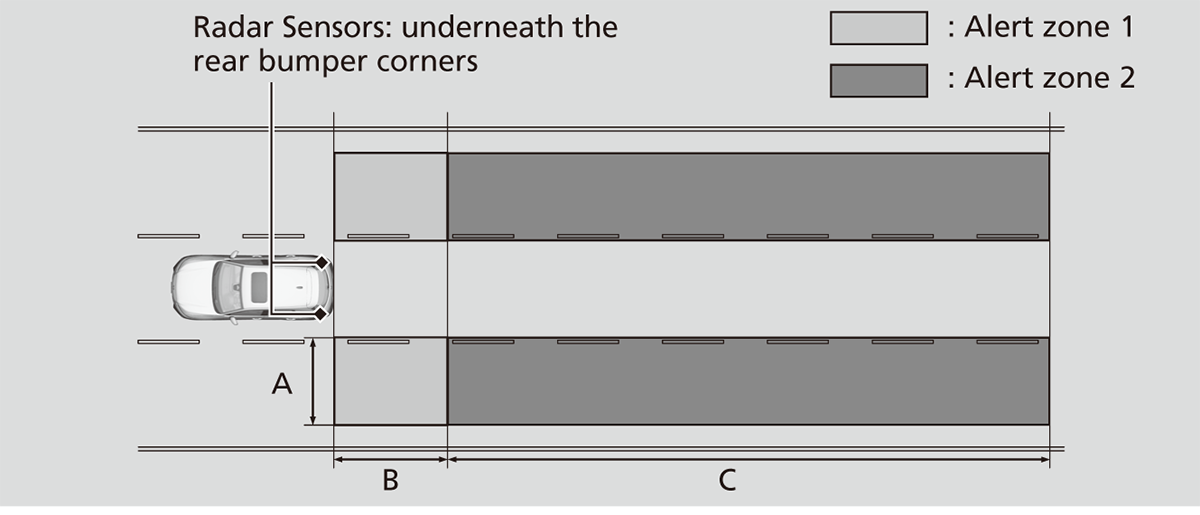
Alert zone range
A: Approx. 1.6 ~ 10 feet (0.5 ~ 3 meters) from vehicle side.
B: Approx. 10 feet (3 meters) from rear bumper.
C: Approx. 10 ~ 82 feet (3 ~ 25 meters) behind from rear bumper. (The faster the approaching vehicle, the further away it will be detected.)
The initially set alert zone is alert zone 1. Over time, after the vehicle has been driven on straight roads with traffic and roadside objects, the system will adapt and expand the alert zone (alert zone 1 and 2).
When the system detects a vehicle
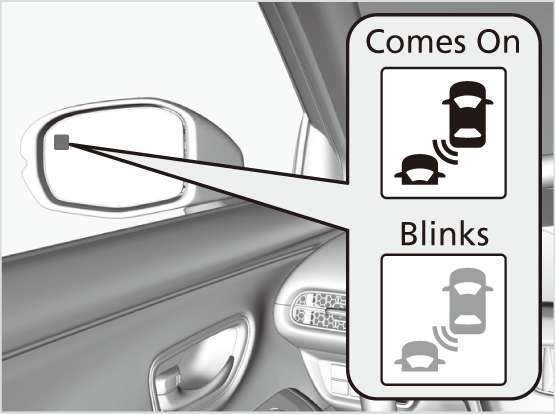
-
Blind Spot Information System alert indicator: Located on the outside rearview mirror on both sides.
Comes on when:- A vehicle approaches you from behind to overtake you at a speed difference of no more than about 31 mph (50 km/h).
- You pass a vehicle at a speed difference of no more than about 12 mph (20 km/h).
Blinks and a beeper sounds when:You use the turn signal lever to signal a turn in the direction of the detected vehicle while the Blind Spot Information System alert indicator is on.
- The beeper sounds three times.
Blind Spot Information System On and Off
You can turn the system on and off using the driver information interface.
Switching the Display Safety Support
The Blind Spot Information System will stay on the previously selected on (checked) or off (unchecked) setting each time you start the engine.
Blind Spot Information System Conditions and Limitations
The Blind Spot Information System alert indicator may not come on under the following conditions:
- There is a large speed difference between your vehicle and the vehicle in the adjacent lane.
- A vehicle is parked in a side lane.
- An object not detected by the radar sensors approaches or passes your vehicle.
- The vehicle driving in the adjacent lane is a motorcycle or other small vehicle.
The Blind Spot Information System may not operate correctly under the following conditions:
- Making a turn at an intersection.
- Objects (guard rails, poles, trees, etc.) are detected.
- An object that does not reflect radio waves well or a motorcycle, is in the alert zone.
- Driving on a curved road.
- A vehicle is moving from a far lane to the adjacent lane.
- The system picks up signal interference such as other radar sensors from another vehicle or strong radio wave transmitted from a facility nearby.
- The rear bumper or the area around the radar sensors is covered by dirt, mud, snow, ice, etc.
- The rear bumper or the area around the radar sensors has been damaged or deformed.
- In bad weather (heavy rain, snow, and fog).
- Making a short turn or driving on a bumpy road that slightly tilts the vehicle.
- An object such as a bicycle rack is attached to the rear of the vehicle.
* Not available on all models
Download Manual