Customized Features (Models with 7-in. Color Touchscreen)
Customized Features
Models with 7-in. Color Touchscreen
Use the audio/information screen to customize certain features.
When you customize settings:
- Make sure that the vehicle is at a complete stop.
- Shift to P.
To customize features detail, refer to the following.
Customization flow
List of customizable options
- Detail
How to Customize the Settings
While the vehicle is at a complete stop with the power mode in ON, press the MENU button. To customize the phone settings, press the PHONE button, then select Settings.
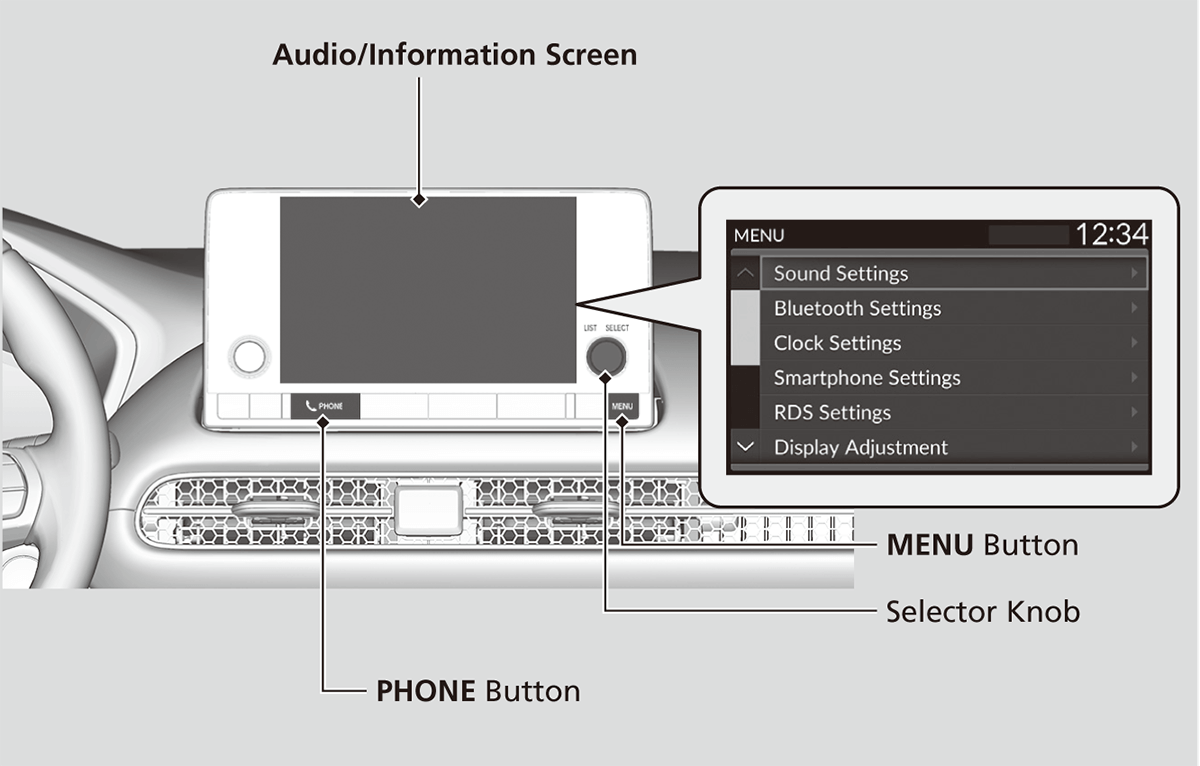
Customization flow
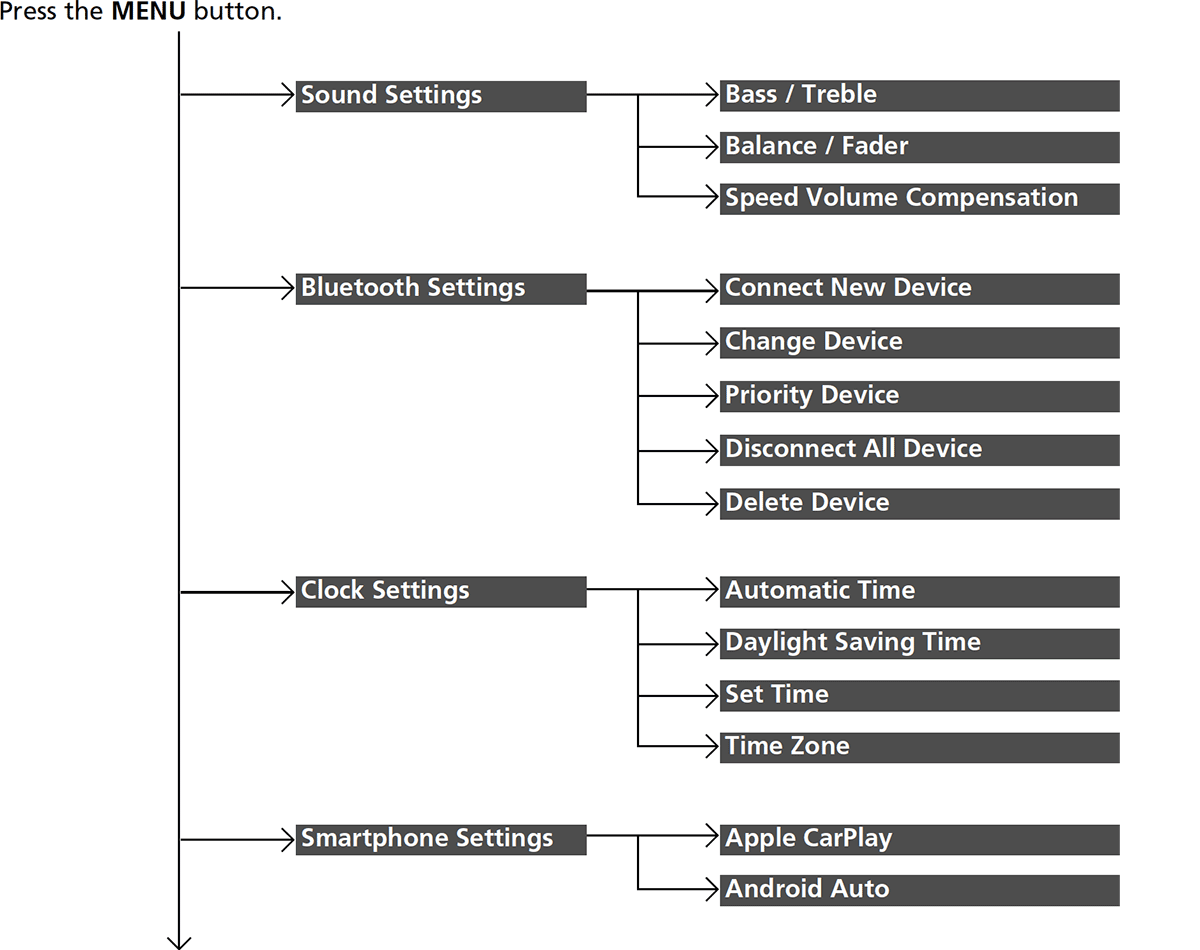


List of customizable options
Press the MENU button.
|
Customizable Features
|
Description
|
Selectable Settings
|
|
|---|---|---|---|
|
Sound Settings
|
Bass / Treble
|
Adjusts the settings of the audio speakers’ sound.
Adjusting the Sound |
—
|
|
Balance / Fader
|
|||
|
Speed Volume Compensation
|
|||
|
Bluetooth Settings
|
Connect New Device
|
Pairs a new phone to HFL.
Phone Setup |
—
|
|
Change Device
|
Connects a paired phone.
Phone Setup |
—
|
|
|
Priority Device
|
Sets a device as the priority device.
|
ON*1/OFF
|
|
|
Disconnect All Device
|
Disconnects a paired phone from HFL.
|
—
|
|
|
Delete Device
|
Deletes a paired phone.
|
—
|
|
|
Clock Settings
|
Automatic Time
|
Selects ON to have the GPS automatically adjust the clock. Select OFF to cancel this function.
|
ON*1/OFF
|
|
Daylight Saving Time
|
Sets the clock to update based on daylight savings time.
|
ON/OFF*1
|
|
|
Set Time
|
Adjusts time.
Adjusting the Clock |
—
|
|
|
Time Zone
|
Changes the time zone manually.
|
||
|
Smartphone Settings
|
Apple CarPlay
|
Sets up the Apple CarPlay connection.
|
—
|
|
Android Auto
|
Sets up the Android Auto connection.
|
||
|
RDS Settings
|
RDS Information
|
Selects whether the RDS information comes on.
|
ON*1/OFF
|
- Default Setting
|
Customizable Features
|
Description
|
Selectable Settings
|
|
|---|---|---|---|
|
Display Adjustment
|
Brightness
|
Changes the brightness of the audio/information screen.
|
—
|
|
Contrast
|
Changes the contrast of the audio/information screen.
|
||
|
Black Level
|
Changes the black level of the audio/information screen.
|
||
|
Day
|
Changes between the daytime mode, nighttime mode and display off mode.
|
||
|
Night
|
|||
|
Display OFF
|
|||
|
Touch Panel Sensitivity
|
Sets the sensitivity of the touch panel screen.
|
Normal*1/High
|
|
|
Rear Camera Setting
|
Fixed Guideline
|
Shows the guideline that does not move with the steering wheel.
About Your Multi-View Rear Camera |
ON*1/OFF
|
|
Dynamic Guideline
|
Shows the guideline that moves with the steering wheel.
About Your Multi-View Rear Camera |
ON*1/OFF
|
|
|
Cross Traffic Monitor*
|
Shows arrows on the rear camera image to indicate vehicles approaching from the sides.
Cross Traffic Monitor* |
ON*1/OFF
|
|
|
Language
|
Changes the display language.
|
English*1/Español/Français
|
|
|
License
|
Shows the legal information.
|
—
|
|
|
Factory Data Reset
|
Resets all the settings to their factory default.
Defaulting All the Settings |
—
|
*1:Default Setting
Press the PHONE button and select Settings.
|
Customizable Features
|
Description
|
Selectable Settings
|
|
|---|---|---|---|
|
Bluetooth Settings
|
Connect New Device
|
Pairs a new phone to HFL.
Phone Setup |
—
|
|
Change Device
|
Connects a paired phone.
Phone Setup |
—
|
|
|
Priority Device
|
Sets a device as the priority device.
|
ON*1/OFF
|
|
|
Disconnect All Device
|
Disconnects a paired phone from HFL.
|
—
|
|
|
Delete Device
|
Deletes a paired phone.
|
—
|
|
|
Ringtone
|
Selects the ringtone.
|
Phone*1/Vehicle
|
|
|
Auto Phone Call Transfer
|
Sets calls to automatically transfer from your phone to HFL when you enter the vehicle.
|
ON*1/OFF
|
|
|
Hands-Free System Clear
|
Resets all customized items in the Phone Settings group as default.
|
—
|
- Default Setting
* Not available on all models
Defaulting All the Settings
Reset all the menu and customized settings as the factory defaults.
- Press the MENU button.
- Select Factory Data Reset.
- A confirmation message appears on the screen.
- Select Yes to reset the settings.
- Select Yes again to reset the settings.
- The system will reboot.
When you transfer the vehicle to a third party, reset all settings to default and delete all personal data.
If you perform Factory Data Reset, it will reset the preinstalled apps to their factory default
Download Manual