Customized Features (Models with 9-in. Color Touchscreen)
Customized Features
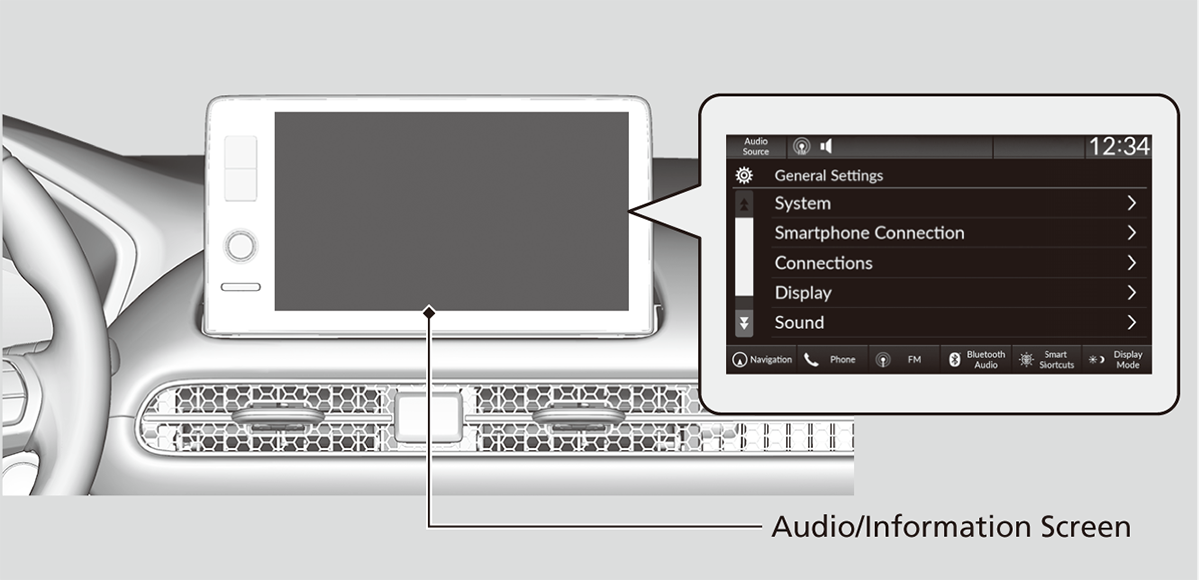
Use the audio/information screen to customize certain features.
- Make sure that the vehicle is at a complete stop.
- Shift to P.
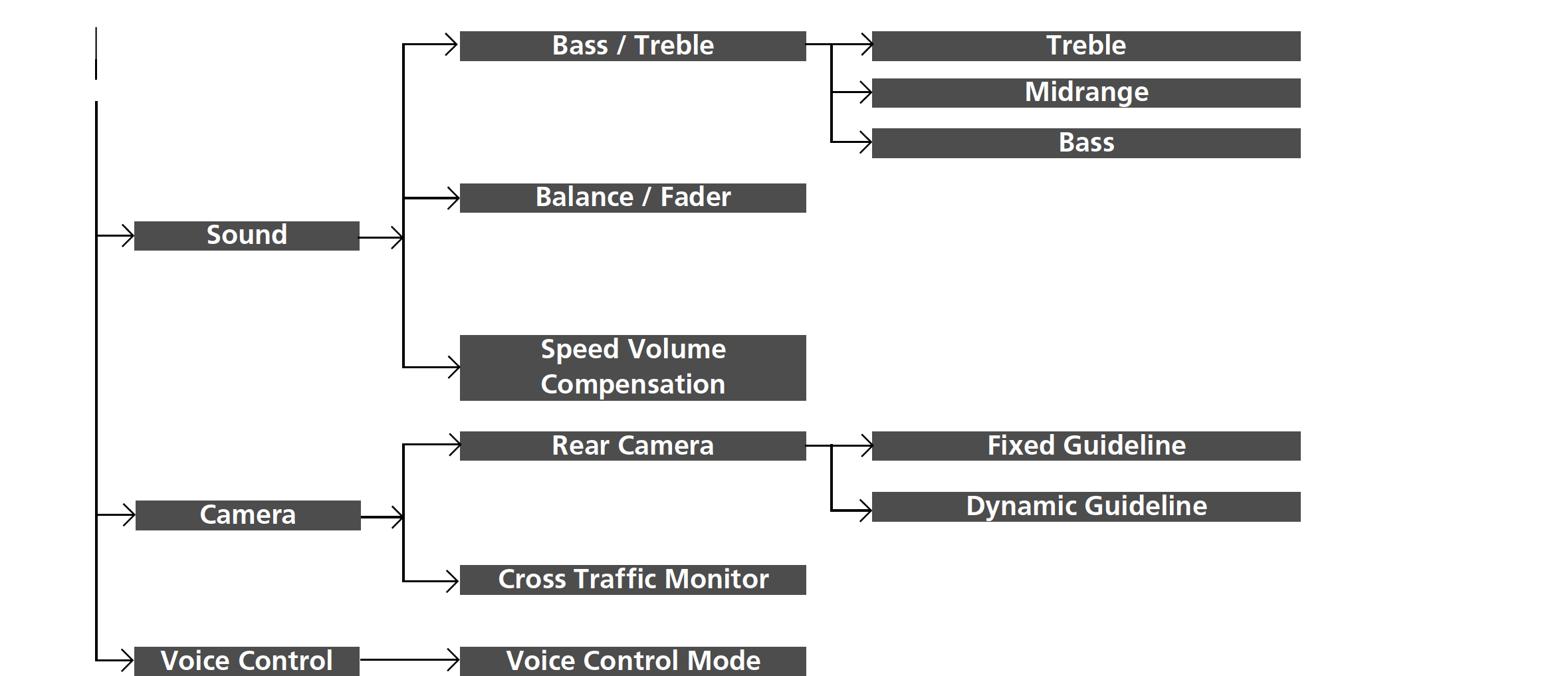
Customization flow
System
Smartphone Connection
Connections
Display
Sound
Camera
Voice Control
- Detail
How to Customize the General Settings
With the power mode in ON, press the  button, and then select General Settings and select a setting item.
Customization flow
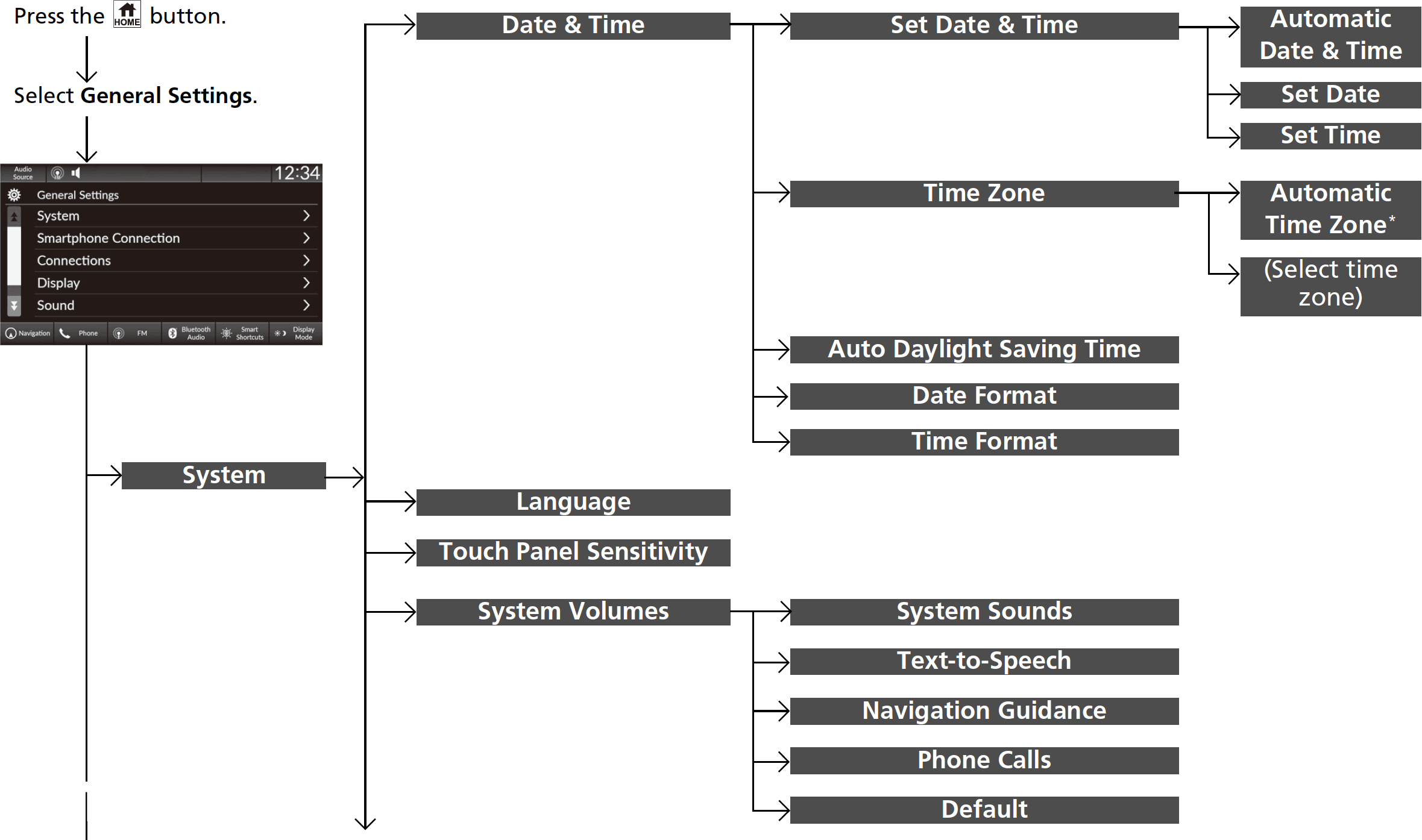
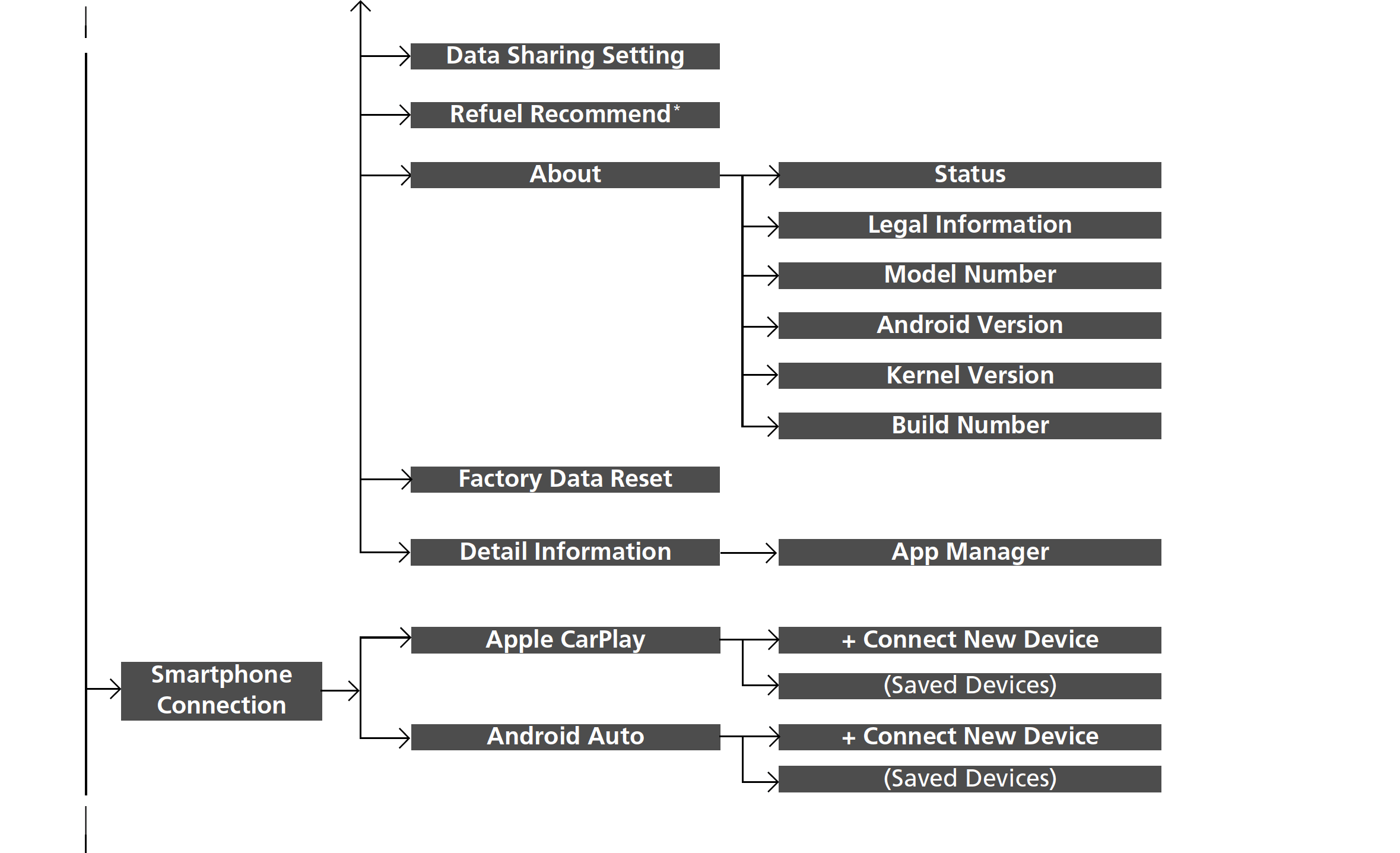
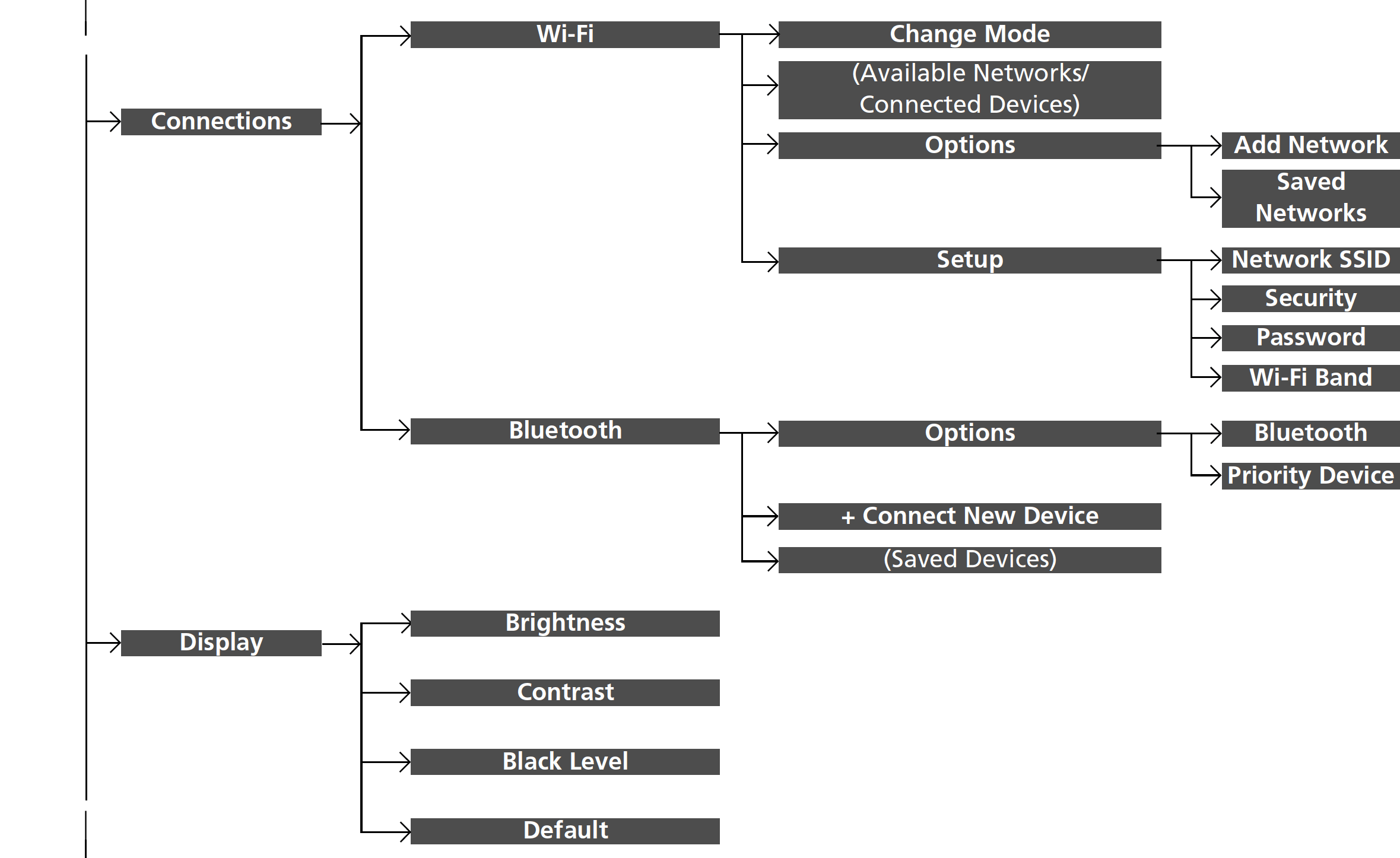
System
|
Customizable Features
|
Description
|
Selectable Settings
|
||
|---|---|---|---|---|
|
Date & Time
|
Set Date & Time
|
Automatic Date & Time
|
Selects ON to have the GPS automatically adjust the clock. Select OFF to cancel this function.
|
ON*1/OFF
|
|
Set Date
|
Adjusts date.
Adjusting the Clock |
Day/Month/Year
|
||
|
Set Time
|
Adjusts time.
Adjusting the Clock |
Hour/Minute
AM/PM
|
||
|
Time Zone
|
Automatic Time Zone*
|
Sets the audio system to automatically adjust the clock when driving through different time zones.
|
ON*1/OFF
|
|
|
(Select time zone)
|
Changes the time zone manually.
|
—
|
||
|
Auto Daylight Saving Time
|
Sets the clock to update based on daylight savings time.
|
ON*1/OFF
|
||
|
Date Format
|
Select a date format.
|
MM/DD/YYYY*2/
DD/MM/YYYY*3/YYYY/MM/DD |
||
|
Time Format
|
Select a time format.
|
12H*1/24H
|
- Default Setting
- Default Setting for U.S. models
- Default Setting for Canadian models
|
Customizable Features
|
Description
|
Selectable Settings
|
|
|---|---|---|---|
|
Language
|
Changes the driver information interface and audio/information screen language separately.
|
English*1/Español/Français
|
|
|
Touch Panel Sensitivity
|
Sets the sensitivity of the touch panel screen.
|
High/Normal*1
|
|
|
System Volumes
|
System Sounds
|
Sets the system sound volume level.
|
—
|
|
Text-to-Speech
|
Sets the text-to-speech volume level.
|
—
|
|
|
Navigation Guidance
|
Sets the navigation guidance volume level.
|
—
|
|
|
Phone Calls
|
Sets the phone call volume level.
|
—
|
|
|
Default
|
Resets all System Volumes settings to default values.
|
||
|
Data Sharing Setting
|
Turns the data sharing setting on and off.
Start Up |
ON*1/OFF
|
|
|
Refuel Recommend*
|
Turns the refuel recommend function on and off.
Refuel Recommend |
ON*1/OFF
|
*1:Default Setting
|
Customizable Features
|
Description
|
Selectable Settings
|
|
|---|---|---|---|
|
About
|
Status
|
Displays the Android setting items.
|
—
|
|
Legal Information
|
|||
|
Model Number
|
|||
|
Android Version
|
|||
|
Kernel Version
|
|||
|
Build Number
|
|||
|
Factory Data Reset
|
Resets all the settings to their factory default.
Defaulting All the Settings |
Continue/Cancel
|
|
|
Detail Information
|
App Manager
|
Displays the Android system memory and apps information.
|
—
|
Smartphone Connection
|
Customizable Features
|
Description
|
Selectable Settings
|
|
|---|---|---|---|
|
Apple CarPlay
|
+ Connect New Device
|
Pairs a new phone to Apple CarPlay.
Phone Setup |
—
|
|
(Saved Devices)
|
Connects, disconnects, or deletes a paired phone.
Phone Setup |
—
|
|
|
Android Auto
|
+ Connect New Device
|
Pairs a new phone to Android Auto.
Phone Setup |
—
|
|
(Saved Devices)
|
Connects, disconnects, or deletes a paired phone.
Phone Setup |
—
|
Connections
|
Customizable Features
|
Description
|
Selectable Settings
|
||
|---|---|---|---|---|
|
Wi-Fi
|
Change Mode
|
Changes the Wi-Fi mode.
|
Network*1/
Smartphone*2/OFF |
|
|
(Available Networks/Connected Devices)
|
Displays the available network(s) or current connected device(s).
|
—
|
||
|
Options
|
Add Network
|
Adds a new network to connect Wi-Fi.
|
—
|
|
|
Saved Networks
|
Saves the connected network.
|
—
|
||
|
Setup
|
Network SSID
|
Sets the network name.
|
—
|
|
|
Security
|
Displays the network security.
|
—
|
||
|
Password
|
Sets password for require entering password when connecting Wi-Fi device to the network.
|
—
|
||
|
Wi-Fi Band
|
Displays the Wi-Fi band.
|
—
|
||
|
Bluetooth
|
Options
|
Bluetooth
|
Turns the Bluetooth® on and off.
|
ON*1/OFF
|
|
Priority Device
|
Displays the priority device.
|
—
|
||
|
+ Connect New Device
|
Pairs a new phone to HFL.
Phone Setup |
—
|
||
|
(Saved Devices)
|
Connects, disconnects, or deletes a paired phone.
Phone Setup |
—
|
- Default Setting
- Appears only when Apple CarPlay or Android Auto is connected wirelessly.
Display
|
Customizable Features
|
Description
|
Selectable Settings
|
|---|---|---|
|
Brightness
|
Changes the brightness of the audio/information screen.
|
—
|
|
Contrast
|
Changes the contrast of the audio/information screen.
|
—
|
|
Black Level
|
Changes the black level of the audio/information screen.
|
—
|
|
Default
|
Resets all customized settings for the brightness, contrast, and black level.
|
—
|
Sound
|
Customizable Features
|
Description
|
Selectable Settings
|
|
|---|---|---|---|
|
Bass / Treble
|
Treble
|
Adjusts the settings of the audio speakers’ sound.
Adjusting the Sound |
—
|
|
Midrange
|
|||
|
Bass
|
|||
|
Balance / Fader
|
|||
|
Speed Volume Compensation
|
Camera
|
Customizable Features
|
Description
|
Selectable Settings
|
|
|---|---|---|---|
|
Rear Camera
|
Fixed Guideline
|
Shows the guideline that does not move with the steering wheel.
About Your Multi-View Rear Camera |
ON*1/OFF
|
|
Dynamic Guideline
|
Shows the guideline that moves with the steering wheel.
About Your Multi-View Rear Camera |
ON*1/OFF
|
|
|
Cross Traffic Monitor
|
Shows arrows on the rear camera image to indicate vehicles approaching from the sides.
Cross Traffic Monitor* |
ON*1/OFF
|
- Default Setting
Voice Control
|
Customizable Features
|
Description
|
Selectable Settings
|
|---|---|---|
|
Voice Control Mode
|
Selects a mode of the voice portal screen.
Voice Control Operation |
Assist/Normal*1
|
- Default Setting
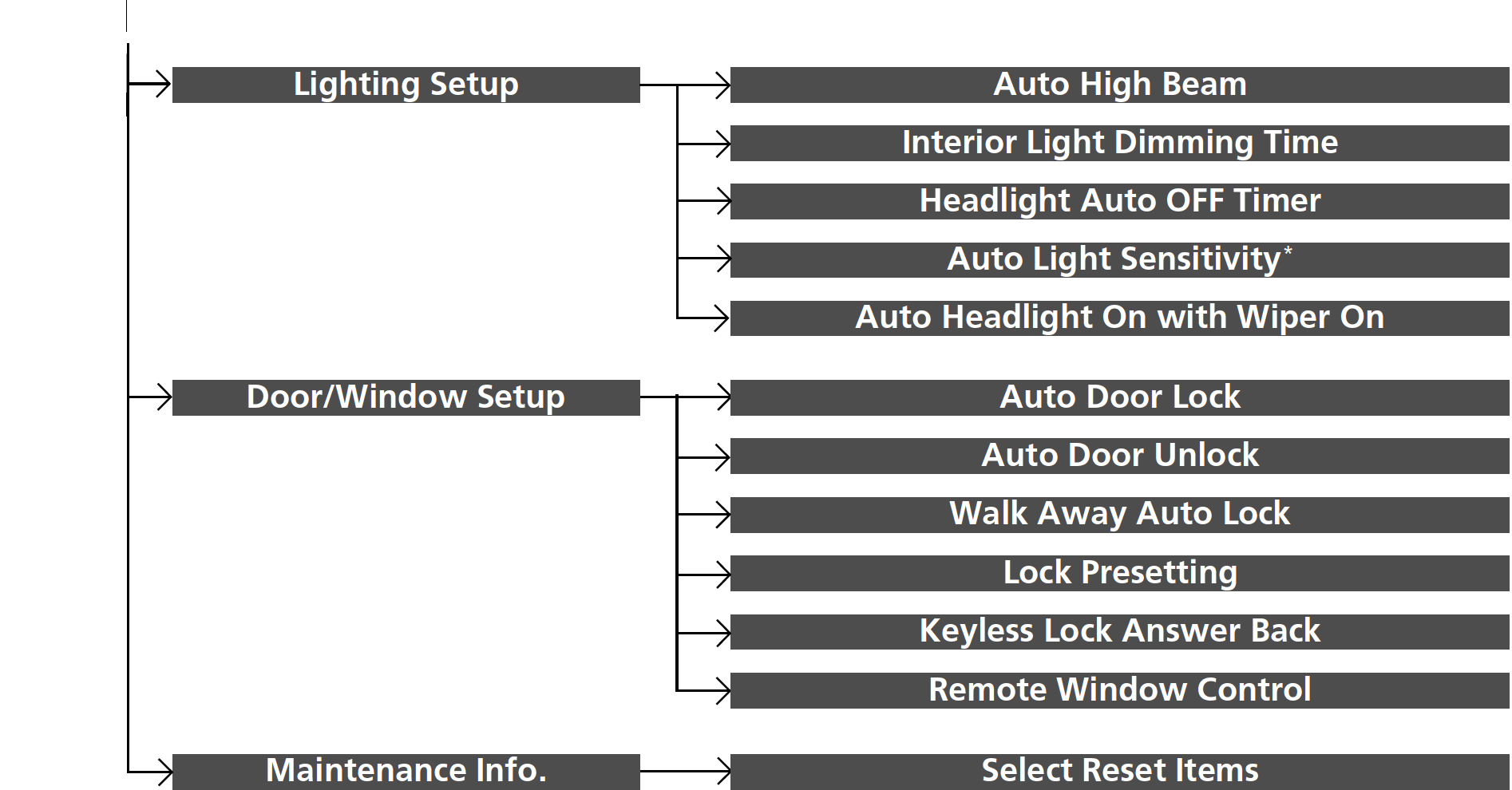
How to Customize the Vehicle Settings
With the power mode in ON, press the button, and then select Vehicle Settings and select a setting item.
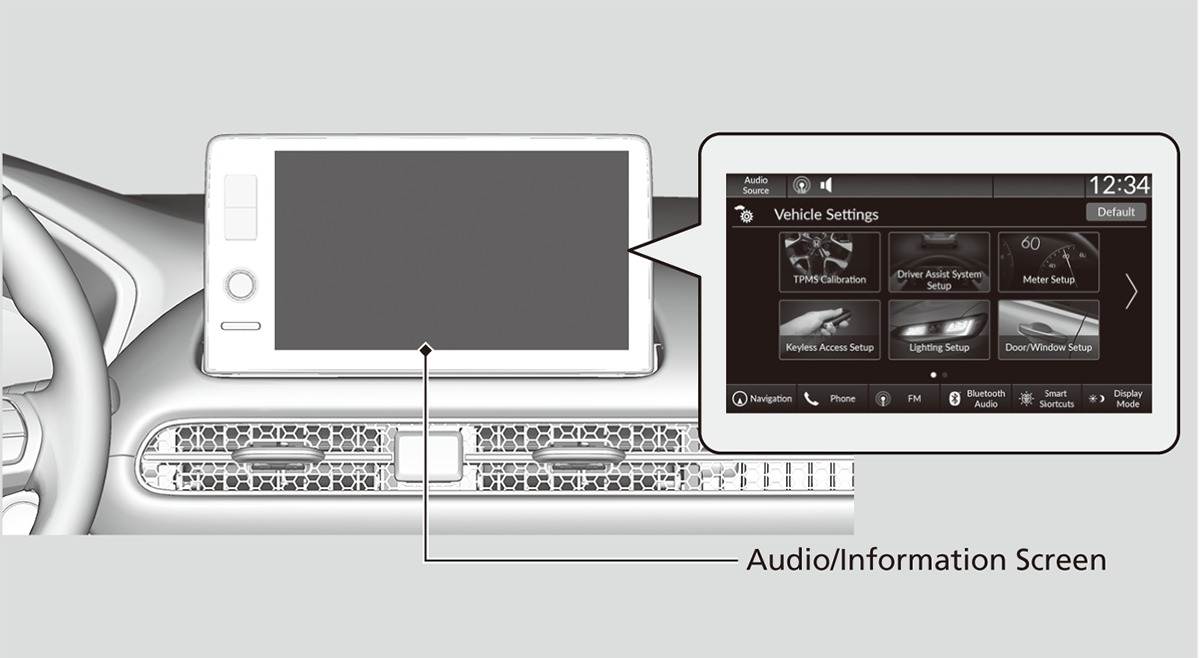
Customization flow
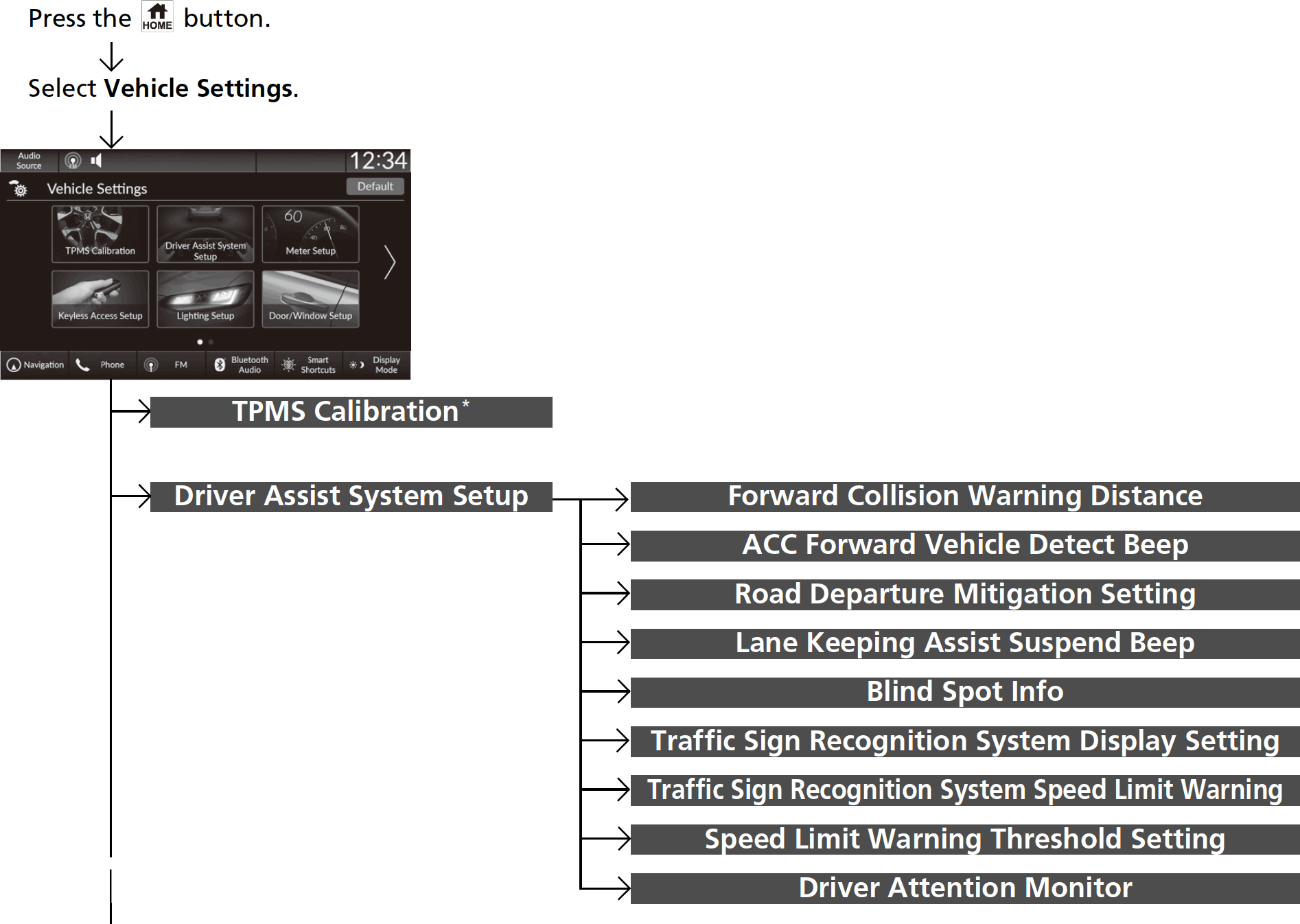
TPMS Calibration*
|
Customizable Features
|
Description
|
Selectable Settings
|
|---|---|---|
|
TPMS Calibration
|
Cancels/Calibrates the tire pressure monitoring system (TPMS).
Tire Pressure Monitoring System (TPMS) |
Calibrate/Cancel
|
Driver Assist System Setup
|
Customizable Features
|
Description
|
Selectable Settings
|
|---|---|---|
|
Forward Collision Warning Distance
|
Selects distance for Forward Collision Warning audible and visual alerts.
Collision Mitigation Braking SystemTM (CMBSTM) |
Long/Normal*1/Short
|
|
ACC Forward Vehicle Detect Beep
|
Turns On/Off audible notification when vehicle has moved in/out of adaptive cruise control range.
Adaptive Cruise Control (ACC) with Low Speed Follow |
ON/OFF*1
|
|
Road Departure Mitigation Setting
|
Selects operating mode of the Road Departure Mitigation system.
Road Departure Mitigation System |
Narrow/Normal*1/Wide/Warning Only
|
|
Lane Keeping Assist Suspend Beep
|
Selects On/Off the LKAS alert for not detecting road lines.
Lane Keeping Assist System (LKAS) |
ON/OFF*1
|
- Default Setting
|
Customizable Features
|
Description
|
Selectable Settings
|
|---|---|---|
|
Blind Spot Info
|
Selects On/Off the blind spot information system audible alert.
Blind Spot Information System* |
Audible And Visual Alert*1/Visual Alert
|
|
Traffic Sign Recognition System Display Setting
|
Displays the traffic sign recognition system on instrument panel.
Traffic Sign Recognition System |
Display*1/None
|
|
Traffic Sign Recognition System Speed Limit Warning
|
Enables over speed limit warning when speed limit is exceeded.
Traffic Sign Recognition System |
ON*1/OFF
|
|
Speed Limit Warning Threshold Setting
|
Select speed limit warning threshold based on personal preference.
Traffic Sign Recognition System |
Speed Limit*1/
Speed Limit +3mph/ Speed Limit +5mph/ Speed Limit +10mph (When mph is selected)
Speed Limit*1/
Speed Limit +5km/h/ Speed Limit +10km/h/ Speed Limit +15km/h (When km/h is selected)
|
|
Driver Attention Monitor
|
Changes the setting for the driver attention monitor.
Driver Attention Monitor |
OFF/Tactile Alert/Tactile And Audible Alert*1
|
- Default Setting
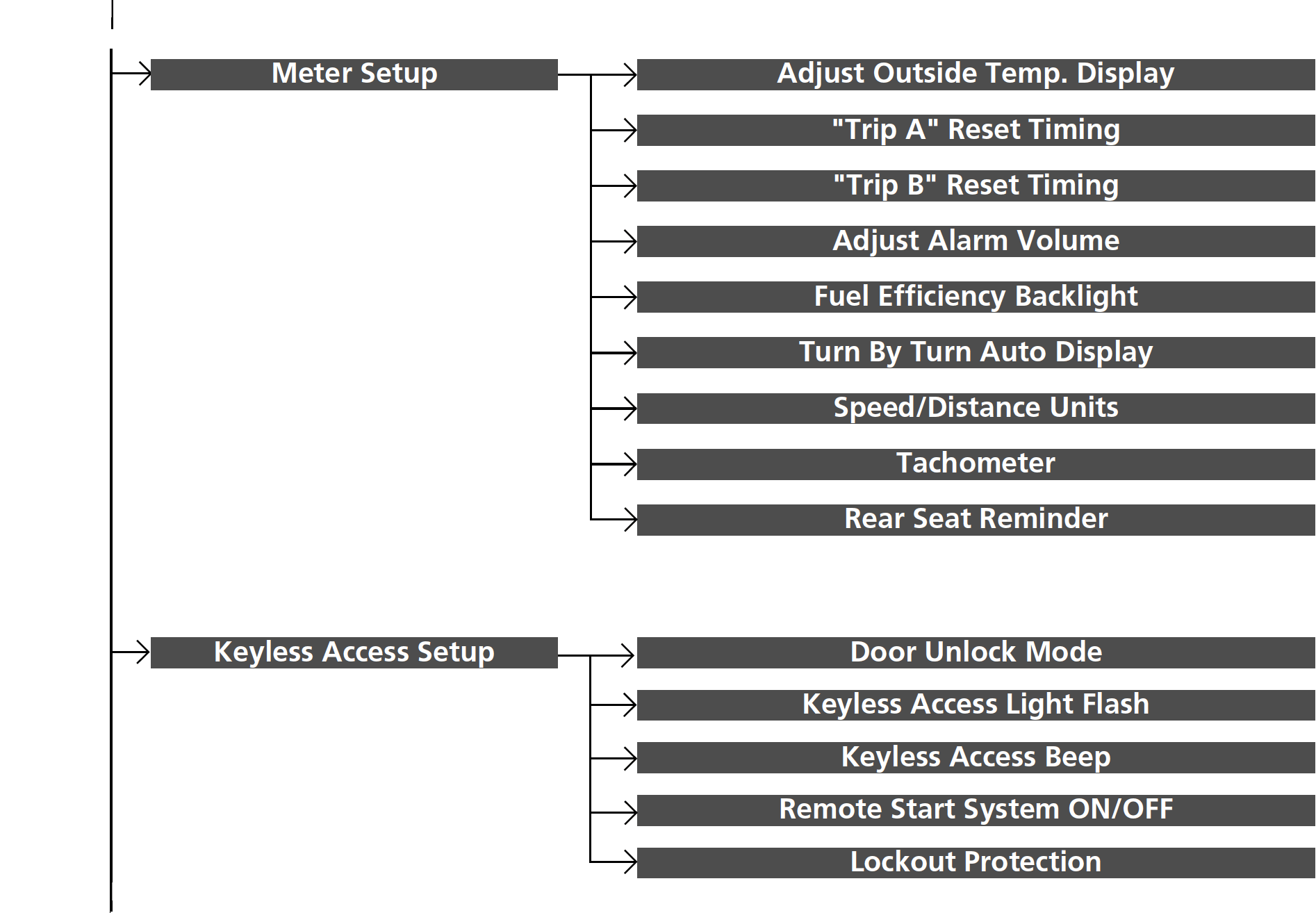
Meter Setup
|
Customizable Features
|
Description
|
Selectable Settings
|
|---|---|---|
|
Adjust Outside Temp. Display
|
Selects to adjust outside temperature reading by a few degrees.
Outside Temperature |
-5°F ~ ±0°F*1 ~ +5°F (U.S.)
-3°C ~ ±0°C*1 ~ +3°C (Canada)
|
|
"Trip A" Reset Timing
|
Selects the timing to reset Trip A.
Range/Fuel/Trip Meter Speed/Time/Trip Meter |
When Fully Refueled/
IGN OFF/Manually Reset*1 |
|
"Trip B" Reset Timing
|
Selects the timing to reset Trip B.
Range/Fuel/Trip Meter Speed/Time/Trip Meter |
When Fully Refueled/
IGN OFF/Manually Reset*1 |
|
Adjust Alarm Volume
|
Changes volume level of all system warnings, door opening warning and indicator.
|
High/Mid*1/Low
|
|
Fuel Efficiency Backlight
|
Turns the ambient meter feature on and off.
|
ON*1/OFF
|
|
Turn By Turn Auto Display
|
Turns on/off the pop-up warning in the turn-by-turn navigation in the driver information interface.
Turn-by-Turn Directions |
ON*1/OFF
|
|
Speed/Distance Units
|
Selects the trip computer units.
Speed/Distance Units |
km/h · km/mph · miles*1 (U.S.)
km/h · km*1/mph · miles (Canada)
|
|
Tachometer
|
Selects whether the tachometer come on the driver information interface.
|
ON*1/OFF
|
|
Rear Seat Reminder
|
Turns the Rear Seat Reminder feature on and off.
|
ON*1/OFF
|
- Default Setting
Keyless Access Setup
|
Customizable Features
|
Description
|
Selectable Settings
|
|---|---|---|
|
Door Unlock Mode
|
Changes which doors unlock when you grab the driver’s door handle.
|
Driver Door Only*1/All Doors
|
|
Keyless Access Light Flash
|
Causes some exterior lights to flash when you unlock/lock the doors.
|
ON*1/OFF
|
|
Keyless Access Beep
|
Causes the beeper to sound when you unlock/lock the doors.
|
ON*1/OFF
|
|
Remote Start System ON/OFF
|
Turns the remote engine start feature on and off.
|
ON*1/OFF
|
|
Lockout Protection
|
Changes the settings for the lockout protection function.
|
ON*1/OFF
|
- Default Setting
Lighting Setup
|
Customizable Features
|
Description
|
Selectable Settings
|
|---|---|---|
|
Auto High Beam
|
Turns on/off auto high beam function.
|
ON*1/OFF
|
|
Interior Light Dimming Time
|
Selects the length of time the interior lights stay on after doors are closed.
Interior Lights |
60sec/30sec*1/15sec
|
|
Headlight Auto OFF Timer
|
Selects the length of time the exterior lights stay on after you close the driver's door.
Automatic Lighting Off Feature |
60sec/30sec/15sec*1/0sec
|
|
Auto Light Sensitivity*
|
Changes the timing for the headlights to come on.
|
Min/Low/Mid*1/High/Max
|
|
Auto Headlight On with Wiper On
|
Selects On/Off headlight function and wiper operation when the headlight is in AUTO setting.
Headlight Integration with Wipers |
ON*1/OFF
|
- Default Setting
Door/Window Setup
|
Customizable Features
|
Description
|
Selectable Settings
|
|---|---|---|
|
Auto Door Lock
|
Changes the setting for the automatic locking feature.
|
OFF/With Vehicle Speed*1/Shift From P
|
|
Auto Door Unlock
|
Changes the setting for when the doors unlock automatically.
|
OFF/All Doors When Driver’s Door Opens*1/All Doors When Shifted to Park/All Doors With IGN OFF
|
|
Walk Away Auto Lock
|
Changes the settings for the auto lock function when you walk away from the vehicle.
|
ON/OFF*1
|
|
Lock Presetting
|
Changes the settings for the Lock Presetting function.
|
ON*1/OFF
|
|
Keyless Lock Answer Back
|
Turns on/off flash of exterior lights when doors are locked/unlocked by the keyless remote.
Using the Remote Transmitter |
ON*1/OFF
|
|
Remote Window Control
|
Turns the remote window control on and off.
|
ON*1/OFF
|
- Default Setting
Maintenance Info.
|
Customizable Features
|
Description
|
Selectable Settings
|
|---|---|---|
|
Maintenance Info.
|
Resets the maintenance information.
Maintenance MinderTM To Use Maintenance MinderTM |
Select Reset Items
|
* Not available on all models
Defaulting All the Settings
Reset all the menu and customized settings as the factory defaults.
HondaLink®
- Detail
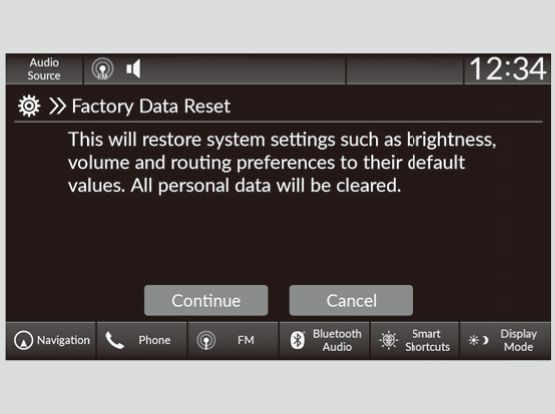
Defaulting General Settings
-
- Press the button.
- Select General Settings.
- Select System.
- Select Factory Data Reset.
- A confirmation message appears on the screen.
- Select Continue to reset the settings.
- Select Continue again to reset the settings.
- The system will reboot.
- Press the
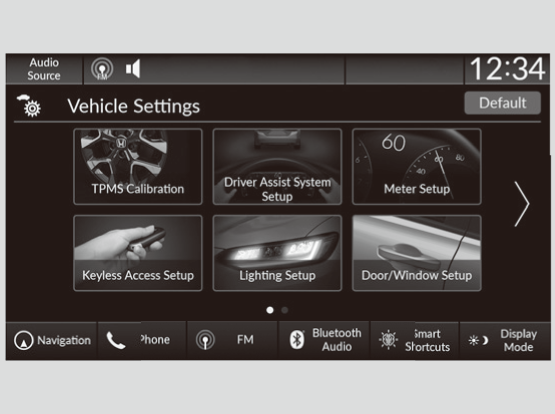
Defaulting Vehicle Settings
-
- Press the button.
- Select Vehicle Settings.
- Select Default.
- Select Yes.
- Press the
Download Manual